Introduction
In our last lesson, you saw how itertools.chain, islice, and tee allow you to combine, slice, and duplicate iterators without consuming large amounts of memory. This follows the core itertools philosophy: build lazy, efficient data pipelines that process items one at a time.
Today, we move from manipulating streams to analyzing them. This lesson focuses on two powerful functions for aggregation and analysis: itertools.groupby and itertools.accumulate. You will learn how to perform sequential grouping and cumulative calculations, which are fundamental operations in data processing, reporting, and financial analysis. Mastering these will enable you to replace complex, stateful loops with concise, declarative, and highly efficient iterator-based code.
1. Sequential Grouping with itertools.groupby
A common data processing task is to group items based on a shared property. For example, grouping sales records by region or log entries by date. itertools.groupby is the tool for this, but it comes with one crucial rule.
The Golden Rule: Sort Before Grouping
itertools.groupby works by iterating through a sequence and creating a new group whenever the "key" changes. It only groups consecutive items. This is different from a SQL GROUP BY clause, which aggregates all items with the same key regardless of their position.
Therefore, to group all like items together, you must sort the data by the grouping key first.
Let's see this in action.

How groupby Works
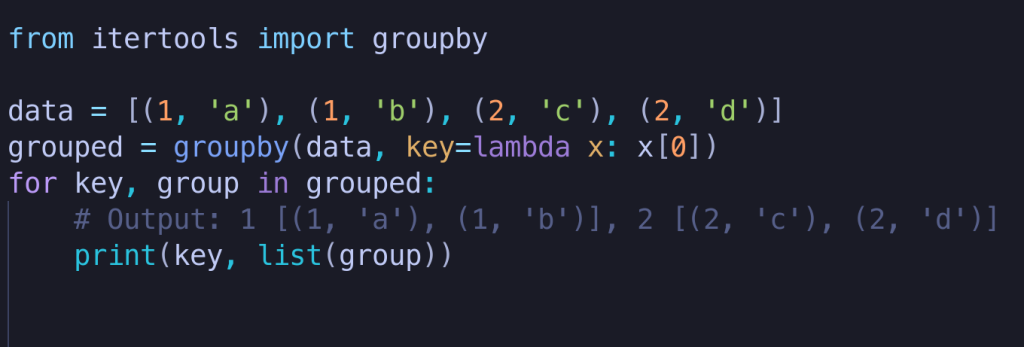
The groupby function takes an iterable and an optional key function. It returns an iterator that yields (key, group) tuples, where:
keyis the value returned by the key function for that group.groupis itself an iterator containing all the consecutive items that share that key.
Since the group is an iterator, it will be exhausted after one use. If you need to access its contents multiple times, you must first convert it to a list: list(group).
Let's look at an example with a key function.
For a formal definition, you can refer to the official documentation.
itertools — Functions creating iterators for efficient looping
The official Python documentation for itertools.groupby provides a concise definition and a crucial implementation detail.
Read the section on itertools.groupby(). Pay close attention to the explanation of why the iterable needs to be sorted and the code block demonstrating how to store the group iterator as a list if you need the data later.
Practical Application: Building Relay Teams
Let's apply this to a real-world data problem. The "Python itertools By Example" article has an excellent walkthrough of processing swimmer data to form relay teams. This example perfectly illustrates the "sort-then-group" pattern.
This section of the Real Python article demonstrates a multi-level grouping task: first by stroke, then by swimmer. It's a prime example of how groupby is used in practical data analysis.
Read the section 'Building Relay Teams From Swimmer Data'. Follow the logic: Data is read from a CSV into Event objects. It's sorted and grouped by stroke. Inside that loop, events for a given stroke are sorted and grouped by name. The best time for each swimmer is found, and teams are formed. This nested sort_and_group pattern is a powerful idiom.
The key takeaway from the swimmer example is the helper function they create:
import itertools as it

def sort_and_group(iterable, key=None):
    """Group a sorted iterable by a key."""
    return it.groupby(sorted(iterable, key=key), key=key)


# Usage:
# for stroke, events in sort_and_group(all_events, key=lambda e: e.stroke):
#     ...
This pattern is so common that abstracting it into a function is a great Pythonic practice.
2. Cumulative Calculations with itertools.accumulate
Another common pattern is calculating a running value over a sequence, such as a running total, a running average, or a running maximum. This is what itertools.accumulate is for.
By default, accumulate performs a running sum.
from itertools import accumulate

numbers = [1, 2, 3, 4, 5]
running_total = list(accumulate(numbers))
print(running_total)


# Output: [1, 3, 6, 10, 15]
Customizing accumulate
The real power of accumulate comes from its optional second argument, a binary function (func). This function takes two arguments: the previously accumulated result and the next item from the iterable.
This lets you perform other cumulative calculations:
- Running product:
accumulate(numbers, operator.mul) - Running maximum:
accumulate(numbers, max) - Running minimum:
accumulate(numbers, min)
The official documentation provides excellent examples, including a financial one.
itertools — Functions creating iterators for efficient looping
The Python documentation for itertools.accumulate is the best place to see its flexibility in action. It covers the default behavior, custom functions, and the initial parameter.
Read the section on itertools.accumulate(). Study the examples for running maximum, running product, and especially the loan amortization table. The amortization example shows how accumulate can model more complex, stateful calculations with a simple lambda function.
Advanced Application: Recurrence Relations
To showcase its full power, accumulate can even be used to generate sequences defined by recurrence relations, like the Fibonacci sequence. This is a more advanced use case that demonstrates how accumulate can model systems where the next state depends on the previous one.
The "Python itertools By Example" article explores this concept.
This section of the Real Python article shows a more theoretical but powerful application of accumulate.
Read the section on 'Recurrence Relations' up to and including 'First Order Recurrence Relations'. You don't need to dive deep into the math, but focus on the first_order function. Observe how lambda s, _: p*s + q uses the accumulated value s and ignores the next item from the input iterator (_) to generate the next value in the sequence. This is a clever trick for modeling state changes.
This pattern of using accumulate with an infinite iterator (like itertools.repeat) and a lambda that ignores one of its inputs is a powerful technique for generating complex data streams.
Exercise: Daily Account Balance Report
You are given a list of financial transactions. Each transaction is a tuple (date, amount), where a positive amount is a deposit and a negative amount is a withdrawal.
Your task is to write a function generate_daily_balances that calculates the running balance at the end of each day.
- The transactions are not guaranteed to be in order.
- Your function should process transactions grouped by day.
- It should then compute a running total of these daily net changes to produce an end-of-day balance.
Use itertools.groupby and itertools.accumulate to solve this efficiently.
from itertools import groupby, accumulate
from operator import itemgetter


# --- Do not modify this setup ---
transactions = [
    ('2023-01-02', 100.00),
    ('2023-01-01', 500.00), # Initial deposit
    ('2023-01-02', -20.50),
    ('2023-01-03', -150.00),
    ('2023-01-01', -10.00),
    ('2023-01-03', 75.25),
]


# ---

def generate_daily_balances(txs, initial_balance=0.0):
    """
    Calculates the end-of-day balance from a list of transactions.

    Args:
        txs: A list of (date, amount) tuples.
        initial_balance: The starting balance before any transactions.

    Returns:
        A list of (date, end_of_day_balance) tuples.
    """


    # 1. Sort transactions by date to prepare for grouping.
    sorted_txs = sorted(txs, key=itemgetter(0))


    # 2. Group transactions by date and calculate the net change for each day.
    #    itemgetter(0) is equivalent to lambda x: x[0]
    daily_net_changes = []
    for date, group in groupby(sorted_txs, key=itemgetter(0)):


        # The 'group' is an iterator of (date, amount) tuples.
        # We only need the amount, which is at index 1.
        net_change = sum(item[1] for item in group)
        daily_net_changes.append((date, net_change))


    # 3. Use accumulate to calculate the running balance.
    # We need the daily net amounts, not the dates, for accumulation.
    net_amounts = [change[1] for change in daily_net_changes]
    running_balances = accumulate(net_amounts, initial=initial_balance)


    # We need to skip the initial_balance from the accumulator output
    # to align with the dates.
    next(running_balances)


    # 4. Zip the dates with their corresponding end-of-day balances.
    dates = [change[0] for change in daily_net_changes]

    return list(zip(dates, running_balances))


# --- Testing your solution ---
daily_balances = generate_daily_balances(transactions, initial_balance=0.0)
print("Daily End-of-Day Balances:")
for date, balance in daily_balances:
    print(f"- {date}: {balance:.2f}")


# --- Verification ---
# 2023-01-01: 500.00 - 10.00 = 490.00
# 2023-01-02: 490.00 + 100.00 - 20.50 = 569.50
# 2023-01-03: 569.50 - 150.00 + 75.25 = 494.75
expected = [
    ('2023-01-01', 490.00),
    ('2023-01-02', 569.50),
    ('2023-01-03', 494.75),
]
assert daily_balances == expected
print("\n✅ Your solution is correct!")
Conclusion
You have now explored two of the most powerful analytical tools in itertools. By composing them, you can perform sophisticated data processing tasks with remarkable clarity and efficiency.
Key Takeaways:
itertools.groupby: Creates an iterator for sequential grouping. Always remember the golden rule: sort the data by the key before grouping.itertools.accumulate: Creates an iterator for cumulative calculations. Its default is a running sum, but it can be customized with any binary function to model complex stateful accumulations.- Composition: The true power of
itertoolscomes from chaining these tools together. The pattern ofsorted -> groupby -> map/sum -> accumulateis a pipeline you will use frequently in data-centric applications.
In our next lesson, we will round out our tour of itertools by examining functions that generate new data structures from iterators: itertools.product for combinatorial items, itertools.pairwise for creating sliding windows, and the new itertools.batched for creating non-overlapping chunks.