Introduction
In our last lesson, you mastered the walrus operator (:=), a tool for simplifying loops and comprehensions by assigning and evaluating in a single expression. This continues our core theme: writing declarative code that describes what you want, rather than imperative code that details how to get it.
Today, we build directly on the concept of unpacking. You've already seen how starred assignment (a, *b = c) can destructure sequences. Now, we'll apply this powerful idiom directly within for loops. This lesson will teach you how to use for a, *rest in rows: to declaratively process structured data, especially when the length of the data varies. This is a common pattern that, once mastered, will make your data-processing code significantly cleaner and more robust.
A Quick Review: Extended Iterable Unpacking
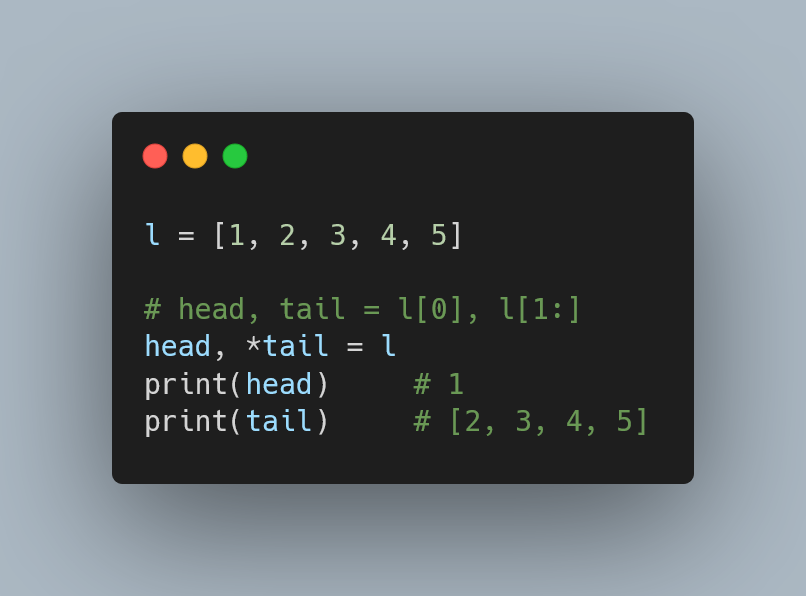
Before we apply it to loops, let's quickly recap the principle of extended iterable unpacking, sometimes called "starred assignment." It uses the * operator to collect multiple items from an iterable into a list.
The most common patterns are:
head, *tail = my_list: Captures the first item inheadand the rest intail.*head, tail = my_list: Captures all items except the last inhead, and the final item intail.first, *middle, last = my_list: Captures the first, last, and all items in between.
The variable prefixed with * will always be a list, even if it captures zero or one item.
This video provides a quick and clear visual explanation of these patterns.
Python's Unpacking Operator Is Awesome
The video 'Python's Unpacking Operator Is Awesome' from the channel Indently gives a concise overview of how starred unpacking works in assignments.
Watch from 00:38 to 04:22. Focus on how first, *middle, last is used to absorb values. Pay special attention to the clarification at 03:25: the starred variable always receives a list, regardless of the original iterable's type.
From Imperative Indexing to Declarative Unpacking in Loops
Now, let's apply this to loops. A common "Java-ism" when processing structured data (like rows from a CSV or database) is to access elements by index inside the loop.
Consider a list of student grades. Each inner list contains the student's name followed by a variable number of scores.
grades_data = [
    ['Alice', 90, 85, 92],
    ['Bob', 78, 81],
    ['Charlie', 95, 88, 91, 89, 94]
]
The Anti-Pattern: Manual Indexing and Slicing
A developer used to C-style or Java-style loops might write this:
# The "bad" way: imperative, relies on indexing and slicing
for row in grades_data:
    name = row[0]
    scores = row[1:] # Creates a new list slice in every iteration
    average_score = sum(scores) / len(scores) if scores else 0
    print(f"Student: {name}, Average: {average_score:.2f}")


# Output:
# Student: Alice, Average: 89.00
# Student: Bob, Average: 79.50
# Student: Charlie, Average: 91.40
This works, but it's not Pythonic. It's imperative—you're telling Python how to get the data (take the item at index 0, slice from index 1 to the end). It's also less readable and can be error-prone if the data structure changes.
The Pythonic Way: Extended Unpacking in a for Loop
We can use extended unpacking directly in the for loop statement to declaratively destructure each row.
# The "good" way: declarative and readable
for name, *scores in grades_data:
    average_score = sum(scores) / len(scores) if scores else 0
    print(f"Student: {name}, Average: {average_score:.2f}")


# Output:
# Student: Alice, Average: 89.00
# Student: Bob, Average: 79.50
# Student: Charlie, Average: 91.40
This code does the exact same thing, but it's far superior. The line for name, *scores in grades_data: is declarative. It says, "For each row, give me the first item as name and pack the rest into a list called scores." The intent is immediately obvious.
The following article explains this technique clearly.
Unpacking in Python: Beyond Parallel Assignment
The article 'Unpacking in Python: Beyond Parallel Assignment' provides an excellent overview of various unpacking use cases. We'll focus on the section that applies this directly to for loops.
Read the section titled 'Unpacking in For-Loops'. It starts with an example using tuple indexing and then refactors it to use unpacking, which perfectly mirrors the grades_data example above. Crucially, it ends by showing the * operator being used inside a loop.
More Unpacking Patterns in Loops
This technique is flexible. You can place the starred variable anywhere, just like in a standard assignment.
1. Ignoring the middle: Process records where you only care about the first and last values. For example, processing log data with a start time, an end time, and variable details in between you want to ignore.
records = [
    ('start', 'user_a', 'action_1', 'action_2', 'end'),
    ('start', 'user_b', 'action_3', 'end'),
]


# The underscore `_` is the conventional name for a variable you don't intend to use.
for first, *_, last in records:
    print(f"Record: starts with '{first}', ends with '{last}'")


# Output:
# Record: starts with 'start', ends with 'end'
# Record: starts with 'start', ends with 'end'
2. Capturing a "tail": Process a sequence where you need the main item and a list of tags.
file_metadata = [
    ['document.pdf', 'work', 'report', 'confidential'],
    ['photo.jpg', 'personal', 'vacation'],
    ['archive.zip', 'backup']
]

for filename, *tags in file_metadata:
    print(f"File '{filename}' has tags: {tags}")


# Output:
# File 'document.pdf' has tags: ['work', 'report', 'confidential']
# File 'photo.jpg' has tags: ['personal', 'vacation']
# File 'archive.zip' has tags: ['backup']
This declarative style is a hallmark of Pythonic code. It improves readability and correctness by making your code's assumptions about the data's shape explicit.
Multiple assignment and tuple unpacking improve Python code readability
The article 'Multiple assignment and tuple unpacking...' by Trey Hunner is a classic on this topic. It explains the philosophy behind this feature.
First, quickly read the section 'Unpacking in a for loop' to solidify your understanding of basic unpacking in loops. Then, read 'An alternative to slicing', which introduces the * operator and explains how it replaces manual slices, making your code more descriptive.
Exercise: Refactor a Command Parser
Your task is to refactor a simple command processor. The input is a list of lists, where each inner list represents a command followed by its arguments. The current implementation uses indexing. Rewrite it using extended unpacking.
# A list of commands to process
commands = [
    ['create_user', 'alice', '--admin', '--email=alice@example.com'],
    ['delete_user', 'bob'],
    ['list_users'],
    ['set_password', 'charlie', 'new_secret_password']
]

def process_commands_before(command_list):
    """
    Processes commands using manual indexing (the "bad" way).
    """
    print("--- Processing with manual indexing ---")
    for cmd_parts in command_list:
        if not cmd_parts:
            continue
        command = cmd_parts[0]
        arguments = cmd_parts[1:]
        print(f"Command: '{command}', Arguments: {len(arguments)} -> {arguments}")

def process_commands_after(command_list):
    """
    Refactor this function to use extended unpacking in the loop.
    """
    print("--- Processing with extended unpacking ---")


    # TODO: Refactor the loop below
    for command, *arguments in command_list:
        print(f"Command: '{command}', Arguments: {len(arguments)} -> {arguments}")


# --- Testing your solution ---
print("--- Testing your refactored function ---")


# Run the original for comparison
process_commands_before(commands)


# Run your refactored version
process_commands_after(commands)


# A simple assertion to verify your logic
# This test is conceptual. We assume if it runs and prints, it's correct.
# In a real scenario, you would capture stdout or return values to test.
print("\n✅ If the output from both functions looks identical, your refactoring is successful!")
Complete the process_commands_after function. The logic should be nearly identical, but the for loop line will be much cleaner.
Click to see the solution
def process_commands_after(command_list):
    """
    Refactor this function to use extended unpacking in the loop.
    """
    print("--- Processing with extended unpacking ---")


    # The refactored loop destructures each command list declaratively.
    for command, *arguments in command_list:
        print(f"Command: '{command}', Arguments: {len(arguments)} -> {arguments}")
Conclusion
You have now integrated another powerful, declarative idiom into your skillset. By using extended unpacking in for loops, you can write code that is not only more concise but also more readable and less prone to indexing errors.
Key Takeaways:
- Declarative over Imperative:
for name, *scores in data:is clearer and safer than accessingrow[0]androw[1:]. It states what you want from each item, not how to extract it. - Handles Variable-Length Data: This pattern excels when processing iterables where the items themselves are iterables of varying lengths.
- Improves Readability: The variable names in the loop signature serve as immediate documentation for the expected structure of the data.
In our next lesson, we will venture into the itertools module. This standard library module is a powerhouse for creating complex, memory-efficient iteration logic. We'll begin by learning how to use itertools.chain, islice, and tee to combine, slice, and duplicate iterators, enabling you to build sophisticated data processing pipelines.