Introduction
In our previous lessons, you've learned to express sophisticated type contracts using typing.Protocol for behavior and TypedDict for data structures. However, these type hints are merely descriptive metadata without a tool to enforce them. They are like blueprints without a building inspector; useful for documentation, but they don't prevent errors on their own.
This lesson bridges that gap. We will introduce mypy, the de facto standard static type checker for Python. You will learn how to integrate mypy into your workflow to catch type-related bugs before your code ever runs. More importantly, you will master a pragmatic, incremental adoption strategy for introducing type checking into existing codebases—a critical skill for any professional developer working on real-world projects.
By the end of this lesson, you will be able to run mypy, configure it for a project, and apply a step-by-step process to begin type-checking a codebase without being overwhelmed.
Getting Started with mypy
First, let's understand what mypy does and see it in action. mypy analyzes your code, following the type hints you've provided, and reports inconsistencies.
To start, you'll need to install mypy in your virtual environment:
pip install mypy
The following video provides a concise introduction to installing and running mypy, and integrating it with your code editor.
Static type checking with Mypy — Perfect Python
Watch this video from Carberra to see a practical demonstration of installing mypy, running it from the command line, and setting it up in VS Code for real-time feedback.
Pay close attention to these key moments: The 'Why' (0:07 - 1:19): Understand the benefits of static analysis in a dynamic language like Python. Installation and Basic Usage (1:42 - 2:44): See how to install mypy and run it on a simple file. Note how it reports no errors on an untyped function, which is a key concept in gradual typing. IDE Integration (3:07 - 4:00): This shows how to enable mypy as a linter in VS Code, giving you immediate feedback as you type. This is a highly effective workflow.
Let's solidify this with a "bad vs. good" example, illustrating mypy's behavior with untyped and typed code.
Bad: Untyped code that hides a bug
Consider this file, buggy_code.py:
# buggy_code.py
def create_greeting(name):


    # Bug: Concatenating a string with an integer
    return "Hello, " + name + 1

print(create_greeting("World"))
If you run mypy buggy_code.py, it will report:
Success: no issues found in 1 source file
mypy sees no type hints, so it assumes you know what you're doing. The bug remains hidden until you run the script, where it will crash with a TypeError.
Good: Typed code that reveals the bug
Now, let's add type hints:
# typed_code.py
def create_greeting(name: str) -> str:


    # Bug: Concatenating a string with an integer
    return "Hello, " + name + 1 # mypy will flag this line

print(create_greeting("World"))
Running mypy typed_code.py now gives you a clear, actionable error before you even run the code:
typed_code.py:3: error: Unsupported operand types for + ("str" and "int")  [operator]
Found 1 error in 1 file (checked 1 source file)
This is the fundamental value of static type checking: catching errors early and making your code more robust.

Configuring mypy for a Project
Running mypy from the command line with various flags is inefficient for a real project. The standard approach is to use a configuration file. The modern standard is pyproject.toml, which is used by many tools like poetry, black, and ruff.
You can also use a standalone mypy.ini or .mypy.ini file. We will focus on pyproject.toml.
Here is a reasonable starting configuration inside your pyproject.toml file:
# pyproject.toml

[tool.mypy]
python_version = "3.11"
warn_unused_ignores = true
warn_redundant_casts = true
show_error_codes = true


# A crucial first step for new code
disallow_untyped_defs = true


# Good for catching subtle None-related bugs
no_implicit_optional = true


# Essential when working with libraries that don't have types
ignore_missing_imports = true
Let's break down the most important options:
disallow_untyped_defs = true: This is one of the most impactful settings. It forces you to add type annotations to all function signatures, preventing untyped functions from silently creeping into your typed codebase.no_implicit_optional = true: By default,mypyallowsNoneto be passed to arguments typed asstr,int, etc. This flag enforces that you must explicitly useOptional[str]if you intend to allowNone. This eliminates a whole class ofNoneTypeerrors.ignore_missing_imports = true: Many third-party libraries don't include type hints. Without this flag,mypywould complain every time you import one. This setting tellsmypynot to worry about them.
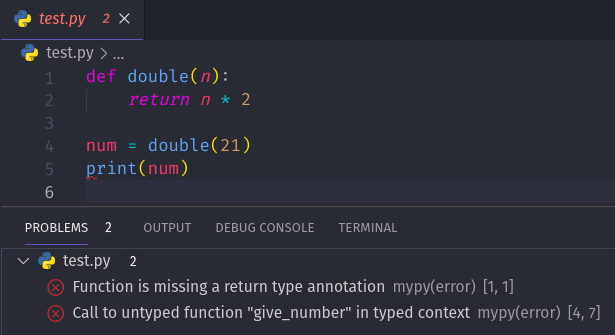
The mypy --strict Flag
mypy offers a --strict flag (or strict = true in the config file) which enables a whole suite of the strictest checks. While being fully strict is a great goal for a new project, it is often counter-productive to enable it on an existing codebase as it will likely generate thousands of errors.
The key is to start with a lenient configuration and incrementally increase strictness.
Incremental Adoption: The Professional Strategy
You have a large, untyped legacy project. How do you introduce mypy without halting all development to fix 10,000 type errors? You do it incrementally.
The official mypy documentation and other expert resources provide a clear, battle-tested playbook for this.
mypy documentation: Using mypy with an existing codebase
The official mypy documentation provides the authoritative guide on this topic. It outlines a pragmatic, step-by-step process for integrating mypy into a mature codebase.
Read the section 'Using mypy with an existing codebase'. Focus on the strategies outlined: Start small and don't boil the ocean. Run mypy in CI to prevent regressions. How and why to ignore errors from certain modules. The strategy of prioritizing widely imported modules first. The importance of introducing stricter options gradually.
Let's combine those principles into a concrete, actionable strategy.
Step 1: Establish a Lenient Baseline
Create your pyproject.toml with a lenient configuration, similar to the one shown above (ignore_missing_imports = true is key). Run mypy on your entire codebase. You will likely see many errors. Don't fix them yet.
Step 2: Use # type: ignore Pragmatically
Your first goal is to get mypy to pass with zero errors, even if it means ignoring them. This gives you a "green" baseline. From here, you can prevent new type errors from being introduced.
# type: ignore is not a mark of failure; it's a migration tool.
import a_library_without_types  # type: ignore[import]

def messy_legacy_function(data):  # type: ignore[no-untyped-def]


    # This function is too complex to type right now.
    # We will come back to it later.
    ...
Best Practice: Always provide a specific error code ([import], [no-untyped-def]) and, if possible, a comment explaining why the ignore is there. This turns a messy hack into a documented piece of technical debt.
Step 3: Enable Per-Module Strictness
Once you have a baseline, you can start tightening the screws on specific parts of your codebase. This is the most powerful feature for incremental adoption. Target new modules or modules you are actively refactoring.
# pyproject.toml

[tool.mypy]


# Global config is lenient
ignore_missing_imports = true


# Stricter settings for our new, clean module
[[tool.mypy.overrides]]
module = "my_app.new_feature.*"
disallow_untyped_defs = true
no_implicit_optional = true


# Completely ignore a legacy module that is too difficult to type right now
[[tool.mypy.overrides]]
module = "my_app.legacy_module"
ignore_errors = true
This configuration allows you to enforce high standards on new code while quarantining legacy code.
Step 4: Integrate into CI/CD
The ultimate goal is to automate this check. Add a step to your CI pipeline (e.g., GitHub Actions) that runs mypy. Now, no pull request can be merged if it introduces a new type error in the typed parts of your codebase.
This playbook gives you a fantastic example of a GitHub Actions workflow.
This playbook provides excellent, concise examples for configuration and CI/CD, boiling down best practices into copy-pasteable snippets.
Review the following sections: 'Incremental Adoption Strategies': This reinforces the concepts from the official docs with clear code examples for per-module strictness and using # type: ignore. 'CI/CD Integration': Look at the 'GitHub Actions' example. This is a production-ready template for ensuring type safety in your project.
By following this strategy—baseline, ignore, tighten incrementally, and automate—you can successfully introduce static typing to any Python project, no matter its size or age.
Conclusion
You now understand that type hints are only half the story. mypy is the other, essential half that brings your type annotations to life, turning them from simple documentation into a powerful bug-prevention tool.
Key Takeaways:
mypyis a static type checker: It finds type errors in your code without running it.- Start with a configuration file: Use
pyproject.tomlto ensure consistentmypyruns for everyone on your team. Key starter options includedisallow_untyped_defsandignore_missing_imports. - Incremental adoption is key: Don't enable
--stricton a large, existing codebase. You will be overwhelmed. - Follow the playbook:
- Establish a lenient baseline config.
- Use
# type: ignore[error-code]to get to a "green" state. - Use per-module overrides to enforce strictness on new or refactored code.
- Automate
mypychecks in your CI/CD pipeline to prevent regressions.
In the next lesson, we will dive deeper into some of the more advanced and powerful features of the typing module: TypeVar and Generic. Now that you know how to run the type checker, you'll be able to write and validate reusable, type-safe functions and classes that work with multiple types, such as a container that can hold either integers or strings while remaining fully type-safe.