Hello! Welcome back to the course.
In our last lesson, we focused on video inpainting, learning how to fill masked regions in a video while maintaining temporal consistency. We saw that the core challenge was ensuring the filled patch looked correct not just spatially, but also across time to avoid flickering.
Today, we take that a step further. Instead of simply filling a hole, we want to control what we fill it with. This lesson is about instruction-guided video editing, where we use text prompts to make specific changes to a video, such as altering an object's style, changing its properties, or replacing it entirely. Your learning outcome is to implement instruction-guided video editing (e.g., style or object changes).
We'll start with the high-level concept behind many popular video editing tools and then dive deep into a state-of-the-art framework that addresses the core challenges of this task in a very clever way.
From Inpainting to Editing: The Basic Idea
At its simplest, instruction-guided video editing is a form of video-to-video translation. The process often looks like this:
- Take an input video.
- Add a certain amount of noise to its frames, effectively "damaging" the video part-way through the forward diffusion process.
- Use a diffusion model to denoise the video back to a clean state, but this time, guide the generation with a new text prompt.
This allows the model to retain the overall structure and motion of the original video (from the noisy latent) while changing the content and style to match the new instructions.
Many practical tools are built on this principle. For instance, the AnimateDiff library provides pipelines that operationalize this concept.
Text-to-Video Generation with AnimateDiff
Let's look at the Hugging Face Diffusers documentation for AnimateDiff. It provides a great practical example of video-to-video editing in action.
Please review the section titled 'AnimateDiffVideoToVideoPipeline'. Look at the sample outputs, particularly the raccoon turning into a panda and Margot Robbie turning into Tony Stark. This demonstrates the core idea of using a text prompt to change the subject of a video while preserving motion and background.
The examples you just saw look impressive, but achieving this level of quality is non-trivial. If you apply this naive process, you often face a critical trade-off:
- Faithfulness vs. Editability: If you add too little noise, the model will be very faithful to the original video but won't have enough freedom to make the requested edit. If you add too much noise, the model can make the edit, but you might lose the original video's structure and motion entirely.
- Temporal Inconsistency: Even if you edit one frame correctly, applying the same process independently to all frames often leads to flickering, where the edited object's appearance changes subtly from frame to frame.
To solve these issues, we need a more sophisticated approach.
Advanced Editing with Cross-Attention Control: Video-P2P
A groundbreaking approach for high-quality video editing is presented in the paper "Video-P2P: Video Editing with Cross-attention Control". This framework adapts a pre-trained image diffusion model for detailed video editing. Its design directly addresses the faithfulness vs. editability problem.
The core idea is to separate the task into two parallel processes during denoising: one focused on reconstructing the original video and another focused on creating the edited version.
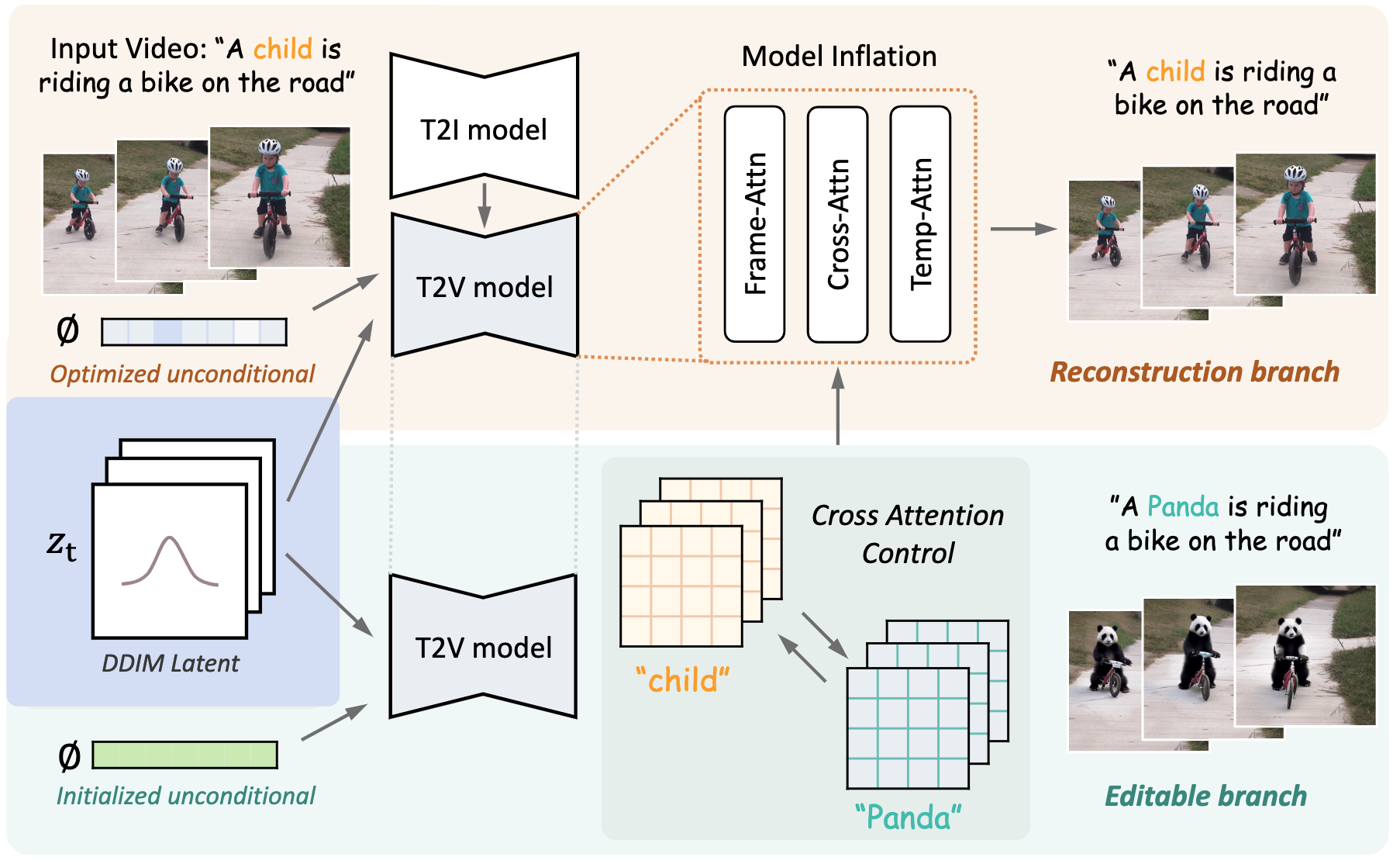
Let's break down the key components of this architecture, as understanding them is crucial for implementation.
Video-P2P: Video Editing with Cross-attention Control
The Video-P2P paper is dense but contains the key architectural patterns for robust video editing. We'll focus on the two main technical innovations.
Please read the following sections from the paper: Section 3.2 (Video Inversion): Focus on the concept of optimizing a shared unconditional embedding for all frames. This is the foundation for being able to reconstruct the original video accurately. Section 3.3 (Decoupled-guidance Attention Control): This is the core of the method. Pay close attention to the motivation: why one inference pipeline isn't enough and how they combine two branches (one for reconstruction, one for editability). Look at Algorithm 1 for the pseudo-code. Section 4.2 (Applications): Skim this section to see the results of the technique, such as 'word swap' and 'prompt refinement'. This connects the technical method to the desired outcomes.
Let's unpack those two critical components.
1. Video Inversion with a Shared Unconditional Embedding
Before we can edit, we must be able to perfectly reconstruct the original video. This means finding a starting noise latent z_T and conditioning that, when denoised with the original prompt P, yields the original video V.
The paper finds that standard DDIM inversion isn't accurate enough. Instead, they propose optimizing the unconditional embedding ? (the embedding for the empty string "" used in classifier-free guidance). Crucially, they optimize a single, shared ? for all frames in the video.
This has two benefits:
- Efficiency: It's much cheaper than optimizing a separate embedding for each frame.
- Consistency: It acts as a regularizer, encouraging the model to find a consistent representation for the video's content, which helps prevent temporal flickering later on.
2. Decoupled-Guidance Attention Control
This is the most important concept. The authors found that the optimized embedding ? that is excellent for reconstruction makes the model brittle and poor at editing. Conversely, a standard, non-optimized embedding is better for editing but can't reconstruct the original video well.
Their solution is to run two denoising processes in parallel at each step t:
-
Reconstruction Branch (Source):
- Input: Source prompt
P(e.g., "a raccoon playing a guitar"). - Guidance: Uses the optimized unconditional embedding
?. - Purpose: To perfectly reconstruct the original video. From this branch, we only extract the cross-attention maps
M_t. These maps tell us "where" each word (e.g., "raccoon") is located in the frame.
- Input: Source prompt
-
Editable Branch (Target):
- Input: Target prompt
P*(e.g., "a panda playing a guitar"). - Guidance: Uses a standard, initialized unconditional embedding
?*. - Purpose: To generate the new content.
- Input: Target prompt
The magic happens when these two branches are combined. During the denoising of the editable branch, we inject the cross-attention maps from the reconstruction branch. For any word that is shared between the two prompts (like "playing", "a", "guitar"), we replace the editable branch's attention map with the one from the reconstruction branch.
This forces the editable branch to place content in the exact same locations as the original video, preserving the structure and background perfectly. The only parts that are truly "new" are those corresponding to the changed words in the prompt (e.g., "panda"). This elegantly solves the faithfulness vs. editability trade-off.
Test your understanding!
You are tasked with editing a video described by the prompt "a man riding a horse on a beach" to "a knight riding a horse on a beach". Using the Video-P2P decoupled-guidance framework, answer the following:
- What are the source and target prompts?
- Which unconditional embedding (
?_optimizedor?_initialized) is used for each branch? - During denoising, the attention maps for which words from the reconstruction branch would be injected into the editable branch?
Show answer
-
Source Prompt: "a man riding a horse on a beach"
Target Prompt: "a knight riding a horse on a beach" -
Reconstruction Branch: Uses the source prompt and
?_optimized.
Editable Branch: Uses the target prompt and?_initialized. -
The attention maps corresponding to the common words would be injected: "a", "riding", "a", "horse", "on", "a", "beach". By enforcing that the editable branch uses the same spatial attention for these words as the reconstruction branch, the model ensures the horse, the beach, and the motion are preserved, while only generating new content for the word "knight" in the location previously occupied by "man".
Enhancing Edits with Structural Control
Instruction-guided editing is powerful, but sometimes text alone isn't enough to preserve complex motion or poses. We can combine our text prompt with structural guidance from a model like ControlNet, which we explored in Module 6.
This creates a pipeline where:
- The text prompt dictates the content (e.g., "astronaut").
- ControlNet dictates the structure, using conditions like pose, depth, or canny edges extracted from the original video (e.g., preserving a specific dance move).
Text-to-Video Generation with AnimateDiff
The AnimateDiff documentation also shows how to integrate ControlNet for more precise video-to-video editing.
Review the section 'AnimateDiffVideoToVideoControlNetPipeline'. Notice the example of changing a dancing anime girl into a dancing astronaut. This is a perfect illustration of combining textual guidance (changing the character) with structural guidance (preserving the dance moves).
This combination is extremely powerful in a production setting, as it gives you multiple levers to control the final output, balancing semantic changes with structural fidelity.
Conclusion
In this lesson, we moved beyond simple video filling to full-fledged, instruction-guided video editing. We saw that while the basic idea of partial noising and re-denoising with a new prompt is intuitive, high-quality results require more sophisticated techniques.
Key Takeaways:
- Instruction-guided video editing fundamentally relies on a video-to-video translation process.
- A core challenge is the faithfulness vs. editability trade-off, which is hard to balance with a single generation pipeline.
- The Video-P2P framework provides a robust solution with its decoupled-guidance strategy, using one branch for reconstruction and another for editing, linked by cross-attention map injection.
- Accurate video inversion, often achieved by optimizing a shared unconditional embedding, is a prerequisite for high-fidelity reconstruction.
- For maximum control, textual instructions can be combined with structural guidance from models like ControlNet to preserve specific poses or motions.
Next Lesson Preview:
We've now learned several advanced techniques for generating and editing video. However, as with any complex generative process, things can go wrong. The most common failure mode in video generation is a lack of temporal consistency, which manifests as "flickering" or other visual artifacts. In our next and final lesson of this module, we will focus on how to debug temporal flickering and inconsistency artifacts, equipping you with the practical skills to diagnose and fix these issues in your own projects.