Hello. In the previous lesson, you used arrays to process ordered values with iteration, map, filter, and reduce. This lesson adds the data structure you will encounter constantly in Node.js APIs, blockchain explorers, wallets, and dApps: the object.
An array answers “what is at position 0?” An object answers “what is the value associated with the key hash, from, or status?” By the end of this lesson, you will be able to create an object, read its properties, update or add properties, and extract values cleanly with destructuring. Allow about 45–55 minutes, including a short video, two readings, and a coding walkthrough.
Objects: related values with names
An object groups related values under named properties. For instance, a simulated transaction has related pieces of information: a sender, recipient, value, and status.
const transaction = {
  hash: "0xabc123",
  from: "0xAlice",
  to: "0xBob",
  value: 125,
  confirmed: false
};
This is an object literal: we have written the object directly between curly braces.
Each entry is a property, made of:
property name: value
For example:
value: 125
Here, value is the property name (also called a key) and 125 is its value. Properties are separated with commas.
An object can hold values of many types:
const wallet = {
  address: "0xA1B2C3",
  balance: 42,
  isConnected: true,
  supportedNetworks: ["mainnet", "sepolia"],
  network: {
    name: "Sepolia",
    chainId: 11155111
  }
};
The network property above contains another object, called a nested object. This is common in structured API data: a transaction might contain a nested fee object, and a wallet response might contain nested network information.
Objects are accessed by property names, rather than by array indexes. An object is therefore a good fit when each value has a distinct meaning.
Javascript Objects Explained | Javascript Objects Tutorial
Watch “Javascript Objects Explained” from Dave Gray for a compact visual introduction to object literals, nested values, and two ways to access properties.
Watch object structure to see key-value properties, arrays inside objects, and nested objects. Then watch bracket notation for the second property-access syntax. Focus on the difference between retrieving the whole object and retrieving one named value.
Creating and reading properties
The most common way to read a property is dot notation:
console.log(transaction.hash);      // 0xabc123
console.log(transaction.value);     // 125
console.log(transaction.confirmed); // false
Read transaction.value as: “the value property belonging to transaction.”
For nested data, continue with another dot:
console.log(wallet.network.name);    // Sepolia
console.log(wallet.network.chainId); // 11155111
There is also bracket notation:
console.log(transaction["hash"]); // 0xabc123
console.log(transaction["value"]); // 125
For ordinary property names, dot notation is usually clearer:
transaction.value
Use brackets when the property name comes from a variable. This matters whenever a program decides at runtime which field to read.
const fieldName = "value";

console.log(transaction[fieldName]); // 125
Be precise about the difference:
console.log(transaction.fieldName);  // undefined
console.log(transaction[fieldName]); // 125
With transaction.fieldName, JavaScript literally looks for a property named "fieldName". With transaction[fieldName], JavaScript first evaluates the variable, gets "value", and then retrieves transaction["value"].
A missing property normally produces undefined:
console.log(transaction.fee); // undefined
That result is useful information: it means the object does not currently have a fee property. It is different from an error, although trying to access a property inside an absent nested object can cause an error later.
JavaScript object basics - Learn web development | MDN
Read “JavaScript object basics” from MDN to reinforce how object literals organize related data, and how dot and bracket notation differ when retrieving or changing properties.
In the “Object basics” section, read the object-literal explanation, including the example that mixes values of several types. Then read “Dot notation,” “Bracket notation,” and “Setting object members.” Pay particular attention to dynamic property access, followed by adding new properties.
Updating and adding properties
You can change an existing property with an assignment:
transaction.confirmed = true;

console.log(transaction.confirmed); // true
You can also add a property that did not exist when the object was created:
transaction.confirmations = 1;
transaction.status = "confirmed";

console.log(transaction);
The object now has two additional properties.
Bracket notation also works for updates, especially when the property name is dynamic:
const updateField = "status";

transaction[updateField] = "finalized";

console.log(transaction.status); // finalized
const objects can still change
This can initially look contradictory:
const transaction = {
  status: "pending"
};

transaction.status = "confirmed"; // allowed
const means you cannot reassign the variable transaction to a completely different value:
// transaction = {}; // TypeError
But you can change properties inside the object that transaction refers to.
A practical guideline:
- Use
constfor an object variable when you will keep referring to the same object. - Updating its properties is still allowed.
- Use
letonly if you expect to reassign the entire variable later.
You can update nested properties in the same way:
wallet.network.name = "Ethereum Mainnet";
wallet.network.chainId = 1;
For now, use the simple rule: if a property name is known directly in your code, use dot notation. If the name is held in a variable, use bracket notation.
| Situation | Syntax |
|---|---|
| Known property name | transaction.status |
| Property name is a string | transaction["status"] |
| Property name comes from a variable | transaction[fieldName] |
| Update a known property | transaction.status = "confirmed" |
| Add a dynamic property | transaction[fieldName] = newValue |
Destructuring: pull properties into variables
Often you need just a few values from an object. You could write:
const hash = transaction.hash;
const value = transaction.value;
const status = transaction.status;
That works, but object destructuring provides a shorter, deliberate way to extract those properties:
const { hash, value, status } = transaction;

console.log(hash);
console.log(value);
console.log(status);
The property names on the left must match the property names on the object.
const transaction = {
  hash: "0xabc123",
  value: 125,
  status: "confirmed"
};

const { hash, value } = transaction;

console.log(hash);  // 0xabc123
console.log(value); // 125
Destructuring does not remove anything from the original object:
console.log(transaction.hash); // still 0xabc123
It simply assigns selected values to new variables.
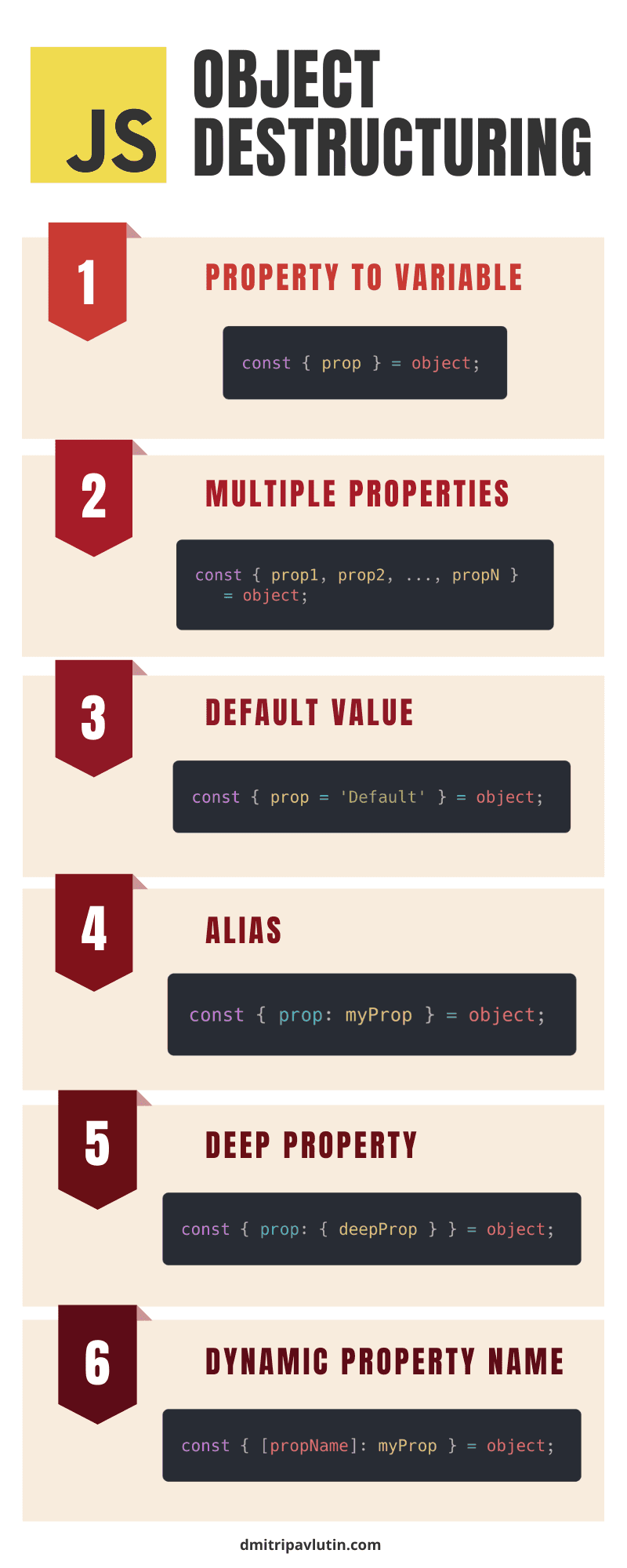
Rename a destructured value
Sometimes the property name is not the best variable name for the current task. Use a colon to map the source property to a new variable name:
const { from: sender, to: recipient } = transaction;

console.log(sender);    // 0xAlice
console.log(recipient); // 0xBob
Read this pattern from left to right:
from: sender
Take the
fromproperty and assign it to a variable namedsender.
The left side is always the object’s actual property name. The right side is the new variable you are creating.
Provide a default value
A property may not exist yet. Instead of receiving undefined, you can supply a default:
const { fee = "not estimated" } = transaction;

console.log(fee); // not estimated
If transaction already has a fee property, its actual value wins:
const transactionWithFee = {
  value: 125,
  fee: 3
};

const { fee = "not estimated" } = transactionWithFee;

console.log(fee); // 3
A destructuring default applies when the value is missing or undefined. It does not replace meaningful values such as 0 or false.
const receipt = {
  confirmed: false,
  confirmations: 0
};

const { confirmed = true, confirmations = 1 } = receipt;

console.log(confirmed);     // false
console.log(confirmations); // 0
That behavior is important: a transaction with zero confirmations should remain 0, not silently become 1.
Extract nested properties
You can destructure through the shape of a nested object:
const wallet = {
  address: "0xA1B2C3",
  network: {
    name: "Sepolia",
    chainId: 11155111
  }
};

const {
  network: {
    name: networkName,
    chainId
  }
} = wallet;

console.log(networkName); // Sepolia
console.log(chainId);     // 11155111
Notice that this does not create a variable called network. It extracts properties inside network directly.
For a beginner-friendly alternative, use two clear steps:
const { network } = wallet;
const { name: networkName, chainId } = network;
This is longer, but sometimes easier to inspect while debugging.
Collect the remaining properties
The rest pattern, written as ...rest, gathers properties you did not explicitly extract:
const { hash, ...transactionDetails } = transaction;

console.log(hash);
console.log(transactionDetails);
transactionDetails is a new object containing the other top-level properties, such as from, to, value, and status.
This pattern becomes useful when you want to separate one field—for example, a transaction hash used as an identifier—from the remaining information.
A dynamic property in destructuring
Most dynamic reads are easiest with bracket notation:
const fieldName = "value";
const selectedValue = transaction[fieldName];
JavaScript also allows a dynamic property name within destructuring:
const fieldName = "value";

const { [fieldName]: selectedValue } = transaction;

console.log(selectedValue); // 125
For now, recognize this syntax when you see it, but prefer the simple bracket-access version unless destructuring genuinely makes the surrounding code clearer.
Read the “Object destructuring” material from javascript.info. It provides a careful reference for the compact syntax you will see frequently in JavaScript API and dApp code.
In “Object destructuring,” read the basic pattern first. Continue through aliases and defaults, focusing on when defaults apply. Then read “The rest pattern” and follow the rest-object example. You can skip the later array-focused material for this lesson.
Destructuring in function parameters
Destructuring becomes especially useful with functions. Recall that a function can receive a whole object as one argument:
function showTransaction(transaction) {
  console.log(transaction.hash + ": " + transaction.status);
}
If the function needs only a few fields, destructure them directly in the parameter list:
function showTransaction({ hash, status = "pending" }) {
  console.log(hash + ": " + status);
}

showTransaction({
  hash: "0xabc123",
  status: "confirmed",
  value: 125
});
Output:
0xabc123: confirmed
This makes the function’s needs visible: it uses hash and status; the other properties can still be present but are not needed for this task.
In later modules, you will receive large objects from JSON files, APIs, wallet providers, and contract libraries. Destructuring helps you select the few pieces that a specific function needs, rather than repeatedly writing long expressions such as receipt.transactionHash or network.chainId.
Build a transaction-object report
Create a file named object-report.js in your practice folder. The data below is simulated: it is not a real transaction, wallet address, or blockchain network connection.
const transaction = {
  hash: "0xabc123",
  from: "0xAlice",
  to: "0xBob",
  value: 125,
  status: "pending",
  network: {
    name: "Sepolia",
    chainId: 11155111
  }
};

// Read properties using dot notation.
console.log("Transaction hash:", transaction.hash);
console.log("Initial status:", transaction.status);

// Read a property selected at runtime.
const selectedField = "value";
console.log("Selected value:", transaction[selectedField]);

// Update existing properties and add a new one.
transaction.status = "confirmed";
transaction.confirmations = 1;

console.log("Updated status:", transaction.status);
console.log("Confirmations:", transaction.confirmations);

// Destructure selected transaction information.
const {
  hash,
  from: sender,
  to: recipient,
  value,
  fee = "not estimated",
  network: {
    name: networkName
  }
} = transaction;

console.log("Hash:", hash);
console.log("Sender:", sender);
console.log("Recipient:", recipient);
console.log("Value:", value);
console.log("Fee:", fee);
console.log("Network:", networkName);

// Keep one property separate from the remaining top-level details.
const { hash: transactionId, ...details } = transaction;

console.log("Transaction ID:", transactionId);
console.log("Remaining details:", details);
Run it:
node object-report.js
The important parts of the output should include:
Transaction hash: 0xabc123
Initial status: pending
Selected value: 125
Updated status: confirmed
Confirmations: 1
Fee: not estimated
Network: Sepolia
As you inspect the final details object, observe that it includes the transaction’s other top-level properties but not hash. That is the effect of the rest pattern.
Common mistakes to recognize
Using a variable name after a dot
const fieldName = "status";

console.log(transaction.fieldName); // looks for "fieldName"
Use brackets for the variable’s value:
console.log(transaction[fieldName]); // looks for "status"
Trying to destructure a property under the wrong name
const { sender } = transaction;

console.log(sender); // undefined
The object has from, not sender. Rename it correctly:
const { from: sender } = transaction;
Forgetting that nested data has another level
console.log(wallet.name); // undefined
The name belongs to wallet.network:
console.log(wallet.network.name); // Sepolia
Assuming const freezes an object
const receipt = {
  status: "pending"
};

receipt.status = "confirmed"; // allowed
const protects the variable binding, not the object’s individual properties.
Wrap-up
You can now work with JavaScript objects as structured data:
- An object stores related values under named properties.
- Create an object with an object literal using
{ key: value }. - Read known properties with dot notation, such as
transaction.hash. - Use bracket notation when a property name is stored in a variable, such as
transaction[fieldName]. - Update existing properties or add new ones with assignment.
constobjects can have their properties changed, even though the variable cannot be reassigned.- Destructure properties into variables with patterns such as
const { hash, value } = transaction. - Destructuring supports aliases, defaults, nested properties, and a rest object.
This completes the JavaScript foundations module. Next, you will begin a more realistic development workflow by initializing a Node.js project and understanding the role of package.json.