Welcome back! In our previous lesson, we examined how to structure a frontend codebase, contrasting the simplicity of a monolithic architecture with the organizational scalability of micro-frontends. We concluded that the choice is driven primarily by team size and the need for independent deployment.
Today, we shift our focus from the structure of the codebase to the fundamental behavior of the application itself. We will tackle another critical architectural decision: choosing between a Single-Page Application (SPA) and a Multi-Page Application (MPA). This choice profoundly impacts user experience, performance, SEO, and development complexity.
Given your three years of experience with React, you are already well-versed in the SPA development model. This lesson will build on that practical knowledge by framing the SPA vs. MPA decision from a higher-level architectural perspective. We will focus on the "why" and "when"—evaluating the trade-offs to make informed choices that align with specific project requirements and business goals.
The Two Fundamental Lifecycles
At its core, the web operates on a request-response model. The distinction between an MPA and an SPA lies in how they handle this model after the initial page load.
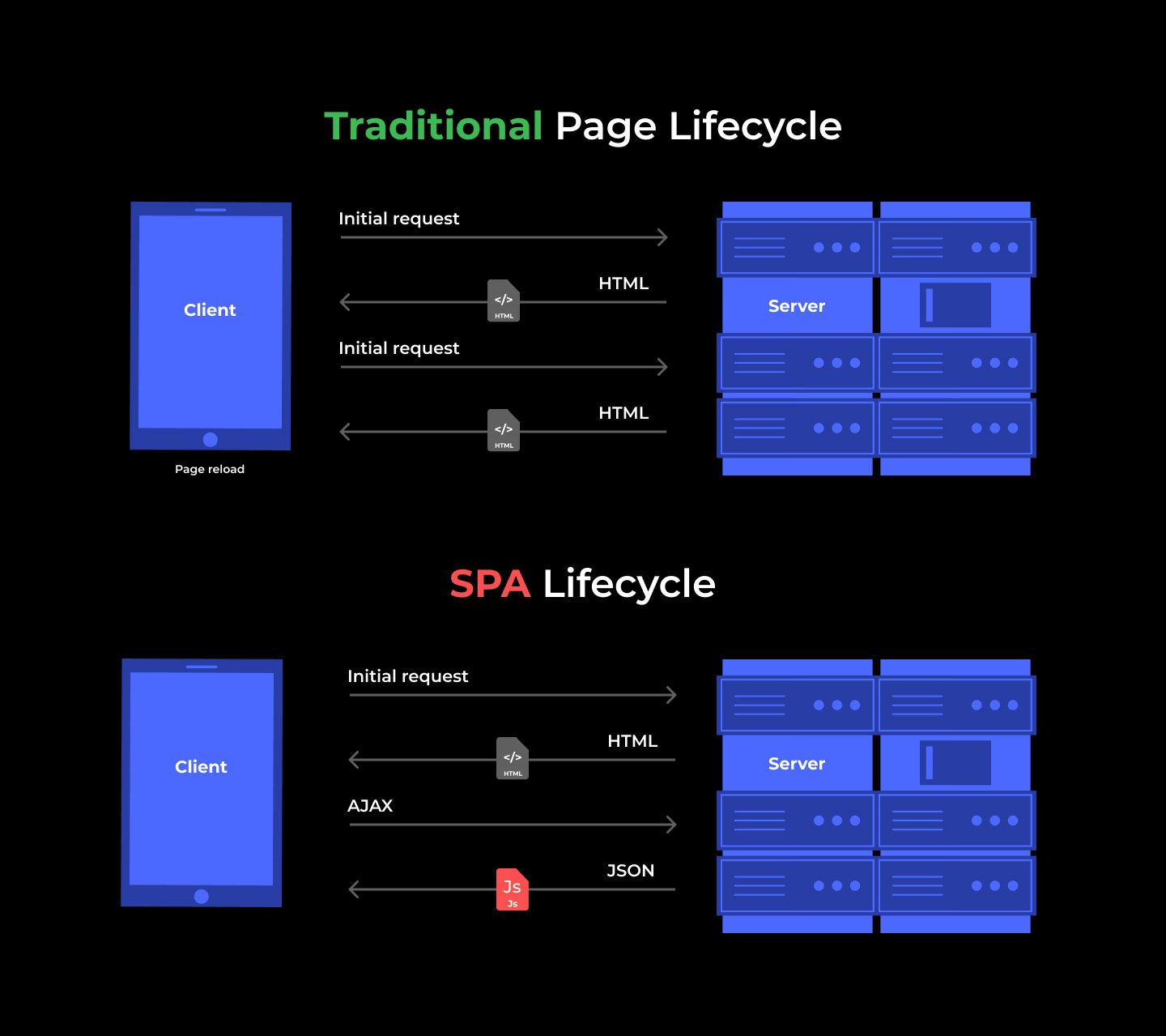
- A Multi-Page Application (MPA) is the traditional model. Every time the user navigates to a new page (e.g., by clicking a link), the browser makes a full request to the server, which then returns a brand-new HTML document to be rendered.
- A Single-Page Application (SPA) loads a single HTML "shell" and a large JavaScript bundle initially. From that point on, JavaScript intercepts navigation, fetches data from APIs as needed, and dynamically rewrites the current page rather than requesting a new one from the server.
This diagram illustrates the difference in their communication patterns with the server.
Let's explore these two models in more detail.
SPA vs. MPA: Which Architecture is Right for Your Project?
This article from Glow Team provides excellent, clear definitions for both architectures and their underlying rendering patterns.
Please read the sections What Is a Single-Page Application (SPA)? and What Is a Multi-Page Application (MPA)? to solidify your understanding of these core concepts.
The difference is also very apparent visually. In the following video, notice how clicking links on an MPA causes the browser's refresh icon to spin, indicating a full page load, while an SPA's navigation feels instant.
SPAs vs MPAs/MVC - Are Single Page Apps always better?
This video from Academind provides a great visual demonstration of both architectures in action.
First, watch the demonstration of an MPA from the beginning, using the New York Times website. Then, observe the SPA behavior from this segment, using the Angular.io website. Pay attention to the browser's reload icon in the top-left corner.
The Core Trade-offs: Evaluating Your Options
The choice between an SPA and an MPA is not about which is "better" in a vacuum, but which set of trade-offs is more acceptable for your specific project. Let's analyze these trade-offs across four key dimensions.
1. User Experience & Responsiveness
This is the most visible difference. SPAs offer a fluid, "app-like" experience. Once the initial load is complete, transitions are instantaneous, which is ideal for highly interactive applications where users perform many actions within a single session.
MPAs, on the other hand, deliver predictable reliability. Each page is a fresh, self-contained document. While navigation involves a "flash" as the new page loads, the content is rendered quickly by the browser without depending on a complex client-side state, which can be a source of bugs.
SPA vs. MPA: Which Architecture is Right for Your Project?
The article we reviewed earlier has a great section comparing the user experience.
Read the part on UX & Responsiveness. It effectively summarizes the trade-off between fluidity and reliability.
2. Performance: A Tale of Two Metrics
Performance is a nuanced topic here, as it depends on what you're measuring.
- Initial Load Performance: MPAs generally win. The server sends a relatively lightweight, pre-rendered HTML file, so the user sees content very quickly (a fast Time To First Byte and First Contentful Paint). SPAs must first download, parse, and execute a large JavaScript bundle before any meaningful content can be rendered, which can lead to a longer wait on the initial visit.
- Subsequent Navigation Performance: SPAs win decisively. After the initial load, navigating between views only requires fetching small amounts of data (as JSON), not entire new pages. This makes subsequent interactions feel instantaneous.
This creates a clear performance trade-off: do you optimize for the first-time visitor or the engaged power user?
The following article provides a detailed, data-driven comparison based on building the same application twice—once as an MPA and once as an SPA.
Multi vs Single Page Apps: user experience, performance ...
This article by Igor binaryigor.com offers a rigorous, hands-on comparison of the two architectures.
First, read the section on User experience, which breaks down the sequence of requests needed to render a page in each model. Next, carefully review the Performance section. Don't worry about the specific test code, but focus on the methodology and the final summary table comparing the page load percentiles. Notice that the SPA requires an additional API request, contributing to its slightly slower overall page load time in these tests.
3. SEO & Discoverability
Search Engine Optimization is a critical business concern for many applications, and it's historically been the SPA's greatest weakness.
- MPAs are inherently SEO-friendly. Every URL corresponds to a unique HTML document with all its content and meta tags present on the server. This makes it trivial for search engine crawlers to index the site.
- SPAs, by default, serve a nearly empty HTML file. The content is rendered client-side by JavaScript. While Google's crawler has gotten better at executing JavaScript, it's not perfect, and many other crawlers (for social media link previews, etc.) cannot execute it at all.
This means that for an SPA to have good SEO, you must implement additional techniques like Server-Side Rendering (SSR) or Static Site Generation (SSG), which adds complexity. We'll touch on this more later.
Multi page vs Single Page Applications - Which One Is Right For You?!
James Q Quick explains this difference clearly in his video.
Watch the segment on SEO value, where he discusses why crawlers can easily index MPAs but face challenges with client-rendered SPAs.
4. Development Complexity & Cost
As a React developer, you know that building an SPA involves a specific set of complexities: client-side routing, global state management, and careful API design for data fetching.
- MPA development is often simpler to start. State is largely managed on the server, and traditional browser features like form submissions and links work out of the box. The frontend/backend are more tightly coupled.
- SPA development introduces a "complexity floor" but offers a clear separation between the frontend (which consumes APIs) and the backend (which provides them). This can be a major advantage for larger teams, allowing frontend and backend specialists to work in parallel. However, it means you are essentially building and maintaining two applications: the client-side app and the backend API.
Multi vs Single Page Apps: user experience, performance ...
The same article from binaryigor.com provides a fantastic analysis of complexity.
Read the section on Complexity, which includes a line-of-code comparison that quantifies the additional frontend code required for an SPA. Then, review the Tradeoffs section, paying close attention to the points on "Division of labour," "Components ecosystem," and "Skills availability."
The Decision Framework: Which Should You Choose?
Now that we've analyzed the trade-offs, we can establish a framework for making the decision. The choice should be guided by your product's core function and business requirements.
SPA vs. MPA: Which Architecture is Right for Your Project?
The Glow Team article provides a very practical checklist.
Read the section Decision Framework. These heuristics are an excellent starting point for any architectural discussion on this topic.
To summarize and expand on that framework:
Choose an MPA if:
- SEO is paramount: Your business relies on organic search traffic (e.g., e-commerce, blogs, news sites, marketing pages).
- The application is content-focused: The primary user interaction is reading and navigating between distinct pieces of content.
- Simplicity and speed-to-market are key: You have a small team and need to launch quickly without the overhead of complex client-side state management.
- Broad device support is crucial: You want a baseline experience that works even on low-end devices or with JavaScript disabled.
Choose an SPA if:
- The product is a highly interactive "app": Users perform complex tasks and spend long sessions within the application (e.g., SaaS dashboards, design tools like Figma, social media feeds).
- A rich, fluid user experience is a competitive advantage: The "app-like" feel is a core part of the product's value proposition.
- SEO is a secondary concern: The application is behind a login, is an internal tool, or its user acquisition doesn't depend on public search.
- You need a clean frontend/backend separation: Your team is structured with distinct frontend and backend specialists.
The Modern Hybrid: You Don't Have to Choose
Fortunately, the choice is no longer a strict binary. Modern frontend frameworks, often called "meta-frameworks," allow you to blend the best of both worlds.
Frameworks like Next.js (for React), Nuxt.js (for Vue), and SvelteKit enable hybrid rendering strategies on a per-page basis within a single application. For example, you can:
- Use Static Site Generation (SSG) for your marketing pages and blog for maximum performance and perfect SEO (acting like an MPA).
- Use Server-Side Rendering (SSR) for dynamic but public pages like product listings.
- Use Client-Side Rendering (CSR) for your authenticated user dashboard (acting like a pure SPA).
This allows you to make optimized architectural choices for different parts of your application, rather than being locked into one global model. We will explore these rendering patterns in much greater detail in a future module. For now, it's important to know that these hybrid solutions are often the answer for complex, large-scale applications.
Conclusion
In this lesson, we dissected the fundamental differences between Multi-Page and Single-Page applications. You now have a comprehensive framework for evaluating this crucial architectural decision based on a project's specific needs.
Here are the key takeaways:
- MPA (Multi-Page Application): The classic web model. Optimized for content-heavy sites where SEO and fast initial load are critical. Its trade-off is a less fluid user experience due to full page reloads.
- SPA (Single-Page Application): The modern "app-in-a-browser" model. Optimized for highly interactive applications where a rich user experience is paramount. Its trade-offs are a slower initial load and inherent SEO challenges that require extra work.
- The Choice is a Trade-off: The decision hinges on balancing UX, performance, SEO, and development complexity against your business goals and team capabilities.
- Hybrid is the Future: Modern meta-frameworks allow you to mix and match rendering strategies, giving you the benefits of both MPA and SPA architectures within a single project.
In our next lesson, we will zoom in further. Having decided on the high-level application model, we will explore how to architect a layered frontend system by applying separation of concerns principles. This will set the stage for designing clean, maintainable, and scalable codebases, regardless of whether you're building an SPA, MPA, or a hybrid.