Introduction
In our first lesson, we established the crucial difference between containers and virtual machines, understanding that containers offer a lightweight, efficient way to package and run applications by virtualizing the operating system. You now know what a container is and the problem it solves.
Today, we'll explore how Docker works under the hood. This lesson focuses on Docker's client-server architecture, breaking it down into its three fundamental components: the Docker client, the Docker daemon, and a Docker registry. Understanding this architecture is key to mastering Docker, as it explains the relationship between the commands you type and the actions that create and manage containers.
The Docker Engine: A Client-Server Application
At its core, Docker is a client-server application. You interact with it through a client, which in turn communicates with a server that does all the heavy lifting. This model is common in software engineering and should be conceptually familiar from your experience with Python, where you might have a client application making requests to a server via an API.
The main components are:
- The Docker Client: This is your primary interface to Docker. It's a command-line interface (CLI) tool that you use to issue commands like
docker runordocker build. - The Docker Host: This is the machine where the Docker daemon is running.
- The Docker Daemon (
dockerd): This is the "server" part. It's a background process (a daemon) that listens for API requests from the Docker client and manages Docker objects like images, containers, networks, and volumes. - A Registry: This is a stateless, scalable service that stores and distributes Docker images. Docker Hub is the default public registry.
The following diagram from the official Docker documentation illustrates this relationship.
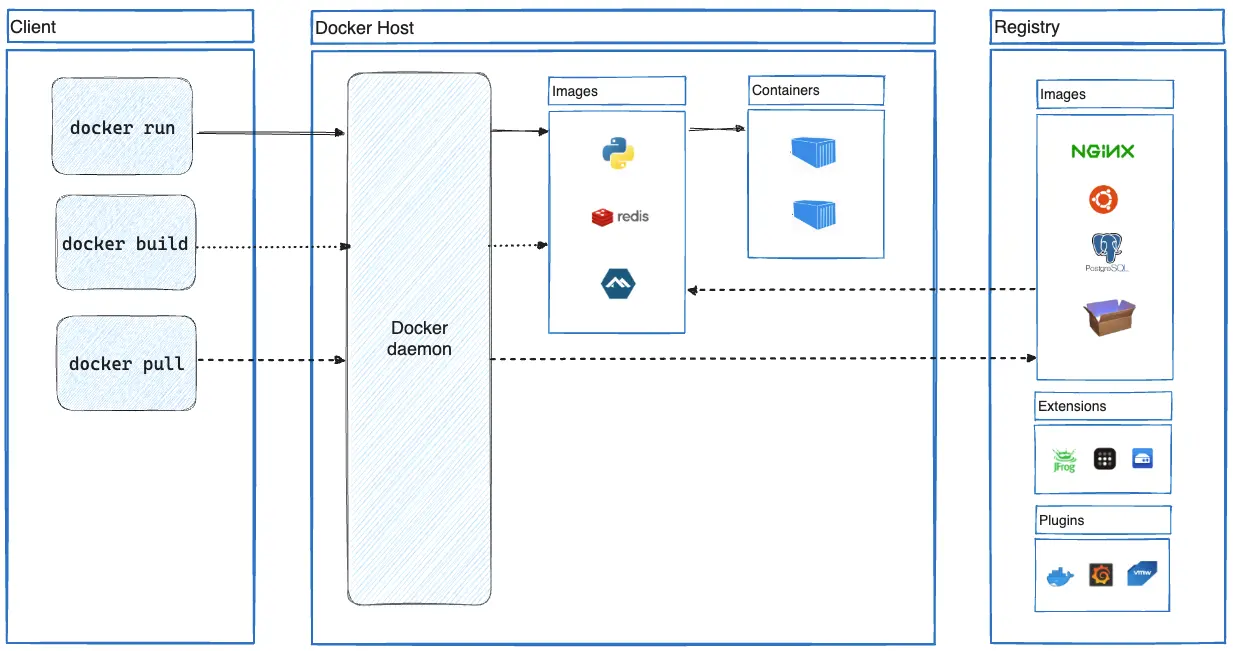
Let's break down how these pieces fit together. When you type a command like docker run python, the Docker client doesn't actually run the container. Instead, it packages your instruction into a REST API call and sends it to the Docker daemon. The daemon receives the request, checks if it has the python image locally, and if not, pulls it from the configured registry (Docker Hub, by default). Once the image is available locally, the daemon creates and runs a new container from it.
Exploring the Components in Detail
To get a more dynamic explanation of this workflow, the following video provides a concise overview of the architecture and how common commands trigger interactions between the client, daemon, and registry.
Free Docker Fundamentals Course - Docker Architecture
Watch the section on "Docker Architecture" from this "Free Docker Fundamentals Course" by LearnCantrill.
This clip gives a clear, animated walkthrough of the components. Pay attention to how the presenter traces the path of different commands: docker pull: How the client tells the daemon to fetch an image from a registry. docker build: How the client sends a Dockerfile to the daemon to create a new image. docker run: How the daemon uses an image to launch a container. docker push: How an image on the host is sent back to a registry.
Now that you have a visual and verbal model, let's solidify your understanding with the official documentation. This text provides the formal definitions for each component.
Docker Docs What is Docker? | Docker Docs
This official documentation provides a succinct description of Docker's architecture and its core components.
Please read the section Docker architecture. Then, focus on the descriptions for the three key parts: The Docker daemon The Docker client Docker registries
As you read, note that the communication between the client and daemon happens over a REST API. This is a powerful design choice. It means your Docker client could be on your laptop, controlling a Docker daemon on a remote server in a data center, just as easily as it controls one on your local machine.
The Architecture in Action: "Hello World"
Theory is essential, but seeing the architecture work provides clarity. The docker run hello-world command is the classic first step for any Docker user, and its output message explicitly describes the client-daemon-registry interaction.
The following video segment walks through running this command and, more importantly, analyzes the output step-by-step. This is a perfect, practical illustration of everything we have discussed.
The intro to Docker I wish I had when I started
Watch the section of this video where the hello-world command is run and its output is analyzed.
Focus on the part from the analysis of the output. The message generated by the hello-world container is a self-description of the Docker architecture at work. It confirms that: The client contacted the daemon. The daemon pulled the hello-world image from the Docker Hub registry. The daemon created a new container from that image. The daemon streamed the output back to the client.
This simple command beautifully encapsulates the entire workflow, making the abstract architectural diagram tangible.
Conclusion
In this lesson, we dissected Docker's client-server architecture. You now have a mental model for how the different parts of the Docker ecosystem communicate to build, run, and share containerized applications.
Key Takeaways:
- Docker operates on a client-server model.
- The Docker client (
dockerCLI) is your user interface. It sends instructions to the daemon via a REST API. - The Docker daemon (
dockerd) is the engine. It's a background service that manages containers, images, and other Docker objects. - A Docker registry (like Docker Hub) is a repository for storing and sharing Docker images.
- A simple command like
docker runtriggers a sequence of interactions between the client, daemon, and registry.
Now that you understand the components and how they interact, the next logical step is to get them running on your own machine. In our next lesson, you will install Docker and verify the installation, setting the stage for us to begin running containers and building your own images.