Hello! Welcome to the third lesson in our module on Persistent Storage Fundamentals.
In our last lesson, we established the "supply" side of storage in Kubernetes by introducing the PersistentVolume (PV). We learned that a PV is a cluster-wide piece of storage, provisioned by an administrator, that exists independently of any Pod. It's the raw material for persistence.
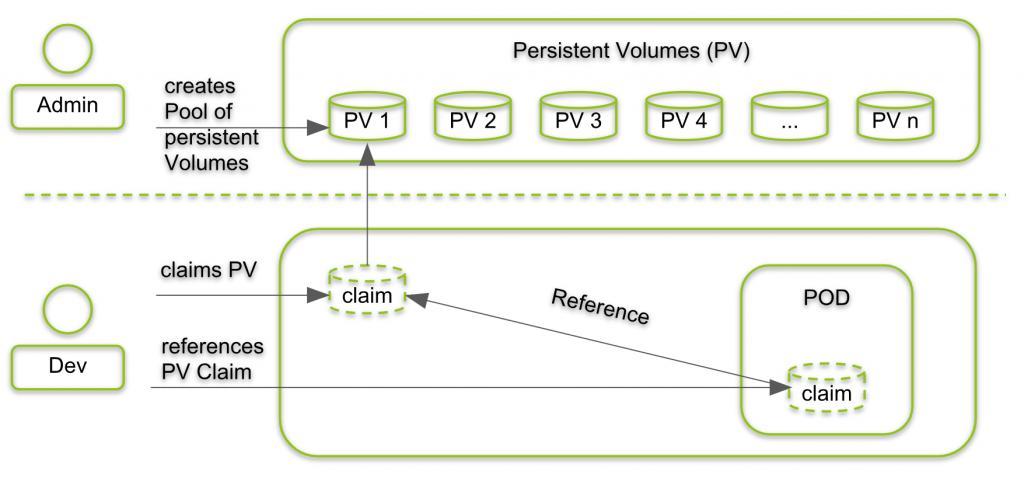
Now, we need to connect that supply to the applications that need it. This lesson's goal is to explain the relationship between Pods, PersistentVolumeClaims (PVCs), and PersistentVolumes (PVs). This three-part mechanism is the core of Kubernetes's storage model. Understanding this flow is essential for you as a Platform Engineer, as it bridges the gap between managing cluster infrastructure and supporting developer workloads.
1. The Request: PersistentVolumeClaim (PVC)
If a PV is the available pool of storage, how does an application request a piece of it? It doesn't grab a PV directly. Instead, it makes a claim. This is done with a PersistentVolumeClaim (PVC).
A PVC is a request for storage made by a user. It's similar to how a Pod requests a certain amount of CPU or memory.
Difference Between PV and PVC in Kubernetes
To begin, let's get a formal definition of a PersistentVolumeClaim from the Baeldung article, 'Difference Between PV and PVC in Kubernetes'. This provides a concise explanation and a clear YAML example.
Please read Section 3, 'What Is a PersistentVolumeClaim (PVC)?'. Pay attention to its role as a request for storage and the key fields in the example manifest, such as accessModes, resources.requests.storage, and storageClassName.
The two most important distinctions between a PV and a PVC are:
- Scope: A PV is a cluster-scoped resource. A PVC is a namespace-scoped resource. This means a developer can create and manage PVCs within their own project namespace without needing cluster-level permissions.
- Role: A PV represents the existence of storage. A PVC represents a request for storage.
A PVC specifies its desired accessModes (e.g., ReadWriteOnce) and resources.requests.storage (e.g., 5Gi), acting as a specification for the storage it needs.
2. The Binding: Connecting a Claim to a Volume
So we have a supply (PV) and a demand (PVC). How are they connected? This is handled automatically by the Kubernetes control plane in a process called binding.
When a developer creates a PVC, Kubernetes scans the existing PVs to find one that satisfies the claim's requirements (access mode, size, etc.). If a suitable, Available PV is found, Kubernetes binds the PVC to that PV.
This is a one-to-one exclusive binding. Once a PV is bound to a PVC, it cannot be bound to another PVC. The PV is reserved for that specific claim until the claim is released.
Kubernetes Volumes explained | Persistent Volume, Persistent Volume Claim & Storage Class
The video 'Kubernetes Volumes explained' by TechWorld with Nana provides an excellent visual walkthrough of this entire abstraction, from the Pod down to the physical storage.
Watch from 09:13 to 12:10. This segment first introduces the PVC as a 'claim' and then animates the entire flow: the Pod uses the PVC, the PVC finds and binds to a PV, and the PV provides the actual storage. Focus on how these layers connect.
After the binding process is complete:
- The PV's status changes from
AvailabletoBound. - The PVC's status also becomes
Bound, and it will show which PV it is bound to.
You can think of this like a hotel reservation system. The PVs are the available rooms in the hotel (managed by the hotel staff/admin). The PVC is a guest's (developer's) reservation for a room with certain features (king bed, non-smoking). The hotel system (Kubernetes) matches the reservation to an available room and assigns it. The guest doesn't need to know the exact room number when they book, just that their requirements will be met.
3. The Consumption: How a Pod Uses the Claim
The final piece of the puzzle is the Pod. A key aspect of this design is that a Pod is completely decoupled from the PV. It only needs to know about the PVC.
From the Pod's perspective, the PVC is the volume. In the Pod's manifest, you define a volume that references the PVC by name and then mount that volume into a container.
Configure a Pod to Use a PersistentVolume for Storage
The official Kubernetes documentation 'Configure a Pod to Use a PersistentVolume for Storage' walks through this entire sequence. Let's look at the final step where the Pod is created.
Read the section 'Create a Pod'. Note in the YAML (pv-pod.yaml) how the volumes section specifies a persistentVolumeClaim by its claimName. The Pod has no direct knowledge of the PV (task-pv-volume) itself.
This completes the relationship:
- Pod references a PVC.
- PVC is bound to a PV.
- PV represents the actual storage backend.
Test your understanding!
A developer in the webapp namespace needs 5Gi of storage that can be read and written by a single Pod at a time. As the platform engineer, you have already created a 10Gi PersistentVolume named general-purpose-pv with ReadWriteOnce access mode, and it is currently Available.
What object does the developer need to create? What namespace will it be in? And what happens to general-purpose-pv after the developer's object is created?
Show answer
- What object? The developer needs to create a
PersistentVolumeClaim(PVC). - What namespace? The PVC must be created in the
webappnamespace, the same namespace where their Pod will run. - What happens to the PV? The Kubernetes control plane will see that
general-purpose-pvsatisfies the PVC's request (10Gi > 5Gi, and access modes match). It will bind the PVC togeneral-purpose-pv. The PV's status will change fromAvailabletoBound.
4. Why This Abstraction Matters
This multi-layered approach might seem complex, but it provides powerful benefits that are central to the platform engineering philosophy.
Kubernetes Volumes explained | Persistent Volume, Persistent Volume Claim & Storage Class
Let's revisit the TechWorld with Nana video for a final segment that explains the 'why' behind this design.
Watch from 12:24 to 13:42. This part explains the benefits of separating the user (developer) from the underlying storage details.
As the video highlights, this separation of concerns is the primary goal:
- For Developers: They can provision storage for their applications using a simple, consistent API (PVCs) without needing to know or care about the underlying infrastructure. Their application manifests become portable across different clusters with different storage backends.
- For Administrators/Platform Engineers: You retain full control over the storage infrastructure. You can provision different types of storage (e.g., high-performance SSD, cheap archival storage) and expose them as different
StorageClasses. You manage the capacity, security, and lifecycle of the storage resources without interfering with application development.
This model allows you to provide "Storage-as-a-Service" to development teams within your organization.
Conclusion
In this lesson, we connected all the dots to understand how persistent storage is managed and consumed in Kubernetes.
Key Takeaways:
- The relationship flows from Pod -> PVC -> PV.
- A PersistentVolumeClaim (PVC) is a namespaced request for storage made by a developer.
- The control plane binds a PVC to a suitable, available PersistentVolume (PV). This is an exclusive, one-to-one relationship.
- A Pod consumes persistent storage by defining a volume that refers to a PVC, not a PV.
- This entire abstraction elegantly decouples application configuration from infrastructure management, which is a core principle of modern platforms.
Next Up:
We've covered the theory and relationships. In the next two lessons, we'll put this into practice. First, we'll walk through creating a hostPath PersistentVolume for local development. Then, we'll create a PersistentVolumeClaim to bind to it and mount it in a Pod, seeing this entire workflow in action with kubectl.