Hello! Welcome to the first lesson in our module on Real-Time Operating Systems.
In our last session, you built an impressive capstone project, integrating a timer, ADC, DMA, and an I2C LCD to create a system health monitor. Your firmware successfully used a timer to trigger ADC conversions and DMA to transfer the results, all while the main loop waited for a flag before processing and displaying the data.
This "super-loop" architecture with flags works well for a single, primary function. However, imagine we needed to add more independent functionalities. What if we also had to monitor a CAN bus for messages, parse commands from a UART terminal, and control a motor via PWM simultaneously? The single while(1) loop would become a tangled web of flags and state machines, making it difficult to manage, debug, and guarantee that critical operations happen on time.
This is precisely the problem that a Real-Time Operating System (RTOS) is designed to solve. This module will introduce you to FreeRTOS, the industry-standard RTOS for embedded systems.
Today, we will focus on the fundamental theory. Your learning outcome is to explain the core concepts of an RTOS: tasks, scheduling, and context switching. Understanding these concepts is essential before we start writing any code.
1. From Super-Loops to Real-Time Systems
So far, our applications have followed a "super-loop" or "bare-metal scheduler" pattern:
int main(void) {
    initialize_peripherals();
    while(1) {
        if (flag_task1_is_due) {
            do_task_1();
            flag_task1_is_due = 0;
        }
        if (flag_task2_is_due) {
            do_task_2();
            flag_task2_is_due = 0;
        }
        // ... and so on
    }
}
This approach has significant drawbacks:
- Blocking: If
do_task_1()takes a long time to complete, it delays the execution ofdo_task_2(). - Non-Determinism: The time it takes to respond to an event becomes unpredictable because it depends on what the loop is currently doing.
- Scalability: Adding new features increases complexity exponentially and can break the timing of existing features.
An RTOS addresses these issues by providing a framework to manage multiple threads of execution. But first, what defines a "real-time" system? It's not about being fast; it's about being deterministic.
Comprehensive Guide to Real-Time Systems
Let's start by defining what makes a system 'real-time'. This article from LinkedIn provides a clear explanation, distinguishing between real-time and general-purpose applications.
Please read the first two sections: 'What is Real Time Application (RTA)': Focus on the concept of time-determinism and the difference between hard and soft real-time systems. 'What is a Real Time OS?': Understand the key differences between an RTOS and a General-Purpose OS (GPOS) like Windows or Linux, particularly regarding scheduling and latency.
As you read, consider automotive examples. An airbag deployment system is hard real-time; failing to meet its deadline has catastrophic consequences. A vehicle's infotainment system is typically soft real-time; a slight delay in changing a song is acceptable. An RTOS is crucial for ensuring the deadlines of critical systems are always met.
2. The Core Components of an RTOS
To achieve this determinism, an RTOS is built around a few key concepts. Think of it like a traffic controller for your CPU.
This simple overview from Medium.com provides a great mental model. An RTOS doesn't replace your firmware; it provides a structure for it to run within.
Let's break down the main components.
Tasks: The Building Blocks
Instead of one giant loop, an RTOS allows you to break your application into multiple independent functions called tasks. A task is essentially a C function that runs in its own context, usually in an infinite loop.
For our previous project, we could define separate tasks:
Task_Read_Sensors: Wakes up every second, triggers the ADC/DMA, and waits for the data.Task_Update_Display: Wakes up whenever new sensor data is available and updates the LCD.Task_CAN_Handler: Spends most of its time waiting for a CAN message to arrive.
Each task believes it has the CPU all to itself. In reality, the RTOS is rapidly switching between them.
The Scheduler: The Brain of the RTOS
If you only have one CPU core, how can multiple tasks run concurrently? The illusion of parallelism is created by the scheduler. The scheduler is the part of the RTOS kernel that decides which task should run at any given moment.
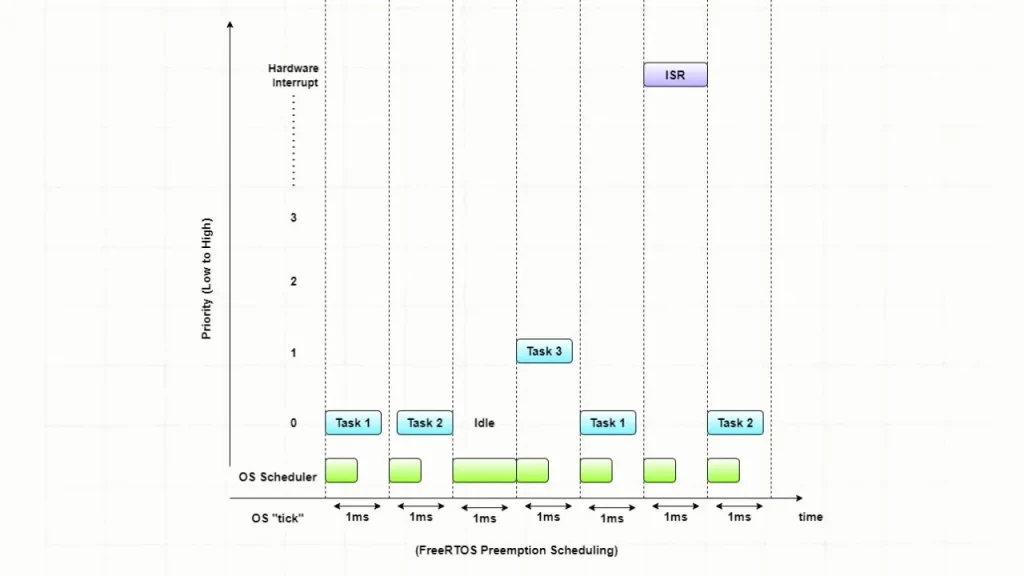
This is typically managed by a periodic hardware timer interrupt, called the system tick. The tick might occur, for instance, every 1 millisecond. At every tick, the scheduler runs and evaluates which task has the highest priority and is ready to execute.
Introduction to RTOS Part 3 - Task Scheduling | Digi-Key Electronics
This video from Digi-Key provides an excellent visual explanation of how a scheduler uses time-slicing to manage multiple tasks on a single core.
Watch from the beginning to 1:42. Focus on how the processor's time is divided into 'time slices' and how the scheduler runs at every 'tick' to decide which task to execute next.
The scheduler uses a scheduling policy to make its decisions. The two most common policies are:
- Co-operative Scheduling: A task runs until it voluntarily gives up the CPU (e.g., by calling a delay function). This is simple but risky, as a poorly-written task can starve all other tasks.
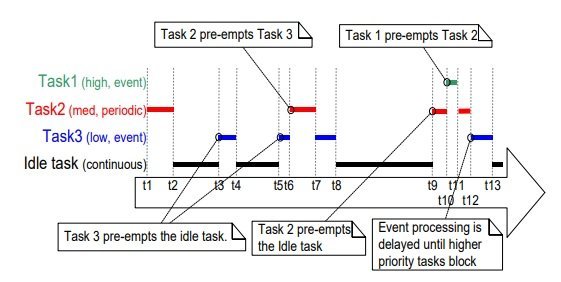
- Pre-emptive Scheduling: The scheduler can forcibly interrupt a running task if a higher-priority task becomes ready to run. This is the default and most robust method used in RTOSes like FreeRTOS.
The fundamental rule of pre-emptive scheduling is: The highest-priority task that is ready to run is the task that will be running.
Introduction to RTOS Part 3 - Task Scheduling | Digi-Key Electronics
Now let's see how the scheduler handles tasks with different priorities. This next part of the Digi-Key video demonstrates pre-emptive scheduling in action.
Continue watching from 1:42 to 3:15. Pay attention to how the higher-priority tasks (B and C) pre-empt the lower-priority task (A), and how tasks of equal priority are handled in a round-robin fashion.
This concept of preemption is fundamental to an RTOS. The diagrams below illustrate this behavior.
Task States and Context Switching
For the scheduler to work efficiently, it must know the state of every task. A task can be in one of several states:
- Running: The task is currently executing on the CPU. Only one task can be in this state at any time on a single core.
- Ready: The task is able to run, but is waiting for the CPU because a higher-priority task is currently in the Running state.
- Blocked: The task is waiting for an event, such as a time delay to expire (
vTaskDelay) or for data to arrive in a queue. A blocked task consumes zero CPU time, which is a key benefit of an RTOS. - Suspended: The task is "frozen" and will be ignored by the scheduler until it is explicitly resumed by another task.
Introduction to RTOS Part 3 - Task Scheduling | Digi-Key Electronics
This final clip from the Digi-Key video explains these different task states and how a task transitions between them.
Watch from 4:10 to 6:07. Understand the differences between the Ready, Running, Blocked, and Suspended states and why the Blocked state is so important for efficiency.
When the scheduler decides to switch from one task to another (e.g., when a high-priority task unblocks or a running task blocks), it performs a context switch.
A task's context is a snapshot of its execution environment at a specific moment. It includes the contents of the CPU registers, the program counter (which instruction it was about to execute), and its stack pointer.
A context switch is the process where the RTOS kernel:
- Saves the context of the currently running task to its own private stack area in RAM.
- Restores the context of the next task that is scheduled to run.
- Resumes execution of the new task, which continues exactly where it left off, unaware that it was ever paused.
Introduction to RTOS Part 3 - Task Scheduling | Digi-Key Electronics
The mechanism that allows a task to be paused and resumed seamlessly is the context switch. This last part of the video defines this crucial concept.
Watch from 6:07 to 6:56. The video defines a task's 'context' and explains that a 'context switch' is the process of saving one task's context and restoring another's.
On ARM Cortex-M processors like our STM32, this context switch is typically handled with extreme efficiency by a dedicated, low-priority exception handler (PendSV), ensuring minimal overhead.
Summary and Next Steps
Let's tie these concepts together. In a FreeRTOS application:
- You structure your code into multiple independent tasks.
- You assign a priority to each task based on its importance.
- The scheduler, driven by the system tick, ensures the highest-priority ready task is always running.
- When a task needs to wait, it enters a blocked state, consuming no CPU time.
- When the scheduler switches tasks, it performs a context switch to save the state of the outgoing task and restore the state of the incoming one.
- This cycle repeats thousands of times per second, creating the illusion of parallel execution and ensuring your system is responsive and deterministic.
Key Takeaways:
- An RTOS is used to manage complexity and provide temporal determinism in embedded systems.
- Tasks are independent functions that allow you to modularize your application.
- The Scheduler decides which task runs when, typically using a priority-based pre-emptive policy.
- A Context Switch is the mechanism for pausing one task and resuming another, creating the illusion of multitasking.
- Using an RTOS efficiently means designing tasks that block when they are waiting, rather than polling in a loop, to free the CPU for other work.
In our next lesson, we will move from theory to practice. You will learn how to integrate the FreeRTOS source files into an STM32CubeIDE project, preparing the foundation for creating and running your first tasks.