Welcome back. In our last lesson, we explored a powerful technique for reconciling large files by offloading the heavy lifting to the DFSORT utility. This highlighted a key principle for senior developers: selecting the most efficient tool for the job. Today, we'll continue exploring complex batch processing by examining a scenario where the most efficient approach is to bring the sorting logic inside our COBOL program.
This lesson addresses the learning outcome: Solve a scenario: Process a multi-record-type file with internal sorting and control break logic. This is a quintessential mainframe batch pattern, frequently used to test a developer's grasp of file processing, reporting, and structured programming during technical interviews. You will learn to architect a single, self-contained program that can ingest unstructured data, sort it internally, and produce a hierarchical summary report.
The Scenario: Hierarchical Sales Reporting
Imagine you are given a raw daily transaction file from a retail system. This single file contains multiple types of records jumbled together:
- Record Type 'S': A sale, containing Region, Store ID, and Sale Amount.
- Record Type 'R': A return, containing Region, Store ID, and Return Amount.
- Record Type 'A': A store adjustment, containing only a Region, Store ID, and Adjustment Amount.
- Other record types (e.g., inventory logs, cashier sign-on records) that should be ignored for this report.
The business requirement is to produce a summary report that lists total net sales, with subtotals for each store and each region. The final output should look something like this:
REGION: EAST
  STORE: 101   NET SALES: $15,450.75
  STORE: 102   NET SALES: $22,100.00
  ** REGION EAST SUBTOTAL: $37,550.75

REGION: WEST
  STORE: 201   NET SALES: $18,000.50
  ** REGION WEST SUBTOTAL: $18,000.50

*** GRAND TOTAL: $55,551.25
This task requires three distinct logical operations:
- Filtering and Normalization: Reading the multi-record-type file and processing only the 'S', 'R', and 'A' records into a standard format.
- Internal Sorting: Sorting the normalized records by Region (major key) and then by Store ID (minor key).
- Control Break Processing: Reading the sorted data and generating subtotals whenever the Store ID or Region changes.
Handling Complex Record Layouts
The input file contains multiple layouts. In COBOL, this is typically handled in the FILE SECTION by defining a base record length and then using the REDEFINES clause to describe the different possible structures that can occupy that space. The program logic then inspects a "record type" field to determine which layout is currently active.
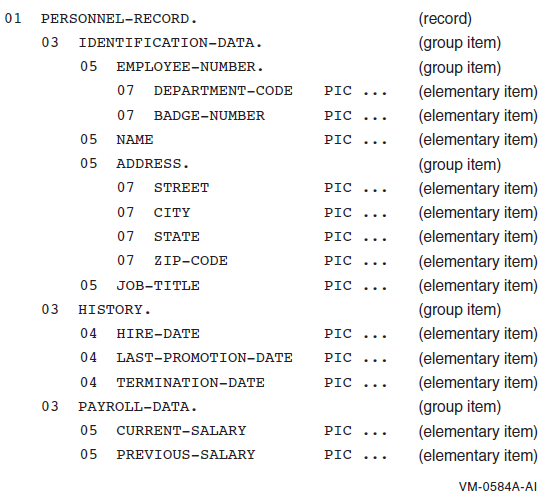
Real-world records can be quite complex, with nested group levels, as shown in the example below. Our scenario is a simplified version of this concept.
The Core of the Solution: Control Break Logic
Before we build the full program, let's focus on the heart of the reporting logic: the control break. A control break is a change in the value of a key field from one record to the next in a pre-sorted file. This change triggers a "break" in the normal processing to perform a summary action, like printing a subtotal.
For our scenario, we have two levels of control breaks:
- Major Break: On
REGION. - Minor Break: On
STORE-ID.
A change in REGION implies a change in STORE-ID as well. The logic must handle this cascade. For an experienced developer, the basic concept is familiar, but the elegance of the implementation is what sets a senior-level solution apart.
The following resource provides excellent, modern patterns for implementing this logic in a clean and maintainable way.
This document from DePaul University outlines the fundamental patterns for control break processing. We'll focus on how to structure the logic for both single and multiple breaks.
First, read the brief introduction to control breaks to formalize the concept and its dependency on sorted input. Next, study the single control break pattern. Pay close attention to the use of a STORED-REC-CONTROL field to hold the previous value and the IF statement that detects the change. Then, read the section on the logic for multiple breaks. This explains the critical concept of ranking keys from major to minor and the cascading effect of breaks. Finally, analyze the first method for multiple breaks. Note how the EVALUATE statement checks for breaks from major to minor, and how the MAJOR-CONTROL-BREAK paragraph in turn PERFORMs the MINOR-1-CONTROL-BREAK paragraph to ensure the correct cascading summarization.
The pattern using the EVALUATE statement and cascading PERFORMs is a robust and highly readable way to handle multi-level control breaks, making it an ideal choice for a production program.
The Architectural Framework: COBOL SORT with Procedures
Now, how do we handle the sorting requirement? We could have a separate JCL step to run DFSORT, but that would require writing the filtered, normalized data to a temporary file first. A more elegant and self-contained solution is to use the COBOL SORT verb with the INPUT PROCEDURE and OUTPUT PROCEDURE options.
This powerful construct turns your COBOL program into a three-phase process:
INPUT PROCEDURE: Your code reads the raw, unsorted input file. You can apply complex logic here to select, validate, and reformat records before passing them to the sort engine using theRELEASEverb. This is where we will handle our multi-record-type file.- The Sort Engine: COBOL's internal sort utility takes the records you
RELEASEd, sorts them in memory or using temporary work files, according to theON ASCENDING/DESCENDING KEYclause. OUTPUT PROCEDURE: After the sort is complete, this part of your code is given control. You retrieve the sorted records one by one using theRETURNverb. This is the perfect place to implement our control break logic.
The structure of the PROCEDURE DIVISION looks like this:
PROCEDURE DIVISION.
MAIN-LOGIC.
    SORT SORT-WORK-FILE
        ON ASCENDING KEY SW-REGION, SW-STORE-ID
        INPUT PROCEDURE IS 100-FILTER-AND-NORMALIZE
        OUTPUT PROCEDURE IS 200-CREATE-REPORT.
    STOP RUN.

100-FILTER-AND-NORMALIZE SECTION.
    OPEN INPUT RAW-TRANSACTION-FILE.
    PERFORM UNTIL END-OF-RAW-FILE
        READ RAW-TRANSACTION-FILE
            AT END
                SET END-OF-RAW-FILE TO TRUE
            NOT AT END
                PERFORM 110-PROCESS-RAW-RECORD
        END-READ
    END-PERFORM.
    CLOSE RAW-TRANSACTION-FILE.
    * The GO TO is required by the SORT verb's procedure syntax.
    GO TO 199-EXIT.

110-PROCESS-RAW-RECORD.
    EVALUATE RAW-REC-TYPE
        WHEN 'S'
            MOVE CORRESPONDING SALE-RECORD TO SORT-WORK-RECORD
            RELEASE SORT-WORK-RECORD
        WHEN 'R'
            MOVE CORRESPONDING RETURN-RECORD TO SORT-WORK-RECORD
            COMPUTE SW-AMOUNT = SW-AMOUNT * -1
            RELEASE SORT-WORK-RECORD
        WHEN 'A'
            MOVE CORRESPONDING ADJUSTMENT-RECORD TO SORT-WORK-RECORD
            RELEASE SORT-WORK-RECORD
    END-EVALUATE.

199-EXIT.
    EXIT.

200-CREATE-REPORT SECTION.
    * Initialize report, set HOLD fields, etc.
    PERFORM UNTIL END-OF-SORTED-DATA
        RETURN SORT-WORK-FILE
            AT END
                SET END-OF-SORTED-DATA TO TRUE
            NOT AT END
                * This is where the multi-level control break logic from
                * the DePaul resource would be implemented.
                PERFORM 210-PROCESS-CONTROL-BREAKS
                PERFORM 220-PROCESS-DETAIL-RECORD
        END-RETURN
    END-PERFORM.
    * Perform final control breaks to print last subtotals.
    PERFORM 215-FINAL-BREAKS.
    * The GO TO is required.
    GO TO 299-EXIT.

... control break paragraphs (210, 215, etc.) go here ...

299-EXIT.
    EXIT.
This architecture is a classic example of sophisticated COBOL batch design. The INPUT PROCEDURE acts as a pre-processor, cleaning the data, while the OUTPUT PROCEDURE acts as the main processor, consuming the clean, sorted data to produce the final output.
Conclusion
In this lesson, we designed a complete solution for a complex reporting scenario that required handling multiple record types, internal sorting, and multi-level control breaks. This integrated approach, using the SORT verb with INPUT and OUTPUT procedures, is a powerful pattern that every senior mainframe developer should have in their toolkit.
Key Takeaways:
- Multi-Record-Type Files: Use
REDEFINESin theFDto map multiple layouts onto a single input record and use a record type code to drive processing logic. - Control Break Logic: Implement multi-level breaks using a structured, cascading pattern, such as an
EVALUATEstatement that calls break-specific paragraphs from major to minor. - Internal Sorting: The
SORT ... INPUT PROCEDURE ... OUTPUT PROCEDUREconstruct provides a robust and self-contained architecture for scenarios requiring pre-processing before a sort and report generation after. - Division of Labor: The
INPUT PROCEDUREis for filtering and formatting the data for the sort. TheOUTPUT PROCEDUREis for processing the sorted data to generate the final report.
We have now covered two advanced COBOL scenarios. In our next lesson, we will broaden our scope and begin our refresher on the essential framework that executes these batch programs: JCL. We will start by reviewing the fundamental statements—JOB, EXEC, and DD—and how to diagnose common errors.