Hello! In our last lesson, we fortified our server-side endpoints with idempotency, ensuring they can safely handle repeated requests. This was a crucial step in building a resilient system. Now, we'll shift our focus to the other side of the connection: the client.
Today's lesson is about implementing a smart retry strategy. When a service call fails due to a temporary network issue or a brief server overload, a naive client might give up immediately, or worse, hammer the failing service with rapid-fire retries. Your goal is to learn how to implement a retry strategy with exponential backoff, a robust pattern that allows your client to recover from transient failures gracefully without making the problem worse.
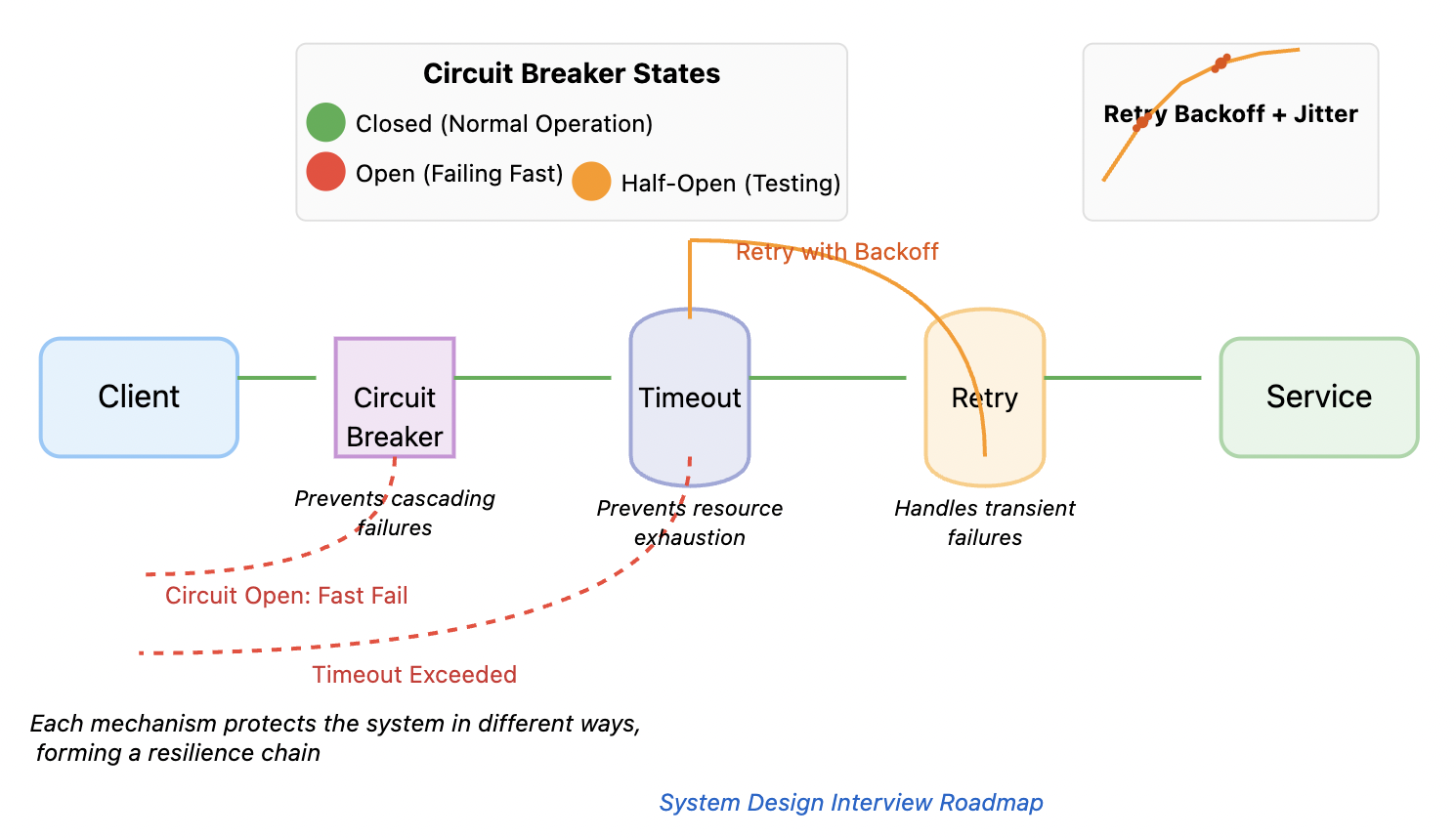
This pattern is a fundamental part of building reliable distributed systems, as shown in the resilience chain below. Retries work alongside timeouts and circuit breakers (which we'll cover soon) to protect your system.
The Problem with Simple Retries: The "Thundering Herd"
Imagine a service temporarily goes down. If thousands of clients are all programmed to retry the connection every second, they will create a "thundering herd" of requests that slams the service the moment it tries to come back online, likely knocking it over again. This can lead to a cycle of failures.
Let's watch a video that visualizes this problem and sets the stage for a more intelligent solution.
Retries & Exponential Backoff - Deep Dive
The glich.stream channel provides a fantastic deep dive into this topic. This section explains why a simple, constant-delay retry is a flawed approach.
Watch the segment from "what does that actually mean" to the end of the section. Focus on the explanation of how a naive retry strategy with a constant delay can amplify a failure, especially under high traffic.
As the video demonstrates, simply retrying with a fixed delay isn't enough. It can overload a recovering service and create cascading failures throughout the system.
A Smarter Strategy: Exponential Backoff
The core idea of exponential backoff is to progressively increase the delay between each retry attempt.
- After the 1st failure, wait 1 second.
- After the 2nd failure, wait 2 seconds.
- After the 3rd failure, wait 4 seconds.
- And so on.
This gives the struggling service exponentially more "breathing room" to recover. Let's see how this works by building the logic from scratch.
Retry Pattern: The Secret to Resilient Python Code
The ArjanCodes channel has an excellent video that builds a retry mechanism from first principles, which is a great way to understand the underlying logic.
First, watch the segment where a basic retry function is built. This establishes the core loop and exception handling. Then, see how it's enhanced with exponential backoff. Notice how the sleep time is calculated based on the attempt number.
The logic is straightforward, but it has a subtle flaw. If all clients start their backoff schedule at the same time, they might still retry in synchronized waves. This is where the final ingredient comes in.
The Finishing Touch: Adding Jitter
Jitter is simply a small amount of randomness added to each backoff delay. Instead of every client waiting exactly 4 seconds, one might wait 3.8s, another 4.3s, and another 4.1s. This small change desynchronizes the retry attempts, spreading the load on the recovering service much more evenly.
Let's return to the deep-dive video to see a formal explanation of the exponential backoff algorithm and the critical role of jitter.
Retries & Exponential Backoff - Deep Dive
This part of the glich.stream video explains the math and shows why jitter is essential for large-scale systems.
First, watch the detailed explanation of the exponential backoff algorithm, including the formula and a plot of the delay curve. Next, watch the section on Jitter. This part references a famous AWS article and visually demonstrates how jitter smooths out the distribution of retry attempts over time.
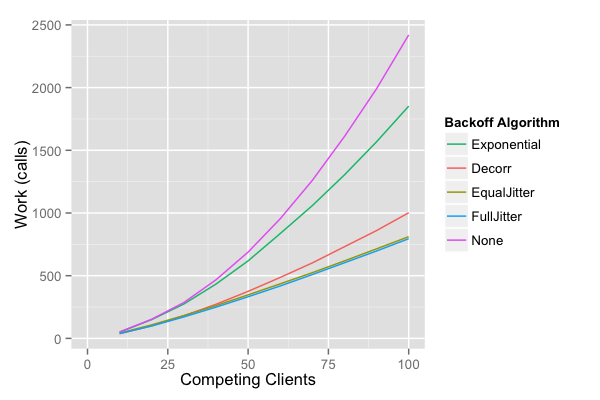
The difference jitter makes is stark, especially under load. This graph from the AWS article mentioned in the video shows how "Full Jitter" results in far less work (fewer concurrent calls) for the server compared to simple exponential backoff.
Production-Ready Retries with the tenacity Library
While it's valuable to understand the mechanics, you should not implement this logic from scratch in a production application. As with many common patterns, there's a robust, well-tested library for it. In Python, the standard is tenacity.
Let's get a quick introduction to the library.
Retry Pattern: The Secret to Resilient Python Code
ArjanCodes makes a key point here about using existing libraries.
Watch this short segment from "you don't need to do that", where he introduces tenacity as the go-to solution.
tenacity uses decorators to elegantly add retry logic to any function, including async functions.
This blog post from OneUptime provides a clear, practical example of using tenacity.
Please read the "Getting Started with Tenacity" section, focusing on the "Basic Retry" code block. Notice how the @retry decorator wraps the fetch_data function. Pay attention to the stop and wait arguments.
The two most important arguments to the @retry decorator are:
stop: Defines when to give up. The most common isstop_after_attempt(n).wait: Defines the delay strategy.wait_exponential(...)is the basis for our pattern.
Configuring a Complete Strategy
A robust retry strategy needs three components:
1. When to Stop?
Never retry forever. Always set a limit on the number of attempts or the total time.
from tenacity import stop_after_attempt, stop_after_delay


# Stop after 5 attempts
stop=stop_after_attempt(5)


# Stop after 30 seconds, regardless of attempts
stop=stop_after_delay(30)
2. Which Errors to Retry?
Retrying a 400 Bad Request is pointless; the request is malformed and will always fail. You should only retry on transient errors that are likely to resolve themselves.
Transient vs. Permanent Errors
This resource from Easyparser provides a clear table classifying common HTTP status codes.
Read the section "The Two Faces of Failure: Transient vs. Permanent Errors". The table is particularly useful for deciding which HTTP status codes are retryable. As a rule of thumb, you should retry 5xx server errors and network-level exceptions, but not 4xx client errors.
3. How to Wait?
As we've established, exponential backoff with jitter is the best practice. tenacity makes this easy.
This resource shows several wait strategies, including the recommended one.
First, quickly scan the "Understanding Wait Strategies" section to see the different options available. Then, focus on the "Best Practices" section, particularly the code snippets for wait_exponential_jitter. This is the one you'll want to use most often.
The recommended wait strategy is wait_exponential_jitter.
Retries in an Async World
Given your goal of working with async Python, it's crucial that our retry logic works with async/await. tenacity handles this seamlessly. You can apply the same @retry decorator to an async def function, and it will correctly await the coroutine and use asyncio.sleep() for delays.
Let's see a complete example using httpx, a modern async HTTP client.
This section demonstrates the integration of tenacity with async code.
Study the code block under the "Async Retry with Tenacity" heading. Notice how the @retry decorator is applied to the async_fetch function. The retry argument is also used here to specify which exceptions should trigger a retry, connecting back to our discussion of transient failures.
A Complete Example
Let's tie this all together into a working Python script. This example attempts to fetch data from a URL that will fail, demonstrating the full retry cycle with exponential backoff and jitter.
You can save this as a .py file and run it. You'll need to install tenacity and httpx first: pip install tenacity httpx.
import asyncio
import httpx
import logging
from tenacity import retry, stop_after_attempt, wait_exponential_jitter, retry_if_exception_type


# Configure basic logging to see the retry attempts
logging.basicConfig(level=logging.INFO, format='%(asctime)s - %(levelname)s - %(message)s')

def is_retryable_exception(exception: BaseException) -> bool:
    """
    Returns True if an exception is a transient network error or a 5xx server error.
    """
    if isinstance(exception, (httpx.ConnectError, httpx.TimeoutException)):
        return True
    if isinstance(exception, httpx.HTTPStatusError):


        # Retry on 5xx server errors
        return exception.response.status_code >= 500
    return False


# The @retry decorator applies the logic.
@retry(


    # 1. Stop after 4 attempts
    stop=stop_after_attempt(4),


    # 2. Use exponential backoff with jitter. Start at 1s, max out at 10s.
    wait=wait_exponential_jitter(initial=1, max=10),


    # 3. Only retry on specific, transient exceptions.
    retry=retry_if_exception_type(is_retryable_exception),


    # 4. Log a message before sleeping on a retry.
    before_sleep=lambda retry_state: logging.warning(
        f"Retrying call to {retry_state.args[0]} due to {retry_state.outcome.exception()}. "
        f"Attempt #{retry_state.attempt_number}, waiting {retry_state.next_action.sleep:.2f}s."
    )
)
async def fetch_data_with_retry(url: str):
    """
    Asynchronously fetches data from a URL with a robust retry strategy.
    """
    logging.info(f"Attempting to fetch data from {url}...")
    async with httpx.AsyncClient() as client:


        # We set a short timeout to make network errors happen faster for this demo
        response = await client.get(url, timeout=5)
        response.raise_for_status()  # Raise an exception for 4xx/5xx responses
        return response.json()

async def main():


    # This URL is designed to fail to demonstrate the retry mechanism.
    # You can replace it with a test endpoint that sometimes returns 503 errors.
    bad_url = "http://httpbin.org/status/503"

    try:
        data = await fetch_data_with_retry(bad_url)
        logging.info("Successfully fetched data:", data)
    except Exception as e:
        logging.error(f"Failed to fetch data after all retries. Final error: {e}")

if __name__ == "__main__":
    asyncio.run(main())
When you run this code, observe the log messages. You will see the initial attempt fail, followed by logged warnings for each retry, with an increasing delay between them.
Conclusion
You have now mastered a critical pattern for building resilient clients. By replacing simple, immediate retries with a strategy of exponential backoff and jitter, you ensure your application can gracefully handle transient failures without contributing to a system-wide outage.
Key Takeaways:
- Naive, high-frequency retries can create a "thundering herd" that overwhelms services.
- Exponential backoff increases the delay between retries, giving services time to recover.
- Jitter adds randomness to the delay, preventing clients from retrying in synchronized waves.
- The
tenacitylibrary is the production standard in Python for implementing retry logic, and it fully supportsasync/await. - A robust strategy only retries transient failures (like network errors and 5xx status codes) and has a clear stop condition.
Preview of the Next Lesson:
We've discussed delays between retry attempts, but how long should a client wait for a single request to complete before considering it failed? In the next lesson, we will explore service timeouts, another crucial piece of the resilience puzzle, and analyze how they interact with retry strategies to prevent your application's resources from being tied up by unresponsive services.