Welcome to Module 11! So far in this course, we've focused on designing and building individual microservices, implementing resilience patterns, and ensuring they communicate effectively. Now, we're shifting our focus from development to deployment. How do we run, manage, and scale these services in a real production environment? The answer for most of the modern software world is Kubernetes.
In our last lesson, we discussed graceful degradation, a pattern for handling runtime failures. This lesson is the next logical step: we're moving into the world of container orchestration, the system responsible for managing our applications' lifecycle, including restarting them after they fail. Our goal today is to understand the fundamental building blocks of Kubernetes. By the end of this lesson, you will be able to explain the core concepts of Pod, Service, Deployment, and ConfigMap.
1. What is Kubernetes?
As we've moved from a single monolithic application to a collection of independent microservices, we've solved some problems (like team autonomy and independent scaling) but created new ones. How do we manage dozens, or even thousands, of running containers? How do we make sure they can find each other? What happens when a container crashes?
Doing this manually with scripts is complex and brittle. This is where a container orchestrator like Kubernetes comes in.
To get a clear overview of what Kubernetes is and the problems it solves, let's start with a short video.
Kubernetes Crash Course for Absolute Beginners [NEW]
This segment from "Kubernetes Crash Course for Absolute Beginners" by TechWorld with Nana provides a concise introduction to Kubernetes.
Watch the section from the beginning of the definition to the end of the problems it solves, "What is Kubernetes?". Pay close attention to the three key guarantees it provides: high availability, scalability, and disaster recovery.
In essence, Kubernetes is the conductor for an orchestra of containers. You don't tell it how to run your application; you declaratively tell it what you want the end state to look like (e.g., "I want 3 copies of my API gateway running at all times"), and Kubernetes works tirelessly to make that a reality.
2. The Kubernetes Cluster: A High-Level View
Before we dive into the specific components, let's look at the overall architecture. A Kubernetes environment is called a cluster. A cluster is composed of multiple machines, called Nodes.
There are two types of nodes:
- Control Plane (or Master) Nodes: These are the brains of the operation. They make global decisions about the cluster (like scheduling), as well as detecting and responding to cluster events.
- Worker Nodes: These are the machines that do the actual work of running your application containers.
You requested an analogy of a restaurant kitchen, and it fits perfectly here.

This separation is key. As a developer, you primarily interact with the Control Plane via an API, and the Control Plane instructs the Worker Nodes on your behalf.
3. The Core Kubernetes Objects
Now, let's meet the main "characters" you'll work with in Kubernetes. These are called objects, and they are the fundamental building blocks you use to define your application.
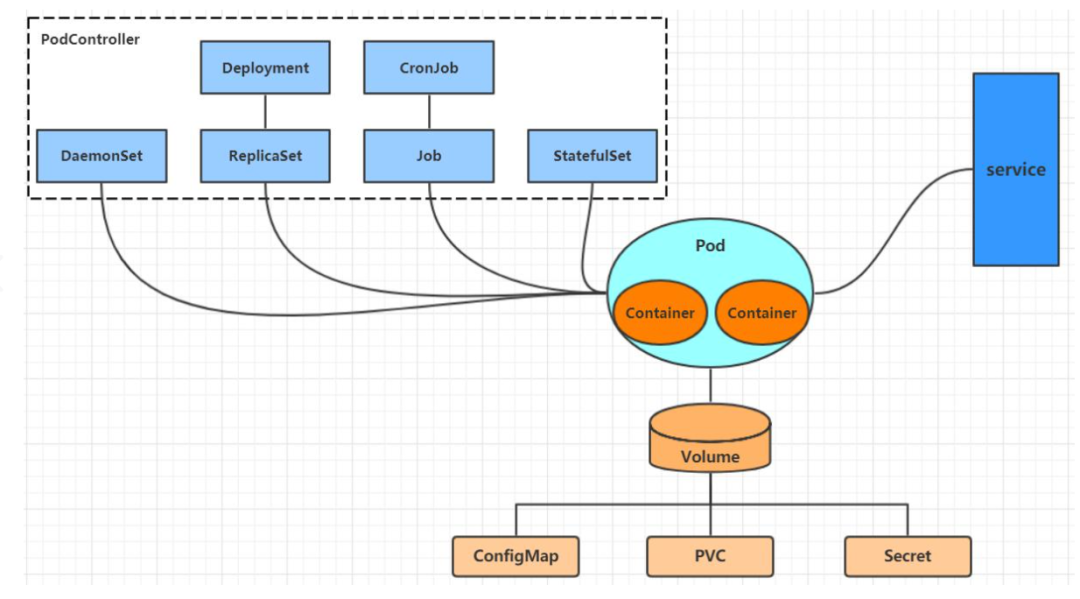
We will now look at each of these in more detail.
Pod: The Smallest Unit of Work
A Pod is the smallest and most basic deployable object in Kubernetes.
- It's an abstraction over containers. A Pod wraps one or more containers (though most commonly, it's just one). You can think of the container as a fish and the Pod as the fishbowl.
- It has a single IP address. All containers within a Pod share the same network namespace, meaning they can communicate with each other over
localhost. - Pods are ephemeral. This is a critical concept. A Pod can be destroyed and replaced at any time (if it crashes, or if the node it's on fails). When a new Pod is created, it gets a new IP address.
This ephemeral nature is why you almost never create Pods directly. If you did, and the Pod died, it would be gone forever. Instead, we use a higher-level object to manage them for us.
Deployment: The Pod Manager
A Deployment is a controller that manages the lifecycle of Pods. You tell a Deployment what your desired state is, and it makes it happen.
- Manages Replicas: You declare
replicas: 3, and the Deployment ensures that three Pods running your application container are always available. If one Pod crashes, the Deployment automatically creates a new one to replace it. This provides self-healing. - Manages Updates: When you want to release a new version of your application, you update the container image in your Deployment. It then performs a rolling update, gradually replacing old Pods with new ones, ensuring zero downtime for your users.
In short: you create a Deployment, and the Deployment creates and manages the Pods for you.
Service: The Stable Network Endpoint
We've established that Pods can come and go, each time getting a new IP address. So how does one microservice reliably communicate with another? How does our API Gateway find the User service if the User service Pods are constantly being replaced?
This is the problem that a Service solves.
- Provides a stable IP address and DNS name. A Service gets a single, stable IP address and a DNS name (e.g.,
user-service) that does not change, even when the underlying Pods do. - Acts as a load balancer. The Service keeps track of all the healthy Pods that belong to it. When it receives a request, it automatically forwards it to one of the available Pods.
Using the restaurant analogy again: Pods are like individual chefs who might change shifts. A Service is like the restaurant's permanent phone number. You always call the same number, and you're automatically connected to a chef who is on duty.
ConfigMap: Externalizing Configuration
Just as we used .env files with Docker Compose to keep configuration out of our code, Kubernetes provides a native way to do this with ConfigMaps.
- A ConfigMap is an object used to store non-confidential configuration data as key-value pairs.
- This data can then be consumed by Pods either as environment variables or as mounted configuration files.
- For sensitive data like passwords or API keys, Kubernetes provides a similar object called a Secret.
This allows you to use the same container image across different environments (dev, staging, production) simply by applying a different ConfigMap to each.
4. A Video Walkthrough of the Concepts
The video we started with has an excellent walkthrough that visually ties all these concepts together. Watching this will help solidify your understanding of how they relate to each other.
Kubernetes Crash Course for Absolute Beginners [NEW]
This video will walk you through the core components, explaining their purpose and relationship.
Please watch the following segments in order: Pods and Services: Start by understanding Pods and their ephemeral nature, and then see how Services provide a stable endpoint. ConfigMaps and Secrets: Next, watch the section on externalizing configuration to decouple it from your application image. Deployments: Finally, see how Deployments manage Pods, providing replication and self-healing.
5. Defining Objects with YAML
So how do you tell Kubernetes to create these objects? You do it declaratively by writing YAML manifest files. A manifest describes the desired state you want Kubernetes to achieve.
Every Kubernetes manifest has three main fields:
apiVersion: The version of the Kubernetes API you're using to create this object.kind: The type of object you want to create (e.g.,Deployment,Service,ConfigMap).metadata: Data that helps uniquely identify the object, like itsnameandlabels. Labels are particularly important for connecting different objects.spec(Specification): This is where you define the desired state of the object. For a Deployment, thespecwould include the container image to use and the number of replicas. For a Service, it would define which ports to expose.
The following video provides an excellent breakdown of the structure of these YAML files and how they work.
Kubernetes YAML File Explained - Deployment and Service | Kubernetes Tutorial 19
This video, "Kubernetes YAML File Explained," dives into the structure of the configuration files you'll write.
Watch the first part of the video, which explains the three main sections of a YAML file: metadata, spec, and the auto-generated status. This declarative model is the core principle of working with Kubernetes.
The most crucial part of the spec is the selector. A Service uses a label selector to know which Pods to send traffic to. A Deployment uses a label selector to know which Pods it's responsible for managing. It's the "glue" that connects your Kubernetes objects.
# A simple Service manifest
apiVersion: v1
kind: Service
metadata:
  name: my-app-service
spec:
  selector:
    app: my-app  # <-- Sends traffic to any Pod with this label
  ports:
    - protocol: TCP
      port: 80         # <-- The port the Service listens on
      targetPort: 8080 # <-- The port on the Pod to forward traffic to
---


# A simple Deployment manifest
apiVersion: apps/v1
kind: Deployment
metadata:
  name: my-app-deployment
spec:
  replicas: 3
  selector:
    matchLabels:
      app: my-app # <-- Manages any Pod with this label
  template: # This is the blueprint for the Pods it will create
    metadata:
      labels:
        app: my-app # <-- The Pods get this label
    spec:
      containers:
      - name: my-app-container
        image: your-repo/my-app:1.0.0
        ports:
        - containerPort: 8080
Notice how the Service's selector (app: my-app) matches the labels applied to the Pods created by the Deployment's template. This is how they are linked.
Conclusion
Congratulations on taking your first step into the world of Kubernetes! It can seem like a lot of new terminology, but the core ideas are very logical extensions of the problems we face when running microservices at scale.
Key Takeaways:
- Kubernetes is a container orchestrator that automates the deployment, scaling, and management of containerized applications.
- A Pod is the smallest unit of deployment, a wrapper around one or more containers. Pods are ephemeral and get a new IP address every time they are created.
- A Deployment is a controller that manages Pods. It ensures a desired number of replicas are running (self-healing) and handles zero-downtime updates.
- A Service provides a stable network endpoint (IP address and DNS name) for a set of ephemeral Pods, acting as an internal load balancer.
- A ConfigMap is used to store and manage non-sensitive application configuration external to the container image.
- We define all these objects declaratively in YAML files, telling Kubernetes our desired state.
Preview of the Next Lesson
Now that we have a conceptual understanding of the fundamental Kubernetes objects, it's time to get our hands dirty. In the next lesson, we will deploy a containerized microservice to a local Kubernetes cluster. We'll write our own Deployment and Service YAML files and use the kubectl command-line tool to bring our application to life inside a Kubernetes environment.