Introduction
Hello! In our last lesson, you mastered the art of formulating a business case and calculating the ROI for a new HR technology. You now know how to get the strategic "yes" from leadership by translating HR needs into the language of business value.
With that approval secured, we move from "why" to "how." A successful technology project isn't just about choosing the right software; it's about implementing it effectively. This is where many projects falter, not due to the technology itself, but due to poor planning and a failure to manage the human side of change.
Today, we'll address this head-on. This lesson will equip you to develop a phased implementation plan for a new HR system to ensure smooth adoption. We will break down this complex process into manageable stages, covering everything from initial planning and data migration to user training and going live. Your background in IT will be a great asset here, as we'll touch on project management and system configuration principles you're likely familiar with, but applied within an HR context.
This lesson concludes our first module on strategic technology selection, bridging the gap between high-level strategy and on-the-ground execution.
The Two Pillars of a Successful Implementation
Implementing a new HR system is a major organizational change. To manage it effectively, you need to stand on two pillars: Project Management and Change Management.
- Project Management: This is the technical, logistical side of the implementation. It involves defining tasks, setting timelines, allocating resources, and managing risks to deliver the new system on time and on budget. It answers the question: "How do we build and deploy the system correctly?"
- Change Management: This is the human side. It focuses on ensuring that employees understand, accept, and correctly use the new system. It involves communication, training, and managing resistance. It answers the question: "How do we ensure people actually use and benefit from the system?"
Research shows that up to half of all organizational change initiatives fail. A primary reason is neglecting the "people" side. Let's watch a short video from Harvard Business School Online that outlines the core process of managing change.
5 Steps in the Change Management Process | Business: Explained
This video introduces a five-step change management process. As you watch, think about how each step would apply specifically to introducing a new HR software in a company.
Watch the video from 0:53 to 2:53. Pay close attention to the steps: preparing for change, crafting a vision, implementing, embedding the change, and reviewing progress. We will integrate these concepts into our implementation plan.
As you can see, a successful implementation requires a dual focus. You need a rock-solid project plan and an empathetic, robust change management strategy.
The Phased Implementation Framework
To structure our plan, we'll use a phased approach. This breaks the entire project into a series of logical stages, making it easier to manage, track, and execute. While models vary slightly, a typical HRIS implementation follows a clear lifecycle.
Let's get a high-level overview of such a process from the Academy to Innovate HR (AIHR).
How to Implement an HRIS in 6 Steps | AIHR Learning Bite
This video presents a straightforward 6-step framework for HRIS implementation. It provides a great mental map for the more detailed phases we will explore next.
Watch the video from 0:58 to 2:53. Note the six phases mentioned: Search, Planning & Aligning, Defining & Designing, Configuring & Testing, Training & Communication, and Deployment & Sustainability.
Building on that overview, let's detail a comprehensive five-phase plan. For a deep, practical dive into these stages, we'll reference a detailed presentation from TribalHub.
This presentation, while designed for a specific audience, contains universally applicable and highly detailed checklists and frameworks for HRIS implementation. We will use it as our core reference for the following sections.
Please open the resource and locate the slide titled 'Follow through with a successful, thoughtful implementation' (page 39). Familiarize yourself with the table on that page, which lists seven stages: Discovery, Planning, Configuration, Testing and Validation, Training, Go-Live and Transition, and Post-Implementation Adjustments. We will structure our plan around a condensed version of these stages.
Here are the five core phases we will build our plan around:
- Phase 1: Discovery & Planning
- Phase 2: Configuration & Data Migration
- Phase 3: Testing & Validation
- Phase 4: Training & Communication
- Phase 5: Go-Live & Post-Implementation
Let's explore each one.
Phase 1: Discovery & Planning
This is the foundational phase where you lay the groundwork for the entire project. Skipping or rushing this step is a common cause of project failure.
Key Activities:
- Form the Project Team: Assemble a cross-functional team. This typically includes:
- Executive Sponsor: A senior leader who champions the project.
- Project Manager: The day-to-day lead (this could be you!).
- Steering Committee: Senior delegates from HR, IT, Finance, and the vendor.
- Subject Matter Experts (SMEs): Power users from HR and other departments who know the current processes inside-out.
- Develop the Project Plan: This is the master document for the implementation. It should include:
- Scope: A clear definition of what is included and, just as importantly, what is not included.
- Timeline: A detailed schedule with key milestones and dependencies. This is often visualized as a Gantt chart.
- Resource Plan: Who is needed for the project and how much of their time is required.
- Budget: A detailed breakdown of all costs (TCO) you identified in the business case.
- Risk Management Plan: Identifying potential risks and planning how to mitigate them.
- Kick-off Meeting: Formally start the project, align all stakeholders on the goals, timeline, and roles.
Take a look at the slide "Develop a comprehensive implementation plan..." (page 30) in the TribalHub presentation (LINK). The table shown there is a perfect example of a high-level project timeline, which is a key output of this phase. It lists tasks, owners, and dates, bringing structure to the project.
Phase 2: Configuration & Data Migration
This is where the technical build begins. The system is set up to match your organization's specific needs, and data is moved from the old system(s) to the new one.
Key Activities:
- System Configuration: Based on the requirements gathered, you (or the vendor) will configure the software. This includes setting up departments, job titles, leave policies, approval workflows, payroll components, etc. This is the practical work we will begin in the next module.
- Data Migration: This is a critical and often underestimated task. Your IT background gives you an advantage in understanding its complexity.
- Data Cleansing: Reviewing your existing HR data (from spreadsheets, old systems) for inaccuracies, duplicates, and inconsistencies. Garbage in, garbage out is the rule here.
- Data Mapping: Defining how data fields from your old source map to the fields in the new system.
- Extraction, Transformation, Load (ETL): The technical process of exporting the data, converting it to the required format, and importing it into the new HRIS.
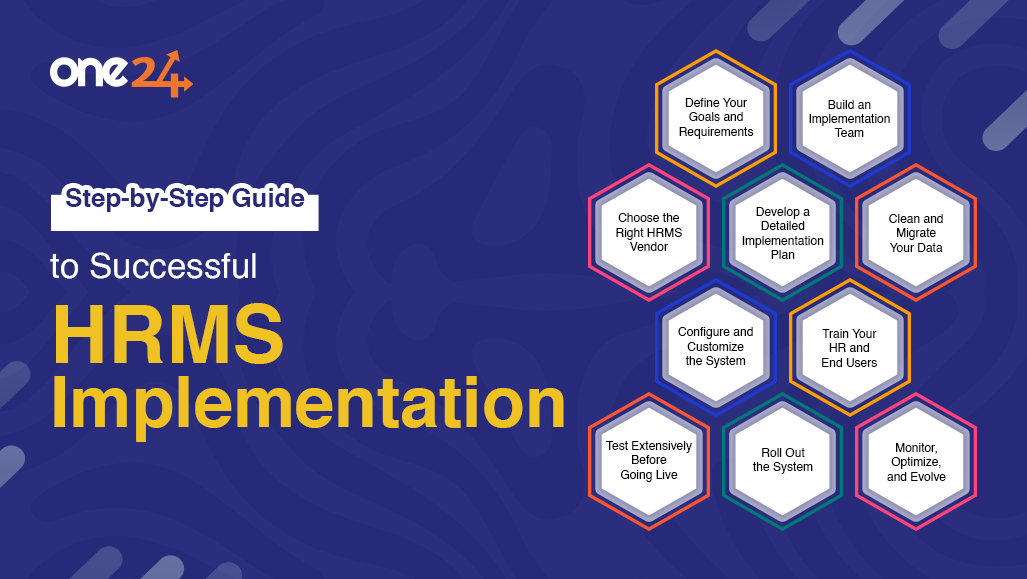
HRMS Implementation Plan: Your 8-Step Checklist
Let's turn to the Darwinbox blog post for a concise summary of the data migration process. Darwinbox is a major HR tech player in India, so their perspective is very relevant.
Read point #3, 'Migrate HR data into the HRMS'. Focus on the key activities: identifying which data to move, cleansing it, and ensuring correct formatting and mapping.
Phase 3: Testing & Validation
Before you let anyone use the system, you must ensure it works as expected.
Key Activities:
- System Testing: The project team rigorously tests all configured workflows and features to find bugs. Does the leave request workflow trigger the correct approval chain? Does the payroll calculation match the rules?
- User Acceptance Testing (UAT): This is the most critical testing stage. A group of selected end-users ("super users" or SMEs) are asked to perform their regular tasks in the new system. Their job is to confirm that the system is not only bug-free but also practical and usable for their day-to-day work. Their feedback is invaluable for final tweaks before launch.
The goal of UAT is not to have a perfect system, but to ensure it is ready for go-live and to identify any critical issues that must be fixed.
Phase 4: Training & Communication
This phase runs in parallel with the others but ramps up significantly before go-live. It is the core of your change management effort.
Key Activities:
- Develop a Communication Plan: Keep everyone informed throughout the project. Explain why the change is happening, what to expect, and when. Use multiple channels: emails, team meetings, posters, etc.
- Create Role-Based Training: One size does not fit all. The training needs to be tailored to different user groups.
- HR Team: Needs in-depth training on all administrative functions.
- Managers: Need training on approving requests, viewing team data, and performance management modules.
- All Employees: Need training on self-service features like applying for leave, viewing payslips, and updating personal information.
The TribalHub presentation offers excellent guidance on creating role-based training.
Read the slide 'Keep on training and learning: Prepare for organization-wide role-based training...' (page 44). Note the different focus for End Users, HR, and IT. This is a perfect blueprint for structuring your training strategy.
Phase 5: Go-Live & Post-Implementation
This is the moment of truth when you switch the new system on.
Key Activities:
- Go-Live: The new system becomes the official system of record. This could be a "big bang" (everyone switches at once) or phased (one department at a time).
- Hypercare Support: For the first few weeks after go-live, provide intensive support. Have project team members and SMEs available to answer questions and quickly resolve issues. This is crucial for building user confidence.
- Gather Feedback: The project isn't over at go-live. Use surveys and feedback sessions to understand what's working and what's not. The Darwinbox article (LINK, section 6) suggests specific questions to ask in a post-go-live survey.
- Measure Success & Optimize: Go back to the business case. Are you achieving the ROI you projected? Use data from the system to measure success metrics (e.g., reduction in time spent on payroll, lower HR query volume). Continuously look for ways to optimize and improve the system.
Test your understanding!
Match the following activities to the correct implementation phase:
Activities:
A. A group of managers test the new performance review workflow.
B. Developing a Gantt chart with project milestones.
C. Running the first live payroll in the new system.
D. Cleaning up employee data in old spreadsheets before import.
Phases:
- Discovery & Planning
- Configuration & Data Migration
- Testing & Validation
- Go-Live & Post-Implementation
Show answer
- A -> 3 (Testing & Validation): This is a classic User Acceptance Testing (UAT) activity.
- B -> 1 (Discovery & Planning): The Gantt chart is a key component of the project plan created in this phase.
- C -> 4 (Go-Live & Post-Implementation): Running the first live process marks the transition to the new system.
- D -> 2 (Configuration & Data Migration): Data cleansing is a critical step before migrating data.
Managing Reality: Common Challenges
No implementation is perfectly smooth. Anticipating challenges is key to overcoming them.
Finally, let's look at some common challenges and how to prepare for them. Acknowledging these potential headwinds shows foresight and builds trust with stakeholders.
Review the slide 'Don’t get discouraged - encountering headwinds is part of any major system implementation' (page 42). Pay attention to the 'Common Challenges' on the left and the corresponding 'Mitigation Strategies' on the right.
Key takeaways from this are to have formal processes for change requests, plan for resource back-ups, and celebrate small wins along the way to combat project fatigue.
Conclusion
You now have a structured, phased framework for planning and executing an HR system implementation. This plan is your roadmap to success, ensuring you manage not only the technical deliverables but also the critical human element of change.
Key Takeaways:
- A successful implementation rests on two pillars: strong Project Management (the 'how') and effective Change Management (the 'who').
- A phased approach (Discovery & Planning -> Configuration & Data Migration -> Testing & Validation -> Training & Communication -> Go-Live) breaks the project into manageable parts.
- Data migration is a complex, critical step that requires meticulous planning and cleaning.
- User Acceptance Testing (UAT) and role-based training are non-negotiable for ensuring smooth user adoption.
- The project does not end at Go-Live. Post-implementation support, feedback, and optimization are essential for realizing the long-term value of your investment.
Preview of the next lesson:
This lesson concludes our strategic module. We've gone from evaluating systems to building a business case and now to planning the implementation. It's time to put theory into practice.
In our next module, "Core HRIS Implementation & Automation," we'll start the hands-on work. Your very next lesson will guide you to perform the initial company setup in a free HRIS (Zoho People), where you will configure the foundational elements like departments, designations, and locations. The plan is made; now, the build begins.