Hello! Welcome to your next lesson in the Marketing Automation Foundations module.
In our last session, we mapped out the hotel guest journey, identifying the key moments where timely communication can make a real impact. We answered the "what" and "when" of our automation strategy. Today, we'll focus on the "how." We're going to demystify the technology by breaking it down into its essential components.
Our learning outcome for this lesson is to explain core automation concepts: triggers, actions, delays, and conditions. These four elements are the universal building blocks of any marketing automation platform. Mastering them will give you the language and logic to turn the journey map we created into a real, functioning system that works for your hotel 24/7.
1. The Anatomy of an Automation Workflow
Think of an automation workflow as a recipe for your marketing. A recipe has ingredients, instructions, cooking times, and checkpoints (e.g., "if the sauce is too thick, add water"). Automation workflows are structured in a very similar way. They are a sequence of steps that run automatically based on a set of rules.
Every workflow is built from four fundamental concepts:
- Triggers: The event that starts the recipe.
- Actions: The specific steps you take, like "send an email."
- Delays: The waiting periods, like "wait 2 days."
- Conditions: The decision points, like "if the guest is a VIP, do this."
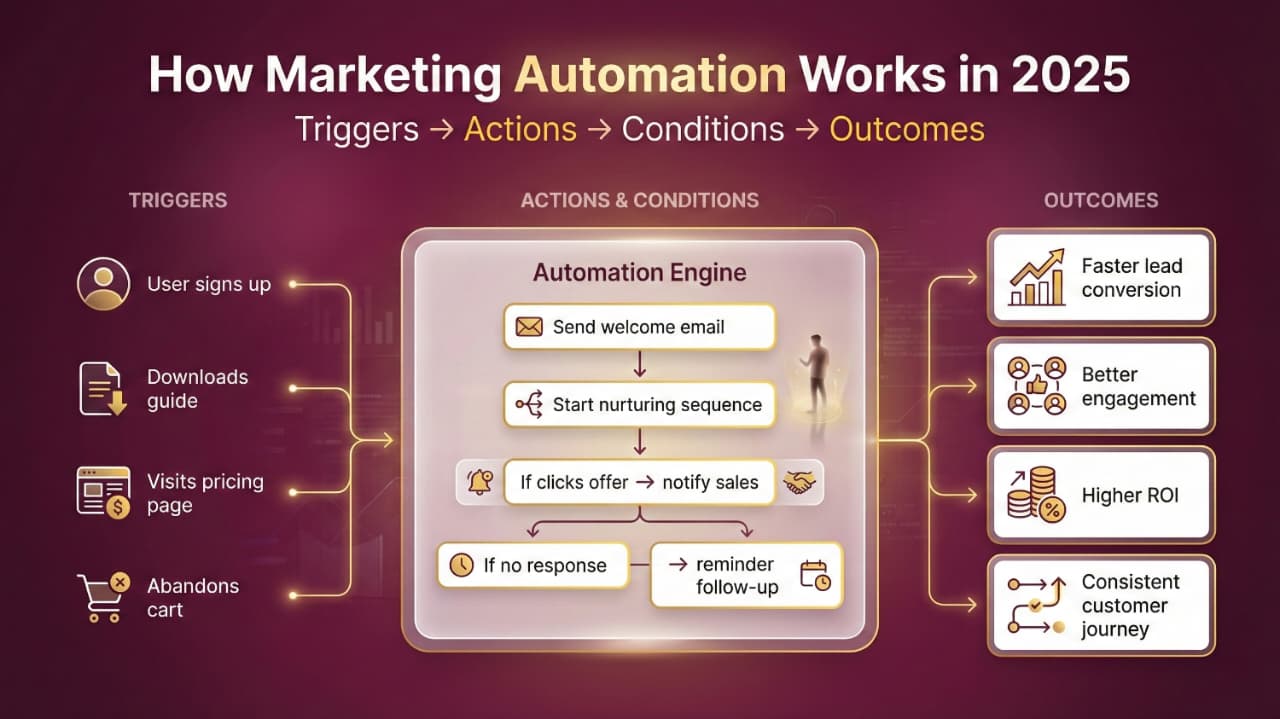
This image provides a great high-level overview of how these pieces fit together to guide a potential guest through a process.
To get a formal definition of these terms, please read the following short text.
How to Build Marketing Automation Workflows
This article from ActiveCampaign provides clear, concise definitions for the key elements of an automation workflow. Understanding these terms is the first step.
Please read the section titled 'How to create a marketing automation workflow'. Focus on how it describes Triggers, Actions, Conditions, and Time controls as an 'if/then' system with guardrails.
Now, let's break down each of these four components with hotel-specific examples.
2. Triggers: The Starting Gun
A trigger is the specific event that enrolls a contact into a workflow. It's the "if" that starts the "if-then" statement. Without a trigger, the automation never begins.
Common triggers in a hotel context include:
- A potential guest submits your "Newsletter Signup" form.
- A guest visits your hotel's "Spa Packages" webpage.
- A contact is added to a list called "Leads for Wedding Venues."
- A guest's booking status changes to "Checked-out" in your booking system.
A single workflow can even have multiple triggers. For instance, you could have one welcome workflow that starts whether someone signs up via a form on your blog or a pop-up on your homepage.
Let's see what setting up a trigger looks like in a real marketing platform.
HubSpot Workflows: The COMPLETE Guide (2024)
This clip from a HubSpot tutorial clearly shows a user selecting a 'form submission' as the trigger. This is one of the most common types of triggers you will use.
Watch from 03:05 to 04:39. Notice how the user defines the starting point of the workflow by specifying the exact event that must occur.
3. Actions: The "Then What?"
An action is the task that the system executes. It's the "then" in the "if-then" statement. Once a trigger occurs, the workflow performs one or more actions.
Common actions include:
- Send an email: "Send welcome email."
- Send an SMS: "Send check-in reminder."
- Add/Remove a tag: "Add tag 'VIP_Guest'."
- Notify a team member: "Send an email to the front desk manager."
- Update a contact property: "Change 'Lead Status' from 'New' to 'Contacted'."
Actions are the workhorses of your automation. You can chain multiple actions together to create a sophisticated sequence.
Following our previous video example, let's see an action being added.
HubSpot Workflows: The COMPLETE Guide (2024)
Immediately after setting the trigger, the next logical step is to define the first action. This clip continues the HubSpot workflow setup.
Watch from 04:28 to 05:20. You'll see the user add the action 'Send an email'. Now the logic is complete: IF a contact fills out the form, THEN send them this email.
4. Delays: The Art of Waiting
A delay (also called a "wait step" or "time control") is a pause in the workflow. This is a simple but critical component. Without delays, all your communications would fire off instantly, which would feel robotic and overwhelming to your guests.
Delays allow you to time your communications perfectly based on the journey map we built in the last lesson.
- Booking Abandonment: Trigger: Starts booking -> Wait 1 hour -> Action: Send reminder email.
- Pre-Arrival Upsell: Trigger: Books a room -> Wait 7 days -> Action: Send email with room upgrade offers.
- Post-Stay Feedback: Trigger: Checks out -> Wait 24 hours -> Action: Send "Thank you & review request" email.
Using delays makes your marketing feel more like a thoughtful conversation and less like an automated blast.
5. Conditions: The Fork in the Road
Conditions (also known as "if/else" or "if/then" branches) are what make your automations truly intelligent and personal. A condition checks if a contact meets a certain criterion and then splits them down different paths based on the result.
This is where you can create highly personalized experiences at scale.
-
Scenario: You send a promotional email for your restaurant.
- Condition: Did the guest click the "View Menu" link?
- Path A (Yes): Wait 2 days, then send a follow-up email with a special dinner offer.
- Path B (No): Do nothing, or send a different offer in a week.
-
Scenario: A guest has just booked a room.
- Condition: Is the
countryproperty on their contact record "USA"? - Path A (Yes): Send the pre-arrival email with information about domestic travel.
- Path B (No): Send a different pre-arrival email with information on international travel, passports, and currency.
- Condition: Is the
This video provides an excellent real-world demonstration of using a wait step combined with an if/else condition.
How to Use GoHighLevel WORKFLOWS (If/Else, Automations, & More!)
This clip from a GoHighLevel tutorial shows a powerful combination: waiting for a guest's response, and then using a condition to change the workflow based on whether they replied or not.
Watch from 10:50 to 12:49. Pay close attention to the logic: 1. Send an SMS. 2. Wait 15 minutes for a reply. 3. Use an 'if/else' step to check if a reply was received. This branching is the key to dynamic automation.
6. Putting It All Together: A Hotel Workflow Example
Let's design a classic "Booking Abandonment" workflow using all four concepts. The goal is to recover potentially lost revenue from guests who start but don't finish booking.
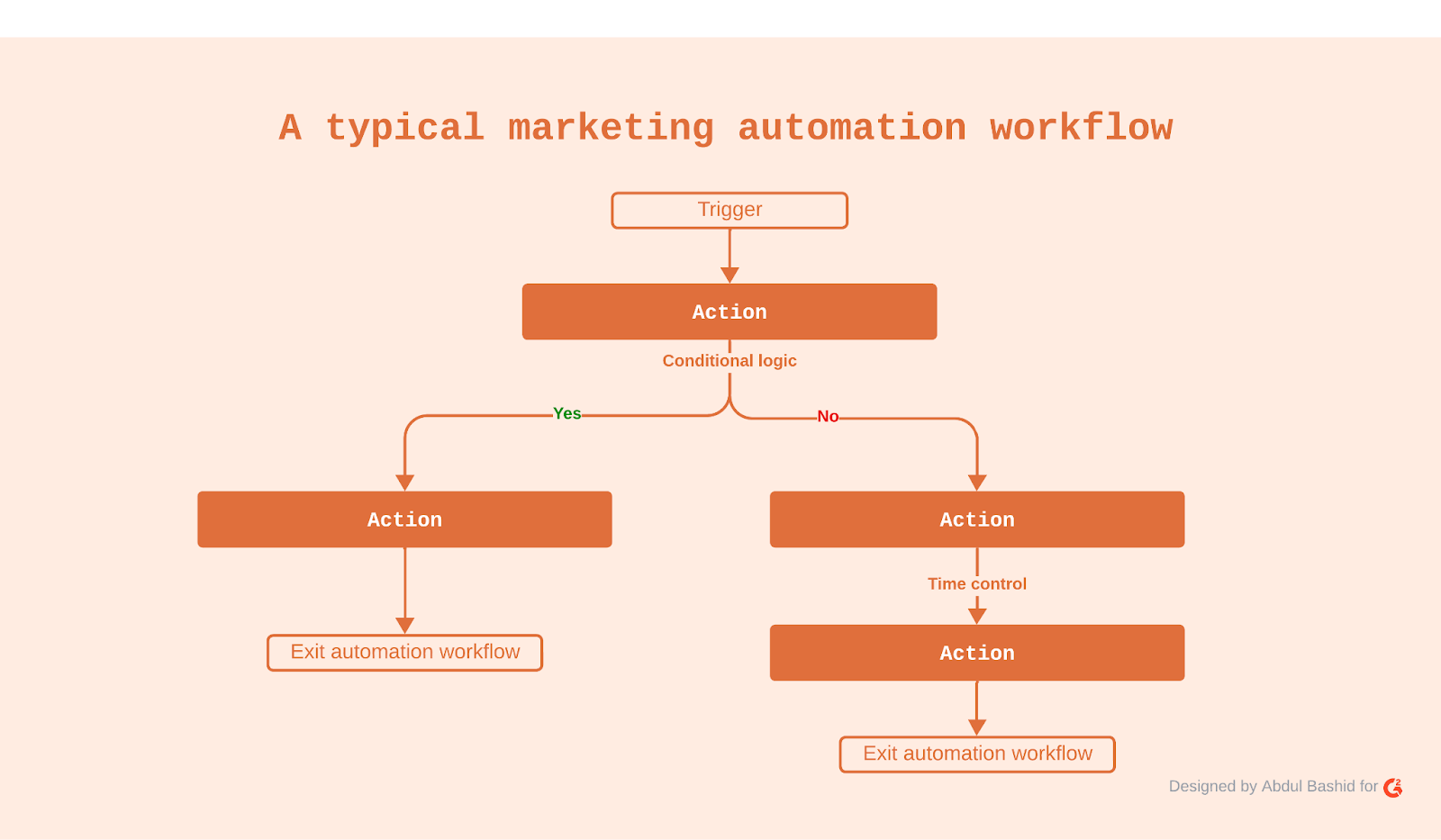
Here's how we'd build it:
- Trigger: A guest views the checkout page but does not view the "thank you" confirmation page within 30 minutes.
- Delay: Wait for 1 hour. (This gives them a chance to come back on their own or fix a payment issue).
- Action: Send an email with the subject line "Having trouble with your booking?" The email contains a simple message and a prominent link to bring them back to their reservation.
- Delay: Wait for 23 hours.
- Condition: Has the guest booked in the meantime? (e.g., IF the contact now has the "Booked_Guest" tag, THEN follow the 'Yes' path).
- 'Yes' Path: The guest has booked. End the workflow. No more emails are needed.
- 'No' Path: The guest has still not booked. Proceed to the next action.
- Action (on 'No' Path): Send a second email. This one can create a bit of urgency or add an incentive. Subject: "Your dates are in high demand!". Body: "Complete your booking now before your preferred room is taken. As a bonus, book in the next 4 hours for a complimentary breakfast."
This simple sequence uses all four core concepts to create a powerful, automated process that can directly increase your hotel's revenue.
Test your understanding!
You want to create an automation for guests who sign up for your "Local Events Guide" on your blog. The goal is to nurture them from a blog reader into a booked guest.
Using the concepts of Trigger, Action, Delay, and Condition, outline the steps for a simple 2-email nurturing workflow.
Show answer
Here is one possible workflow:
- Trigger: Contact submits the "Local Events Guide" form.
- Action 1: Immediately send an email with a link to download the guide.
- Delay: Wait 3 days.
- Action 2: Send a follow-up email with the subject "Explore [Your City] from the perfect home base." The content could highlight one or two key events from the guide and position your hotel as the ideal place to stay.
- Delay: Wait 4 days.
- Condition: Has the contact clicked the link in the second email?
- Action 3 (If 'Yes'): Send a final email with a soft offer, like "Book direct and save 10% on your stay."
- Action 3 (If 'No'): End this specific workflow. The contact can be nurtured through your regular newsletter.
Conclusion
Today, we've pulled back the curtain on marketing automation. You've learned that behind any complex-looking system are four simple, powerful concepts.
Key Takeaways:
- Triggers are the events that start a workflow (e.g., submitting a form).
- Actions are the tasks the system performs (e.g., sending an email).
- Delays control the timing of actions, making communication feel more natural.
- Conditions create personalized paths, sending the right message to the right person based on their data or behavior.
These four elements are the fundamental grammar of marketing automation. No matter which software platform you use, you will find these same building blocks.
What's Next?
We've covered the "what" (journey mapping) and the "how" (the four core concepts). In our next lesson, we will finally move from theory to practice. Our learning outcome will be to set up a 'welcome' email sequence for new newsletter subscribers. We'll take what you've learned today and build your first tangible automation, step by step.