Welcome to our next lesson. In our previous session, we focused on controlling the structure of an LLM's final response, ensuring you get predictable, machine-readable JSON. Now, we'll turn our attention to the delivery of that response.
For any interactive AI application—be it a chatbot, a coding assistant, or a content generator—the user experience is paramount. A user staring at a loading spinner for several seconds feels like an eternity. This lesson tackles that problem head-on. We'll explore how to stream responses from an LLM token-by-token, just like you see in ChatGPT, to create a fluid and responsive feel in your Node.js applications. This is a fundamental skill for building the production-grade agents you aim to deliver.
The Problem with Waiting: Latency and User Perception
When you make a standard API call to an LLM, your application sends a prompt and then waits. The model processes the entire request, generates the full response, and only then sends it back. This is known as a blocking request.
- For very short responses, this is fine.
- For longer responses (e.g., a few paragraphs of text, a block of code), the user might wait 5, 10, or even 30 seconds with no feedback. This perceived latency can make an application feel slow, unresponsive, or even broken.
Streaming solves this. Instead of a single, large response, the API sends a sequence of small chunks, often individual tokens. Your application receives and displays these chunks as they arrive. This gives the user immediate feedback and a much better experience, even if the total time to generate the full response is the same.
The architectural diagram below illustrates where this happens. Your application uses an SDK, which handles the secure HTTPS connection to the provider's API. The SDK and the API's "Streaming Handler" work together to deliver the response incrementally.
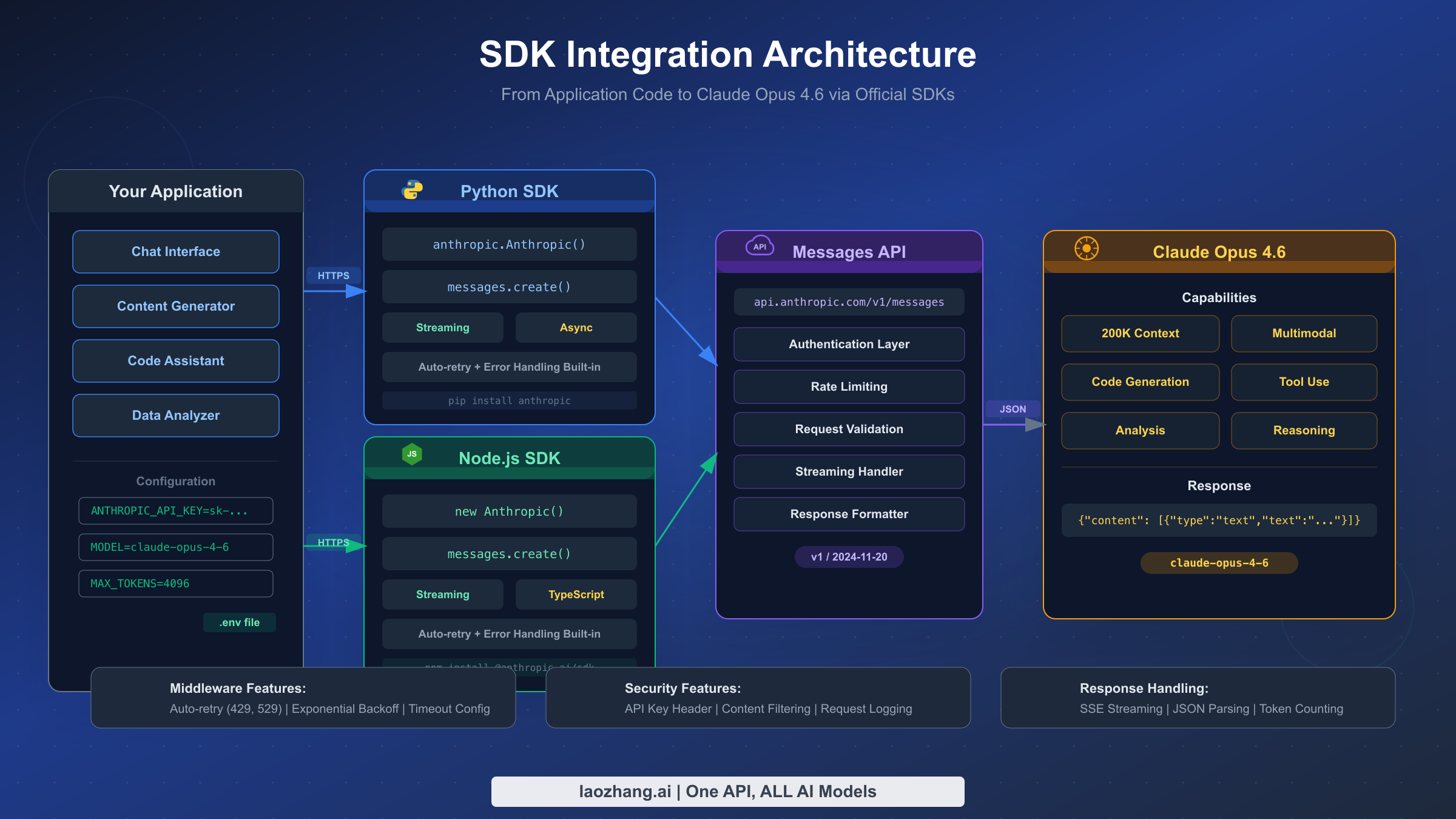
Implementing Streaming with the Anthropic Node.js SDK
Since you're an experienced TypeScript developer aiming to build production services, let's dive into a practical, server-side example using Anthropic's Node.js SDK and an Express server. This pattern is directly applicable to building a backend for a chat application.
The core of streaming in the Anthropic SDK is the client.messages.stream() method. It returns an AsyncIterable, which you can process elegantly in TypeScript using a for await...of loop.
Let's see the code. The following article provides a clear, production-oriented example.
How to Use the Claude Node.js SDK to Build AI-Powered Applications | The AI Journal
This article from The AI Journal provides a fantastic walkthrough of the Claude Node.js SDK. We'll focus on the section that implements streaming within an Express.js application, as this is a common pattern for building AI agent backends.
Please read the section titled Pattern 1. Pay close attention to these key parts: Setting SSE Headers: The code sets headers like Content-Type: text/event-stream. This tells the browser that the server will be sending a stream of events, which is the standard mechanism for this kind of communication. The Stream Call: Notice the use of client.messages.stream() instead of create(). The Loop: The for await (const chunk of stream) loop iterates over the incoming data chunks. Processing Chunks: Inside the loop, it checks if chunk.type === 'content_block_delta'. This event type signifies a piece of new text content. The text itself is in chunk.delta.text. Sending to the Client: The line res.write(...) sends the chunk to the connected client, formatted as a Server-Sent Event (SSE).
This example shows the complete end-to-end flow: receiving a request, starting a stream from the LLM, and piping the token chunks to the client. This is the foundational pattern for building a responsive chat backend.
A Common Pattern: The AsyncIterable Interface
The for await...of pattern you just saw is not unique to Anthropic. It's a standard JavaScript feature for handling asynchronous data streams, and most modern LLM SDKs for Node.js adopt it. Let's reinforce this concept by looking at how the OpenAI SDK handles streaming.
The video below demonstrates this using OpenAI's TypeScript SDK. The principles are identical.
Streaming LLM Responses | OpenAI Agent SDK with Typescript
In this video, Piyush Garg provides a step-by-step guide to enabling streaming with OpenAI's SDK. It clearly illustrates the transition from a blocking call to a streaming one.
Please watch the following segments: Enabling Streaming: First, watch from 3:34 to 4:17, where the presenter adds stream: true to the API call. Notice how the return type changes from a simple RunResult to a StreamedRunResult, which implements the AsyncIterable interface. This is the key switch that enables streaming. Iterating the Stream: Next, watch from 5:25 to 6:18. Here, the presenter uses the same for await...of loop we saw in the Anthropic example to process the stream. Initially, each token is logged to a new line. Piping to stdout: Finally, see the more elegant approach from 6:25 to 7:23. The SDK provides a helper to convert the response to a standard Node.js readable stream, which can be directly pipe()-d to process.stdout. This is a powerful technique for command-line tools and scripts.
The key takeaway is the consistency of the pattern. Regardless of the provider, the general workflow is:
- Enable streaming in your API call (
stream: true). - Receive an
AsyncIterableobject in response. - Process the stream of tokens using a
for await...ofloop.
A Robust Pattern for Frontend Integration
While piping to the console is great for demos, real applications need to send this stream to a frontend. The Express example from the Anthropic article showed one way to do this using raw res.write().
A slightly more robust pattern is to wrap the stream logic in your own asynchronous generator function. This allows you to yield structured objects that give the consumer (e.g., your API endpoint handler) more context about the stream's state.
The same video demonstrates this advanced pattern.
Streaming LLM Responses | OpenAI Agent SDK with Typescript
This final segment demonstrates how to build a custom generator function to wrap the LLM stream, making it easier to consume on the frontend.
Watch the section from 7:31 to 9:54. The presenter creates an async function* (an async generator) that: Internally calls the LLM's streaming API. Uses a for await...of loop to process tokens. For each token, it yields an object like { isCompleted: false, value: 'token text' }. After the loop finishes, it yields a final object like { isCompleted: true, value: 'full final text' }. This is an excellent pattern because it allows the consumer of your function to know not only the content of each chunk but also when the stream has definitively ended.
Your API endpoint can then call this generator and send each yielded object to the frontend via SSE or WebSockets, giving your UI the information it needs to gracefully handle the stream.
Conclusion
In this lesson, you've learned the why and how of streaming LLM responses in Node.js. This is a critical technique for building AI applications that feel fast and interactive to the end-user. You've moved beyond simple blocking requests to handling real-time data flow.
Here are the key takeaways:
- Streaming enhances user experience: It provides immediate feedback and eliminates the perception of waiting for a slow backend.
AsyncIterableis the core pattern: Most modern Node.js SDKs expose streams asAsyncIterableobjects, which are best consumed with afor await...ofloop.- Provider SDKs make it easy: You can enable streaming with a simple parameter (e.g.,
stream: true) and use dedicated methods like.stream(). - Backend streams can be served to a frontend: Using Server-Sent Events (SSE) in an Express endpoint is the standard way to pipe the token stream from the LLM provider all the way to the user's browser.
- Generator functions create robust wrappers: Wrapping your stream logic in an
async function*provides a clean and structured way to handle stream state for your API consumers.
In our next and final lesson of this foundational module, we will address a crucial operational concern: cost. While streaming makes an application feel faster, the billing is still based on the total number of tokens you process. We will learn how to estimate, monitor, and manage token usage to keep your agent's operational costs under control.