Hello! Welcome to your next lesson on design patterns.
In the previous module, we explored Creational Patterns like Factory Method, Abstract Factory, and Singleton, which focus on how objects are created. You learned to decouple a system from its concrete classes and, with the Singleton, how to manage and critique the enforcement of a single instance.
We now move into Structural Patterns. These patterns are all about how classes and objects can be composed to form larger, more flexible, and efficient structures. They help ensure that when one part of a system changes, the entire system doesn't need to be redesigned.
Your learning outcome for today is to implement the Adapter and Facade structural patterns to simplify or adapt interfaces. These are two of the most common and practical patterns you'll encounter. They both act as "wrappers" around other objects, but they solve distinctly different problems. Mastering the distinction between them is key to developing your architectural judgment.
1. The Adapter Pattern: Making Incompatible Interfaces Cooperate
The intent of the Adapter pattern is simple but powerful: it allows objects with incompatible interfaces to collaborate. Think of it as a translator between two components that don't speak the same language.
A classic real-world analogy is a power plug adapter. When you travel, your laptop charger's plug (the "adaptee") might not fit the wall socket in another country (the "client's expected interface"). An adapter doesn't change the charger or the wall socket; it simply sits in the middle, translating one physical interface to another.
In software, you'll face this problem frequently. Imagine your application's business logic relies on working with data in XML format. You then decide to integrate a new, powerful third-party analytics library, but it only accepts data in JSON format. You can't (or shouldn't) change your core application or the third-party library. This is a perfect scenario for an Adapter.
To see how this is solved, let's watch a video that walks through this exact problem.
The Adapter Pattern Explained and Implemented in Java | Structural Design Patterns | Geekific
This video from Geekific provides an excellent explanation of the Adapter pattern using the XML-to-JSON conversion scenario. It clearly shows how an adapter class can be built to bridge the gap between two incompatible systems.
Please watch from the beginning to 04:08. Pay close attention to: The initial problem of the app working with XML and the new library needing JSON. How the FancyUIServiceAdapter class is created to solve this. The roles of the Client, Client Interface, Service (the adaptee), and the Adapter in the final structure.
How it Works: The Structure of an Adapter
As the video explained, the Adapter pattern uses a middle-layer object to perform the translation. Let's formalize the components, focusing on the most common implementation, the Object Adapter, which uses composition.
- Client: The class that contains your application's business logic and wants to use another object.
- Target Interface: The interface that the
Clientexpects to work with. In our example, this would be an interface that has a method likedisplayData(XML xmlData). - Adaptee (or Service): The class you want to use, but whose interface is incompatible. This is our third-party
FancyUIServicewhich has a method likerender(JSON jsonData). - Adapter: The class that makes it all work.
- It implements the
Target Interface. - It wraps (holds a reference to) an instance of the
Adaptee. - In its implementation of the
Target Interface's methods, it receives the request from theClient, translates the data (e.g., XML to JSON), and then calls the appropriate method on the wrappedAdaptee.
- It implements the
From the Client's perspective, it's just interacting with another object that correctly implements the Target Interface. It has no idea that a complex translation is happening behind the scenes. This decouples the client from the incompatible Adaptee.
For a more detailed breakdown and a step-by-step implementation guide, the 'Adapter' article on Refactoring.guru is an excellent resource.
Please read the 'Structure', 'Applicability', and 'How to Implement' sections. Focus on the 'Object adapter' structure, as it's more flexible and common than the 'Class adapter' approach. Notice how the pattern aligns with the Single Responsibility and Open/Closed principles, which we'll cover later.
Test your understanding!
Imagine you have a new EmailService that sends notifications. Its method is send(recipient, subject, body). However, a legacy part of your system expects to call a Notification interface with a single method notify(messageObject), where messageObject contains all the details.
How would you use the Adapter pattern here? Describe the Client, Target Interface, Adaptee, and the logic inside the Adapter class.
Show answer
- Client: The legacy part of the system.
- Target Interface: The
Notificationinterface with itsnotify(messageObject)method. - Adaptee: The new
EmailServiceclass. - Adapter: A new class, let's call it
EmailServiceAdapter.- It would implement the
Notificationinterface. - It would hold an instance of
EmailService. - Its
notify(messageObject)method would:- Receive the
messageObject. - Extract the recipient, subject, and body from the
messageObject. - Call
emailService.send(recipient, subject, body).
- Receive the
- It would implement the
2. The Facade Pattern: Simplifying a Complex Subsystem
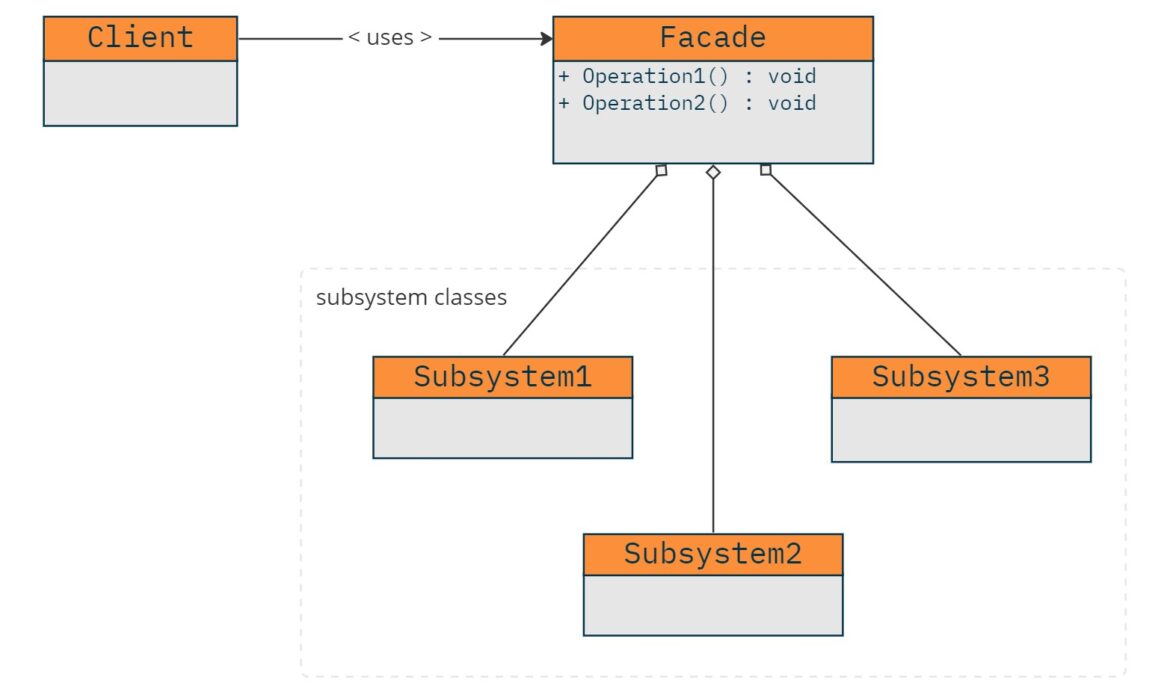
Now let's look at the Facade pattern. While it's also a "wrapper," its intent is different: to provide a simplified, high-level interface to a complex subsystem.
Imagine you're integrating a powerful but convoluted library for video processing. To convert a video file, you might need to:
- Initialize a video file reader.
- Create a specific codec object (e.g., H.264, VP9).
- Configure bitrate and resolution settings.
- Initialize an audio stream processor.
- Multiplex the video and audio streams.
- Write the final output to a file.
Your client code doesn't want to know about all these steps; it just wants to convertVideo(inputFile, outputFile, format). A Facade provides this simple "front-facing" interface, hiding all the complex interactions with the subsystem's components.
Let's watch another video that illustrates this concept clearly.
The Facade Pattern Explained and Implemented in Java | Structural Design Patterns | Geekific
This video from Geekific demonstrates the Facade pattern by wrapping a complex cryptocurrency trading library. It's a great example of how a Facade can shield client code from implementation details and simplify workflows.
Please watch from the beginning to 05:13. Focus on: The initial problem: the client code is becoming tightly coupled to the many classes of a third-party library. How the BuyCryptoFacade class provides a single, simple method that hides the complexity. The relationship between the Client, the Facade, and the Complex Subsystem.
How it Works: The Structure of a Facade
The Facade's structure is straightforward:
- Client: The code that needs to access the subsystem.
- Facade: The single class the client interacts with. It holds references to the various parts of the subsystem and knows how to coordinate them to perform high-level operations.
- Complex Subsystem: A collection of classes, libraries, or APIs that are powerful but difficult to use directly. These subsystem classes are unaware of the Facade's existence.
By putting a Facade in place, you decouple your client code from the internal workings of the subsystem. If the subsystem is ever updated or replaced, you only need to update the Facade class, not every client that uses it. This makes your overall architecture much more resilient to change.
The Refactoring.guru article on Facade provides further examples and clarifies its applicability and implementation.
Please read the 'Intent', 'Problem', 'Structure', 'Applicability', and 'How to Implement' sections. Note the key benefit mentioned: isolating your code from the complexity of a subsystem.
3. Adapter vs. Facade: What's the Difference?
This is a critical point. Both patterns wrap other objects and can seem similar at first glance. Understanding their difference in intent is what builds your architectural intuition.
- Adapter's Intent: To change an interface. It makes an existing interface usable by a client that expects a different one. The goal is compatibility.
- Facade's Intent: To simplify an interface. It provides a new, simpler interface to a complex system. The goal is usability.
Let's use the Refactoring.guru articles, which state this difference perfectly:
Facade defines a new interface for existing objects, whereas Adapter tries to make the existing interface usable. Adapter usually wraps just one object, while Facade works with an entire subsystem of objects.
Here is a summary of the key differences:
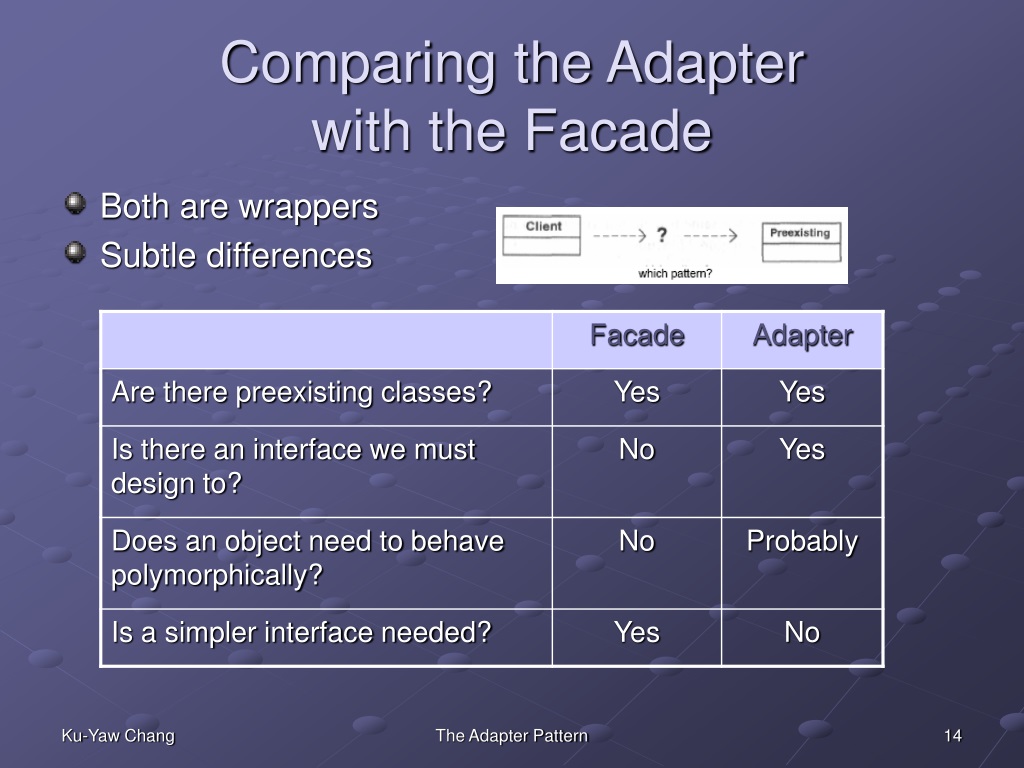
Let's break down the questions from the image above to solidify this:
| Question | Adapter | Facade |
|---|---|---|
| Are one or more preexisting classes used? | Yes | Yes |
| Is there an interface you must design to? | Yes. The whole point is to fit an expected interface. | No. You are creating a new, simpler interface. |
| Does the object need to behave polymorphically? | Yes. The client treats the adapter as just another object implementing the target interface. | No. The client usually knows it's using the specific Facade. |
| Is a simpler interface needed? | No, just a different one. | Yes. This is the primary motivation. |
Conclusion
Today you've implemented two fundamental structural patterns. By understanding both their implementation and, more importantly, their intent, you can make better architectural decisions that lead to more maintainable and decoupled systems.
Key Takeaways:
- Structural patterns are concerned with how classes and objects are composed to form larger structures.
- The Adapter pattern converts the interface of a class into another interface clients expect. Its goal is to make incompatible classes work together.
- The Facade pattern provides a unified, simplified interface to a set of interfaces in a subsystem. Its goal is to make a complex system easier to use.
- The key distinction is intent: Adapter is for compatibility, while Facade is for simplicity.
Preview of the Next Lesson:
We will continue our exploration of structural patterns by looking at two more powerful concepts: Decorator and Composite. The Decorator pattern will show us how to add new responsibilities to objects dynamically, while the Composite pattern will help us compose objects into tree structures to represent part-whole hierarchies.