Hello! Welcome back to our series on design patterns.
In our last lesson, we explored the Strategy and Observer patterns, which are cornerstones of behavioral design. You learned how Strategy encapsulates interchangeable algorithms and how Observer creates a decoupled notification system. This focus on separating responsibilities is a key element of the architectural thinking you're aiming to master.
Today, we will implement another powerful behavioral pattern: the Command pattern. Our goal is to understand how to encapsulate a request as an object, which decouples the sender of a request from its receiver. This might sound abstract, but it unlocks capabilities like queuing actions, logging operations, and, most famously, implementing undo/redo functionality.
This pattern is a crucial tool for any software architect, as it provides a clean and flexible way to manage actions within a system.
1. The Core Idea: What is a Command?
Imagine you're building a complex application with a graphical user interface, like a photo editor. You have a toolbar with buttons, a context menu (right-click), and keyboard shortcuts. Many of these trigger the same action—for example, "copy".
A naive approach would be to put the "copy" logic inside the event handler for the toolbar button, then duplicate it for the menu item, and again for the keyboard shortcut. This leads to code duplication and tight coupling. The UI components (like CopyButton) become directly dependent on the business logic (the Editor class).
How can we decouple the UI from the action it triggers?
The Command pattern solves this by turning the request itself into an object.
To start, let's get a clear definition of the pattern and the problem it solves. This article from Refactoring.guru provides an excellent introduction using a text editor example.
Please read the 'Intent', 'Problem', and 'Solution' sections. Focus on how the pattern decouples the GUI layer from the business logic by introducing a command object as an intermediary.
As you've just read, the essence of the pattern is to create a standalone object for each action. A great way to think about this comes from the book Game Programming Patterns.
A command is a reified method call.
"Reify" means to make something abstract (like a request or a method call) into a concrete thing (an object). By turning a request into an object, we can pass it around, store it, queue it, and execute it whenever we want. This is conceptually similar to how you might pass callback functions in JavaScript, a language you're familiar with.
2. The Structure of the Command Pattern
The pattern involves five key participants that work together.
- Receiver: The object that knows how to perform the actual work (e.g., a
Lightobject withon()andoff()methods). - Command Interface: Declares a single method, typically
execute(), that all concrete commands will implement. It often includes anundo()method as well. - Concrete Command: Implements the command interface. It holds a reference to the Receiver and encapsulates all the information needed to call a method on it (e.g.,
LightOnCommandholds aLightobject and itsexecute()method callslight.on()). - Invoker: The object that triggers the command (e.g., a
RemoteControlButton). It holds a reference to a command object and calls itsexecute()method. The Invoker is completely decoupled from the Receiver. - Client: The application code that sets everything up. It creates the Receiver, creates a Concrete Command and associates it with the Receiver, and then creates an Invoker and associates it with the Command.
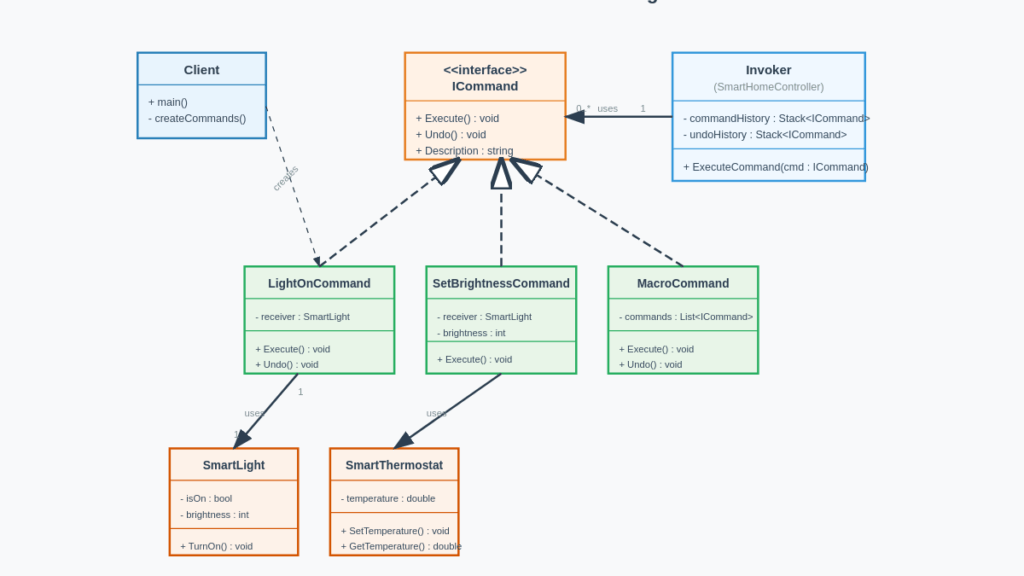
To see how these parts interact in a dynamic way, let's watch a video that walks through the concept and the diagram.
Command Pattern – Design Patterns (ep 7)
This video by Christopher Okhravi provides a fantastic conceptual walkthrough of the pattern using a smart home remote control, which is a classic and very intuitive example.
Please watch from 06:10 to 19:29. Pay close attention to: The analogy of programming a Philips Hue remote (06:10 - 13:33). This clearly illustrates the role of the Invoker and the need for configurable actions. The explanation of the UML diagram (13:33 - 19:29), where he details the responsibilities of the Invoker, ICommand, Concrete Command, and Receiver.
3. Implementing the Command Pattern
Now that we have a solid grasp of the theory, let's dive into a practical implementation. We'll see how to refactor a system to use commands and then add the powerful undo/redo feature.
This is where the architectural benefit truly shines. By encapsulating actions, we can build a history of commands, making complex state management much simpler.
Real-Life Case of the Command Design Pattern
The following video from ArjanCodes implements the pattern in Python using a banking system example. This is a complete, real-world case study that perfectly demonstrates the learning outcome.
Please watch from 03:53 to 22:53. The video is divided into clear sections: Creating Commands (03:53 - 09:32): See how operations like Deposit and Withdrawal are turned into explicit Transaction objects (Concrete Commands). Creating the Controller/Invoker (09:32 - 13:50): Understand how the BankController (Invoker) is created to execute these transaction objects, decoupling the execution logic from the commands themselves. Adding Undo/Redo (13:50 - 22:53): This is the most crucial part. Observe how undo() and redo() methods are added to the commands, and how the BankController uses stacks to manage the history of executed commands.
After watching the implementation, let's summarize the core logic for the undo functionality in the BankController (Invoker):
- Execution: When a new command is executed, it's pushed onto an
undoStack. TheredoStackis cleared. - Undo: To undo, the controller
pop()s the last command from theundoStack, calls itsundo()method, and pushes the command onto theredoStack. - Redo: To redo, the controller
pop()s from theredoStack, calls itsredo()orexecute()method, and pushes it back onto theundoStack.
This clean separation of concerns makes what could be a messy state-management problem remarkably elegant.
Test your understanding!
You are building a simple text editor. You need to implement a "Paste" command that can be undone.
- What would be the Receiver?
- What state would the
PasteCommand(Concrete Command) need to store to supportundo()? - Briefly describe the logic for the
execute()andundo()methods inPasteCommand.
Show answer
- The Receiver would be the
TextEditororDocumentobject, which manages the text content and cursor position. - To support undo, the
PasteCommandwould need to store the text that was replaced by the paste operation (if any) and the length of the pasted text. For a simple paste (no selection replaced), it just needs to know the length of the text it inserted. -
execute(): It would get the text from the clipboard and call a method on theTextEditorreceiver, likeeditor.insert(clipboardText). It would store the length ofclipboardText.undo(): It would call a method on the receiver to delete the text that was just pasted, for example,editor.delete(cursorPosition - length, length).
4. Advanced Applications
The Command pattern's flexibility enables several advanced use cases that are common in modern software architecture.
Macro Commands
You can combine multiple commands into a single, complex command. This uses the Composite pattern, which we studied earlier. The ArjanCodes video you watched demonstrates this with the Batch command. A Batch is a command that holds a list of other commands. When execute() is called on the Batch, it iterates through its list and executes each command. This is incredibly powerful for creating transactional workflows where a series of actions must succeed or be rolled back together.
Queuing and Asynchronous Operations
Since commands are objects, they can be serialized and stored in a database or sent to a message queue. This is the foundation of many background job systems, which you've likely used in frameworks like Laravel.
For example, when a user requests a data export:
- The web server (Client) creates an
ExportDataCommandobject containing the user ID and query parameters. - Instead of executing it immediately, it serializes the command and pushes it onto a queue (e.g., Redis or RabbitMQ).
- A separate worker process (Invoker) pulls commands from the queue, deserializes them, and calls
execute().
This decouples the request from its execution, preventing long-running tasks from blocking the main web application.
Conclusion
Today, you've learned how to implement the Command pattern, a versatile behavioral pattern that is fundamental to building decoupled, flexible, and robust systems.
Key Takeaways:
- Encapsulation: The Command pattern encapsulates a request as an object, decoupling the object that invokes an operation (Invoker) from the object that performs it (Receiver).
- Flexibility: As objects, commands can be stored, passed as arguments, queued for later execution, and combined into more complex commands.
- Undo/Redo: By adding an
undo()method to the command interface, you can easily implement multi-level undo/redo functionality by maintaining a history of executed commands. - Architectural Value: This pattern is a key tool for creating clean boundaries in your application, which aligns perfectly with your goal of developing an "architectural mindset."
Preview of the Next Lesson:
We have now covered several Creational, Structural, and Behavioral patterns. In our next lesson, we will shift from learning individual patterns to applying them. The challenge will be to select and justify an appropriate design pattern for a given design problem. This will test your ability to analyze requirements and make informed architectural decisions.