Hello! Over the past few lessons, we've focused on the principles of good design: SOLID and Composition over Inheritance. These are the tools you use to build clean, maintainable, and flexible software. Today, we'll flip the coin and learn to recognize the symptoms of poor design.
This lesson is about defining and identifying code smells. A code smell isn't a bug—the code might work perfectly—but it's a surface-level indicator of a deeper structural problem. Learning to spot these smells is a critical step toward developing the "architectural mindset" you're aiming for, as it trains you to look beyond functionality and evaluate the long-term health of a codebase.
Your goal for this lesson is to be able to define 'code smells' and identify common examples like Long Method and Large Class.
1. What Exactly is a "Code Smell"?
The term "code smell" was popularized by Kent Beck and Martin Fowler. It's a powerful metaphor: just like a strange smell in the kitchen might signal that food is going bad, a code smell signals that something in your design might be rotting.
To get a clear definition, let's start with a short video that explains the concept and distinguishes it from bugs.
This video from the Telusko channel provides a great introduction to what code smells are and why they matter for code maintainability, even when the application works as expected.
Watch from the beginning to 03:10. Focus on the distinction between a bug (the code is broken) and a smell (the code works but is poorly structured).
As the video explains, code smells are about readability, maintainability, and the ease of future change. Another excellent, concise way to think about it is that a smell is an indicator that you should investigate further.
A few common code smells to be aware of and how to fix them
This short clip from The Shaggy Dev offers a perfect summary.
Watch the first 23 seconds. The key takeaway is that a smell 'may be indicative of a larger problem' and warrants evaluation.
In summary, a code smell is a hint that a software design principle—like SRP, DRY, or Open/Closed—has likely been violated. It's the symptom, not the disease itself.
2. A Catalog of Common Smells
There are dozens of documented code smells. We'll focus on a few of the most common and impactful ones, especially those that directly relate to the principles we've already studied. Many of these smells fall into a category called Bloaters, where code, methods, and classes have grown so large they become difficult to manage.
The following article is a fantastic, practical guide to several key smells. We will refer to it throughout this section.
Detecting Code Smells: Your First Step Toward Refactoring ...
The article 'Detecting Code Smells' by Mathieu Perroud provides clear definitions and, importantly, code examples that show the smell and a hint of the fix. We will use it as a reference for the smells we discuss.
First, read the introduction of the article, down to the start of the '1. Long Methods' section. It provides excellent context on the link between code smells and design principles.
Now, let's dive into the specific smells.
Smell 1: Long Method
This is one of the most common smells. As a developer, you've likely written or encountered methods that scroll on for pages.
- Symptom: A function or method that is excessively long. A common rule of thumb is that anything over 10-15 lines should be looked at with suspicion.
- Problem: Long methods almost always do more than one thing, which is a direct violation of the Single Responsibility Principle (SRP). They are hard to understand, difficult to name accurately, and nearly impossible to reuse or test in isolation.
Detecting Code Smells: Your First Step Toward Refactoring ...
Let's return to the article to see a concrete example.
Read section '1. Long Methods'. Pay attention to how the 'before' code is hard to follow, while the 'after' code, broken into smaller methods, reads almost like a summary of the logic. The fix for this is a refactoring technique called 'Extract Method', which we'll cover in the next lesson.

Smell 2: Large Class (The "God Object")
The Large Class is the big brother of the Long Method. It's a class that has accumulated too many responsibilities over time.
- Symptom: A class with a vast number of methods, instance variables, and thousands of lines of code. It often tries to control many other objects and may be central to the entire application.
- Problem: This is a major violation of the SRP. The class is tightly coupled to many other parts of the system, making it fragile and extremely difficult to change. Testing a God Object is a nightmare because of its many dependencies and states.
A few common code smells to be aware of and how to fix them
The 'God Object' smell often doesn't appear overnight. It grows incrementally. This video gives a perfect narrative of how a simple global object can slowly evolve into an unmanageable mess.
Watch from 02:40 to 04:27. Notice how each 'small, reasonable' addition contributes to creating a class with no single purpose, making the system's state hard to reason about.
The solution to a Large Class is to apply SRP and split its responsibilities into smaller, more cohesive classes, often using principles like Dependency Injection, which we covered earlier.
Smell 3: Duplicate Code
This is another classic smell that directly violates a core principle you've seen before.
- Symptom: You see the exact same block of code, or a very similar one, in multiple places throughout your codebase.
- Problem: This violates the Don't Repeat Yourself (DRY) principle. If you need to fix a bug or change the logic in that code block, you have to remember to find and update every single copy. Missing one can lead to subtle and frustrating bugs.
Detecting Code Smells: Your First Step Toward Refactoring ...
Let's look at the 'Duplicated Code' section in our reference article.
Read section '2. Duplicated Code'. The example of calculating totals for a Cart and an Invoice is a very realistic scenario. The fix demonstrates creating a single source of truth for the shared logic.
Smell 4: Long Parameter List
This smell makes your methods feel like you're filling out a complicated form every time you call them.
- Symptom: A method that takes a large number of parameters (e.g., more than three or four). Often, you'll see a subset of these parameters being passed around together in different method calls. This related group is sometimes called a Data Clump.
- Problem: Long parameter lists are hard to read and use. It's easy to make mistakes by passing arguments in the wrong order. More importantly, it often indicates that the parameters have a conceptual relationship that isn't being properly modeled.
Detecting Code Smells: Your First Step Toward Refactoring ...
The article's final section provides a great solution to this problem.
Read section '4. Long Parameter Lists'. The fix here, 'Introduce Parameter Object', is a key refactoring technique. It involves creating a new class (like UserProfile) to encapsulate the related data, which makes the code cleaner and creates a new, meaningful concept in your domain.
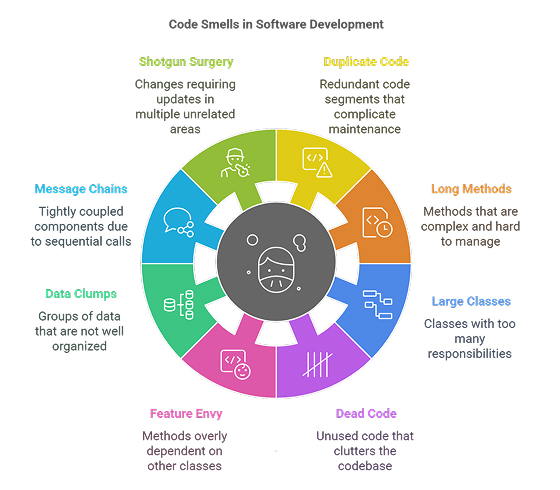
The image below gives a high-level overview of some of the smells we've discussed and others you may encounter.
Test your understanding!
You are reviewing the following C#-like pseudocode for an e-commerce application.
public class OrderManager
{
    public void ProcessOrder(int orderId, string customerName, string customerEmail, string shippingAddress, string billingAddress, List<Product> items, string promoCode)
    {
        // 1. Validate customer data
        if (string.IsNullOrEmpty(customerName) || !customerEmail.Contains("@"))
        {
            Console.WriteLine("Error: Invalid customer data.");
            return;
        }

        // 2. Calculate subtotal
        double subtotal = 0;
        foreach (var item in items)
        {
            subtotal += item.Price * item.Quantity;
        }

        // 3. Apply discount
        double discount = 0;
        if (promoCode == "SAVE10")
        {
            discount = subtotal * 0.10;
        }
        else if (promoCode == "SAVE20")
        {
            discount = subtotal * 0.20;
        }
        double finalTotal = subtotal - discount;

        // 4. Save to database
        Console.WriteLine($"Saving order {orderId} with total {finalTotal} to DB.");

        // 5. Send confirmation email
        string emailBody = $"Dear {customerName}, your order total is {finalTotal}.";
        Console.WriteLine($"Sending email to {customerEmail}: {emailBody}");

        // 6. Check for large orders and send separate notification
        if (finalTotal > 1000)
        {
            string notificationBody = $"A large order of {finalTotal} was placed by {customerName}.";
            Console.WriteLine($"Sending notification: {notificationBody}");
        }
    }
}
Identify at least three distinct code smells in this ProcessOrder method and name them.
Show answer
Here are the most prominent code smells in the snippet:
-
Long Method: The
ProcessOrdermethod is doing far too many things: validating data, calculating totals, applying discounts, saving to the database, and sending multiple notifications. This is a clear violation of the Single Responsibility Principle. -
Long Parameter List: The method signature
ProcessOrder(int orderId, string customerName, ...)has seven parameters. This makes it hard to call and indicates that some of this data should be grouped. -
Data Clump: The parameters
customerName,customerEmail,shippingAddress, andbillingAddressare a classic Data Clump. They belong together in aCustomerorCustomerInfoobject. -
(Bonus) Primitive Obsession: The code uses primitive types like
stringfor everything (e.g.,promoCode,customerEmail). APromoCodecould be its own class, and anEmailtype could contain its own validation logic, rather than checking for "@" inside this method.
Conclusion
In this lesson, we've defined what code smells are and learned to identify some of the most common ones. You now have the vocabulary to describe why a piece of code "feels wrong" even if it works correctly. This is the first and most crucial step in improving code quality.
Key Takeaways:
- Code smells are symptoms, not bugs. They indicate deeper design problems that can make code hard to maintain, understand, and change.
- Long Methods and Large Classes often violate the Single Responsibility Principle (SRP). They do too much and should be broken down into smaller, more focused units.
- Duplicate Code violates the Don't Repeat Yourself (DRY) principle and creates a maintenance nightmare. Logic should exist in a single source of truth.
- Long Parameter Lists and Data Clumps suggest that data is not being properly structured into meaningful objects.
Preview of the Next Lesson:
Identifying a smell is only half the battle. What do you do once you've found one? In our next lesson, "Apply foundational refactoring techniques (e.g., Extract Method) to improve code quality," we will learn the specific, step-by-step techniques to fix these smells and transform messy code into a clean, well-structured design.