Hello! Welcome to your third lesson in the "Multi-Core Programming Concepts" module.
In our previous lesson, we successfully implemented a spinlock using the LDREX and STREX exclusive access instructions. You'll recall that our final, correct implementation included a DMB (Data Memory Barrier) instruction after acquiring the lock and before releasing it. We briefly noted that this was essential to prevent the compiler or CPU from reordering memory accesses in a way that would break our lock.
Today, we're going to do a deep dive into that very topic. This lesson fulfills the learning outcome: Explain the need for memory barriers (DMB, DSB, ISB) and use them to enforce memory ordering. Understanding memory models and barriers is not just an academic exercise; it's a non-negotiable skill for writing correct and performant code on any modern multi-core system, and a frequent topic in advanced embedded engineering interviews.
Why We Need Barriers: ARM's Weak Memory Model
To maximize performance, modern processors like ARM do not guarantee that memory operations will be executed in the order they appear in your program. This is known as a weakly-ordered or relaxed memory model. The CPU might reorder non-dependent reads and writes, use store buffers that delay when a write becomes visible to other cores, and execute instructions speculatively.
For a single core, the processor ensures these tricks don't change the program's outcome. But in a multi-core system, where multiple cores ("observers") are looking at the same shared memory, this reordering can lead to subtle and catastrophic bugs.
The only ordering guarantees the ARM architecture provides by default are for dependent accesses (e.g., loading a pointer and then dereferencing it). For everything else, you must assume reordering can and will happen.
Let's watch a segment of a talk from an Amazon engineer that brilliantly illustrates this problem.
Arm's Weakly-Ordered Memory Model and Barrier Requirements - Ash Wilding, Amazon
The video 'Arm's Weakly-Ordered Memory Model and Barrier Requirements' explains what a weakly-ordered memory model is and uses a classic multi-core 'polled mailbox' example to demonstrate how things can go wrong without explicit ordering instructions.
Please watch from 02:40 to 11:29. Focus on: The core concept: non-dependent loads and stores can be reordered. The polled mailbox scenario: understand how CPU0 reordering its stores or CPU1 reordering its loads can lead to CPU1 reading stale data even after the flag is set.
As the video clearly showed, relying on program order for synchronization between cores is a recipe for failure. We need to tell the processor explicitly when ordering matters. This is done with memory barrier instructions.
The Three Essential Tools: DMB, DSB, and ISB
The ARM architecture provides three main barrier instructions to enforce order and synchronization.
The ARM processor (Thumb-2), part 11: Atomic access and barriers
This article from Microsoft's Raymond Chen provides a concise and clear summary of the three barrier types. It's a great quick reference.
Read the section starting with 'DMB ish' that defines DMB, DSB, and ISB. Don't worry about the atomic sequence example yet; just focus on the definitions of the three barriers.
To summarize and expand on those definitions:
-
DMB- Data Memory Barrier: This is the "ordering" barrier. It ensures that all memory accesses (loads and stores) appearing in the code before theDMBare observed by other cores before any memory accesses after theDMB. It does not stall the CPU; it just prevents reordering of memory operations across the barrier. This is the most common barrier used for general-purpose synchronization, like in our spinlock. -
DSB- Data Synchronization Barrier: This is a "completion" barrier. It is much stricter thanDMB. ADSBwill stall the execution of any further instructions (not just memory accesses) until all memory accesses before theDSBhave fully completed. This is crucial when your code's logic depends not just on the order, but on the side effects of a memory write, such as interacting with a hardware peripheral. -
ISB- Instruction Synchronization Barrier: This is the "pipeline flush" barrier. It's the strictest of all. AnISBflushes the processor's pipeline and prefetch buffers, causing all instructions following theISBto be re-fetched from memory. This is necessary after operations that change the context of execution, such as modifying page tables, MPU settings, or writing new code to memory (self-modifying code).
Now, let's learn more about DSB and ISB from the same video.
Arm's Weakly-Ordered Memory Model and Barrier Requirements - Ash Wilding, Amazon
Let's continue with the 'Arm's Weakly-Ordered Memory Model' video to get formal definitions and use cases for DSB and ISB.
Watch the segment from 28:20 to 29:18 to understand the DSB instruction, and the segment from 30:46 to 31:43 for the ISB instruction.
Putting Barriers to Use: From Theory to Practice
Knowing the barriers is one thing; using them effectively is another. Using a DSB or ISB when a DMB would suffice can needlessly harm performance. The key is to use the minimally intrusive barrier that guarantees correctness.
DMB and Performance: Qualifiers
The DMB instruction can be made more granular (and thus more performant) using qualifiers. These qualifiers restrict the barrier's effect in two ways:
-
Shareability Domain: Specifies which observers the ordering applies to.
ISH(Inner Shareable): Typically the group of CPUs in a single cluster (e.g., your SMP Linux cores).OSH(Outer Shareable): A wider domain, including other clusters or bus masters like a GPU.NSH(Non-Shareable): Only applies to observers within the issuing core itself (e.g., instruction fetch vs. data access units).SY(Full System): Applies to all observers in the entire system. This is the strongest and most expensive.
-
Access Type: Specifies which types of memory access are ordered.
ST(Store): Orders only stores before the barrier against stores after it (DMB ISHSTmeans Inner-Shareable, Store-Store barrier).LD(Load): Orders loads before the barrier against any access (load or store) after it.
By combining these, you can precisely state your ordering requirements. For the polled mailbox example, the writer only needs to order its two stores, and the reader only needs to order its two loads.
Arm's Weakly-Ordered Memory Model and Barrier Requirements - Ash Wilding, Amazon
Let's return to the 'Arm's Weakly-Ordered Memory Model' video one last time to see how these qualifiers are used to create efficient barriers.
Watch from 11:29 to 18:37. This is a critical section. Pay close attention to: The explanation of shareability domains (ISH, OSH, etc.). The explanation of access types (ST, LD). How this is applied to solve the mailbox problem with DMB ISHST and DMB ISHLD.
Using DMB ISHST is far more efficient than a full DMB SY, because the CPU doesn't have to worry about ordering any loads, and it only needs to ensure the ordering is visible to other cores in its own cluster, not every single device in the SoC. This is the level of detail expected in advanced driver development.
DSB for Hardware Synchronization (I/O & DMA)
Your work involves extensive interaction with peripherals. This is a classic use case for DSB. Imagine you're writing a UART driver. You write data to a DMA buffer in RAM, and then you write to a DMA controller's register to kick off the transfer.
STR r0, [BUFFER_ADDR]// Write data to RAMSTR r1, [DMA_START_REG]// Tell DMA controller to start
Because of store buffers, the write to the DMA register could become visible to the DMA controller before the data write has actually reached RAM. The DMA would then transfer garbage. A DMB is not sufficient here because it only guarantees ordering between the two accesses, not completion. The DMA controller is a separate bus master; we need to ensure the write to RAM is complete and visible across the system before we proceed. This requires a DSB.
From Weak to Weedy: Effective Use of Memory Barriers in the ARM Linux Kernel - W. Deacon, ARM
This is a must-see example for an embedded developer. The video 'From Weak to Weedy' shows exactly why a strong barrier is needed when programming I/O devices like DMA controllers.
Watch from 22:33 to 29:25. The speaker walks through a DMA-to-device scenario, first showing why a DMB is insufficient (the race condition) and then explaining why a DSB is required to stall the CPU and guarantee the data is in memory before the DMA is triggered. The diagrams are extremely helpful.
The key takeaway is that when communicating with another master (like a peripheral), you often need to guarantee completion, not just ordering. This is DSB territory. In the Linux kernel, the wmb() (write memory barrier) macro often expands to a DSB for this exact reason when dealing with I/O.
ISB for Context-Altering Operations
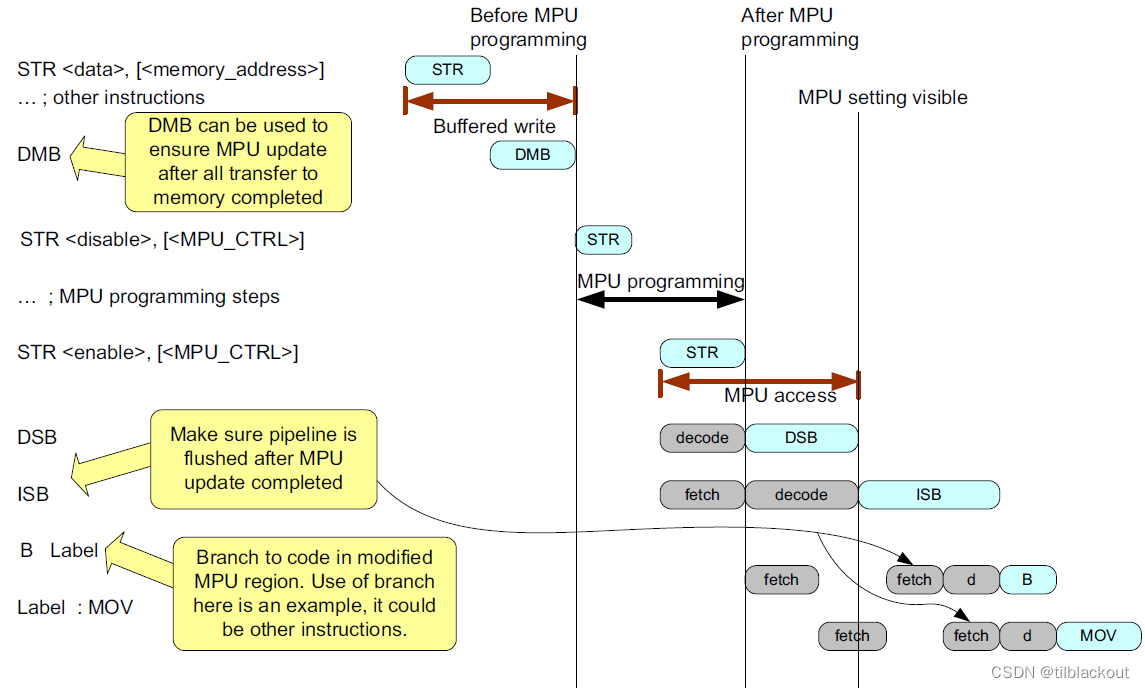
Finally, ISB is used when the fundamental rules of execution change. A prime example from your domain is programming a Memory Protection Unit (MPU).
When you reconfigure MPU regions, you are changing memory access permissions. After writing to the MPU configuration registers, the CPU's pipeline might still contain instructions that were fetched before the change, under the old rules. Executing these could violate the new memory protection scheme.
The correct sequence is:
- Write to MPU registers.
- Execute a
DSBto ensure those writes to the MPU (which is a memory-mapped peripheral) are complete. - Execute an
ISBto flush the pipeline and ensure that any subsequent instruction fetches happen with the new MPU settings in effect.
Test your understanding!
You are writing a bootloader that copies the main application from flash memory into RAM and then jumps to it. Why might you need a DSB followed by an ISB right after the copy loop finishes and before you jump to the application's entry point in RAM?
Show answer
This is a case of self-modifying code from the processor's perspective (or at least, writing code that will soon be executed).
DSB: The copy loop involves a series of store instructions to write the application code into RAM. These writes might be buffered. TheDSBis needed to ensure that all of these store operations are fully completed and the entire application is actually present in RAM before you attempt to execute it.ISB: The instruction cache and pipeline might hold stale data from the RAM addresses you just overwrote (which previously contained garbage or zeros). TheISBflushes the pipeline and instruction cache, guaranteeing that when you jump to the application's start address, the CPU will fetch the new, correct instructions from RAM.
Without this sequence, you risk jumping to a location where the code hasn't fully arrived from the write buffer, or executing stale instructions from the cache.
Interview Corner
Mastering this topic will set you apart in a technical interview.
Q1: What is a memory barrier and why is it needed on ARM processors?
A: A memory barrier is an instruction that enforces an ordering constraint on memory operations. It's necessary on ARM because it has a weakly-ordered memory model, meaning the processor can reorder memory accesses for performance. In a multi-core system, this can break synchronization logic that relies on program order. Barriers are used to explicitly tell the processor "do not reorder accesses across this point."
Q2: Explain the difference between DMB, DSB, and ISB. Give a brief example use case for each.
A:
- DMB (Data Memory Barrier) enforces ordering. It ensures all memory accesses before it are observed before accesses after it, but it doesn't stop the CPU. It's used for synchronizing shared data between cores, like in a spinlock implementation.
- DSB (Data Synchronization Barrier) enforces completion. It stalls the CPU until all prior memory accesses are complete. It's used when synchronizing with hardware state, for example, ensuring data is written to a buffer in RAM before writing to a DMA controller's register to start a transfer.
- ISB (Instruction Synchronization Barrier) enforces context synchronization. It flushes the CPU pipeline and instruction caches. It's used after an operation that changes the execution context, like updating MPU settings, modifying page tables, or jumping to newly written code in memory.
Q3: What is the purpose of barrier qualifiers like ishst? Why not just use a full system barrier (dmb sy) everywhere?
A: Qualifiers make barriers more granular and performant. ishst means "Inner Shareable, Store-Store," which limits the barrier's scope. It only orders store operations against other stores, and only guarantees this ordering is visible within the local CPU cluster (the inner shareable domain). A full system barrier (dmb sy) is a "sledgehammer" approach—it orders all access types (loads and stores) and forces that ordering to be visible to every single component in the entire SoC. While always correct, it's unnecessarily expensive and hurts performance. Using the minimally intrusive barrier (ishst in this case) that satisfies the specific requirement of the algorithm is key to writing efficient low-level code.
Conclusion
Today, you've taken a deep dive into one of the most complex but crucial aspects of modern embedded programming. We've moved beyond simply knowing a barrier is needed to understanding why it's needed and which specific barrier to use.
Key Takeaways:
- ARM's weakly-ordered memory model allows reordering of memory accesses for performance, which can break multi-core synchronization.
DMBis an ordering barrier, used to sequence memory accesses between observers (e.g., two CPU cores).DSBis a completion barrier, used to ensure memory operations are finished before the CPU proceeds, which is vital for hardware interaction.ISBis a pipeline flush barrier, used to synchronize the execution context itself.- Using qualifiers like
ishandstallows for minimally intrusive barriers, which is critical for balancing correctness and performance.
Next Lesson Preview:
Barriers ensure writes become visible in the correct order, but caches introduce another problem: where is the "memory" that other cores see? A write might be sitting in one core's local L1 cache, invisible to another core. In our next lesson, we will explore cache coherency issues in multi-core systems and the role of hardware coherency mechanisms like the MESI protocol to solve them.