Hello! Welcome to the final lesson in your module on Functional Safety.
In our last lesson, we explored temporal safety and implemented a deadline monitoring mechanism to detect timing faults. Detecting a fault is the first critical step, but a complete safety mechanism must also report that fault so the system can take appropriate action. Today, we'll connect the detection to the reporting.
The learning outcome for this lesson is to integrate a driver with the AUTOSAR Development Error Tracer (DET) module for runtime fault reporting. This is a fundamental skill in AUTOSAR BSW development and directly ties into the requirements of ISO 26262 Part 6 for software error handling. We'll explore what the DET is, how it differs from other diagnostic modules you're familiar with, and how to use its API within your own driver code.
1. The AUTOSAR Diagnostic Landscape: DET vs. DEM
In the complex world of AUTOSAR diagnostics, two modules often cause confusion: the Diagnostic Event Manager (DEM) and the Development Error Tracer (DET). Given your experience with AUTOSAR, clarifying this distinction is crucial for a senior-level interview.
- DEM (Diagnostic Event Manager): This is a powerful, complex module used for production diagnostics. It manages Diagnostic Trouble Codes (DTCs), stores event data and freeze frames in non-volatile memory, and communicates with external test tools via the DCM (Diagnostic Communication Manager). It is designed to diagnose faults that occur in the field.
- DET (Development Error Tracer): This is a very simple, lightweight module for reporting development errors—that is, software bugs. Examples include passing a null pointer to an API, calling a function with an invalid parameter, or using a module before it's initialized. DET is primarily intended for use during the development and integration phases and is typically disabled and compiled out of the final production software.
To get a clear overview, let's watch a short video that introduces the key diagnostic modules.
This clip from 'AUTOSAR DIAGNOSTIC STACK' by ANCIT Technical Videos provides a concise explanation of the purpose of the DET module and contrasts it with the runtime-focused DEM.
Watch from 00:57:06 to 00:58:42. Pay close attention to the statement that DET is 'primarily focused more towards development' and is distinct from the runtime error capture handled by DEM.
2. Understanding Development Errors
AUTOSAR formally classifies different types of errors. The General Specification of Basic Software Modules is the authoritative source for these definitions.
General Specification of Basic Software Modules
Let's read the official AUTOSAR definition of development errors and how they are handled. This will establish the formal basis for our work with the DET.
Please read section 7.2, 'Error Handling,' focusing on 7.2.1, 'Classification,' and 7.2.2.1, 'Synopsis' of development errors. Notice the key points: development errors are software bugs, and they are reported to the DET via Det_ReportError. Crucially, they are expected to behave like assertions, halting the normal flow of execution.
As the specification states, the primary purpose of the DET is to catch programming errors. This is enforced by a configuration switch, <Ma>DevErrorDetect, which enables or disables these checks for each BSW module. When enabled, the module performs extra validation (e.g., on API parameters) and reports any failures to the DET.
3. Integrating a Driver with the DET
Now for the practical part. How do we call the DET from our own driver? The interface is straightforward and is defined in the Specification of Default Error Tracer.
The primary function is Det_ReportError.
Specification of Default Error Tracer
This is the official specification for the DET module. We will focus on the API definition for reporting development errors.
Please review section 8, 'API specification.' Focus on the function definition in 8.1.3.2, 'Det_ReportError'. Familiarize yourself with its signature and the meaning of its four parameters: ModuleId, InstanceId, ApiId, and ErrorId.
The function signature is:Std_ReturnType Det_ReportError(uint16 ModuleId, uint8 InstanceId, uint8 ApiId, uint8 ErrorId)
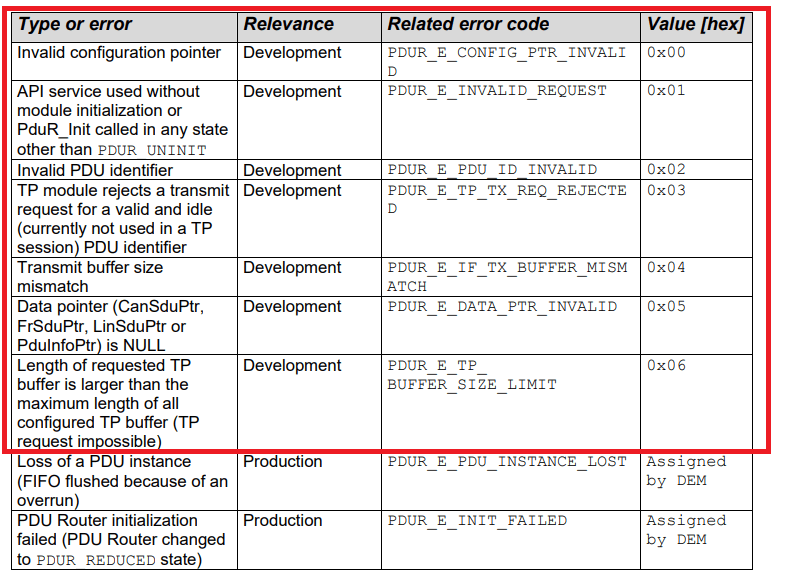
ModuleId: A unique ID assigned to each BSW module. For your own custom driver, you would typically be assigned a value from a reserved range.InstanceId: Identifies the specific hardware instance if your driver manages multiple identical peripherals (e.g., CAN0, CAN1, CAN2). For single-instance drivers, this is 0.ApiId: A unique ID for each API function within your driver. This helps pinpoint exactly which function the error occurred in.ErrorId: A unique ID for the specific error condition being reported (e.g.,MYDRIVER_E_PARAM_POINTER,MYDRIVER_E_UNINIT).
These IDs are defined as macros in the module's header files. The following image shows a typical error table for the AUTOSAR PDU Router module.
Code Example: Reporting a Temporal Fault
Let's modify the deadline monitor code from our previous lesson. If the monitor detects a timing failure, we will now report it to the DET. This is a perfect example of integrating a functional safety mechanism with the standard error reporting framework.
First, we define our error codes, typically in a MyDriver_Cfg.h or similar file.
// MyDriver_Cfg.h

// Set to STD_ON to enable development error checks for this module
#define MYDRIVER_DEV_ERROR_DETECT   STD_ON

// Module and Instance ID
#define MYDRIVER_MODULE_ID          ((uint16)200) // Example ID from user-defined range
#define MYDRIVER_INSTANCE_ID        ((uint8)0)

// API IDs
#define MYDRIVER_PROCESS_EVENT_API_ID ((uint8)0x01)

// Error IDs for the Process Event API
#define MYDRIVER_E_DEADLINE_MIN     ((uint8)0x01) // Task finished too fast
#define MYDRIVER_E_DEADLINE_MAX     ((uint8)0x02) // Task finished too slow
#define MYDRIVER_E_DEADLINE_TIMEOUT ((uint8)0x03) // Task never finished
Now, we integrate the Det_ReportError call into our logic.
// MyDriver.c

#include "MyDriver.h"
#include "MyDriver_Cfg.h"
#include "Det.h" // Include the DET header

// ... (deadline_monitor_t struct and functions from previous lesson) ...

void process_critical_event(void) {
    static deadline_monitor_t my_monitor = {
        .min_us = 100,
        .max_us = 500,
        .status = MONITOR_STATUS_IDLE
    };

    deadline_monitor_start(&my_monitor);

    // ... critical event processing code ...

    deadline_monitor_end(&my_monitor);

    // Check status and report errors if DEV_ERROR_DETECT is enabled
#if (MYDRIVER_DEV_ERROR_DETECT == STD_ON)
    if (my_monitor.status == MONITOR_STATUS_FAILED_MIN) {
        (void)Det_ReportError(MYDRIVER_MODULE_ID,
                              MYDRIVER_INSTANCE_ID,
                              MYDRIVER_PROCESS_EVENT_API_ID,
                              MYDRIVER_E_DEADLINE_MIN);
    } else if (my_monitor.status == MONITOR_STATUS_FAILED_MAX) {
        (void)Det_ReportError(MYDRIVER_MODULE_ID,
                              MYDRIVER_INSTANCE_ID,
                              MYDRIVER_PROCESS_EVENT_API_ID,
                              MYDRIVER_E_DEADLINE_MAX);
    }
#endif
}

// The supervisor check for timeouts also needs to report errors
void check_all_monitors_periodically(void) {
    // ... loop through all active monitors ...
    deadline_monitor_check_timeout(&a_monitor);

#if (MYDRIVER_DEV_ERROR_DETECT == STD_ON)
    if (a_monitor.status == MONITOR_STATUS_FAILED_TIMEOUT) {
        (void)Det_ReportError(MYDRIVER_MODULE_ID,
                              MYDRIVER_INSTANCE_ID,
                              // Use a different API ID for the supervisor task
                              MYDRIVER_SUPERVISOR_API_ID,
                              MYDRIVER_E_DEADLINE_TIMEOUT);
    }
#endif
}
This pattern, where reporting calls are conditionally compiled using the _DEV_ERROR_DETECT switch, is standard practice across all AUTOSAR BSW modules.
Test your understanding! (Interview Question)
In a production build, MYDRIVER_DEV_ERROR_DETECT is set to STD_OFF. What is the performance impact of the if (my_monitor.status == ...) checks that remain in the code? How could you eliminate them entirely from the production build?
Show answer
Even with the Det_ReportError call removed by the preprocessor, the if condition itself is still compiled and executed, consuming a small number of CPU cycles.
A common and more efficient practice is to wrap the entire check-and-report block in the #if directive. For even cleaner code, you can define a wrapper macro in your module's header.
Example:
// In MyDriver.h
#if (MYDRIVER_DEV_ERROR_DETECT == STD_ON)
  #define MYDRIVER_REPORT_ERROR(ApiId, ErrorId) \
    (void)Det_ReportError(MYDRIVER_MODULE_ID, MYDRIVER_INSTANCE_ID, (ApiId), (ErrorId))
#else
  #define MYDRIVER_REPORT_ERROR(ApiId, ErrorId) // Resolves to nothing
#endif

// In MyDriver.c
if (my_monitor.status == MONITOR_STATUS_FAILED_MIN) {
    MYDRIVER_REPORT_ERROR(MYDRIVER_PROCESS_EVENT_API_ID, MYDRIVER_E_DEADLINE_MIN);
}
In a production build (STD_OFF), the preprocessor will replace MYDRIVER_REPORT_ERROR(...) with an empty statement. A good compiler will then recognize that the if statement has an empty body and perform dead code elimination, removing the if check entirely. This results in zero runtime overhead.
4. What Happens When an Error is Reported?
The AUTOSAR standard specifies the Det_ReportError API, but it deliberately does not specify its implementation. The rationale is that the desired behavior is highly project- and tool-specific. However, the behavior should be assertion-like and is not expected to return.
Common implementations of Det_ReportError include:
- Storing the four ID parameters in a global struct.
- Entering an infinite loop (
while(1);). - Triggering a software breakpoint if a debugger is connected.
- Forcing a system reset.
The DET specification allows for "Error Hooks"—configurable callout functions that are executed when an error is reported. This provides a standardized way for an integrator to add custom debugging functionality. The sequence diagrams in the DET spec illustrate this flow clearly.
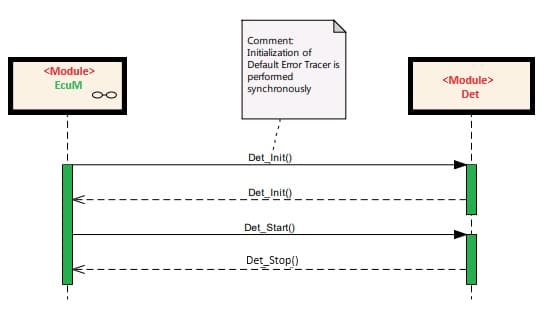
The more interesting sequence is the error report itself.
Specification of Default Error Tracer
Let's look at the sequence diagrams from the DET specification to see the flow of control when Det_ReportError is called.
Examine section 9, 'Sequence diagrams.' Compare 'Figure 2 – Det_ReportError with configured hook' and 'Figure 3 – Det_ReportError without configured hook.' Notice that in both cases, the final action is 'HALT,' reinforcing the assertion-like nature of development error reporting.
Conclusion
This lesson completes our journey through the key software aspects of ISO 26262. We've bridged the gap between detecting a fault (temporal monitoring) and reporting it using a standard AUTOSAR mechanism. You are now equipped to discuss and implement robust error handling in a BSW driver, from detection to reporting.
Key Takeaways:
- DET vs. DEM: DET is for reporting software bugs during development (e.g., invalid API parameters), while DEM is for handling diagnostic events and DTCs in production.
Det_ReportError: This is the core API for reporting development errors. It takes aModuleId,InstanceId,ApiId, andErrorIdto precisely locate the fault.- Configuration Control: DET checks and reporting are controlled by the
<ModuleName>_DEV_ERROR_DETECTpre-compile switch, allowing them to be completely removed from the production build to eliminate overhead. - Assertion-like Behavior: A call to
Det_ReportErroris considered fatal for the system's normal operation and is not expected to return. The typical behavior is to halt the processor.
With the completion of this lesson, you have finished the functional safety module and, indeed, the entire course. You have methodically covered the core competencies for an advanced embedded driver development role, from low-level ARM assembly and peripheral programming to RTOS concepts, advanced optimizations, and functional safety. Congratulations on your dedication to this comprehensive preparation! We wish you the best of luck in your upcoming interviews.