Hello! Welcome to the next lesson in our journey to master secure cloud solutions.
In our last lesson, you successfully secured a .NET web API by requiring a valid access token for entry. We noted, however, that storing sensitive data like client IDs and secrets directly in appsettings.json is a common practice in development but poses a significant security risk in production environments.
Today's lesson directly addresses that problem. We will focus on the learning outcome: Describe the purpose of Azure Key Vault for managing secrets, keys, and certificates. You will learn about Azure's dedicated service for secure secret management, which is the industry standard for building secure, robust applications. This lesson will focus on the "what" and "why" of Key Vault, setting the stage for the next lesson where you will programmatically access it.
1. The Problem with Configuration-Based Secrets
As an experienced developer, you know that applications require sensitive information to function:
- Database connection strings
- API keys for third-party services
- Client secrets for OAuth 2.0 flows
- Certificates for TLS/SSL communication
Storing this information in configuration files like appsettings.json or as environment variables has several drawbacks:
- Security Risk: If the source code or a deployment package is leaked, your secrets are exposed.
- Management Overhead: Managing different secrets for development, staging, and production environments can be complex and error-prone.
- Access Control: It's difficult to grant granular access. A developer who can see the code can see all the secrets, even if they only need one.
- Auditing: It's hard to track who accessed a secret and when.
Azure Key Vault is designed to solve these problems.
2. Introducing Azure Key Vault
Azure Key Vault is a cloud service that provides a secure, centralized store for your application's sensitive information. Instead of storing secrets in your application's configuration, you store them in a Key Vault and your application retrieves them at runtime.
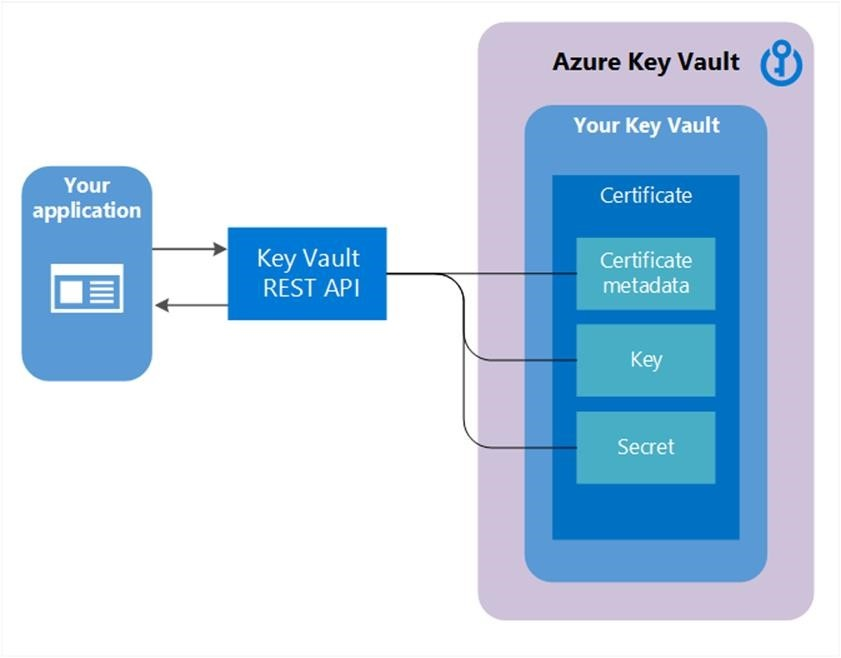
To start, let's get a formal overview from the official Microsoft documentation.
This document, 'About Azure Key Vault', provides a concise introduction to the service. It outlines its primary functions and the key problems it solves.
Please read the introduction and the section 'Why use Azure Key Vault?'. Focus on the three primary functions listed (Secrets, Key, and Certificate Management) and the benefits of centralizing secrets.
As the article highlights, Key Vault provides several key benefits:
- Centralizes application secrets, reducing the chance of accidental leaks.
- Securely stores secrets and keys, with access controlled by Microsoft Entra ID.
- Monitors access and use, providing audit trails.
- Simplifies administration and integrates with other Azure services.
3. The Three Pillars of Key Vault
Key Vault manages three distinct types of objects. Understanding the difference between them is crucial for the AZ-204 exam and for proper application architecture.
The following video provides an excellent breakdown of these components.
Azure Key Vault Security Guide | Managed Identity for Web API Secrets (Hands-On Demo!)
The video 'Azure Key Vault Security Guide' gives a clear, real-world explanation of keys, secrets, and certificates.
Watch the segment from 01:53 to 05:38. Pay close attention to the 'When to use...' examples for each component, as they clearly illustrate the distinct purpose of each.
Let's summarize and expand on what the video explained:
a) Secrets
- What they are: Any sensitive string of up to 25KB. This is the most common object type you'll use.
- Purpose: To store tokens, passwords, connection strings, and API keys.
- Use Case: This is the direct solution to our
appsettings.jsonproblem. You would store the database connection string or the client secret from your Entra ID app registration as a secret in Key Vault.
b) Keys
- What they are: Cryptographic keys (e.g., RSA, EC) used for encryption and digital signing. Crucially, your application doesn't see the key material itself; it asks Key Vault to perform cryptographic operations on its behalf.
- Purpose: To encrypt data at rest, sign JWTs, or verify signatures.
- Use Case: Imagine you have an Azure Storage Account. You can configure Azure Storage Service Encryption (SSE) to use a key stored in your Key Vault (a "customer-managed key") to encrypt all the data in that storage account. This gives you control over the encryption key lifecycle.
The next video demonstrates this exact use case, making the abstract concept of a "key" very concrete.
AZ-204 Key Vault Masterclass: Secrets, Security, and Best Practices Explained
In 'AZ-204 Key Vault Masterclass', the presenter demonstrates how to use a cryptographic key from Key Vault to encrypt a storage account.
Watch the demonstration from 42:13 to 46:25. You don't need to perform the steps, but observe how a key is created in Key Vault and then selected in the Storage Account's encryption settings.
c) Certificates
- What they are: A higher-level object that bundles a private key, a public key, and associated metadata. Key Vault manages the entire lifecycle of the certificate.
- Purpose: To manage and deploy TLS/SSL certificates for securing web traffic (HTTPS).
- How it works: When you create a certificate in Key Vault, it automatically creates a corresponding key (the private key) and a secret (the public certificate as a string).
- Use Case: You can provision a TLS certificate in Key Vault and then configure an Azure App Service to use it directly, enabling HTTPS for your web application and automating certificate renewal.
4. Key Vault's Core Security Features
Beyond just storing these objects, Key Vault provides critical security features you need to know.
Standard vs. Premium Tiers
Key Vault offers two pricing tiers, with the main difference being the level of hardware protection for keys.
- Standard Tier: Uses software-protected keys. This is suitable for most development and production scenarios.
- Premium Tier: Uses keys protected by Hardware Security Modules (HSMs). HSMs are physical devices that provide a very high level of security, ensuring that the key material never leaves the hardware boundary. This is required for applications with high security or compliance requirements (e.g., FIPS 140-2 Level 3).
The video below explains the difference in more detail.
AZ-204 Key Vault Masterclass: Secrets, Security, and Best Practices Explained
This segment from the 'AZ-204 Key Vault Masterclass' video compares the Standard and Premium tiers, highlighting the role of HSMs.
Watch from 04:45 to 07:51. Focus on understanding what an HSM is and why an organization would choose the Premium tier.
Soft Delete and Purge Protection
What happens if you accidentally delete a critical secret? Key Vault has a built-in safety net.
- Soft Delete: When enabled (which is now by default and cannot be disabled), a deleted secret, key, or certificate is not permanently removed. Instead, it is moved to a "soft-deleted" state for a configurable retention period (7-90 days). During this period, it can be recovered.
- Purge Protection: This is an optional but recommended feature. When enabled, a soft-deleted item cannot be manually purged (permanently deleted) during its retention period. This protects against a rogue administrator or attacker maliciously deleting and purging a key to cause a denial-of-service.
This next clip provides a perfect demonstration of these two features.
AZ-204 Key Vault Masterclass: Secrets, Security, and Best Practices Explained
This final video clip clearly demonstrates how soft delete and purge protection work in practice.
Watch from 37:55 to 42:00. Observe what happens when a secret is deleted with and without purge protection enabled. Note the difference in the options available in the 'Manage deleted secrets' view.
Conclusion
In this lesson, we have established the fundamental purpose of Azure Key Vault. It is not just a place to store strings; it is a comprehensive service for managing the lifecycle of your application's most sensitive components.
Key Takeaways:
- Purpose: Key Vault solves the problem of storing sensitive information in code or configuration by providing a centralized, secure, and auditable cloud service.
- Core Components:
- Secrets: For storing passwords, connection strings, and API keys.
- Keys: For performing cryptographic operations like encrypting data at rest.
- Certificates: For managing TLS/SSL certificates for services like web apps.
- Key Security Features:
- HSM-backed keys in the Premium tier provide the highest level of protection.
- Soft Delete and Purge Protection are crucial safety mechanisms to prevent data loss from accidental or malicious deletion.
You now have the conceptual foundation of Azure Key Vault. You understand what it is, what problems it solves, and its main features.
Next Steps
Knowing what Key Vault is for is the first step. The next logical step is to use it. In our next lesson, Retrieve secrets from Azure Key Vault programmatically using the Azure.Security.KeyVault.Secrets .NET SDK, you will write C# code to connect your .NET application to Key Vault and finally remove that sensitive connection string from your appsettings.json file.