Hello! Welcome to the first lesson of our new module, "Developing Solutions with Cosmos DB."
In the previous module, we mastered Azure Blob Storage, learning how to manage unstructured data, secure it, and handle concurrency for individual blobs using leases. Now, we are shifting gears significantly. We move from a simple storage service to a powerful, globally-distributed, multi-model database service designed for high performance and availability at a massive scale: Azure Cosmos DB.
This lesson addresses the foundational concepts you need to understand before working with Cosmos DB. Our learning outcome is to: Describe the Azure Cosmos DB resource model, supported APIs, and consistency levels.
We will explore the core building blocks of Cosmos DB, the different "personalities" it can adopt to suit your application's needs, and the crucial concept of data consistency in a distributed world.
1. Introduction to Azure Cosmos DB
At its heart, Azure Cosmos DB is a fully managed NoSQL database for modern app development. It's built to handle enormous amounts of data and requests from users spread all over the world, with guaranteed low latency.
Unlike a traditional SQL database where you might spend considerable effort managing schemas and scaling a single server (scaling up), Cosmos DB is designed to scale out horizontally across many machines and even across the globe.
To get a feel for its key features, let's start with a short video.
Azure Cosmos DB Tutorial | Globally distributed NoSQL database
This video from Adam Marczak - Azure for Everyone provides an excellent overview of what makes Cosmos DB unique.
Watch the introduction from the beginning up to 03:59. As you watch, focus on these key features: global distribution, elastic scale, low latency, and its schema-agnostic nature.
As the video highlighted, Cosmos DB's core data model is based on JSON documents. This should feel familiar given your experience with REST APIs and web development. Instead of rigid tables and columns, you work with flexible key-value documents, which allows for evolving application requirements without complex database migrations.
2. The Cosmos DB Resource Model
Every Azure service has a resource hierarchy, and Cosmos DB is no exception. Understanding this structure is fundamental to provisioning and managing your database.
Let's review the official Microsoft documentation which details this hierarchy.
Databases, containers, and items in Azure Cosmos DB
This Microsoft Learn article provides the definitive breakdown of the Cosmos DB resource model. It clearly defines each component in the hierarchy.
Read the sections 'Elements in an Azure Cosmos DB account', 'Azure Cosmos DB databases', 'Azure Cosmos DB containers', and 'Azure Cosmos DB items'. Pay close attention to the tables that show how entities like 'container' and 'item' map to different API-specific names.
To summarize and structure what you've just read, the hierarchy is as follows:
-
Azure Cosmos DB Account: This is the top-level resource you create in your Azure subscription. It's the unit of global distribution and billing. You configure settings like geographic regions and consistency levels at the account level.
-
Database: Inside an account, you can create one or more databases. A database is a logical unit of management, much like a database in SQL Server or a namespace. It groups together containers.
-
Container: This is where your data lives and is the core unit of scalability.
- It is analogous to a
Tablein a traditional SQL database or aCollectionin MongoDB. - A container holds a set of items (your data).
- Crucially, a container is where you provision throughput (measured in Request Units per second, or RU/s), which determines the performance you get.
- It is also at the container level that you define a partition key, a concept we will explore in depth in the next lesson.
- It is analogous to a
-
Item: An item is the smallest unit of data, representing a single document within a container.
- For the Core (SQL) API, an item is a JSON document.
- In other APIs, it could be a row, a document, or a node/edge in a graph.
- Each item must have a unique
idproperty within its logical partition.
This hierarchical model provides a clear structure for organizing and scaling your data.
3. Supported APIs: The "Personalities" of Cosmos DB
One of the most powerful features of Cosmos DB is its multi-model nature. When you create a Cosmos DB account, you choose an API that determines the data model and the protocol you'll use to interact with your data. This choice is permanent for the life of the account.
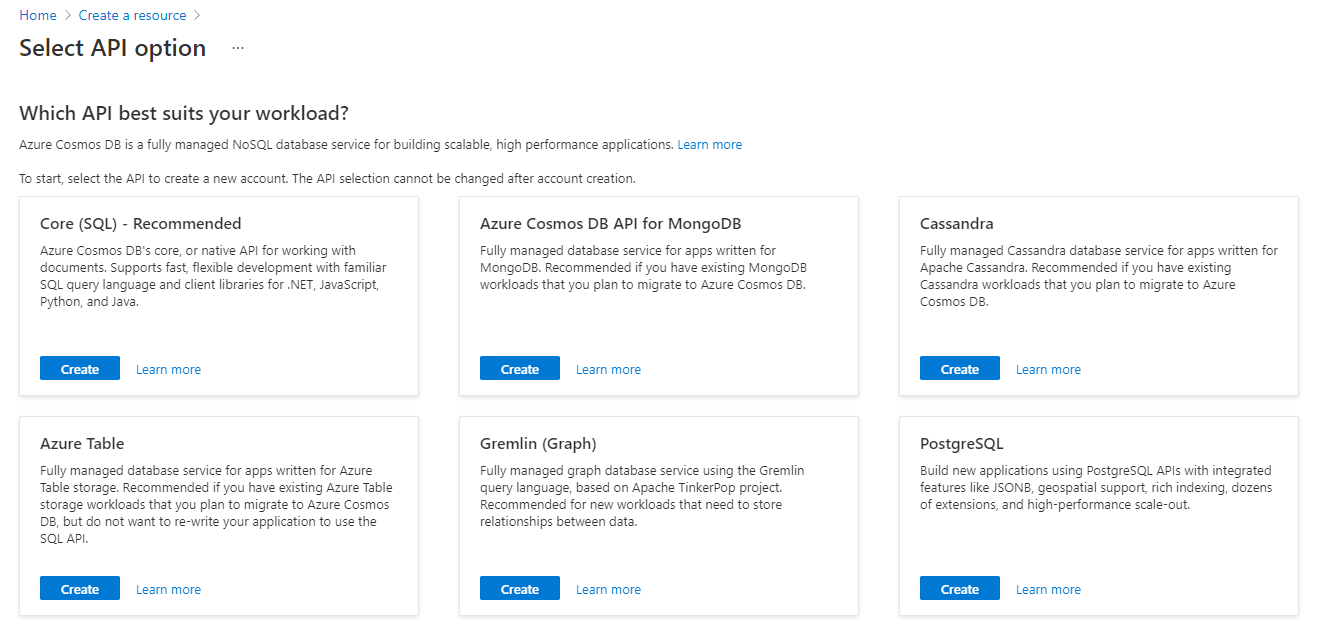
The main APIs available are:
- Core (SQL): This is the native, default API for Cosmos DB. It stores data in a document format and allows you to use a familiar SQL-like query language over your JSON documents. Given your background in SQL and C#, this is the API we will focus on for this course.
- API for MongoDB: Provides a wire-protocol compatible endpoint for MongoDB. This allows you to use existing MongoDB drivers, SDKs, and tools to interact with Cosmos DB, making it a great choice for migrating existing MongoDB applications to Azure.
- API for Cassandra: Similar to the MongoDB API, this provides compatibility with the Cassandra Query Language (CQL), enabling migration of Apache Cassandra applications.
- API for Gremlin: This API is for graph databases. You model your data as vertices and edges and query it using the Gremlin query language.
- API for Table: Provides compatibility with the Azure Table Storage SDK, offering a premium, low-latency alternative for applications that were built for Table Storage.
Choosing the right API is a critical design decision based on your team's existing skills and application requirements. For new .NET projects, the Core (SQL) API is almost always the right choice.
4. Consistency Levels: The Core Trade-Off
In the last module, we dealt with locking a single blob to prevent concurrent writes. In a globally distributed database like Cosmos DB, the problem is much more complex. When you write data to a database replicated in both the US and Europe, how quickly does that data show up for a user reading from the European replica? And is it guaranteed to be the absolute latest version?
This is the essence of data consistency. Cosmos DB offers a spectrum of five well-defined consistency levels, allowing you to make an explicit trade-off between consistency, availability, and performance.
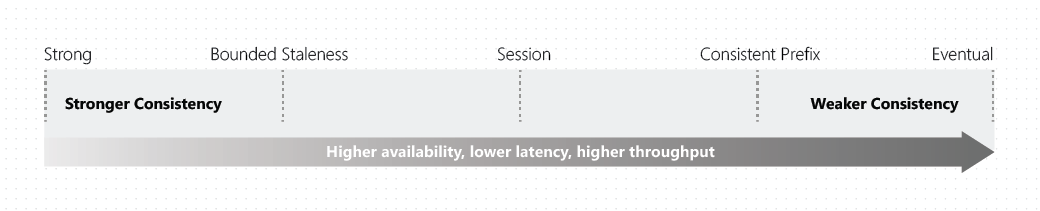
To understand each of these levels, watch the following video from the Microsoft Azure team. It uses excellent analogies to make these abstract concepts concrete.
Consistency | Azure Cosmos DB Essentials Season 1
This video from the 'Cosmos DB Essentials' series breaks down the five consistency levels, explaining what each one guarantees and the ideal use case.
Watch the entire video (about 6 minutes). Focus on understanding the guarantee provided by each level and the example application scenario (e.g., shopping cart, group chat).
Let's summarize the five levels, from strongest to weakest:
-
Strong:
- Guarantee: All reads are guaranteed to return the most recent committed version of an item.
- Analogy: An online auction where everyone must see the same latest bid.
- Trade-off: Highest consistency but also highest latency and lowest read throughput, as reads may need to cross regions to ensure correctness.
-
Bounded Staleness:
- Guarantee: Reads might lag behind writes by a configurable amount, either by a number of versions (
K) or a time period (T). - Analogy: A stock ticker application that can be a few seconds out of date.
- Trade-off: Strong consistency within the staleness window, but with better read performance than Strong.
- Guarantee: Reads might lag behind writes by a configurable amount, either by a number of versions (
-
Session:
- Guarantee: Within a single client session, you are guaranteed to read your own writes. This is the default level.
- Analogy: Adding an item to an online shopping cart and seeing it immediately upon refreshing the page. Other users might not see your cart's contents right away.
- Trade-off: The most popular choice, offering a great balance of low-latency reads/writes with intuitive behavior for user-centric applications.
-
Consistent Prefix:
- Guarantee: Reads will never see out-of-order writes. If you write A, then B, then C, a client might see A, or A and B, or A, B, and C, but never A and C.
- Analogy: A group chat where messages appear in the order they were sent.
- Trade-off: Guarantees order, but allows for more staleness than Session or Bounded Staleness.
-
Eventual:
- Guarantee: No ordering guarantee. With enough time, replicas will eventually converge.
- Analogy: A "like" counter on a social media post, where the exact, real-time count is not critical.
- Trade-off: Lowest latency and highest read throughput, but with the weakest consistency guarantees.
To deepen your understanding, you can refer to the official documentation on consistency levels. The article "Consistency level choices" (LINK) is an excellent, detailed resource that you may want to bookmark for future reference.
Conclusion
In this introductory lesson, we've unpacked the three most fundamental concepts of Azure Cosmos DB that are essential for the AZ-204 exam and for any developer starting with the service.
Key Takeaways:
- Resource Model: Cosmos DB has a clear hierarchy: Account > Database > Container > Item. The container is the key unit of scalability and where you store your items (JSON documents).
- Supported APIs: Cosmos DB is a multi-model database. You choose an API (like Core SQL, MongoDB, Cassandra) at account creation, which tailors the database's behavior to your application's needs. For new .NET apps, Core (SQL) is the standard choice.
- Consistency Levels: You must choose from five levels (Strong, Bounded Staleness, Session, Consistent Prefix, Eventual) that represent a direct trade-off between data consistency and performance/availability. Session consistency is the default and most widely used level.
Next Steps
We've learned that the container is the unit of scalability. But how does it actually scale? The answer lies in partitioning. In our next lesson, we will focus on the learning outcome: "Explain the role of partition keys in Cosmos DB and best practices for selection." This is arguably the most important concept for designing a high-performance, cost-effective Cosmos DB solution.