Hello! Welcome to the final lesson in our module on Azure API Management.
In our last session, you successfully implemented a crucial security measure by locking down your backend API, ensuring it can only be accessed through the APIM gateway. With your API now published, secured, and properly channeled, we turn to the final piece of the API lifecycle puzzle: managing its evolution.
APIs are not static; they change over time to add new features, fix bugs, or improve performance. Sometimes, these changes are "breaking," meaning they are not backward-compatible with applications that currently use the API. How do you roll out a new, improved version without disrupting your existing users?
This lesson answers that question. We will focus on how to configure versioning for an API in API Management. You will learn about different versioning strategies and how to implement them, allowing you to manage your API's lifecycle gracefully and professionally.
1. The "Why" of API Versioning
As a developer, you know that evolving an application's interface can be tricky. The same applies to REST APIs. A breaking change is any modification to your API that could cause existing client applications to fail. Common examples include:
- Changing the data format of a response (e.g., from an integer to a string).
- Renaming or removing a field in the JSON payload.
- Removing an API endpoint or operation.
- Changing an authentication mechanism.
Introducing such changes to a live API without a versioning strategy would be disruptive. API versioning allows you to publish multiple versions of your API simultaneously, giving clients the time to migrate to the new version at their own pace.
To understand the core concepts, let's start with a foundational resource from Microsoft.
Versions in Azure API Management
This document, 'Versions in Azure API Management', explains why versions are necessary and what capabilities APIM provides. It's a great conceptual overview before we get hands-on.
Please read the introduction to understand the purpose of versions and the key features APIM offers for managing them.
2. Versioning Schemes in API Management
APIM provides three standard methods, or "schemes," to let a client specify which version of an API it wants to call.
Let's explore these schemes.
Versions in Azure API Management
This section of the same document details the three versioning schemes. Your experience with REST APIs will make these patterns familiar.
Read the 'Versioning schemes' section to understand path-based, header-based, and query string-based versioning. Pay attention to the example URLs for each.
To summarize the three schemes:
-
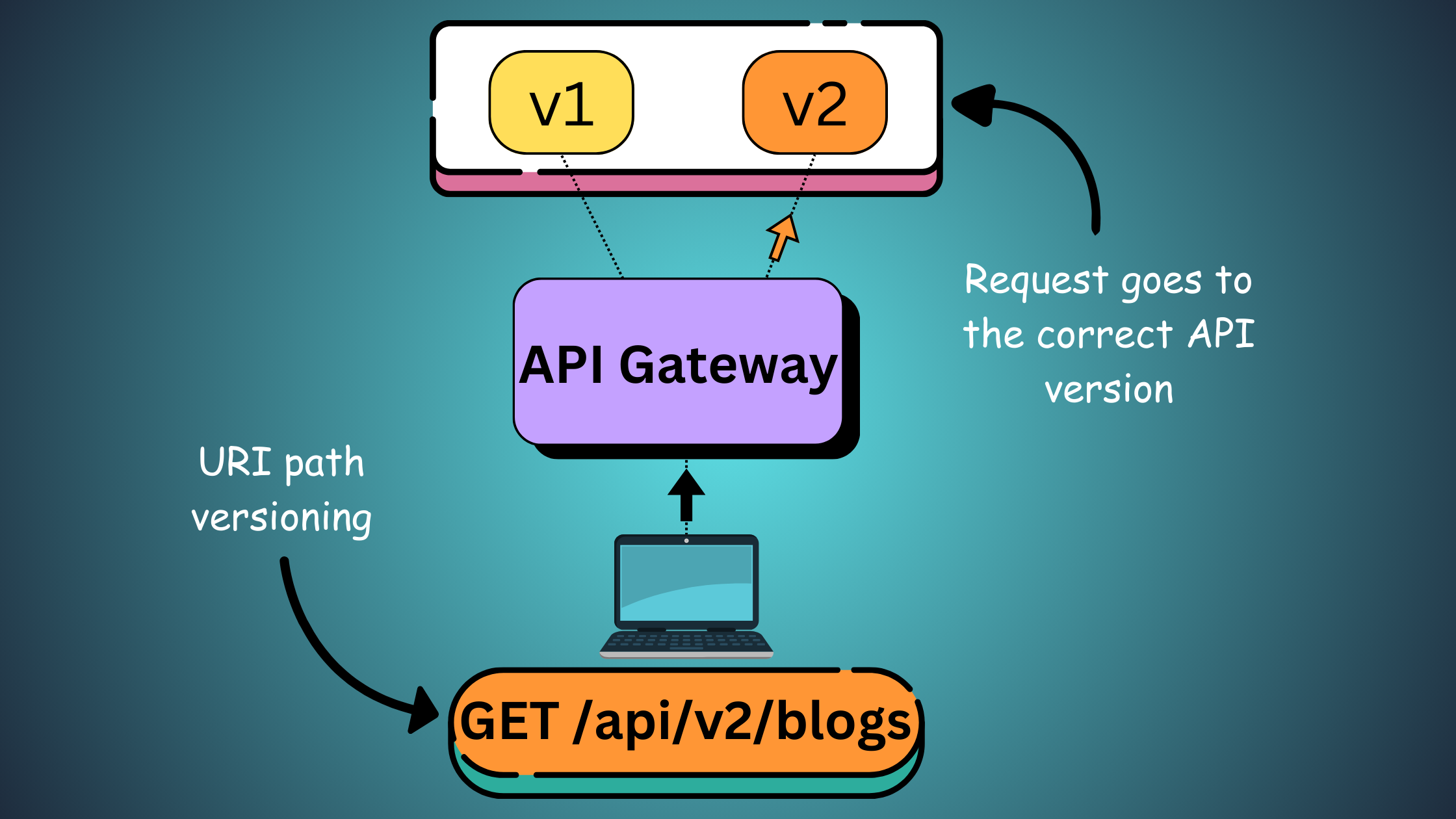
Path-based: The version identifier is part of the URL path. This is very explicit and a common best practice.
Example:https://my-apim.azure-api.net/api/v2/weatherforecast -
Header-based: The version is specified in a custom HTTP request header.
Example:GET /api/weatherforecastwith headerApi-Version: v2 -
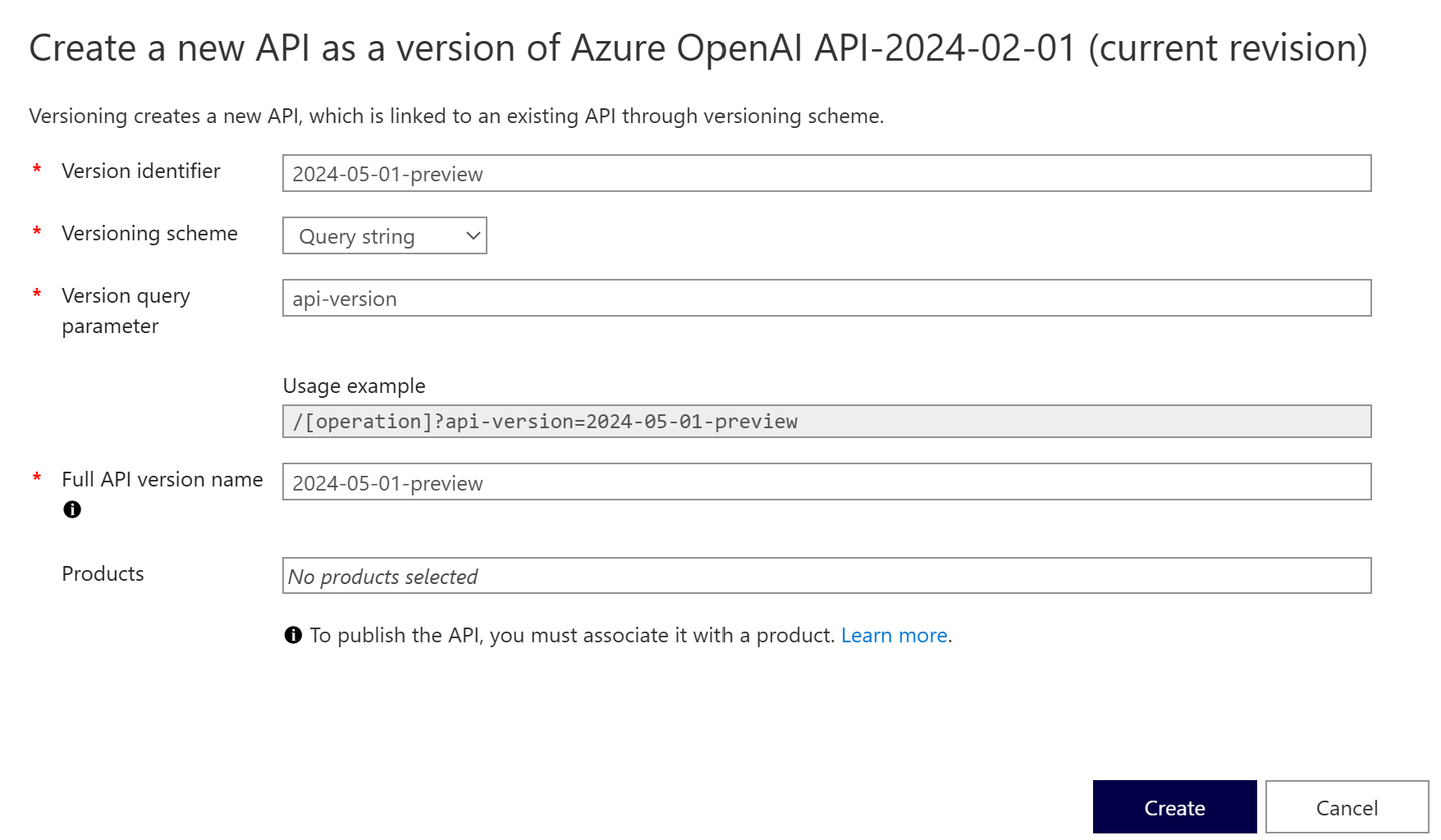
Query string-based: The version is passed as a query parameter in the URL.
Example:https://my-apim.azure-api.net/api/weatherforecast?api-version=v2
The path-based approach is often favored because it makes the resource URLs unique and unambiguous.
While we will use path-based versioning in our hands-on exercise, it's good to see what the configuration for another scheme looks like in the portal.
3. A Critical Distinction: Versions vs. Revisions
Before we implement versioning, it's essential to understand the difference between Versions and Revisions in APIM. This is a common point of confusion and a likely topic for the AZ-204 exam.
Versions in Azure API Management
Let's revisit our conceptual document one last time to clarify this important distinction.
Read the short section 'Versions and revisions'. Focus on the intended use case for each feature.
Here's a summary to help solidify the concepts:
| Feature | Use Case | Impact on Clients | Coexistence |
|---|---|---|---|
| Versions | For breaking changes. | Creates a new, separate API endpoint. Clients must consciously opt-in to the new version. | Multiple versions (v1, v2, etc.) are online and callable at the same time. |
| Revisions | For non-breaking changes (e.g., bug fixes, adding documentation, adding optional fields). | Allows you to edit and test an API safely. Changes are not live until a revision is made "current." | You can have multiple offline revisions, but only one revision is "current" and live at any given time for a specific version. |
In short: use versions to evolve your API contract, and use revisions to safely update the implementation of a specific version.
4. Hands-On: Publishing a New API Version
Now, let's apply this knowledge by creating a v2 of the API you have been working with in this module. We will use the path-based versioning scheme.
This walkthrough will guide you through the process, which is a core skill for the exam.
Tutorial: Publish multiple versions of your API
We will now follow a Microsoft tutorial to add a new version to our existing API. This will walk you through the entire process in the Azure portal.
Read through the sections 'Add a new version', 'Choose a versioning scheme', 'Edit a version', 'Add the version to a product', and 'View the version in the developer portal'. Follow the steps in your own Azure portal to version your API.
Let's walk through the key steps from the tutorial together:
1. Add a New Version
- In the Azure portal, navigate to your APIM instance and select APIs.
- Find your API (e.g., the
WeatherForecastAPI). Click the ellipsis (...) and select + Add version.
2. Configure the Version
- In the "Create a new API as a version" dialog:
- Versioning scheme: Select Path.
- Version identifier: Enter
v2. This will be the segment in your URL (e.g.,/v2). - Products: Ensure your
Unlimitedproduct (or another product) is selected.
- Click Create.
3. Observe the Result: Version Sets and the 'Original' Version
- Back in the API list, you'll see your API is now a collapsible group called a Version Set.
- Inside, you will find two APIs:
- Original: This is your initial API. It remains available at the original URL (without a version path) to ensure backward compatibility for existing clients.
- v2: This is your new version, which is a completely separate API configuration that you can edit independently.
4. Test Your Versions
- Select the v2 API and go to the Test tab.
- Notice the Request URL now includes
/v2/. - Send a request. It should succeed with a 200 OK.
- Notice the Request URL now includes
- Now, select the Original API and go to its Test tab.
- The Request URL does not have a version segment.
- Send a request. This should also succeed.
You have successfully created a new version of your API while maintaining backward compatibility for existing consumers! You can now make breaking changes to the v2 API (e.g., add or remove operations, apply different policies) without affecting anyone using the Original version.
Conclusion
Congratulations on completing the API Management module! In this lesson, you mastered the critical skill of API versioning. You now understand how to manage your API's lifecycle, introduce breaking changes safely, and support multiple versions simultaneously.
Key Takeaways:
- API versioning is essential for evolving an API without disrupting existing clients.
- Azure API Management supports three versioning schemes: Path, Query string, and Header.
- Versions are used for breaking changes, allowing multiple API contracts to be live at once.
- Revisions are for non-breaking changes, providing a safe way to edit and deploy updates to a specific version.
- When you add a version to an unversioned API, APIM automatically creates an
Originalversion to ensure backward compatibility. All versions of a logical API are grouped into a Version Set.
Next Steps
With API Management now covered, you are equipped to build, secure, and manage robust API solutions in Azure.
In our next module, we will explore another powerful paradigm for cloud development: Developing Containerized Solutions. We'll begin by diving into the fundamentals of Docker, learning how to package your .NET applications into portable, efficient containers, and setting the stage for deploying them on Azure.