Hello! Welcome to the next stage of our content automation project.
In the last module, you successfully built and automated a data collection pipeline. Your system is now gathering a constant stream of articles, posts, and discussions from various tech sources. This is a fantastic foundation, but raw data is just noise. The real value lies in finding the signal within that noise.
This lesson marks our entry into the "Data Analysis & Trend Identification" module. Our goal today is to tackle the first and most crucial step in that process: clustering collected content using text embeddings to identify emerging topics.
We will explore how to transform unstructured text into a format that a machine can understand and group. By the end of this lesson, you will be able to take a collection of documents and automatically group them into semantically coherent topics, laying the groundwork for identifying what's currently trending in the tech world.
We will cover:
- The conceptual pipeline: Text -> Embeddings -> Dimensionality Reduction -> Clusters.
- An introduction to
BERTopic, a powerful tool that automates this entire process. - A hands-on activity to apply these techniques to sample data.
From Raw Text to Meaningful Clusters
Imagine you have a thousand articles. How would you group them? You'd likely read the headlines and summaries, and sort them into piles like "AI Developments," "New JavaScript Frameworks," or "Cloud Security." Our goal is to teach the machine to do this automatically.
The process involves three main steps, which are elegantly visualized in this diagram.
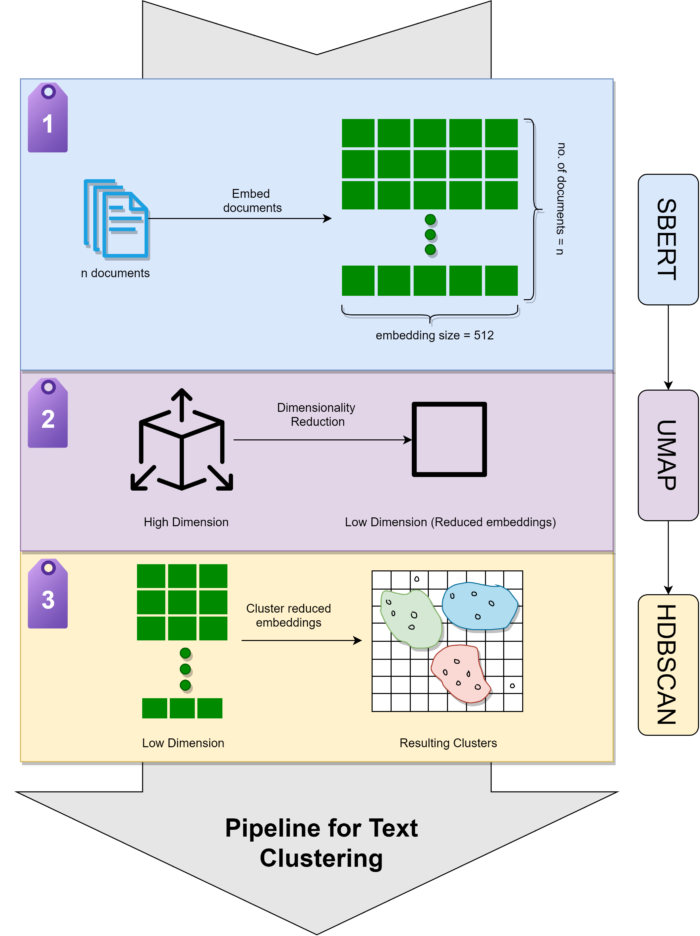
Let's break down each step.
1. Text Embeddings: Turning Words into Vectors
First, we must convert our text into a format that algorithms can process: numbers. We don't just want any numbers; we want numbers that capture the semantic meaning of the text. This is achieved through text embeddings.
An embedding is a high-dimensional vector (an array of numbers) that represents a piece of text. Models called Transformers are exceptionally good at creating these. Texts with similar meanings will have vectors that are "close" to each other in this high-dimensional space.
2. Dimensionality Reduction: Taming the Vectors with UMAP
The embeddings generated by transformer models can have hundreds or even thousands of dimensions. Clustering directly in such high-dimensional space is computationally expensive and often ineffective (a phenomenon known as the "curse of dimensionality").
To solve this, we use a dimensionality reduction technique. While you may have heard of PCA, a more modern and effective algorithm for this task is UMAP (Uniform Manifold Approximation and Projection). UMAP is particularly skilled at reducing the data to a much lower dimension (e.g., 2D or 3D for visualization) while preserving both the local and global structure of the data. This means that points that were close in the high-dimensional space remain close, and clusters that were far apart also remain far apart.
3. Clustering: Finding Groups with HDBSCAN
Once we have our low-dimensional embeddings, we can finally group them. A simple algorithm like K-Means could work, but it has a major drawback: you must specify the number of clusters (k) in advance. We don't know how many topics exist in our data.
This is why we use HDBSCAN (Hierarchical Density-Based Spatial Clustering of Applications with Noise). It's a more sophisticated algorithm that has two key advantages:
- It can find clusters of varying shapes and densities.
- It automatically determines the number of clusters and, crucially, identifies points that don't belong to any cluster, marking them as outliers or noise.
BERTopic: An Integrated Topic Modeling Framework
Implementing these three steps—embeddings, UMAP, and HDBSCAN—and wiring them together can be complex. Fortunately, there's a powerful Python library called BERTopic that orchestrates this entire pipeline for you.
Given your background, you'll appreciate that BERTopic isn't a black box. It's a modular framework that uses best-in-class components for each stage of the process.

To get a solid understanding of how these pieces fit together, the following video provides an excellent and detailed explanation. It walks through each component, explaining both the theory and the practical tuning parameters.
The video 'BERTopic Explained' by James Briggs is a deep dive into the inner workings of the library. It explains each component in detail, which is perfect for understanding how to tune the model for better performance.
Please watch the following segments: High-Level Overview (01:24 - 02:58): Get a quick introduction to the main components: transformer embeddings, UMAP, HDBSCAN, and c-TF-IDF. Transformer Embeddings (08:48 - 11:15): Understand how text is converted into high-dimensional vectors that capture meaning. Dimensionality Reduction with UMAP (11:15 - 31:42): This is a crucial section. Pay close attention to how UMAP works and how the n_neighbors parameter influences the balance between local and global structure. The comparison with PCA and t-SNE is very insightful. Clustering with HDBSCAN (31:42 - 37:23): See how HDBSCAN identifies clusters and how you can tune it using min_cluster_size and min_samples to get meaningful results. Topic Representation with c-TF-IDF (37:23 - 40:58): Learn how BERTopic analyzes the content of each cluster to assign descriptive keywords, which turns a cluster 'ID' into a human-readable 'topic'.
A Note on Technology: Python for ML, TypeScript for the App
Your main project is in TypeScript, which is excellent for building the application layer. However, for specialized data science and machine learning tasks like topic modeling, the Python ecosystem is currently unparalleled in its maturity and the breadth of available libraries like BERTopic, scikit-learn, and transformers.
A common and robust architectural pattern in situations like this is to create a polyglot system. Your main TypeScript application will orchestrate the workflow, and when it's time for heavy-duty ML analysis, it can invoke a dedicated Python script. The script runs the analysis and passes the structured data (e.g., as a JSON file) back to the TypeScript application.
This approach lets you use the best tool for each job, a principle you're likely familiar with from your work on event-driven architectures. For this module, we will be writing our analysis logic in Python.
Activity: Let's Find Some Topics
It's time to put theory into practice. You'll use a Python script with BERTopic to cluster a set of documents.
Assume your data collection pipeline has produced a file named collected_articles.json with the following structure:
[
  {"id": 1, "title": "New AI Model Unveiled", "content": "Researchers have released..."},
  {"id": 2, "title": "The Future of React", "content": "React 19 introduces..."},
  {"id": 3, "title": "Understanding Transformers", "content": "Transformer models are the basis..."},
  ...
]
Your task is to write a Python script that reads this data, identifies topics, and outputs a new file, topics.json, that contains the topic information.
For guidance, the following article provides a superb walkthrough of the entire process, from setting up the environment to customizing the BERTopic components.
Advanced Topic Modeling with BERTopic - Pinecone
The Pinecone article 'Advanced Topic Modeling with BERTopic' is an excellent textual guide that complements the video you just watched. It provides clear code examples for each step of the process.
First, quickly review the section 'BERTopic at a Glance' to see the basic usage. Then, focus on the section 'Back to BERTopic'. This section shows exactly how to initialize custom embedding, UMAP, and HDBSCAN models and pass them to a BERTopic instance for a fine-tuned analysis. This is the pattern you will use.
Setup:
- Make sure you have Python installed.
- Create a
requirements.txtfile and add the necessary libraries:bertopic sentence-transformers hdbscan umap-learn scikit-learn pandas - Install them using
pip install -r requirements.txt.
Implementation Steps:
-
Load Data: Read
collected_articles.jsoninto a pandas DataFrame. Create a list of the document contents. -
Initialize BERTopic: Create an instance of the
BERTopicmodel. For this first pass, you can start with the default settings. A good embedding model to start with isall-MiniLM-L6-v2. -
Fit and Transform: Use the
fit_transformmethod on your list of documents. This will perform all the steps: embedding, dimensionality reduction, and clustering. -
Inspect Topics: Use
topic_model.get_topic_info()to see a summary of the topics found, their size, and their representative keywords. -
Assign Topics to Documents: The
topicsarray returned byfit_transformcontains the topic ID for each of your original documents. Add this information back to your DataFrame. Topic-1is for outliers. -
Save Results: Save the DataFrame containing the original articles plus their assigned topic ID to a new file, and also save the topic information from
get_topic_info()so you have a key to what each topic ID means.
Here is a starter template for your Python script, cluster_articles.py:
import json
import pandas as pd
from bertopic import BERTopic


# 1. Load Data
with open('collected_articles.json', 'r') as f:
    data = json.load(f)

df = pd.DataFrame(data)
documents = df['content'].tolist()


# 2. Initialize BERTopic
# Using a specific embedding model and setting a min_topic_size
# to avoid creating lots of tiny topics.
embedding_model = "all-MiniLM-L6-v2"
topic_model = BERTopic(embedding_model=embedding_model, min_topic_size=5, verbose=True)


# 3. Fit model and transform documents
topics, probabilities = topic_model.fit_transform(documents)


# 4. Get Topic Information
topic_info = topic_model.get_topic_info()
print("Discovered Topics:")
print(topic_info)


# 5. Assign topics to original documents
df['topic_id'] = topics


# 6. Save Results
df.to_json('articles_with_topics.json', orient='records', indent=2)
topic_info.to_json('topic_summary.json', orient='records', indent=2)

print("\nClustering complete. Results saved to 'articles_with_topics.json' and 'topic_summary.json'.")


# You can also visualize the topics (requires plotly)
# fig = topic_model.visualize_topics()
# fig.show()
Run this script on a sample of your collected data. Experiment with the min_topic_size parameter in the BERTopic constructor. A higher value will result in fewer, larger topics.
Conclusion
Congratulations! You've just implemented the core of our trend analysis engine. You've moved from a chaotic collection of text to a structured set of topics, each defined by a cluster of semantically similar documents.
Key Takeaways:
- The process of identifying topics involves creating text embeddings, performing dimensionality reduction (UMAP), and clustering (HDBSCAN).
BERTopicis a powerful, modular Python library that automates this entire pipeline, allowing for easy implementation and fine-tuning.- For complex ML tasks, it's a standard practice to use Python's rich ecosystem, even within a larger application built with another language like TypeScript.
- The output of this process is a set of topic clusters and the assignment of each document to one of those clusters.
Preview of the next lesson:
Now that we can group documents into topics, how do we know which topics are important or "trending"? In our next lesson, we will build on today's output to analyze topic frequency and velocity over time. We'll start measuring how often topics appear and how quickly their popularity is growing, turning our topic model into a true trend detection system.