Hello! Welcome to the next lesson in our journey to automate your social media presence.
In our last session, we constructed a sophisticated, multi-step generateLinkedInArticle function. We learned that creating high-quality, long-form content requires a robust process to maintain narrative cohesion and brand voice. We broke down the task into generating section by section, using a detailed master prompt to guide the LLM.
Today, we pivot from the marathon of article writing to the sprint of micro-blogging. We're shifting our focus to X (formerly Twitter), a platform that rewards brevity, immediacy, and a distinct conversational style.
This lesson directly addresses the learning outcome: Design prompts for concise, engaging X posts derived from trend insights. We will explore the art and science of crafting prompts that transform the analytical outputs from our trend-spotting pipeline into sharp, compelling tweets that capture attention.
From Detailed Blueprints to Sharp Instructions
Generating a post for X is fundamentally different from writing a LinkedIn article. While our article generator relied on a detailed, multi-part "master prompt" and an iterative process to combat instruction drift, X requires a more direct and focused approach. A bloated prompt can be counterproductive, leading to generic or confused outputs.
The key is to be concise yet highly specific. Let's start by understanding the core components of a well-structured prompt.
40+ AI Prompts for Social Media Success (+ DIY Guide)
The article '40+ AI Prompts for Social Media Success' from Metricool provides an excellent foundation for prompt design. It outlines the essential ingredients for giving an AI clear directions.
Please read the sections 'How to Write AI Prompts for Social Media That Work' and 'Tips & Tricks for AI Prompt Writing'. As you read, focus on the core principles: specifying the platform, defining the goal, describing the audience, and providing context. These principles form the bedrock of effective prompt engineering.
The Anatomy of a High-Impact X Prompt
As the Metricool article suggests, a good prompt is a clear set of instructions. For our purposes, we can visualize this structure. The following image breaks down a complex prompt into logical components, a model we can adapt for our X posts.
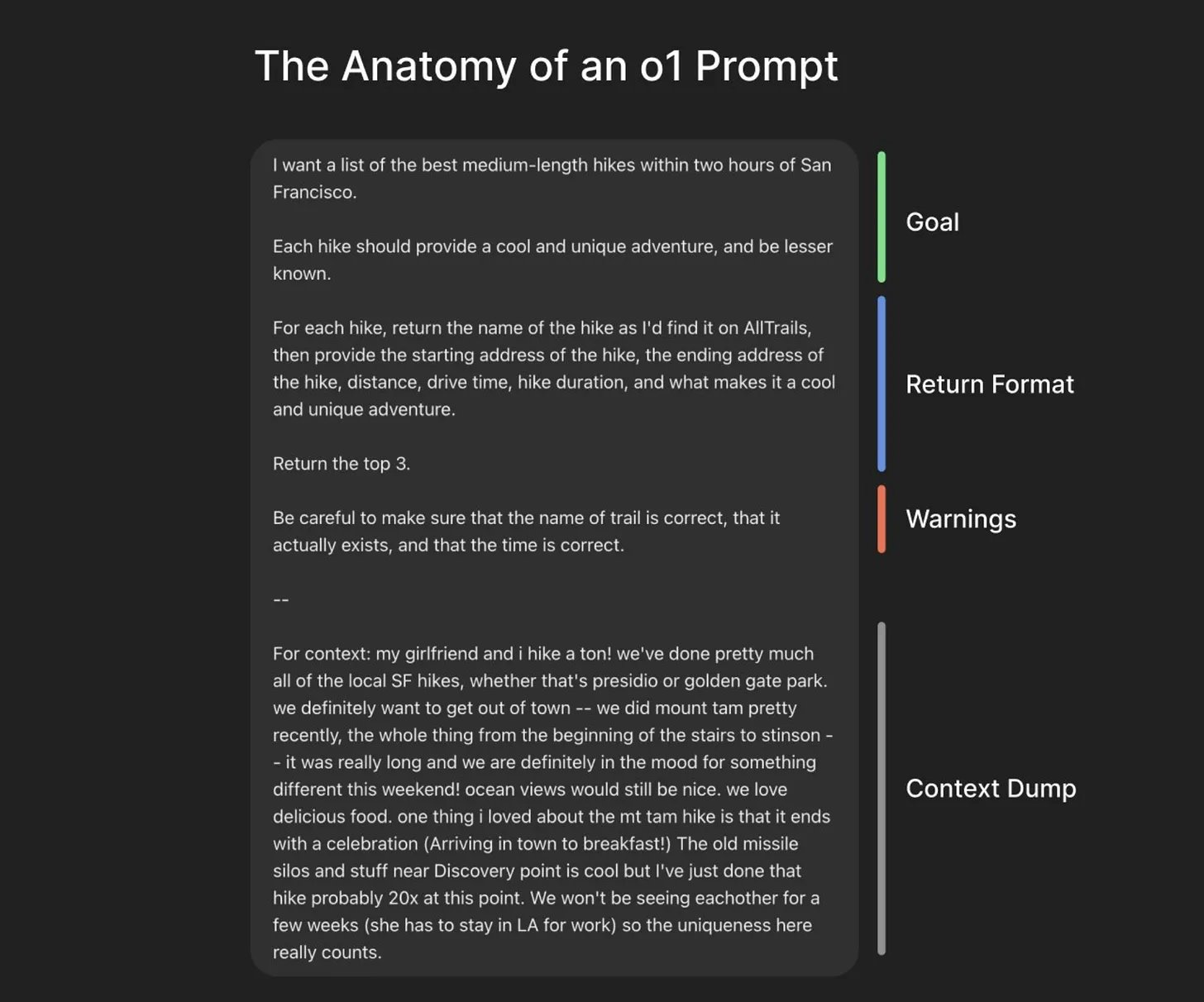
Applying this to our X post generator, the components look like this:
- Role/Goal: Define the AI's persona. "You are a senior software engineer sharing a quick, insightful thought on a new technology."
- Context: This is where the output from our trend analysis pipeline comes in. "Here is a summary of an emerging trend: [trend_insight_goes_here]."
- Format/Constraints (Warnings): This is where we enforce the platform's rules and our brand style. "Your response MUST be a single tweet under 280 characters. Do not use corporate jargon. Use 2-3 relevant hashtags. The tone should be casual and direct."
Finding the Right "Voice" for X
The tone on X is unique. It's less formal than LinkedIn but still needs to convey expertise. A great heuristic is to aim for a specific kind of authenticity.
This Social Media AI Automation Creates Unique Content Daily! (100% Automated!)
The video 'This Social Media AI Automation Creates Unique Content Daily!' from AI Andy contains a couple of brilliant, practical tips for generating content specifically for X.
Please watch these two short clips: The 'Thought' Technique (08:20 - 09:22): Pay close attention to the core idea: framing the prompt to generate a post that sounds like a thought you just had. This is a powerful way to achieve a natural, engaging tone. The 'Shorter is Better' Warning (09:22 - 10:22): This is a crucial insight. The creator explains why overly long prompts can backfire for short-form content, causing the LLM to get confused or 'hallucinate'. This contrasts directly with our long-form article strategy.
These two points are key engineering takeaways for our system:
- Tonal Instruction: Our prompt must explicitly ask for a "thought-like" tone.
- Prompt Efficiency: We should keep our prompts for X focused and avoid unnecessary bloat that could degrade performance.
From Insight to Tweet: Practical Prompt Templates
Now let's apply these principles. Using the trend insight as our raw material, we can use different prompt templates to generate a variety of content, keeping our feed fresh and engaging.
The Metricool article you read earlier contains excellent starting points for X. We'll adapt them for our specific goal.
40+ AI Prompts for Social Media Success (+ DIY Guide)
Let's revisit the Metricool article, this time focusing on the concrete examples for X.
Review the subsection titled '🐦 X (Twitter) Prompts'. Notice how there are different prompts for different goals: sharing information, asking questions, or drafting a thread. We will build functions based on these patterns.
Here are three prompt templates we can implement, each designed to produce a different style of tweet from the same trend insight:
- The Hot Take: Generates a concise, opinionated post to spark discussion.
- The Explainer: Simplifies a key aspect of the trend for a broader technical audience.
- The Question: Poses a question to the community, inviting engagement.
Activity: Building the generateXPost Function
It's time to translate these prompt designs into a functional part of our automation pipeline. We'll create a generateXPost function in a new file, src/generateXPost.ts. This function will take a trend insight and a desired post type, then return a ready-to-publish tweet.
Given your background, you'll see this is a straightforward implementation that encapsulates the logic we've just discussed.
// src/generateXPost.ts

import OpenAI from 'openai';

const openai = new OpenAI({
  apiKey: process.env.OPENAI_API_KEY,
});

// Define the types for our function arguments
type PostType = 'hot_take' | 'explainer' | 'question';

interface TrendInsight {
  narrative: string; // The summarized trend narrative from Module 3
  keywords: string[];
}

/**
 * Generates a prompt for a specific type of X post based on a trend insight.
 * @param insight - The trend data to base the post on.
 * @param type - The type of post to generate.
 * @returns A string containing the full prompt for the LLM.
 */
function getXPostPrompt(insight: TrendInsight, type: PostType): string {
  // Base instructions that apply to all post types
  const systemPrompt = `
    You are a senior software engineer with a talent for clear communication.
    Your persona is knowledgeable, direct, and slightly informal.
    Your task is to write a single, concise X post (formerly a tweet).
  `;

  const commonRules = `
    **RULES:**
    - The post MUST be under 280 characters.
    - The tone should sound like an authentic thought you are sharing with peers, not a marketing announcement.
    - DO NOT use corporate jargon (e.g., "leverage", "synergy").
    - Include 2-3 relevant hashtags based on these keywords: ${insight.keywords.join(', ')}.
    - Do not use emojis.
    - Your output must ONLY be the text of the post. Do not add any extra commentary.
  `;

  let userPrompt = '';
  const context = `**CONTEXT:** An analysis of recent tech discussions has identified the following trend: "${insight.narrative}"`;

  // Select the specific instruction based on the post type
  switch (type) {
    case 'hot_take':
      userPrompt = `
        ${context}
        Based on this, write a concise and slightly contrarian "hot take". It should be a strong opinion that encourages debate.
      `;
      break;
    case 'explainer':
      userPrompt = `
        ${context}
        Based on this, write a post that simplifies the core concept for other developers who might not be familiar with it yet. Make it easy to understand.
      `;
      break;
    case 'question':
      userPrompt = `
        ${context}
        Based on this, write a post that asks an open-ended question to the developer community. The goal is to spark a conversation.
      `;
      break;
  }

  // Combine system and user prompts.
  // Note: For some models, combining into a single user prompt can be effective for short tasks.
  // We place the role definition first, then the core task and context, and finally the strict rules.
  return `${systemPrompt}\n\n${userPrompt}\n\n${commonRules}`;
}

/**
 * Generates a concise, engaging X post from a trend insight.
 * @param insight - An object containing the trend narrative and keywords.
 * @param type - The desired type of post ('hot_take', 'explainer', 'question').
 * @returns The generated X post as a string.
 */
export async function generateXPost(
  insight: TrendInsight,
  type: PostType
): Promise<string | null> {
  const prompt = getXPostPrompt(insight, type);

  try {
    console.log(`Generating X post of type: ${type}...`);
    console.log(`Using prompt:\n---\n${prompt}\n---`);

    const response = await openai.chat.completions.create({
      model: "gpt-4-turbo",
      messages: [
        // We can place the entire structured prompt in the user message for simpler, direct tasks.
        // The OpenAI model is trained to handle structured instructions within a single message.
        { role: "user", content: prompt },
      ],
      temperature: 0.7, // A bit of creativity is good for social media
      max_tokens: 100,  // Generously more than a tweet length to be safe
    });

    const post = response.choices[0].message.content?.trim();

    if (post && post.length > 280) {
        console.warn("Generated post exceeds 280 characters. Consider refining the prompt or handling truncation.");
        // Simple truncation for now, but a retry-with-instruction-to-shorten loop would be more robust.
        return post.substring(0, 279) + '…';
    }

    return post ?? null;

  } catch (error) {
    console.error(`Error generating X post of type ${type}:`, error);
    return null;
  }
}
Deconstructing the Code
getXPostPrompt: This function is our prompt factory. It assembles a complete set of instructions for the LLM. It combines thesystemPrompt(persona), the specificuserPrompt(the task), and thecommonRules(constraints) into a single, clear message. This modular approach allows you to easily add new post types in the future.generateXPost: This is the main exported function. It takes theinsightfrom your data analysis module and the desiredtype, calls the prompt factory, and then executes the API call to OpenAI.- Input-Driven: The function is designed to plug directly into your agentic workflow. The
TrendInsightobject is a placeholder for the structured data you'll be passing from your analysis stage (Module 3). - Error & Length Handling: A basic check for post length is included. In a production system, you might implement a more sophisticated loop that asks the LLM to shorten its own output if it exceeds the limit.
Conclusion
In this lesson, we've tailored our content generation strategy for the fast-paced environment of X. We've seen how to design focused, efficient prompts that translate analytical insights into concise, engaging posts.
Key Takeaways:
- Prompting for X is about precision, not volume. Clear, concise instructions work best.
- A structured prompt (Role, Context, Rules) yields reliable results.
- The "thought-like" tone is a powerful heuristic for achieving an authentic voice on X.
- Using different prompt templates allows you to create content variety from a single trend insight, maximizing the value of your data analysis.
Preview of the next lesson:
A single tweet is powerful, but some topics require more depth. In the next lesson, "Generate X threads that break down complex tech trends into digestible parts," we will build upon today's foundation. You'll learn how to design prompts that instruct the LLM to create a sequence of connected posts, turning a single insight into a compelling narrative thread.