In our last lesson, you constructed a robust, multi-message prompt template, preparing our RAG chain for both structured context and conversational history. However, our chain still relies on a fake_retriever. It's time to build the real retrieval mechanism.
This lesson tackles the "indexing" half of the RAG pipeline. Before we can retrieve relevant information, we must first process our source documents and make them searchable. This process consists of three core steps: loading the raw data, splitting it into manageable pieces, and converting those pieces into numerical representations called embeddings. By the end of this lesson, you will have a script that prepares your knowledge base for retrieval, setting the stage for us to build a complete RAG pipeline in the next lesson.
The Document Ingestion Pipeline
The process of preparing documents for a RAG application is a standardized data pipeline. LangChain provides abstractions for each stage.
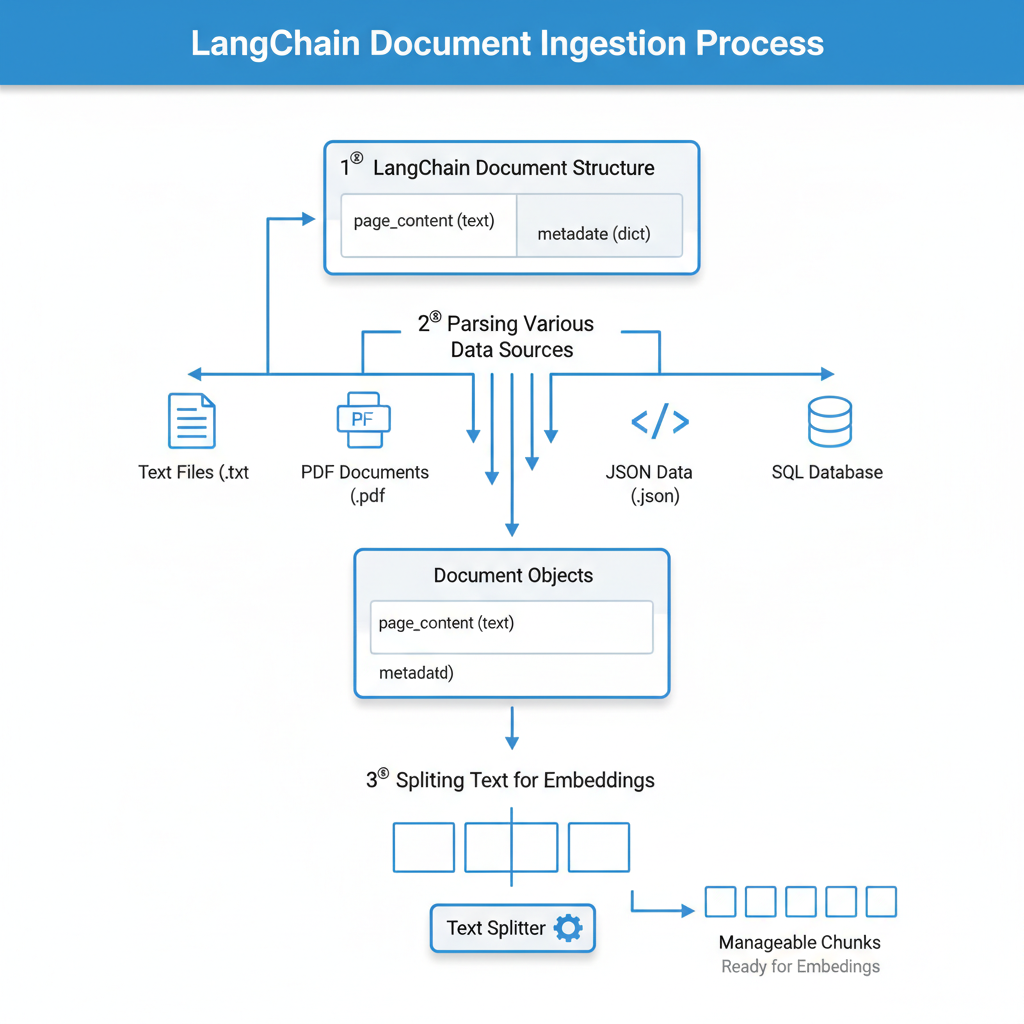
The pipeline ingests raw data (e.g., text files, PDFs, database records) and outputs a set of standardized, chunked Document objects. Let's walk through each step.
Step 1: Loading Documents
LangChain's DocumentLoader components are designed to abstract the process of reading data from various sources. Each loader returns a list of Document objects. A Document is a simple data class containing two attributes:
page_content: A string holding the text content.metadata: A dictionary containing source information, like the file name or page number.
There are loaders for dozens of formats. We'll start with a simple text file, as it requires no extra dependencies.
First, let's create a directory for our data and a sample file to work with. In your project root, create a directory named data, and inside it, create a file named lcel_paper_abstract.txt with the following content:
LangChain Expression Language (LCEL) is a declarative way to compose chains. LCEL was designed from day 1 to support putting prototypes in production, with no code changes, from the simplest “prompt + LLM” chain to the most complex chains. It offers several key benefits.

First, it provides a unified, streamable interface. All LCEL objects implement the Runnable interface, which includes methods like `invoke`, `batch`, and `stream`. This consistency simplifies chain construction and interaction.

Second, LCEL enables easy customization. The "runnable" protocol is designed to be easily extended with custom components. For example, any function can be wrapped in a `RunnableLambda` to become part of a chain.

Finally, it is optimized for production use cases. LCEL chains automatically get parallel execution wherever possible, can be configured for retries and fallbacks, and offer seamless integration with logging and tracing systems like LangSmith for enhanced observability. This robust design makes LCEL a powerful tool for building and deploying production-ready LLM applications.
Now, we can use a DirectoryLoader to load all .txt files from this directory. This loader is configured to use a specific loader class (TextLoader in this case) for each file it finds.
To use these components, you'll need to add a few packages to your project. Run the following command:
uv pip install langchain-community unstructured
langchain-community contains the loaders and splitters we'll be using. unstructured provides tools for parsing various file types, including .txt.
The following reading from the OneUptime blog provides an excellent overview of various document loaders.
How to Build RAG Applications with LangChain
This article section introduces the concept of document loaders and provides code examples for common formats like PDF, text files from a directory, and web pages.
Focus on the subsections for PDF files and for text files. Notice the common pattern: instantiate a loader with a path or URL, then call the .load() method. We will use the DirectoryLoader approach.
Let's create a new file src/lcel_quickstart/data_pipeline.py to house our ingestion logic.
# src/lcel_quickstart/data_pipeline.py

from langchain_community.document_loaders import DirectoryLoader, TextLoader

def load_documents(path: str = "data/") -> list:
    """
    Loads all .txt files from the specified directory.
    """
    loader = DirectoryLoader(
        path,
        glob="**/*.txt",
        loader_cls=TextLoader,
        show_progress=True,
        use_multithreading=True
    )
    print("Loading documents...")
    documents = loader.load()
    print(f"Loaded {len(documents)} document(s).")
    return documents

if __name__ == '__main__':
    docs = load_documents()
    print(f"\nSample document metadata: {docs[0].metadata}")
    print(f"Sample document content preview:\n---\n{docs[0].page_content[:200]}...")
Run this script with uv run src/lcel_quickstart/data_pipeline.py. You should see that it loads one document, and the output will show its metadata (the source file path) and a preview of its content.
Step 2: Splitting Documents
Large documents often exceed the context window of LLMs and can dilute the relevance of retrieved information. The solution is to split them into smaller, semantically coherent chunks. The RecursiveCharacterTextSplitter is the standard choice for this task.
It works by attempting to split text along a prioritized list of separators, starting with the most significant one (e.g., double newlines for paragraphs) and recursively moving to smaller ones (e.g., single newlines for sentences, spaces for words) until the chunks are under a defined size.
Key parameters are:
chunk_size: The maximum number of characters per chunk.chunk_overlap: The number of characters to overlap between adjacent chunks. This overlap is critical for preserving context that might otherwise be cut off at a chunk boundary.
The video below from the pixegami channel provides a quick, practical demonstration of loading and splitting documents.
RAG + Langchain Python Project: Easy AI/Chat For Your Docs
This video walks through the initial steps of a RAG pipeline, focusing on loading and splitting markdown files.
Watch the segment from loading and splitting. Pay attention to the explanation of why splitting is necessary and how the RecursiveCharacterTextSplitter with chunk_size and chunk_overlap is used to create manageable chunks from a larger document.
Now, let's add the splitting logic to our data_pipeline.py script. We'll need to import the splitter from langchain.text_splitter.
# src/lcel_quickstart/data_pipeline.py (updated)

from langchain_community.document_loaders import DirectoryLoader, TextLoader
from langchain.text_splitter import RecursiveCharacterTextSplitter
from langchain_core.documents import Document


# ... load_documents function remains the same ...

def split_documents(documents: list[Document]) -> list[Document]:
    """
    Splits documents into smaller chunks.
    """
    text_splitter = RecursiveCharacterTextSplitter(
        chunk_size=1000,
        chunk_overlap=200,
        length_function=len,
    )
    print("Splitting documents into chunks...")
    chunks = text_splitter.split_documents(documents)
    print(f"Split {len(documents)} document(s) into {len(chunks)} chunks.")
    return chunks

if __name__ == '__main__':
    docs = load_documents()
    chunks = split_documents(docs)


    # Let's inspect a chunk
    if chunks:
        print(f"\nSample chunk metadata: {chunks[0].metadata}")
        print(f"Sample chunk content preview:\n---\n{chunks[0].page_content}")
        print(f"Sample chunk length: {len(chunks[0].page_content)} characters")
Run the updated script. You'll see that our single document has been split into several smaller chunks, each well under the 1000-character limit. Notice that the metadata from the original document is preserved in each chunk.
Step 3: Generating Embeddings
The final step before storage is to convert our text chunks into numerical vectors using an embedding model. These vectors capture the semantic meaning of the text, allowing a vector database to find chunks that are conceptually similar to a user's query, not just those that share keywords.
Given your background, you're already familiar with the concept of embeddings. In LangChain, this process is handled by Embedding model integrations. We'll use OpenAIEmbeddings, which connects to OpenAI's powerful and efficient embedding models like text-embedding-3-small.
To use this, you need the langchain-openai package:
uv pip install langchain-openai
The process is straightforward: instantiate the OpenAIEmbeddings class. This object can then be used to either embed a single query (embed_query) or a list of documents (embed_documents).
How to Build RAG Applications with LangChain
This section explains what embeddings are and how to generate them using LangChain's OpenAI integration.
Read the section titled "Creating Embeddings". It shows how to instantiate OpenAIEmbeddings and use its methods. Note the distinction between embed_query for single strings and embed_documents for lists of texts.
We will create a function that returns an embedding model instance. While we won't embed all the chunks in this script (that's typically done in one go when populating a vector store), we'll add the model to our pipeline and demonstrate its use on a single chunk.
# src/lcel_quickstart/data_pipeline.py (final version for this lesson)
import os
from dotenv import load_dotenv
from langchain_community.document_loaders import DirectoryLoader, TextLoader
from langchain.text_splitter import RecursiveCharacterTextSplitter
from langchain_core.documents import Document
from langchain_openai import OpenAIEmbeddings


# Load environment variables
load_dotenv()
if "OPENAI_API_KEY" not in os.environ:
    raise ValueError("OPENAI_API_KEY not found in .env file")

def load_documents(path: str = "data/") -> list[Document]:


    # ... (same as before) ...
    loader = DirectoryLoader(path, glob="**/*.txt", loader_cls=TextLoader, show_progress=True, use_multithreading=True)
    print("Loading documents...")
    documents = loader.load()
    print(f"Loaded {len(documents)} document(s).")
    return documents

def split_documents(documents: list[Document]) -> list[Document]:


    # ... (same as before) ...
    text_splitter = RecursiveCharacterTextSplitter(chunk_size=1000, chunk_overlap=200, length_function=len)
    print("Splitting documents into chunks...")
    chunks = text_splitter.split_documents(documents)
    print(f"Split {len(documents)} document(s) into {len(chunks)} chunks.")
    return chunks

def get_embedding_model() -> OpenAIEmbeddings:
    """
    Returns an instance of the OpenAI embedding model.
    """
    return OpenAIEmbeddings(model="text-embedding-3-small")

if __name__ == '__main__':
    docs = load_documents()
    chunks = split_documents(docs)
    embedding_model = get_embedding_model()

    if chunks:


        # Let's test the embedding model on the first chunk
        sample_chunk_content = chunks[0].page_content
        vector = embedding_model.embed_query(sample_chunk_content)

        print("\n--- Embedding Demonstration ---")
        print(f"Vector for the first chunk has been generated.")
        print(f"Vector dimension: {len(vector)}")
        print(f"First 5 vector values: {vector[:5]}")
When you run this final script, you'll see the output from the loading and splitting steps, followed by a demonstration that a vector of a specific dimension (1536 for text-embedding-3-small) has been created from our first chunk.
Conclusion
In this lesson, you have successfully built the ingestion pipeline for our RAG application. This is a critical, one-time process that prepares your knowledge base for efficient retrieval.
Here are your key takeaways:
- Document Loaders: LangChain provides a simple, unified interface (
.load()) to ingest data from numerous sources into a standardDocumentformat. - Text Splitters: The
RecursiveCharacterTextSplitteris a powerful tool for breaking large documents into semantically meaningful chunks, usingchunk_sizeandchunk_overlapto balance context and size. - Embedding Models: The
OpenAIEmbeddingsintegration allows you to easily convert text chunks into numerical vectors that capture their meaning, ready for similarity search.
You now have a list of processed chunks and an embedding_model instance. In the next lesson, we will use these two components to populate a FAISS vector store. We will then create a retriever object from this vector store, which we can finally plug into our LCEL chain to replace the fake_retriever and complete our end-to-end RAG pipeline.