Hello! Welcome to the final lesson in our module on key resolution strategies.
In the previous lessons, you've built a suite of powerful tools. We now have RateLimitKeyResolver implementations that can identify a request by:
- The client's IP address
- An API key from a header
- An authenticated user's ID from the security context
- The specific endpoint path being requested
Each of these is a crucial building block. Now, we'll combine them to unlock the full potential of a multi-tenant rate limiting system.
Your learning outcome for this lesson:
You will create a composite key resolver that combines multiple identifiers (e.g., User ID and Endpoint). This will enable our system to enforce highly specific rules, such as "limit User A to 10 requests per minute on endpoint /api/v1/orders" – a requirement for any production-grade API infrastructure.
1. The Composite Key Strategy
So far, our resolvers generate a single-dimensional key. A UserIdResolver might produce "user-123", and an EndpointPathResolver might produce "/api/orders". This is useful, but what if we need to apply a rule to a specific user on a specific endpoint?
To achieve this, we need to combine these identifiers into a single, unique key. For example: "user-123:/api/orders".
This is where the Composite design pattern comes into play. We'll create a new RateLimitKeyResolver implementation that is composed of other resolvers. Its job won't be to extract information from the request itself, but to orchestrate other resolvers and aggregate their results.
The flow is simple:
- A
CompositeKeyResolveris configured with an ordered list of other "child" resolvers (e.g.,[UserIdResolver, EndpointPathResolver]). - When its
resolve()method is called, it iterates through each child resolver. - It calls
resolve()on each child and collects the results. - Finally, it joins these results together with a delimiter (like a colon
:) to form the final composite key.
This approach is both flexible and extensible. We can create different composite resolvers for different needs (e.g., API Key + Endpoint, User ID + IP Address) without changing the core logic.
2. Implementing the CompositeKeyResolver
Let's translate this design into code. Create a new Java class named CompositeKeyResolver.
import jakarta.servlet.http.HttpServletRequest;
import java.util.List;
import java.util.stream.Collectors;

/**
 * A RateLimitKeyResolver that combines the results of multiple other resolvers.
 * This allows for creating fine-grained keys based on multiple request attributes.
 */
public class CompositeKeyResolver implements RateLimitKeyResolver {

    private final List<RateLimitKeyResolver> resolvers;

    /**
     * Constructs a CompositeKeyResolver with an ordered list of resolvers.
     * @param resolvers The list of resolvers to use for generating the key parts.
     */
    public CompositeKeyResolver(List<RateLimitKeyResolver> resolvers) {
        this.resolvers = resolvers;
    }

    @Override
    public String resolve(HttpServletRequest request) {
        // Use a stream to map each resolver to its resolved key part
        // and join them together with a ":" delimiter.
        return resolvers.stream()
                .map(resolver -> resolver.resolve(request))
                .collect(Collectors.joining(":"));
    }
}
Key Points:
- The class doesn't have a
@Componentannotation. This is intentional. Since each instance needs a specific list of resolvers, we can't let Spring manage it as a generic singleton. We will configure it manually. - The constructor takes a
List<RateLimitKeyResolver>, making it clear what its dependencies are. - The
resolvemethod uses Java Streams for a clean, functional approach. It maps each resolver in the list to its output string and then joins them. The use ofCollectors.joining(":")is efficient and readable.
3. Configuring Composite Beans in Spring
Since CompositeKeyResolver requires a specific configuration at creation time, we need to tell Spring's dependency injection container how to build it. The best way to do this is with a @Configuration class and @Bean methods.
Let's create a configuration class, perhaps named RateLimiterConfiguration, to house our custom bean definitions.
import org.springframework.beans.factory.annotation.Qualifier;
import org.springframework.context.annotation.Bean;
import org.springframework.context.annotation.Configuration;
import java.util.List;

@Configuration
public class RateLimiterConfiguration {

    // Assuming you have these beans defined with @Component("beanName")
    // e.g., @Component("userIdResolver") public class UserIdResolver ...

    @Bean
    @Qualifier("userEndpointCompositeResolver")
    public RateLimitKeyResolver userEndpointCompositeResolver(
            @Qualifier("userIdResolver") RateLimitKeyResolver userIdResolver,
            @Qualifier("endpointPathResolver") RateLimitKeyResolver endpointPathResolver) {

        return new CompositeKeyResolver(List.of(userIdResolver, endpointPathResolver));
    }

    @Bean
    @Qualifier("apiKeyEndpointCompositeResolver")
    public RateLimitKeyResolver apiKeyEndpointCompositeResolver(
            @Qualifier("apiKeyResolver") RateLimitKeyResolver apiKeyResolver,
            @Qualifier("endpointPathResolver") RateLimitKeyResolver endpointPathResolver) {

        return new CompositeKeyResolver(List.of(apiKeyResolver, endpointPathResolver));
    }
}
Dissecting this configuration:
@Configuration: Marks this class as a source of bean definitions.@Bean: This annotation on a method tells Spring that the object returned by this method should be registered as a bean in the application context.- Method Parameters: Spring's dependency injection automatically provides the required
RateLimitKeyResolverinstances as arguments to the method (e.g.,userIdResolver,endpointPathResolver). We use@Qualifierto specify which implementation we want, assuming you've named them (e.g.,@Component("userIdResolver")). @Qualifier("userEndpointCompositeResolver"): We also give our new composite bean a unique name. This allows us to inject this specific composite resolver into ourRateLimitingInterceptorlike this:
// Inside your RateLimitingInterceptor...
private final RateLimitKeyResolver keyResolver;

public RateLimitingInterceptor(
    @Qualifier("userEndpointCompositeResolver") RateLimitKeyResolver keyResolver,
    // ... other dependencies
) {
    this.keyResolver = keyResolver;
}
This pattern gives you complete control to mix and match resolvers to create any composite key strategy you need.
4. Industry Validation and Architectural Context
This pattern of combining identifiers into a delimited string is a standard, battle-tested industry practice. It's simple, efficient, and easy to debug.
The following article, which we've looked at before, contains several examples that validate our approach.
Rate Limit Per Endpoint in Spring Boot APIs - Medium
The article 'Rate Limit Per Endpoint in Spring Boot APIs' by Alexander Obregon provides several direct examples of building composite keys. It demonstrates the same fundamental idea of concatenating identifiers.
Please review the code snippets in the sections 'Identifying Clients' and 'Defining Rules Per Endpoint'. Notice how keys are constructed: String key = clientId + ":" + path; and String key = client + ":" + path + ":" + method;. This is precisely the principle we've just implemented in a more extensible, object-oriented way.
Another resource offers a very explicit example of this practice.
How to Implement Sliding Window Rate Limiting in Spring
In 'How to Implement Sliding Window Rate Limiting in Spring', the author discusses best practices and shows a clear example of a composite key.
Navigate to the subsection '4. Consider Different Keys for Different Use Cases'. The final example, String endpointKey = "endpoint:" + request.getRequestURI() + ":" + ipKey;, is a perfect illustration of a composite key that combines the endpoint path and the client's IP.
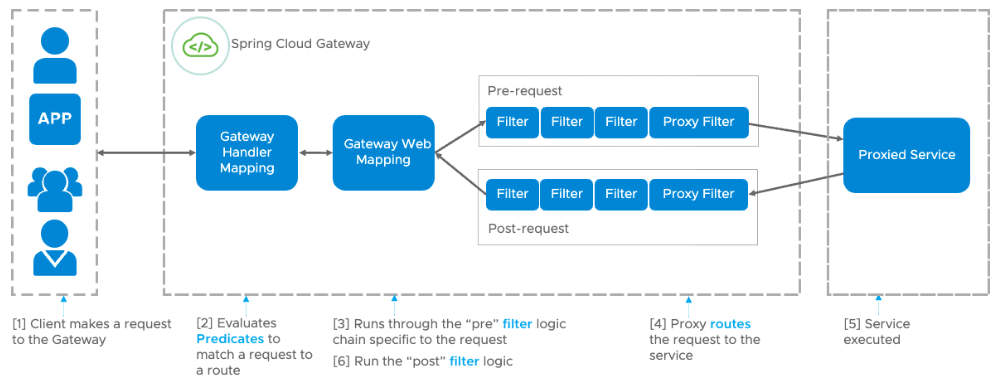
Architecturally, this key resolution logic fits into the request processing pipeline, often within an API gateway or a filter/interceptor chain. The diagram below shows the flow in a Spring Cloud Gateway. Our RateLimitingInterceptor serves a similar purpose to the "Pre" filter shown here, making decisions before the request is routed to the downstream service.
Conclusion
Congratulations on completing this module! You have now designed and implemented a comprehensive and flexible key resolution system, which is a critical component of any multi-tenant rate limiter.
Key Takeaways from this lesson:
- A composite key is formed by combining multiple identifiers (e.g., User ID, Endpoint) to enable highly specific rate-limiting rules.
- The Composite design pattern provides an elegant and extensible way to implement this, allowing a
CompositeKeyResolverto orchestrate other resolvers. - Spring's
@Configurationclasses and@Beanmethods are the proper way to configure and instantiate complex objects that require specific dependencies at creation time. - This approach is a standard industry practice, validated by numerous real-world examples.
Next Steps
With our key resolution strategy complete, we can now reliably generate a unique key for any incoming request based on configurable rules. The next logical question is: what do we do with this key?
In the next module, Distributed State Management with Redis, we will shift our focus from identifying requests to counting them. We'll start by introducing Redis, a high-performance in-memory data store, and see how to connect it to our Spring Boot application. This is the foundation for building a rate limiter that works correctly across multiple server instances.