Hello! Let's dive back into Spring testing.
In our last lesson, we built an integration test for a REST controller using @SpringBootTest and MockMvc. We saw how to simulate requests and verify responses. To isolate our controller from the service layer, we briefly used the @MockBean annotation.
Today, we're putting @MockBean under the microscope. This lesson fulfills the learning outcome: Use @MockBean to replace a bean with a mock in a Spring integration test. We will explore what @MockBean is, why it's fundamentally different from the @Mock annotation you've seen in unit tests, and how it interacts with the Spring ApplicationContext. For someone with your background in system design, we'll also investigate its performance implications, a crucial factor in maintaining efficient build cycles for large-scale applications.
1. Mocking: The Principle of Isolation
In testing, especially within a complex, interconnected system like a microservices application, our goal is often to test one component in isolation. We want to verify that a specific class (the "system under test") behaves correctly, without being affected by the unpredictable behavior or a bug in one of its dependencies.
To achieve this, we replace real dependencies with "test doubles" or "mocks". These are controllable, fake objects that simulate the behavior of the real components.

In a plain Java unit test, you would create and inject these mocks manually. Let's see how that looks before we contrast it with Spring's approach.
Software Testing Tutorial - Learn Unit Testing and Integration Testing
The following video from Amigoscode demonstrates unit testing a StudentService. Pay close attention to how it uses Mockito's @Mock annotation to create a mock of the StudentRepository and manually injects it into the service. This establishes our baseline for mocking outside of the Spring container.
Watch the segment from 00:42:08 to 00:53:50. Observe the setup: the test class uses @ExtendWith(MockitoExtension.class), a field is annotated with @Mock, and the service instance is created manually in a @BeforeEach method, injecting the mock repository. The test then verifies that a method on the mock was called, rather than asserting a result from a real database.
The key takeaway from the video is that in a unit test, you control the object creation and dependency injection. You create the mock, you create the service, and you connect them.
2. Mocking within the Spring Context: @MockBean
In an integration test annotated with @SpringBootTest or @WebMvcTest, we give up manual control. The Spring ApplicationContext is responsible for creating beans and wiring them together. So, how do we tell the context, "For this test, please use a mock for the ProductService instead of the real one"?
The answer is the @MockBean annotation.
@MockBean is a Spring Boot feature that tells the testing framework to find a bean of a specific type in the ApplicationContext and replace it with a Mockito mock. If no bean of that type exists, it adds the mock to the context.
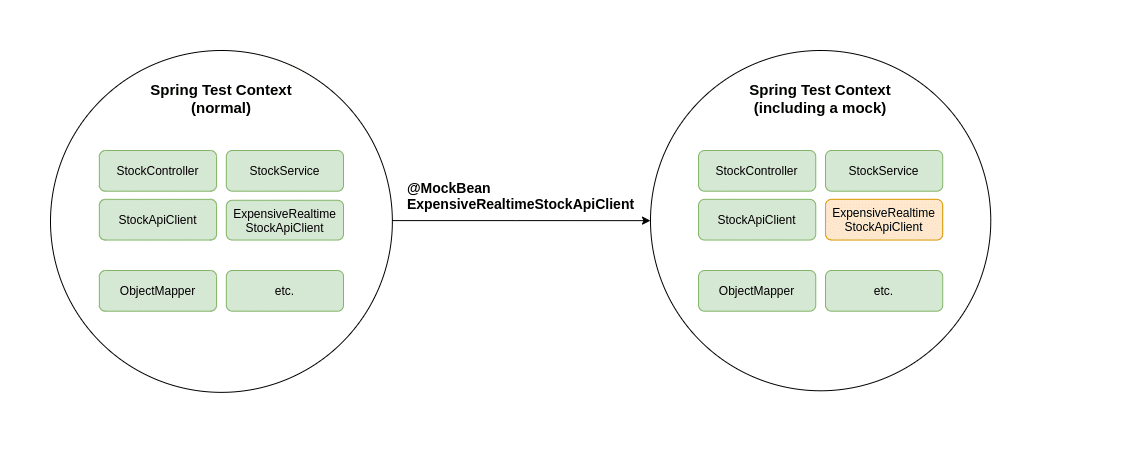
Let's see this in action with a complete example.
Overriding Spring Beans in Integration Tests
The article 'Overriding Spring Beans in Integration Tests' by Baeldung provides a perfect, self-contained example of using @MockBean. It sets up a simple controller and service, then shows how to write an integration test that replaces the real service with a mock.
Read up to and including section 4, 'Overriding Using @MockBean'. Focus on the code in the MockBeanIntegrationTest class. This is the core application of today's lesson.
Let's break down the test code from the Baeldung article:
@SpringBootTest(classes = { Application.class, Endpoint.class })
@AutoConfigureMockMvc
class MockBeanIntegrationTest {

    @Autowired
    private MockMvc mockMvc;

    @MockBean // (1)
    private Service service;

    @Test
    void givenServiceMockBean_whenGetHelloEndpoint_thenMockOk() throws Exception {
        // (2)
        when(service.helloWorld()).thenReturn("hello mock bean");

        // (3)
        this.mockMvc.perform(get("/hello"))
                .andExpect(status().isOk())
                .andExpect(content().string(containsString("hello mock bean")));
    }
}
@MockBean private Service service;: This is the crucial line. Spring finds the bean of typeServicein the application context and replaces it with a mock. This mock is now available for injection into other beans (like theEndpointcontroller) and into our test class itself.when(service.helloWorld()).thenReturn(...): Becauseserviceis a Mockito mock, we can now use standard Mockito methods likewhen()to define its behavior. Here, we're telling the mock to return"hello mock bean"whenever itshelloWorld()method is called.this.mockMvc.perform(...): When themockMvccall invokes the/helloendpoint, theEndpointcontroller is executed. The controller calls thehelloWorld()method on its injectedServicedependency. Since we've replaced the real service with our mock, our defined behavior from step (2) is triggered, and the controller receives the string"hello mock bean". The test then asserts this is the content of the final HTTP response.
This same technique works identically with the @WebMvcTest slice test we saw in the previous lesson. @MockBean is often required there because slice tests don't load service or repository layers by default, so you must provide mocks for the controller's dependencies.
3. The Performance Cost of Convenience
@MockBean is incredibly useful, but it comes with a hidden performance cost that is important to understand in larger projects.
Spring's testing framework is highly optimized. To speed up test execution, it caches the ApplicationContext. If multiple test classes require the exact same configuration (same active profiles, properties, and beans), Spring will load the context just once and reuse it.
However, @MockBean alters the application context. The set of beans defined with @MockBean is part of the "key" used to cache the context.
TestClassAuses@MockBeanonServiceA. Spring creates and caches a context for this configuration.TestClassBuses@MockBeanonServiceB. This configuration is different, so Spring must create and cache a new context.TestClassCuses@MockBeanon bothServiceAandServiceB. Again, this is a new configuration, requiring a third context.
In a large project with hundreds of tests, this can lead to dozens of contexts being created, significantly slowing down your test suite.
Mastering Testing Efficiency in Spring Boot: Optimization Strategies ...
This article from Zalando's engineering blog provides an excellent explanation of the Spring Test context cache and offers practical strategies to mitigate the performance impact of @MockBean.
Please read the sections 'Taming Mock/Spy Beans and Context Caching Dilemmas' and the optimization strategy that follows it. Pay attention to the list of attributes that make up the cache key and the 'before and after' example showing how to consolidate mocks.
As the article explains, the best practice to avoid this issue is to consolidate your mock definitions. If many of your integration tests require the same set of mocks, define them once in a shared base class or a separate @TestConfiguration class that you can @Import. This ensures that all tests using that configuration can share a single, cached application context.
Example: Consolidating Mocks in a Base Class
// All tests that need these mocks can extend this class
@SpringBootTest
public abstract class BaseIntegrationTest {
    @MockBean
    protected ServiceA serviceA;
    @MockBean
    protected ServiceB serviceB;
}

public class MyControllerTest1 extends BaseIntegrationTest {
    @Test
    void testSomething() {
        // serviceA and serviceB are available as mocks
    }
}

public class MyControllerTest2 extends BaseIntegrationTest {
    @Test
    void testSomethingElse() {
        // serviceA and serviceB are available as mocks
    }
}
Now, MyControllerTest1 and MyControllerTest2 will share the same application context, which is loaded only once.
Conclusion
In this lesson, we took a deep dive into @MockBean, a powerful tool for isolating components within Spring integration tests. You learned how it differs from a standard @Mock by directly manipulating the ApplicationContext, allowing you to replace real production beans with test doubles.
Key Takeaways:
@MockBeanreplaces a bean within the SpringApplicationContextwith a Mockito mock, enabling controlled, isolated testing.- It is essential for integration tests (
@SpringBootTest,@WebMvcTest) where the Spring container manages the lifecycle of beans. - Unlike
@Mockin a unit test,@MockBeanintegrates with the Spring dependency injection container. - Using
@MockBeanhas a performance cost as it can "dirty" the test context cache, forcing Spring to create new contexts for different mock configurations. - To optimize test performance, consolidate common
@MockBeandefinitions into a shared base class or an imported@TestConfigurationto promote context reuse.
This lesson concludes our module on testing Spring applications. You now have the skills to write unit tests, data layer integration tests, and web layer integration tests, using mocks effectively to ensure your tests are robust and maintainable.
In our next module, we will shift gears and begin exploring how to secure your applications using the powerful Spring Security framework.