Hello! Welcome to the first lesson in your course on Computerized Accounting Systems (CAS).
Given your goal to master this topic for your CBSE board exams in a short time, we'll keep our lessons focused, practical, and directly tied to the syllabus.
Today, we'll start with the absolute foundation. The goal of this lesson is to define a Computerized Accounting System (CAS) and distinguish it from a manual accounting system. Since you're already familiar with the principles of manual accounting, we'll use that as our starting point to understand what changes when we introduce a computer into the process.
Let's begin.
What is a Computerized Accounting System (CAS)?
At its core, a Computerized Accounting System is exactly what it sounds like: performing accounting tasks using computers and specialized software instead of traditional pen-and-paper methods.
To get a clear and simple introduction, let's start with a short video. The first part introduces the concept, and the second part provides a more formal definition that will be useful for your exams.
👉Class 12 Chapter 1: Overview of Computerized Accounting | Computerised Accounting
This video from 'Commerce By Harshita', a channel you mentioned, will provide a straightforward introduction to what a CAS is. Please watch the two short segments indicated below.
Watch the section from 02:12 to 03:01 for a basic concept, and then the section from 04:36 to 05:54 for a more formal definition. Focus on how CAS is described as an 'Accounting Information System' that follows GAAP.
As you saw in the video, a Computerized Accounting System (CAS) is an accounting information system that processes financial transactions and events according to Generally Accepted Accounting Principles (GAAP) to produce reports as per the user's requirements.
You're already familiar with GAAP from your manual accounting studies. The key takeaway here is that a CAS doesn't change the fundamental rules of accounting; it just changes the tool used to apply them. Instead of manually writing in journals and ledgers, you input data into a software system, which then handles the processing.
The Accounting Cycle: Manual vs. Computerized
The best way to understand the difference between manual and computerized systems is to look at the accounting cycle, a process you already know well.
Let's review the steps in a manual system.
Chapter 01 Overview of Computerized Accounting System
This excerpt from the NCERT textbook lists the familiar steps of the manual accounting cycle. Read through this list to refresh your memory.
Please read the section titled '1.2 COMPONENTS OF CAS'. Focus on the bulleted list that outlines the phases of the manual accounting cycle, from analyzing transactions to preparing financial statements.
In a manual system, each of those steps—journalizing, posting to ledgers, balancing accounts, creating a trial balance, and preparing financial statements—is a separate, time-consuming task.
The fundamental distinction of a CAS is automation. In a computerized system:
- Data is entered once: You record the transaction (e.g., creating a sales invoice).
- The system does the rest: The software automatically posts the entry to the relevant ledgers (e.g., Sales, Debtors, GST), updates the trial balance, and generates financial statements like the Profit and Loss Account and Balance Sheet instantly.
The manual process is linear and requires repetitive work, whereas the computerized process is integrated—one entry updates everything simultaneously.
Key Differences at a Glance
Now that we understand the core distinction, let's explore a detailed comparison across various factors like speed, accuracy, and data security.
Difference between Manual and Computerised Accounting
This article from GeeksforGeeks provides a clear, side-by-side comparison of manual and computerized accounting. The table is particularly useful for revision.
Read the brief definitions of 'Manual Accounting' and 'Computerised Accounting', then carefully study the 'Comparison Between Manual Accounting and Computerised Accounting' table. Pay close attention to differences in calculation, report generation, and backup procedures.
To summarize these points visually, here is a helpful comparison table.
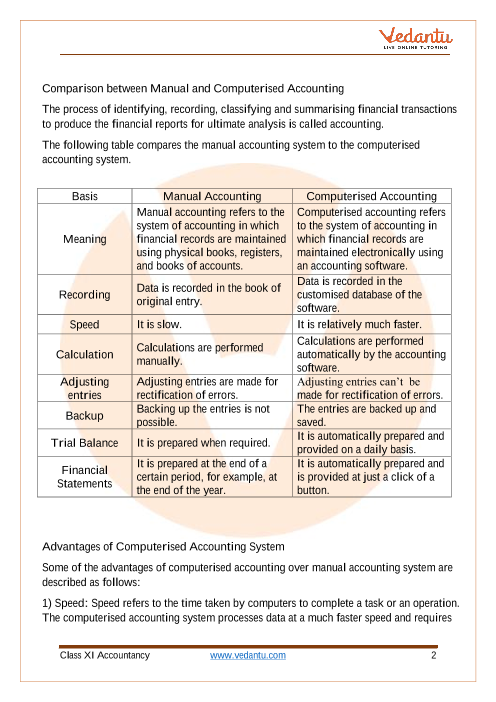
As you can see, the move from manual to computerized accounting brings significant changes:
- Recording: From physical books (journals, ledgers) to a digital database.
- Speed: From a slow, laborious process to high-speed, instant processing.
- Calculations: From manual calculations prone to error to automated, accurate calculations.
- Reporting: From periodic (monthly, quarterly, or yearly) preparation of reports to real-time, on-demand report generation.
Test Your Understanding
Let's quickly check your understanding with a multiple-choice question from your NCERT material.
In the resource "Chapter 01 Overview of Computerized Accounting System", find the Multiple Choice Questions section under EXERCISES. Try to answer Question 2:
2. The Computerised Accounting System refers to :
(a) Printing of Balance Sheet and Profit and Loss Accounts using computer;
(b) Processing of accounting transaction through computer and produce records and reports;
(c) Processing of accounting related data and printing reports;
(d) None of the above.
Answer and Explanation:
The correct answer is (b). A CAS is not just about printing (a) or processing generic data (c). Its specific function is to process accounting transactions to produce both the underlying records (like ledgers) and the final reports (like the Balance Sheet). This definition is the most complete and accurate.
Conclusion
In this introductory lesson, we have covered the essential first step in your journey.
Key Takeaways:
- A Computerized Accounting System (CAS) uses hardware and software to process financial transactions according to GAAP.
- The primary distinction from a manual system is the automation of the accounting cycle. Data is entered once, and the system automatically handles posting, balancing, and report generation.
- Key differences lie in speed (faster), accuracy (automated calculations reduce errors), data storage (digital vs. physical), and the timeliness of reporting (real-time vs. periodic).
You've built a solid foundation. In the next lesson, we will delve deeper into the key features that make a CAS so powerful, such as its accuracy, speed, and scalability. This will help you understand why these systems are so widely adopted in business today.