Hello! Welcome to your fourth lesson.
In our previous session, we established a balanced view of Computerized Accounting Systems by weighing their significant advantages against their limitations. You learned why businesses adopt CAS, focusing on benefits like speed and accuracy, and what risks they must manage, such as cost and security.
Today, we will move from the 'why' to the 'what'. We'll look inside the system to understand its fundamental structure. The learning outcome for this lesson is to describe the five core components of a CAS: hardware, software, people, procedures, and data.
Understanding these building blocks is essential. They are the foundation upon which the entire accounting process rests, and questions about them frequently appear in the CBSE exam.
1. An Overview of the Core Components
Every Computerized Accounting System, regardless of its complexity, is built from the same set of fundamental components working together. Let's start with a quick video that introduces these five key elements.
👉Class 12 Chapter 1: Overview of Computerized Accounting | Computerised Accounting
The 'Commerce By Harshita' video you've seen before provides a concise introduction to the five components of a CAS. This will give us a quick and clear starting point.
Watch the segment from 00:03:51 to 00:04:50. The speaker will list and briefly define Procedure, Data, People, Hardware, and Software.
As the video explained, a CAS is not just about the computer or the software; it's an entire ecosystem involving:
- Hardware: The physical equipment.
- Software: The programs and instructions.
- People: The users who operate the system.
- Procedure: The rules and methods for operation.
- Data: The raw financial facts that are processed.
Now, let's delve deeper into each of these to give you the detail needed for comprehensive exam answers.
2. A Detailed Look at Each Component
For a thorough understanding, we will use a detailed article that breaks down each element. This level of detail will help you construct strong answers for questions that carry more marks.
Computerised Accounting System - GeeksforGeeks
The article 'Computerised Accounting System' from GeeksforGeeks offers a clear and structured explanation of each component. We will go through it section by section.
Read the sections titled '1. Hardware', '2. Software', '3. People', '4. Procedure', and '5. Data'. We will discuss each one below.
Based on your reading, let's consolidate the key points for each component.
1. Hardware
This refers to all the physical, tangible parts of the computer system. Without hardware, there is no system to run.
- Input Devices: Used to enter data into the system (e.g., keyboard, mouse, scanner).
- Processing Unit (CPU): The 'brain' of the computer that performs calculations and processes data.
- Storage Devices: Used to store data and software (e.g., hard disk, SSD).
- Output Devices: Used to display or present the results (e.g., monitor, printer).
2. Software
Software is the set of instructions or programs that tells the hardware what to do. As the GeeksforGeeks article explains, it can be categorized into:
- System Software: Manages the computer's internal functions. The most important example is the Operating System (e.g., Windows, macOS), which acts as the interface between you and the hardware.
- Application Software: Programs designed to perform specific tasks for the user. In our context, the accounting software itself (like Tally or Zoho Books) is the primary application software.
3. People
Often called 'live-ware', people are the most critical component. They design, operate, and maintain the system. The article identifies three key roles:
- System Analysts & Programmers: They design and build the system.
- End Users: These are the people who use the CAS for daily tasks, such as accountants, data entry operators, and managers who view the reports. Their skill and diligence directly impact the system's effectiveness.
4. Procedure
Procedures are the step-by-step instructions and rules that govern how the CAS is used. They ensure that tasks are performed consistently and correctly. This includes:
- How to enter a sales transaction.
- When and how to generate financial reports.
- The process for taking data backups.
Well-defined procedures are crucial for maintaining data integrity and preventing errors.
5. Data
Data are the raw, unprocessed facts and figures that are entered into the system. For a CAS, this includes details of every financial transaction: dates, amounts, account names, voucher numbers, etc. The system processes this raw data to produce meaningful information (e.g., a Profit & Loss Account), which is then used for decision-making.
This flow from data to information is central to any information system. The following diagram illustrates how all five components work together in this process.
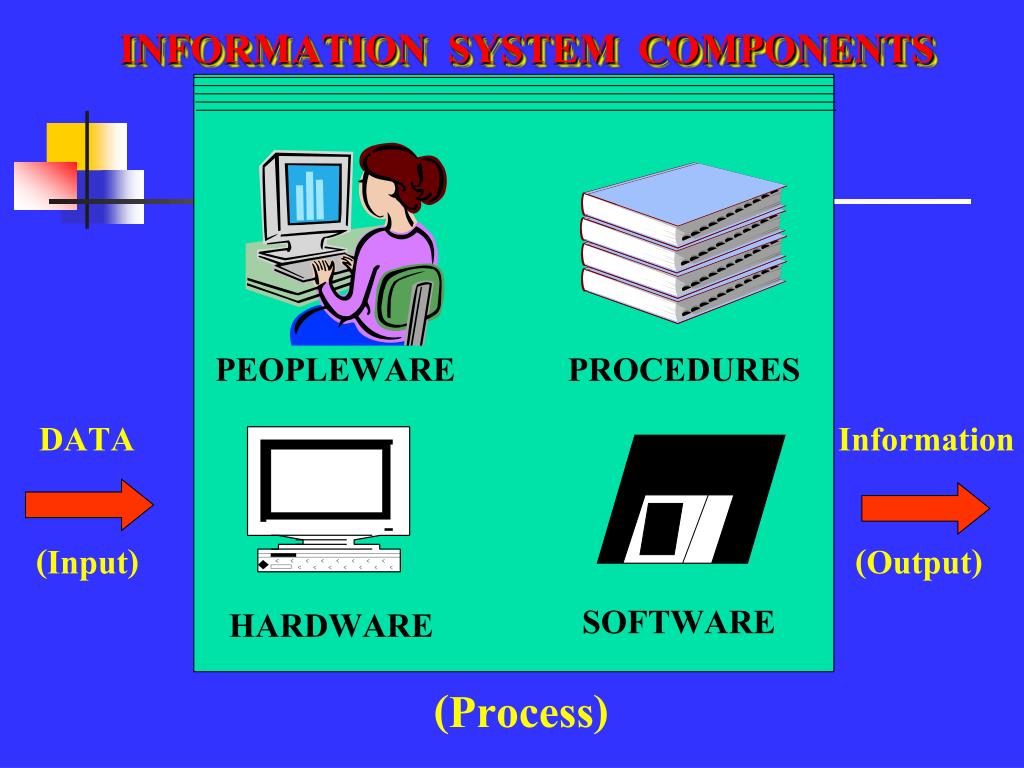
3. A Modern Addition: Connectivity
While the traditional model lists five components, modern systems rely heavily on a sixth: Connectivity. This refers to the way computers are linked together to share data and resources, typically through a network or the internet.
- Why is it important? Connectivity enables features like cloud accounting (accessing your data from anywhere), multi-user access (multiple people working at once), and automated bank feeds.
While your textbook and many exam questions will focus on the core five, mentioning connectivity can show a more advanced understanding of modern CAS.
4. Test Your Understanding
Let's check your knowledge with a question directly from an NCERT-based resource.
Chapter 01 Overview of Computerized Accounting System
The SATHEE resource contains practice questions. Let's try one.
Locate the first question under 'EXERCISES' -> 'Q1. Multiple Choice Questions'. Read the question and its options, and choose the correct one.
Question: The components of Computerised Accounting System are:
(a) Data, Report, Ledger, Hardware, Software;
(b) Data, People, Procedure, Hardware, Software;
(c) People, Procedure, Ledger, Data, Chart of Accounts;
(d) Data, Coding, Procedure, Rules, Output.
Answer: The correct answer is (b). It accurately lists the five core components we've just discussed. Options (a), (c), and (d) incorrectly include items like 'Report', 'Ledger', or 'Coding', which are either outputs of the system or aspects of its setup, not fundamental components.
Conclusion
In this lesson, we have dissected the Computerized Accounting System into its five essential building blocks. You can now confidently describe each component and its function within the system.
Key Takeaways:
- A CAS is a system composed of five interrelated components: Hardware, Software, People, Procedures, and Data.
- Hardware is the physical equipment.
- Software provides the instructions.
- People operate and manage the system.
- Procedures are the rules for operation.
- Data is the raw input that is processed into information.
- Connectivity is a crucial sixth component in modern systems.
In our next lesson, we will focus specifically on the Software component. We will explore the learning outcome: Differentiate between ready-made, customized, and tailor-made accounting software, providing examples of each. This will help you understand the different options available to a business when choosing its accounting software.