Hello! Welcome to your eighth lesson.
In our last lesson, we focused on the key components of an Accounting Information System (AIS), specifically the Cash & Bank, Sales & Accounts Receivable, and Final Accounts sub-systems. We saw how they work together to manage different aspects of a business's finances.
Today, we'll shift our focus from the components to the process. The goal for this lesson is to: Define the Accounting Cycle and list its sequential phases in a computerized environment.
Understanding this is crucial because it explains how a CAS transforms raw transaction data into the final financial statements you're familiar with from your manual accounting studies. This topic frequently appears in CBSE exams, often as a direct question about the phases of the cycle.
1. The Accounting Cycle: A Refresher
Before we look at the computerized process, let's quickly review the traditional accounting cycle that you've learned in your main accountancy course. The term "accounting cycle" refers to the collective process of identifying, analyzing, and recording the accounting events of a company. It's a standard, 8 or 9-step process that begins when a transaction occurs and ends with its inclusion in the financial statements.
To get the formal definition and steps, let's turn to the NCERT-based textbook.
Chapter 01 Overview of Computerized Accounting System
This reading from the 'Chapter 01 Overview of Computerized Accounting System' formally defines the accounting cycle and lists its traditional phases.
Please read the section titled '1.2 COMPONENTS OF CAS'. Focus on the definition of the accounting cycle and the bulleted list of its basic phases.
As the text outlines, the cycle is a series of logical, sequential steps. The following diagram provides a clear visual representation of this flow.
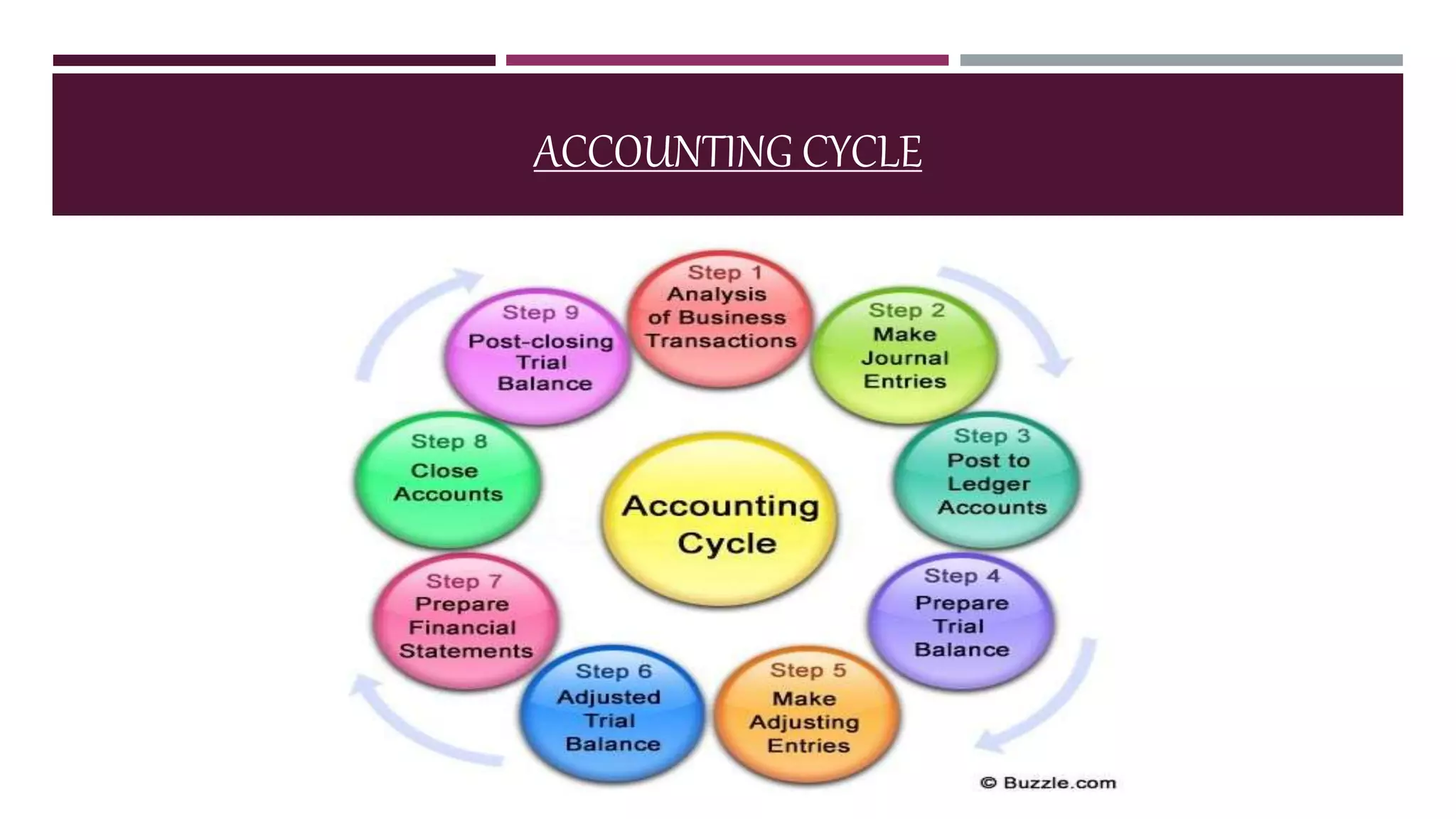
Based on the reading and the diagram, the key phases of the manual accounting cycle are:
- Analyzing Business Transactions: Identifying recordable events.
- Making Journal Entries: Recording these events chronologically in the journal.
- Posting to Ledger Accounts: Transferring journal entries to individual ledger accounts.
- Preparing a Trial Balance: Listing all ledger accounts and their balances to check if debits equal credits.
- Making Adjusting Entries: Recording accruals, deferrals, and other end-of-period adjustments.
- Preparing an Adjusted Trial Balance: A new trial balance prepared after posting adjusting entries.
- Preparing Financial Statements: Using the adjusted trial balance to create the Profit & Loss Account and Balance Sheet.
- Making Closing Entries: Closing temporary accounts (revenue, expense) to the capital account.
- Preparing a Post-Closing Trial Balance: The final trial balance consisting only of permanent (Balance Sheet) accounts.
In a manual system, each of these steps requires separate, careful, and often time-consuming work.
2. The Accounting Cycle in a Computerized Environment
Now, how does this change in a Computerized Accounting System (CAS)? The fundamental principles remain the same—transactions must still be recorded, and financial statements must be produced. However, the CAS automates most of the mechanical steps.
The following video provides an excellent and concise comparison between the manual and computerized processes.
Computerized Accounting - Introduction
This video from Devika's Commerce & Management Academy clearly contrasts the steps of the manual accounting cycle with the streamlined process in a computerized system.
Please watch from 06:25 to 08:09. The first part (06:25-07:08) quickly recaps the manual cycle we just discussed. The second part (07:08-08:09) explains the simplified cycle in a computerized environment. Pay close attention to the steps that become automated.
As you saw in the video, the computerized accounting cycle dramatically simplifies the process for the user. While the software performs all the traditional steps in the background, the user's involvement is focused on the initial stages.
The phases of the computerized accounting cycle can be summarized as:
- Transaction Data Entry (Voucher Entry): This is the most important step for the user. You record the business transaction by selecting the appropriate voucher type (e.g., payment, receipt, sales) and entering the details. This single entry replaces the manual process of writing a journal entry.
- Automated Processing & Report Generation: Once the voucher is saved, the CAS takes over. It automatically and instantly:
- Posts the entry to the relevant ledger accounts.
- Updates the balances of all affected accounts.
- Recalculates the Trial Balance.
- Reflects the changes in all financial reports (P&L Account, Balance Sheet, etc.).
Essentially, the laborious steps of posting, balancing, preparing trial balances, and creating financial statements are all handled by the software in real-time. The user can generate any report at any time with the latest data.
3. Comparing the Manual and Computerized Cycles
Let's put them side-by-side to highlight the difference. This comparison is key to formulating a high-scoring exam answer.
| Aspect | Manual Accounting Cycle | Computerized Accounting Cycle |
|---|---|---|
| Data Entry | Transactions are first recorded in a Journal. | Transactions are entered directly as Vouchers. |
| Posting | Journal entries must be manually posted to Ledgers. | Posting is automatic and instantaneous upon saving the voucher. |
| Balancing | Ledger accounts are manually balanced at the end of a period. | Account balances are updated in real-time automatically. |
| Trial Balance | Manually prepared by listing all ledger balances. Prone to errors. | Generated automatically at any time. Always balanced. |
| Financial Statements | Manually prepared from the Adjusted Trial Balance. | Generated automatically on demand (e.g., P&L, Balance Sheet). |
| Error Correction | Difficult to trace and rectify. Often requires multiple correcting entries. | Easier to locate and correct the original voucher entry. The system updates everything else automatically. |
The key takeaway is automation. In a CAS, the cycle is condensed from a multi-step manual process into a simple "Input -> Process -> Output" model. The accountant's main job becomes ensuring the accuracy of the initial data input (the voucher entry).
4. Exam Focus
In the CBSE exam, you might get a question like: "What are the phases in an accounting cycle?" (This is question Q2.4 from your NCERT resource).
To answer this effectively, you should:
- Start by defining the accounting cycle.
- List the steps of the traditional manual cycle (Analyze, Journalize, Post, Trial Balance, Adjust, etc.). This demonstrates your foundational knowledge.
- Contrast this with the computerized cycle. Explain that while the underlying logic is the same, a CAS automates the process. Describe the simplified flow: voucher entry leads to automatic posting and instantaneous generation of all reports, including the trial balance and final accounts.
This comparative approach shows a deeper understanding than simply listing one set of steps.
Conclusion
In this lesson, we have defined the accounting cycle and contrasted its execution in manual versus computerized environments.
Key Takeaways:
- The Accounting Cycle is the end-to-end process of recording and processing accounting events.
- The manual cycle involves a long sequence of distinct steps: journaling, posting, balancing, creating trial balances, and preparing financial statements.
- The computerized cycle automates most of these steps. The user's primary task is accurate voucher entry.
- In a CAS, once data is entered, the software automatically handles posting, balancing, and allows for the instant generation of financial reports.
In our next lesson, we will continue with the setup of our accounting system. Now that we understand the process, we need to know how to organize the accounts themselves. We will address the learning outcome: Explain the purpose and benefits of using codification for accounts.