Welcome to your first lesson in the MERN Full Stack Development course! I'm excited to guide you as you transition from following tutorials to confidently architecting and building complex applications from the ground up.
Today, we'll tackle one of the most significant and often-skipped steps in software development: planning. Your goal is to "think like a developer," and that process begins long before you write a single line of code. We will focus on how to take a big product idea, like an inventory management system, and break it down into its fundamental building blocks: its core features, the different types of users who will interact with it, and the paths they will take through the application. Mastering this will lay the foundation for everything we build in this course and is the first step toward independent development.
1. Why Plan? Moving from Idea to Action
You've built applications by following tutorials, which is an excellent way to learn syntax and patterns. However, the real challenge, and where the most creative work happens, is in translating a vague idea into a concrete plan. Jumping straight into coding without this plan is like starting a road trip without a map; you might move, but you'll likely get lost, take inefficient routes, and have to backtrack constantly.
Planning saves you from this by forcing you to make critical decisions early, which prevents costly rework later. Let's start by exploring this idea more deeply.
Why User Flows Play a Critical Role in the UI/UX Design Process
This article from the Briebug blog provides some great real-world examples of how a little bit of upfront planning can save months of development time and lead to a much better product. It highlights the importance of understanding the "big picture" before diving into technical details.
Please read the introduction and the first main section of the article. Start with the introduction, from the anecdotes about how identifying a user flow saved a company from building a misguided feature. Then, read the section titled "Begin with the end in mind," focusing on the part from the core argument for understanding the complete picture before development begins.
As the article illustrates, understanding what users actually need is the cornerstone of a successful project. This prevents you from building features that seem important but don't solve a real problem. So, how do we start figuring out what users need?
2. Identifying Users and Features
Every application is built to serve one or more types of users. The first step in breaking down an idea is to identify these user roles. For an inventory management system, you might have:
- Warehouse Manager: Needs to track stock levels, receive new inventory, and manage suppliers.
- Sales Representative: Needs to check product availability and create orders for customers.
- Administrator: Needs to add new products, manage user accounts, and view system-wide reports.
Once you know who will be using the system, you can define what they need to do. A powerful and widely used technique for this is writing user stories. A user story is a short, simple description of a feature told from the perspective of the person who desires the new capability.
The most common format is:
"As a [user role], I want to [perform an action], so that I can [achieve a benefit]."
This structure is brilliant because it forces you to think about three critical things: the user, the required functionality, and the motivation behind it. Let's look at how to properly define these.
User Flow: Creating Seamless Experiences + Free Template
This article from Product School gives a clear, structured breakdown of how to think about user goals. We'll focus on its definition of user stories.
In the article, find the section "How to Create a User Flow." Please read the first two steps: User Story: This subsection explains the user story format with a great example. Task Flow: This part describes how to break down a larger goal into smaller, actionable steps.
This user-centric approach ensures you are building features that provide real value. It keeps you focused on solving problems rather than just implementing technology. For your own projects, like the inventory system, you would start by writing a list of these stories for each user role.
For example:
- As a Warehouse Manager, I want to see a dashboard of low-stock items so that I can prioritize reordering.
- As a Sales Representative, I want to search for a product by its name or SKU so that I can quickly find its availability for a customer.
- As an Administrator, I want to add a new user to the system so that a new employee can get access.
Notice how these are not technical. They don't mention databases, APIs, or specific frameworks. At this stage, the focus is purely on the user and their needs.
3. Visualizing the Journey: User Flows
Once you have a set of user stories, the next step is to map out the sequence of actions a user will take to complete each story. This is called a user flow. A user flow is a diagram that visualizes the path a user takes through your application to achieve a goal.
These diagrams are essential because they force you to think step-by-step, ensuring you don't miss crucial screens, buttons, or decisions in the user's journey. Let's look at a couple of examples.
Here is a simple user flow for a common e-commerce task: purchasing a book.

This flow follows a single user (the customer). However, many systems involve interactions between multiple user roles. For these scenarios, a swimlane diagram is incredibly useful. Each "lane" represents a user role or department, and the flow shows how tasks move between them.
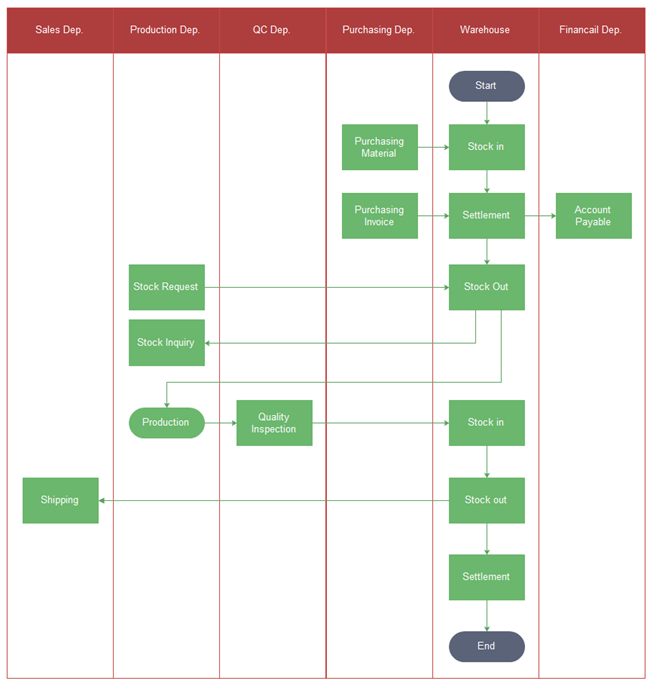
In this inventory system flow, you can trace how a Stock Request from the Production Dep. leads to a Stock Out action in the Warehouse, which eventually leads to Shipping from the Sales Dep.. This is a powerful way to visualize the interconnectedness of your system's features and user roles.
To get a practical perspective on how a developer incorporates these planning steps, let's watch a short segment from a video by Tech With Tim. He outlines his personal process for planning projects.
How I Plan My Coding Projects - 9 Steps
This video offers a pragmatic, developer-focused take on project planning. We'll focus on the parts about user stories and initial sketches.
Please watch the following two segments: First, watch the section on user stories from this timestamp. Notice how he emphasizes keeping them simple and user-focused. Next, watch his approach to prototyping from this part. He calls it drawing a "stupid simple prototype." This is the visual thinking that leads to user flows.
His process of writing user stories and then sketching a "stupid simple" wireframe is exactly how you connect the "what" (the user story) to the "how" (the user flow).
Summary and Next Steps
In this lesson, we've laid the groundwork for planning any software project. You've learned to move from a broad idea to a structured plan by focusing on the user.
Key Takeaways:
- Plan First, Code Later: Upfront planning is not a delay; it's an accelerator. It helps you build the right product more efficiently.
- Identify User Roles: Start by asking "Who is this for?" Defining roles like Administrator, Warehouse Manager, and Sales Rep clarifies the system's audience.
- Write User Stories: Use the "As a..., I want to..., so that..." format to define features from a user's perspective, ensuring every feature has a purpose.
- Map User Flows: Visualize the step-by-step journey a user takes to complete a task. This helps you think through the entire process and identify all necessary screens and interactions.
In our next lesson, we will take this planning to the next level. We will learn how to translate user flows into a list of required pages, API endpoints, and database entities. This is the crucial bridge from user-centric planning to technical architecture, moving you one step closer to building your inventory system from scratch.