Introduction
Hello! In our last lesson, we demystified the this pointer and saw how it's used to resolve ambiguity and enable powerful patterns like method chaining. You learned that when you call a member function like myNote.display(), the compiler secretly passes the address of myNote to the function as the this pointer.
This lesson builds directly on that foundation as we explore operator overloading, a feature that makes C++ incredibly expressive. It allows you to define how standard operators—like +, ==, or <<—should behave when used with your custom classes. This lets you write code that is more intuitive and readable, much like you would with built-in types such as int or double.
By the end of this lesson, you will be able to overload common operators for your own classes, specifically focusing on the arithmetic + operator, the stream insertion << operator for printing, and the equality == operator for comparisons.
1. What is Operator Overloading?
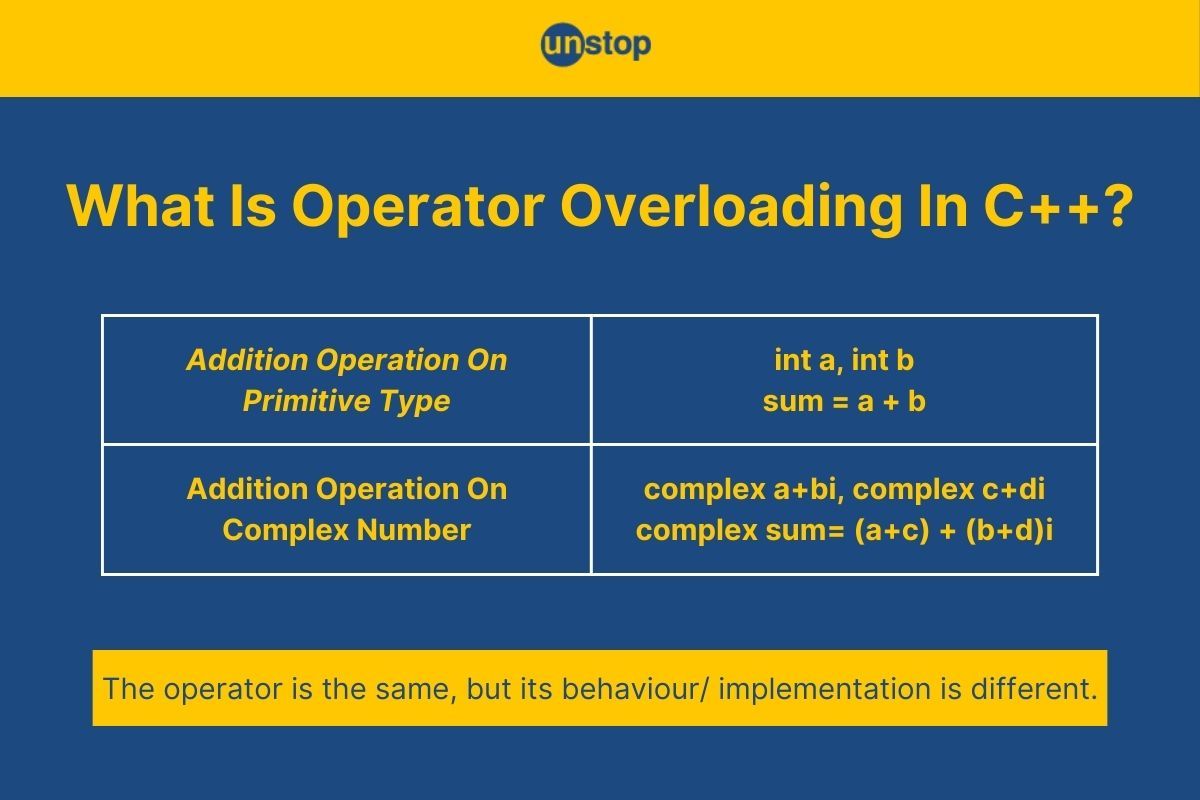
At its core, operator overloading is about providing a new meaning for an existing operator when it's applied to a user-defined type (a class or struct). For example, C++ knows how to add two integers, but it has no built-in knowledge of how to "add" two MusicNote objects. Operator overloading lets you define that behavior.
Essentially, an overloaded operator is just a function with a special name: operator followed by the symbol you're overloading (e.g., operator+, operator<<). The compiler then translates your intuitive, symbolic code into a call to that function.
Let's start with a video that gives a great overview of the concept and syntax.
OPERATORS and OPERATOR OVERLOADING in C++
This video by The Cherno introduces what operators are and why you would want to overload them for your custom types.
Watch the first 2 minutes and 53 seconds. Focus on the idea that operators are just functions with a special syntax and that overloading should be used to make code more readable, not more confusing.
The Principle of Least Astonishment
As the video mentions, with great power comes great responsibility. When overloading operators, it's crucial to follow the Principle of Least Astonishment. This means your overloaded operator should behave in a way that is natural and expected. For example, overloading + to perform subtraction would be highly confusing and lead to buggy, unmaintainable code. Always aim for clarity and predictability.
2. Overloading Arithmetic and Comparison Operators
Let's dive into the most common types of operator overloading, starting with arithmetic and comparison operators. We'll use a Vector2D class as an example, which should resonate with your interest in mathematics and physics.
struct Vector2D {
    float x, y;

    Vector2D(float x, float y) : x(x), y(y) {}
};
Implementing operator+ as a Member Function
If you wanted to add two Vector2D objects, you could write a function like add(). But Vector2D v3 = v1 + v2; is much more natural. To make this work, we can overload the + operator as a member function of our class.
The declaration looks like this:Vector2D operator+(const Vector2D& rhs) const;
Let's break this down:
Vector2D: The return type. Adding two vectors produces a new vector, so we return aVector2Dobject by value.operator+: The special function name.const Vector2D& rhs: The parameter. This is the "right-hand side" of the+sign. We pass it as aconstreference for efficiency (avoids a copy) and safety (we promise not to change it).const(at the end): This promises that the function will not modify the "left-hand side" object (the object the method is called on, accessed viathis).
The implementation would be:
Vector2D Vector2D::operator+(const Vector2D& rhs) const {
    // Create a new vector with the summed components
    return Vector2D(this->x + rhs.x, this->y + rhs.y);
}
Implementing operator==
Comparison operators are just as easy. Let's define equality for our Vector2D class. Two vectors are equal if their corresponding components are equal.
The declaration is:bool operator==(const Vector2D& rhs) const;
The implementation is:
bool Vector2D::operator==(const Vector2D& rhs) const {
    return this->x == rhs.x && this->y == rhs.y;
}
The following video demonstrates these implementations clearly.
OPERATORS and OPERATOR OVERLOADING in C++
Let's watch The Cherno implement operator+ and operator== for a Vector2 struct, which is nearly identical to our Vector2D example.
Watch from 02:53 to 07:31, where he overloads the + and * operators. Then, skip ahead and watch from 09:25 to 11:50, where he implements the == and != operators. Notice his use of const and how he implements != in terms of ==.
A C++ Idiom: Implement Operators in Terms of Each Other
As you saw in the video, a great practice is to implement related operators in terms of a fundamental one to reduce code duplication and ensure consistency.
- Implement
!=in terms of==:return !(*this == rhs); - Implement
>in terms of<:return rhs < *this; - Implement
+in terms of+=. This is a very common and efficient C++ idiom. The compound assignment operator (+=) modifies the object itself and returns a reference (*this), while the binary+operator creates a temporary copy and uses+=on it.
// 1. First, define the compound assignment operator (modifies the object)
Vector2D& Vector2D::operator+=(const Vector2D& rhs) {
    this->x += rhs.x;
    this->y += rhs.y;
    return *this; // Return a reference to allow chaining
}

// 2. Then, define the binary + operator in terms of += (creates a new object)
Vector2D Vector2D::operator+(const Vector2D& rhs) const {
    Vector2D result = *this; // Make a copy of the left-hand side
    result += rhs;           // Use the += operator
    return result;           // Return the new object
}
3. Overloading the Stream Insertion Operator (<<)
One of the most useful operators to overload is <<, which allows you to print your objects directly to output streams like std::cout. Wouldn't it be nice to write std::cout << myVector; instead of std::cout << myVector.x << ", " << myVector.y;?
There's a catch: operator<< must be a non-member function (a free function).
Why? Think about the expression std::cout << myVector;. The left-hand operand is std::cout, which is an object of type std::ostream. We can't add a new member function to the std::ostream class. Therefore, the operator overload must be a free function that takes the stream and our object as arguments.
The signature looks like this:std::ostream& operator<<(std::ostream& stream, const Vector2D& vec);
Let's break it down:
std::ostream&: The return type is a reference to the stream. This is crucial for enabling chaining:std::cout << vec1 << vec2;.std::ostream& stream: The first parameter is a reference to the stream we're writing to (e.g.,std::cout).const Vector2D& vec: The second parameter is the object we want to print.
If operator<< needs to access private members of your class, you can declare it as a friend inside the class definition. This grants the function special access.
class MyClass {
private:
    int private_data;
public:
    //...
    friend std::ostream& operator<<(std::ostream& stream, const MyClass& obj);
};

// Implementation (now has access to obj.private_data)
std::ostream& operator<<(std::ostream& stream, const MyClass& obj) {
    stream << obj.private_data;
    return stream;
}
This next video segment demonstrates this process.
OPERATORS and OPERATOR OVERLOADING in C++
This clip shows exactly how to implement the << operator as a free function to print a custom object.
Watch from 07:31 to 09:25. Pay close attention to the function signature and why it's defined outside the class.
4. Hands-On Exercise: Enhancing the MusicNote Class
It's time to apply these concepts to the MusicNote class from our previous lessons.
Instructions:
- Start with your completed
MusicNoteclass. - Overload the stream insertion operator (
<<). Implement it as afriendfree function so it can access the privatem_pitchandm_octavemembers. It should print the note in a clean format likeC#4. - Overload the equality operator (
==). Implement it as aconstmember function. TwoMusicNoteobjects should be considered equal if they have the same pitch and the same octave. Remember thatm_pitchis a C-style string, so you'll needstrcmp()for comparison, not==. - Use the
mainfunction provided below to test your new operators.
Starter Code (based on previous lesson):
#include <iostream>
#include <cstring>

class MusicNote {
private:
    char* m_pitch;
    int m_octave;

public:
    MusicNote(const char* pitch = "C", int octave = 4) : m_octave(octave) {
        std::cout << "Constructor for " << pitch << octave << std::endl;
        if (pitch) {
            m_pitch = new char[strlen(pitch) + 1];
            strcpy(m_pitch, pitch);
        } else {
            m_pitch = nullptr;
        }
    }

    ~MusicNote() {
        std::cout << "Destructor for " << (m_pitch ? m_pitch : "") << m_octave << std::endl;
        delete[] m_pitch;
    }

    // For simplicity, we'll omit the copy constructor and assignment operator for now,
    // though a complete class would need them (Rule of Three).

    // --- YOUR OPERATOR OVERLOADS GO HERE ---
    // 1. Friend declaration for stream operator
    // 2. Member function declaration for equality operator

};

// --- IMPLEMENTATION OF YOUR OPERATORS GOES HERE ---
// 1. Free function for stream operator
// 2. Member function for equality operator

int main() {
    MusicNote note1("G#", 5);
    MusicNote note2("A", 5);
    MusicNote note3("G#", 5);

    // Test the stream insertion operator
    std::cout << "Note 1 is: " << note1 << std::endl;
    std::cout << "Note 2 is: " << note2 << std::endl;

    // Test the equality operator
    std::cout << std::boolalpha; // Print "true" or "false" instead of 1 or 0
    std::cout << "Is note1 == note2? " << (note1 == note2) << std::endl;
    std::cout << "Is note1 == note3? " << (note1 == note3) << std::endl;

    return 0;
}
Solution
#include <iostream>
#include <cstring>

class MusicNote {
private:
    char* m_pitch;
    int m_octave;

public:
    MusicNote(const char* pitch = "C", int octave = 4) : m_octave(octave) {
        std::cout << "Constructor for " << pitch << octave << std::endl;
        if (pitch) {
            m_pitch = new char[strlen(pitch) + 1];
            strcpy(m_pitch, pitch);
        } else {
            m_pitch = nullptr;
        }
    }

    ~MusicNote() {
        std::cout << "Destructor for " << (m_pitch ? m_pitch : "") << m_octave << std::endl;
        delete[] m_pitch;
    }

    // Friend declaration for the stream insertion operator
    friend std::ostream& operator<<(std::ostream& stream, const MusicNote& note);

    // Equality operator as a const member function
    bool operator==(const MusicNote& other) const {
        // First check if octaves are different (quick exit)
        if (this->m_octave != other.m_octave) {
            return false;
        }
        // Handle cases where one or both pitches are null
        if (this->m_pitch == nullptr || other.m_pitch == nullptr) {
            return this->m_pitch == other.m_pitch; // True only if both are null
        }
        // Use strcmp for C-string comparison. It returns 0 if they are equal.
        return strcmp(this->m_pitch, other.m_pitch) == 0;
    }
};

// Implementation of the stream insertion operator (free function)
std::ostream& operator<<(std::ostream& stream, const MusicNote& note) {
    if (note.m_pitch) {
        stream << note.m_pitch << note.m_octave;
    } else {
        stream << "(rest)";
    }
    return stream; // Return the stream to allow chaining
}


int main() {
    MusicNote note1("G#", 5);
    MusicNote note2("A", 5);
    MusicNote note3("G#", 5);

    // Test the stream insertion operator
    std::cout << "Note 1 is: " << note1 << std::endl;
    std::cout << "Note 2 is: " << note2 << std::endl;

    // Test the equality operator
    std::cout << std::boolalpha; // Print "true" or "false" instead of 1 or 0
    std::cout << "Is note1 == note2? " << (note1 == note2) << std::endl;
    std::cout << "Is note1 == note3? " << (note1 == note3) << std::endl;

    return 0;
}
Conclusion
Excellent work! You've just unlocked one of C++'s most powerful features for writing clean, intuitive, and maintainable code. By defining how operators work with your own classes, you make them feel like a natural extension of the language.
Key Takeaways:
- Operator Overloading lets you define the behavior of operators for your custom classes, making them more intuitive to use.
- Overloaded operators are simply functions with special names (e.g.,
operator+). - Arithmetic operators like
+are typicallyconstmember functions that return a new object by value. - Stream insertion
<<must be a free function that takes anostream&and your object as parameters, and it should return theostream&to allow chaining. - Comparison operators like
==are typicallyconstmember functions that return abool. - Always follow the Principle of Least Astonishment: make your operators behave in a way that users would naturally expect.
Next Up
In this lesson, we saw several examples of const being used to make our operator overloads safer and more correct. In the next lesson, we'll do a deep dive into the const keyword. You'll learn how to apply it correctly to member functions, parameters, and variables to write more robust, self-documenting, and bug-free C++ code.