Introduction
Hello! In our last lesson, you successfully built a complete data persistence pipeline: you saved a vector of Song structs to a file and then parsed that file to load the data back into your program. This is a huge milestone and a fundamental skill in software development.
So far, we've used structs to group related data, like a song's title and year. However, the functions that operate on this data, like save_playlist and load_playlist, exist separately. Object-Oriented Programming (OOP) offers a powerful way to organize this by bundling the data and the functions that operate on it into a single, neat package.
This lesson marks our entry into OOP in C++. You will learn how to define a class, which is the primary tool for building these packages. A class acts as a blueprint for creating objects, which combine data and behavior. This approach is central to building complex applications, including the desktop and embedded systems you're interested in.
Our goal today is to define a class with member variables (data) and member functions (methods), transforming our Song struct into a more capable Song class.
1. From Data Structures to Objects
In procedural programming, data and the functions that manipulate it are separate. You pass data to functions. In OOP, we merge them. The data itself "knows" how to perform actions.
Think about our Song struct. It holds data (title, year), but to do anything with it, we write external functions. An OOP approach would be to create a Song object that not only holds the title and year but also has built-in functionalities, like a display() function.
A class is the C++ blueprint for creating such objects. It defines what data an object will hold and what actions it can perform.
To understand the motivation behind this, let's watch a short video that explains why classes are so useful for organizing code.
The video "CLASSES in C++" by The Cherno provides an excellent introduction to why we need classes. It starts by showing how managing related data with simple variables becomes messy and then introduces classes as a solution.
Please watch from the beginning until 02:43. Pay attention to the problem he describes with unorganized player data and how creating a Player class elegantly solves this by grouping the data together.
As the video illustrates, grouping related variables into a class is a significant improvement over managing them separately. This is similar to what we've already been doing with structs. Now, let's take the next step: adding behavior.
2. Defining a Class with Members
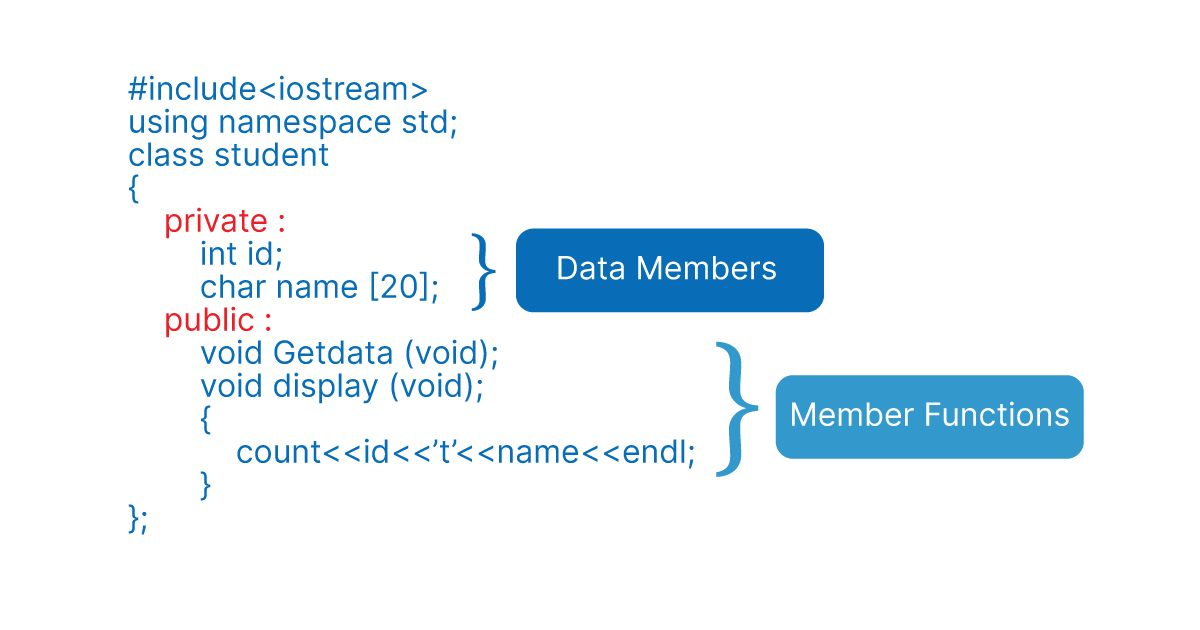
A class definition consists of two main types of members:
- Member Variables (or Data Members): These are the variables that belong to the class and hold the object's state (e.g.,
titleandyear). - Member Functions (or Methods): These are functions that belong to the class and define its behavior (e.g., a function to print the song's details).
Let's continue with the same video to see how to define these members and create an object (an instance of a class).
Continuing with The Cherno's video, we'll now see the syntax for defining a class, creating an object, and adding a member function.
Please watch from 02:43 to 06:35. Focus on: The syntax for defining the Player class and its member variables. The public: keyword. For now, just understand that it makes the members accessible from outside the class. We'll explore this in depth later. How he moves the move function inside the class, turning it into a member function (a method).
Key Syntax Points:
- Class Definition: A class is defined with the
classkeyword, followed by its name, and a body enclosed in curly braces{}. Crucially, the definition must end with a semicolon;. - Access Specifiers: The
public:keyword is an access specifier. It dictates which parts of the class can be accessed from outside. By default, all members of aclassareprivate, meaning they can only be used by other member functions of that same class. Making thempublicallows ourmainfunction to interact with them. - Objects: An instance of a class is called an object. You create one just like any other variable:
ClassName object_name;. - Member Access: You use the dot operator (
.) to access both member variables and member functions of an object:player.x = 10;orplayer.move(1, -1);.
Here is a simple visual breakdown of a class definition:
To solidify this concept, here's a concise article that formally defines classes, objects, and methods, contrasting them nicely with the C structs you've used before.
The article "Understanding Memory Management, Part 2: C++ and RAII" has a great section that clearly defines objects and classes.
Please read the section titled "Objects and Classes". It provides a clear, textual explanation of how C++ extends structs to create classes that associate functions (methods) with data types.
3. Separating Declaration from Implementation
In the examples so far, the member functions were defined inside the class definition. This is called an inline definition. It's fine for very short functions, but for longer ones, it clutters the class declaration.
A cleaner, more professional approach is to separate the function's declaration from its definition.
- Declaration: You declare the function inside the class definition (this tells the compiler the function exists).
- Definition: You provide the function's implementation (the actual code) outside the class definition.
To link the external definition back to the class, you use the scope resolution operator ::.
ReturnType ClassName::functionName(parameters) { /* ... implementation ... */ }
This practice is essential for organizing larger projects, where class declarations are placed in header files (.h) and their definitions in source files (.cpp).
Let's watch a video that demonstrates this technique clearly.
Class Member Functions (aka Methods) | C++ Tutorial
The video "Class Member Functions (aka Methods)" by Portfolio Courses clearly shows how to define methods both inside and outside the class.
Please watch from 00:26 to 04:06. Pay close attention to: How the setDimensions function is defined inline. How the perimeter function is first declared in the class and then defined outside using the Rectangle:: scope resolution operator.
Why is this separation so important? In C++, there is a rule called the One Definition Rule (ODR). It states that every function or class should have exactly one definition in the entire program. If you put the full function definition in a header file and include that header in multiple .cpp files, you'll get a "multiple definition" error from the linker. By placing only the declaration in the header and the definition in a single .cpp file, you satisfy the ODR.
This article section shows exactly how this looks for a class.
Splitting The Class Declaration And Definition Into Header And CPP Files
This article, "C++ Best Practices", explains why we split class declarations and definitions and shows a concrete example.
Please read the section titled "Splitting The Class Declaration And Definition Into Header And CPP Files". Focus on the employee.h (declaration) and employee.cpp (definition) code blocks. This pattern is the standard way to organize classes in C++.
We will practice creating multi-file projects later in the course, but understanding this separation now is key to writing clean, professional C++ code.
4. Practical Exercise: Creating the Song Class
It's time to apply what you've learned. You will convert the Song struct from our previous exercises into a full-fledged Song class.
Instructions:
- Start a new C++ file.
- Define a class named
Song. - Inside the class, add two
publicmember variables:std::string titleandint year. (We'll make theseprivatein the next lesson, but for now,publicis fine). - Add a
publicmember function (method) with the following declaration:void display();. - Outside the class definition, implement the
display()function using the scope resolution operator (::). This function should print the song's title and year to the console in a readable format. - In your
mainfunction:- Create a
std::vector<Song>. - Create a few
Songobjects, set theirtitleandyear, and add them to the vector. - Use a range-based
forloop to iterate through the vector. Inside the loop, call thedisplay()method on eachSongobject.
- Create a
Here is a skeleton to guide you:
#include <iostream>
#include <string>
#include <vector>

// 1. Define the Song class
class Song {
public:
    // Member variables
    std::string title;
    int year;

    // Member function declaration
    void display();
};

// 2. Define the display method outside the class
void Song::display() {
    // Your implementation here: print title and year
    std::cout << "Title: " << title << ", Year: " << year << std::endl;
}


int main() {
    std::vector<Song> playlist;

    // 3. Create Song objects, set their data, and add to the vector
    Song song1;
    song1.title = "Stairway to Heaven";
    song1.year = 1971;
    playlist.push_back(song1);

    Song song2;
    song2.title = "Bohemian Rhapsody";
    song2.year = 1975;
    playlist.push_back(song2);

    Song song3;
    song3.title = "Hotel California";
    song3.year = 1977;
    playlist.push_back(song3);


    std::cout << "--- My Playlist ---\n";
    // 4. Loop through the playlist and call the display() method on each song
    for (const auto& song : playlist) {
        song.display();
    }

    return 0;
}
Conclusion
Excellent work! You've taken a significant first step into Object-Oriented Programming in C++. You've moved beyond simple data structures and learned how to create a custom type that bundles both data and behavior.
Key Takeaways:
- A class is a blueprint for creating objects, combining data (member variables) and functions (member functions/methods).
- An object is an instance of a class. You access its members using the dot operator (
.). - By default, class members are
private. Thepublickeyword makes them accessible from outside the class. - Member functions can be defined inline (inside the class) or externally using the scope resolution operator (
::). - Separating declarations (
.hfiles) from definitions (.cppfiles) is a fundamental best practice in C++ for organization and avoiding linker errors.
Next Up
In this lesson, we made our class members public for easy access. However, a core principle of OOP is encapsulation—protecting an object's internal data from outside interference. In the next lesson, we will explore public, private, and protected access specifiers in detail. We'll also learn about special member functions called constructors and destructors, which manage an object's lifecycle.