Welcome back! In our last lesson, we built a VectorClock class in TypeScript, implementing the tick and merge methods. This gave us a powerful way to capture the causal history of events as they propagate through a distributed system. We saw how a clock like {"alice":2, "bob":3, "charlie":2} tells us precisely which events from each node have been observed.
However, just tracking history isn't enough. The real power of vector clocks lies in what we can do when we compare two of them. This lesson will close that loop. We will implement the logic to compare two vector clocks, allowing us to programmatically determine if one event happened before another or if they occurred concurrently. This is the final and most crucial piece of the puzzle before we can start managing conflicts in your collaborative workflow builder.
The Rules of Comparison
As we touched on in the previous lesson with Martin Kleppmann's explanation, the comparison of two vector clocks, let's call them V_a and V_b, directly maps to the happens-before relationship. Let's formalize the rules:
- Happens-Before (
V_a < V_b): ClockV_ahappened beforeV_bif and only if every counter inV_ais less than or equal to the corresponding counter inV_b, AND at least one counter inV_ais strictly less than its counterpart inV_b. This second condition is crucial to distinguish it from equality. - Concurrent (
V_a || V_b): ClocksV_aandV_bare concurrent if neitherV_a < V_bnorV_b < V_a. This occurs whenV_ahas some counters that are larger thanV_b's, andV_bhas others that are larger thanV_a's. They each contain knowledge the other lacks.
With these rules, we can finally complete our VectorClock class.
Implementing the compare Method
Your experience in frontend architecture involves managing complex state and state transitions. Comparing vector clocks is a pure function that determines the relationship between two state snapshots. Let's add this function to our class.
How to Build Causal Consistency Patterns - OneUptime
The OneUptime article we referenced previously contains a complete and elegant implementation of the compare method within the VectorClock class. It's a perfect blueprint for what we need to build.
Focus on the section How Vector Clocks Work, specifically the compare method within the VectorClock class. Note how it handles keys that might exist in one clock but not the other by treating missing values as 0. Then, review the example usage to see how this comparison identifies a concurrent event.
Let's integrate this logic into the VectorClock class we built in the previous lesson. Here is the complete class, now with the compare method.
// A unique identifier for each client/node.
type NodeID = string;

// The possible causal relationships between two clocks.
type ClockComparison = "BEFORE" | "AFTER" | "CONCURRENT" | "EQUAL";

export class VectorClock {
  private clock: Map<NodeID, number>;
  public readonly nodeId: NodeID;

  constructor(nodeId: NodeID) {
    this.nodeId = nodeId;
    this.clock = new Map<NodeID, number>();
    this.clock.set(this.nodeId, 0);
  }

  tick(): void {
    const current = this.clock.get(this.nodeId) || 0;
    this.clock.set(this.nodeId, current + 1);
  }

  merge(receivedClock: Map<NodeID, number>): void {
    for (const [nodeId, timestamp] of receivedClock.entries()) {
      const localTimestamp = this.clock.get(nodeId) || 0;
      this.clock.set(nodeId, Math.max(localTimestamp, timestamp));
    }
  }

  // NEW: The compare method
  compare(other: VectorClock): ClockComparison {
    // These flags track the relationship between this clock (A) and the other clock (B)
    let thisIsSmaller = false; // Is A smaller than B in at least one position?
    let otherIsSmaller = false; // Is B smaller than A in at least one position?

    // Get all unique node IDs from both clocks to ensure we check every entry.
    const allNodeIds = new Set([...this.clock.keys(), ...other.clock.keys()]);

    for (const nodeId of allNodeIds) {
      const thisValue = this.clock.get(nodeId) || 0;
      const otherValue = other.getClock().get(nodeId) || 0;

      if (thisValue < otherValue) {
        thisIsSmaller = true;
      }
      if (otherValue < thisValue) {
        otherIsSmaller = true;
      }
    }

    if (thisIsSmaller && otherIsSmaller) {
      // If A is smaller in some places and B is smaller in others, they are concurrent.
      return "CONCURRENT";
    } else if (thisIsSmaller) {
      // If A is only ever smaller or equal, it happened BEFORE B.
      return "BEFORE";
    } else if (otherIsSmaller) {
      // If B is only ever smaller or equal, it happened AFTER A.
      return "AFTER";
    } else {
      // If neither is smaller (i.e., all values are equal), the clocks are identical.
      return "EQUAL";
    }
  }

  getClock(): Map<NodeID, number> {
    return new Map(this.clock);
  }

  toString(): string {
    const entries = Array.from(this.clock.entries())
      .sort()
      .map(([k, v]) => `"${k}":${v}`);
    return `{${entries.join(",")}}`;
  }
}
Seeing it in Action
Now, let's update our simulation from the last lesson. We'll reuse the scenario where Bob and Charlie have concurrent events and use our new compare method to prove it.
// --- Simulation ---

// 1. Initialize clocks
const alice = new VectorClock("alice");
const bob = new VectorClock("bob");
const charlie = new VectorClock("charlie");

// 2. Alice sends a message to Bob
alice.tick(); // local event 1
alice.tick(); // event for sending
bob.merge(alice.getClock());
bob.tick(); // event for receiving
console.log(`Bob's clock after receiving from Alice: ${bob.toString()}`);
// Expected: {"alice":2,"bob":1}

// 3. Now, Bob and Charlie have CONCURRENT events
bob.tick(); // Bob's new local event
const bobClock = bob.getClock();
console.log(`Bob's clock after local event: ${bob.toString()}`);
// Expected: {"alice":2,"bob":2}

charlie.tick(); // Charlie's first local event
const charlieClock = charlie.getClock();
console.log(`Charlie's clock after local event: ${charlie.toString()}`);
// Expected: {"charlie":1}

// 4. Compare the clocks!
// For comparison, let's create temporary VectorClock instances
// since the compare method is on the class instance.
const bobState = new VectorClock("bob");
bobState['clock'] = bobClock; // Directly setting private field for demo

const charlieState = new VectorClock("charlie");
charlieState['clock'] = charlieClock; // Directly setting private field for demo

// Does Bob's state happen before Charlie's?
console.log(`\nComparing Bob's state to Charlie's: ${bobState.compare(charlieState)}`);
// Expected: CONCURRENT

// To prove the 'BEFORE' case, let's compare Alice's original state to Bob's final one
console.log(`Comparing Alice's state to Bob's: ${alice.compare(bobState)}`);
// Expected: BEFORE

/*
Expected Output:
Bob's clock after receiving from Alice: {"alice":2,"bob":1}
Bob's clock after local event: {"alice":2,"bob":2}
Charlie's clock after local event: {"charlie":1}

Comparing Bob's state to Charlie's: CONCURRENT
Comparing Alice's state to Bob's: BEFORE
*/
Run this code. As predicted by the theory, the compare method correctly identifies that Bob's and Charlie's operations were concurrent. They both acted on the system without knowledge of the other's update.
From Detection to Resolution
This brings us to the central challenge of your collaborative app. When your system detects a concurrent operation, what should it do?

When concurrency is detected, you have a conflict. Your system must have a strategy to resolve it and converge on a single, consistent state. Vector clocks provide the detection mechanism; the resolution is up to you.
The decision process looks like this:
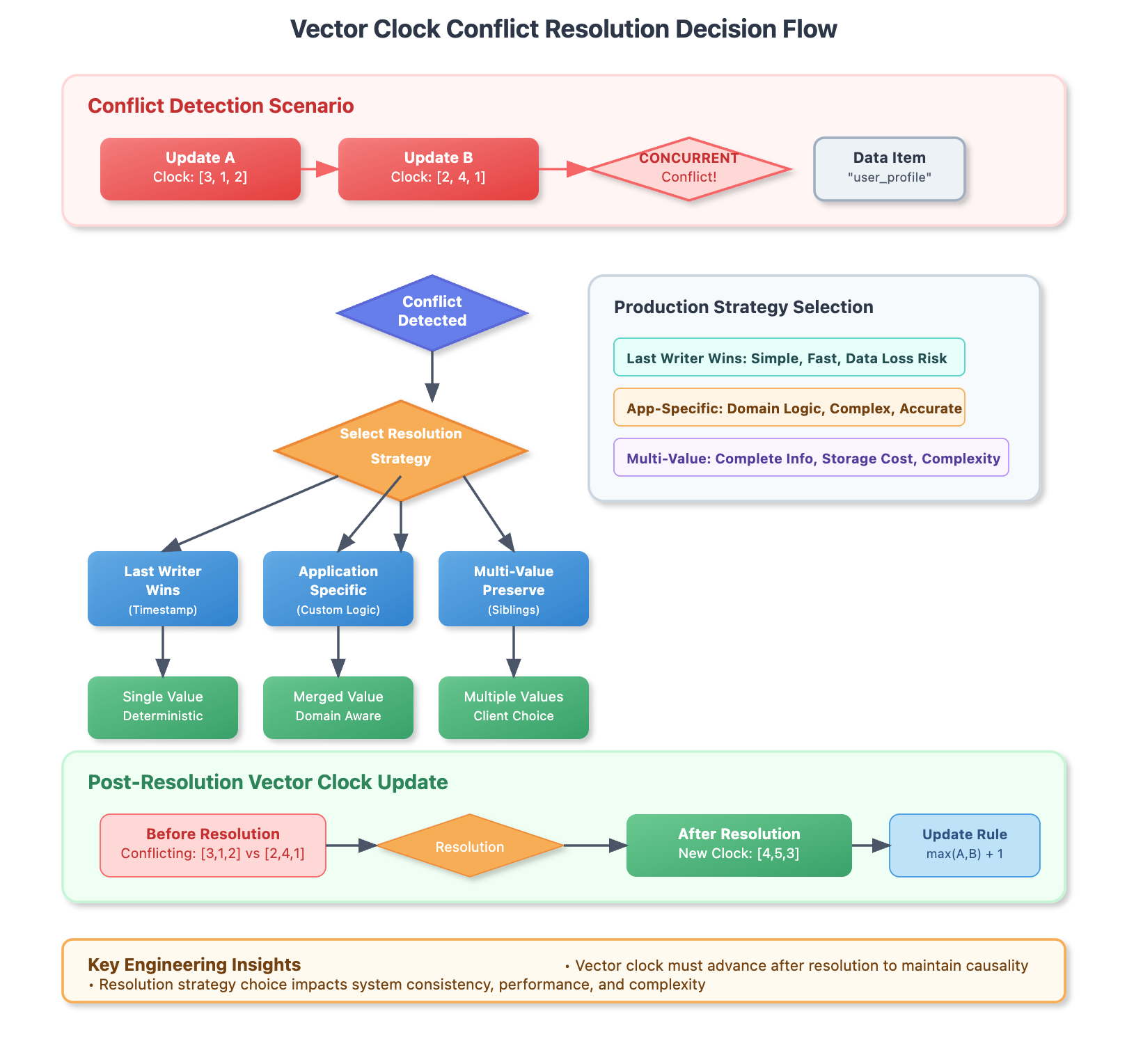
As the flowchart illustrates, there are several common strategies for conflict resolution:
-
Last Writer Wins (LWW): This is the simplest strategy. You use an external timestamp (which could be a physical clock or a Lamport timestamp) to decide which update "wins". The losing update is discarded. It's fast and simple but carries the risk of silent data loss, which might be unacceptable for your application.
-
Application-Specific (Custom Logic): This is the most powerful but also the most complex strategy. You write custom code based on the application's domain to merge the conflicting changes intelligently. For your workflow builder, if two users move the same node, your logic could average the positions, or snap the node to a grid. If one user renames a node while another changes its color, your logic can safely apply both changes. Your deep experience in frontend engineering will be invaluable here, as this logic often lives on the client.
-
Multi-Value (Preserve / Siblings): Instead of choosing a winner, you keep both conflicting versions. The system then presents both versions to the user to resolve manually, or an automated process attempts to merge them later. This is what Amazon's shopping cart does: if you add an item from two different offline devices, it keeps both additions rather than risk losing one. This avoids data loss but can increase storage and client-side complexity.
After a conflict is resolved (e.g., using one of the strategies above), the system must update its vector clock. The resolution event itself is a new event that causally depends on both conflicting updates. Therefore, the new vector clock is created by taking the element-wise maximum of the two conflicting clocks, and then incrementing the local node's counter. This ensures that the newly resolved state is correctly placed in the causal history, happening after both conflicting operations.
Conclusion
In this lesson, you have completed the implementation of vector clocks. You now have a robust tool not just for tracking causality but for algorithmically detecting concurrency. This is a fundamental building block for any distributed, collaborative system.
The key takeaways are:
- Comparison Logic: Two vector clocks are compared element by element. They are concurrent if each is "larger" in at least one position. They have a "happens-before" relationship if one is consistently less than or equal to the other across all positions (and strictly smaller in at least one).
- Conflict Detection: A "concurrent" result from a vector clock comparison signals a conflict—two operations that occurred without knowledge of one another.
- Resolution Strategies: Once a conflict is detected, the application must choose a strategy to resolve it, such as Last Writer Wins, custom application logic, or preserving multiple versions.
You've now mastered the essential concepts of time, order, and causality in distributed systems. You understand the problem that CRDTs were designed to solve. In our next module, we will dive into Conflict-free Replicated Data Types (CRDTs) themselves. You will see how they elegantly embed these conflict resolution strategies directly into their data structures, guaranteeing that all nodes will eventually converge to the same state automatically.