Introduction
Hello! In our last two lessons, we explored the stack data structure, its LIFO (Last-In, First-Out) principle, and how to use it to solve the classic "balanced parentheses" problem. We saw how the LIFO rule was the key to tracking nested structures.
Today, we shift our focus to the conceptual opposite of a stack: the queue. Your learning outcome for this lesson is to describe the queue data structure (FIFO) and implement one using collections.deque.
Just like a line at a grocery store, a queue follows a FIFO (First-In, First-Out) principle. The first person to get in line is the first person to be served. This simple but powerful idea has wide-ranging applications in computing, from managing tasks for a printer to handling network data. We'll explore what a queue is, why a standard Python list isn't the best tool for the job, and how to use Python's highly efficient deque object to build one.
1. What is a Queue? The FIFO Principle
A queue is a linear collection of items where additions and removals follow a specific rule: new items are added to one end (the rear or tail), and items are removed from the other end (the front or head). This ensures that the item that has been in the queue the longest is the first one to be removed.
This is the First-In, First-Out (FIFO) principle.
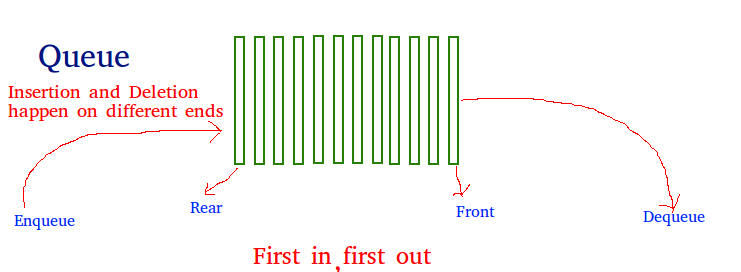
Common analogies for queues are everywhere in daily life:
- A line of people waiting for a bus.
- A playlist of songs in a music app playing in order.
- Cars waiting at a traffic light.
In computer systems, queues are fundamental. To see a more technical example, let's watch a video that explains how a queue can be used to manage a stream of stock price data.
Queue - Data Structures & Algorithms Tutorials In Python #8
The video 'Queue - Data Structures & Algorithms' from the codebasics channel provides an excellent real-world scenario of a producer-consumer problem, which is a classic use case for queues.
Watch from the beginning to 04:51. Pay close attention to how the queue acts as a buffer between the data producer (the stock exchange) and the data consumer (a finance website), allowing them to operate independently.
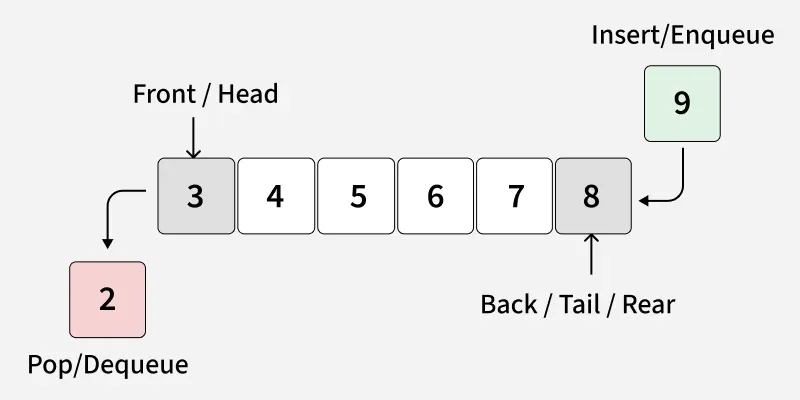
As the video explained, the two primary operations for a queue are:
- Enqueue: Adds an element to the rear of the queue.
- Dequeue: Removes an element from the front of the queue.
2. The Problem with Using a Python list as a Queue
Your first instinct might be to use a Python list to implement a queue. You could append() to add an item to the rear and pop(0) to remove the first item from the front.
Let's see what that looks like:
# Using a list as a queue (demonstration, not recommended!)
my_queue = []


# Enqueue
my_queue.append('a')
my_queue.append('b')
my_queue.append('c')
print(f"Queue state: {my_queue}") # Output: Queue state: ['a', 'b', 'c']


# Dequeue
first_item = my_queue.pop(0)
print(f"Dequeued item: {first_item}") # Output: Dequeued item: a
print(f"Queue state: {my_queue}")  # Output: Queue state: ['b', 'c']
This works, but it's very inefficient. Remember from Module 4 on algorithm efficiency that some operations are more "expensive" than others. Appending to the end of a list is fast (it's an O(1) operation on average). However, popping from the beginning of a list (pop(0)) is slow. It's an O(n) operation, where n is the number of items in the list.
Why? Because when you remove the first element, every other element in the list must be shifted one position to the left to fill the gap. For a queue with thousands or millions of items, this is incredibly slow.
3. The Right Tool: collections.deque
To solve this efficiency problem, Python's standard library provides the collections.deque object. The name "deque" is short for "double-ended queue" and is pronounced "deck".
A deque is specifically designed for fast additions and removals from both its ends. It is built using a data structure called a doubly linked list, which means that adding or removing items from either the front or the back is an O(1) operation—it takes the same, constant amount of time, regardless of the queue's size.
To understand why deque is superior to list for this task, please read the following material.
Python's deque: Implement Efficient Queues and Stacks
The article 'Python's deque' from Real Python explains the performance difference between lists and deques and introduces the core deque methods.
Please read the sections 'Get Started With Python’s deque' and 'Pop and Append Items With Efficient deque Methods'. Focus on the explanation of why list operations can be O(n) and how deque achieves O(1) performance for its end operations.
4. Implementing a Queue with deque
Now that you understand why deque is the right choice, let's see how to use it to implement a queue. The conventional way is to use:
deque.append(item)for the enqueue operation (add to the right/rear).deque.popleft()for the dequeue operation (remove from the left/front).
This short video provides a quick, clear demonstration.
Using collections.deque for Queues and Stacks in Python
This video from the Real Python channel demonstrates the FIFO principle using collections.deque with the .append() and .popleft() methods.
Watch the entire video (it's just over a minute long). Notice how append adds to the right and popleft removes from the left.
While you can use a deque object directly, it's good practice to wrap it in a custom Queue class. This hides the implementation details and provides a clean interface with methods named enqueue and dequeue. This connects back to the object-oriented programming concepts you learned in Module 3.
Python's deque: Implement Efficient Queues and Stacks
Let's return to the Real Python article. This section shows how to build a custom Queue class using a deque internally.
Read the section titled 'Build Efficient Queues With deque'. Pay attention to how the .append() and .popleft() methods of the internal deque object are used to create the enqueue and dequeue methods of the class.
Here is a summary of the Queue class implementation. Take a moment to read through the code and the comments.
from collections import deque

class Queue:
    def __init__(self):


        # The internal storage for the queue is a deque object.
        self._items = deque()

    def enqueue(self, item):
        """Adds an item to the rear of the queue."""
        self._items.append(item)

    def dequeue(self):
        """Removes and returns the item from the front of the queue."""
        if not self._items:


            # It's good practice to handle the case of an empty queue.
            raise IndexError("dequeue from an empty queue")
        return self._items.popleft()

    def is_empty(self):
        """Returns True if the queue is empty, False otherwise."""
        return not self._items

    def size(self):
        """Returns the number of items in the queue."""
        return len(self._items)

    def __repr__(self):
        """Provides a user-friendly string representation."""
        return f"Queue({list(self._items)})"
5. Your Turn: Practice with the Queue
Let's put this Queue class to use. Imagine a simple task manager where tasks are completed in the order they are added.
- Create an instance of our
Queueclass. enqueuethe following tasks (strings):"Wash dishes","Do laundry","Write report".- Print the queue to see its current state.
- Now,
dequeueone task and print the returned task. - Print the queue again to see how it has changed.
enqueuea new task:"Call mom".- Finally, print the queue's final state.
Try to predict the output at each step before running the code.
# Create a queue for tasks
task_queue = Queue()


# Add initial tasks
task_queue.enqueue("Wash dishes")
task_queue.enqueue("Do laundry")
task_queue.enqueue("Write report")

print(f"Initial tasks: {task_queue}")


# Complete the first task
completed_task = task_queue.dequeue()
print(f"Completed: {completed_task}")
print(f"Remaining tasks: {task_queue}")


# Add a new task
task_queue.enqueue("Call mom")
print(f"Final tasks: {task_queue}")


# Expected final output should be:
# Final tasks: Queue(['Do laundry', 'Write report', 'Call mom'])
This exercise should confirm your understanding of the FIFO order. "Wash dishes" was added first, so it was the first to be removed.
Conclusion
Great work! You've learned about a fundamental data structure and its efficient implementation in Python.
Key Takeaways:
- A queue is a data structure that follows the FIFO (First-In, First-Out) principle.
- The primary operations are enqueue (add to the rear) and dequeue (remove from the front).
- Using a Python
listfor a queue is inefficient because removing from the front (pop(0)) is an O(n) operation. collections.dequeis the ideal tool for implementing queues in Python, as itsappendandpopleftmethods are both O(1) operations.- Encapsulating a
dequewithin a customQueueclass provides a clean, reusable, and easy-to-understand interface.
Preview of the Next Lesson:
We mentioned that deque is implemented using a "doubly linked list." In the next lesson, we'll dive into this underlying concept. You will learn to define a Node class and implement a basic singly linked list from scratch. This will give you a much deeper understanding of how data structures like deque work under the hood.