Hello! Welcome to the eighth lesson in your algorithms course.
In our last lesson, you saw how to use Python's standard library to perform tasks like mathematical calculations and generating random numbers. We briefly used lists when working with the random module, for example, with random.choice() and random.shuffle(). Now, it's time to dive deep into what lists are and how to work with them directly.
This lesson marks the beginning of our second module, "Core Data Structures in Python". We'll start with the list, which is one of the most fundamental and versatile data structures you'll use. You will learn how to create lists and then how to access and modify their contents. Mastering lists is essential, as they form the backbone for many algorithms you'll encounter later.
1. What is a Python List?
Think of a list just like a shopping list. It's a collection of items, and the order in which you write them down matters. In Python, a list is an ordered collection of items.
Key properties of a list:
- Ordered: Each item has a specific position, or index. The first item is at index 0, the second at index 1, and so on. This is called zero-based indexing.
- Mutable: You can change the list after it's created. You can add new items, remove existing ones, or change the items that are already in it.
- Flexible: A list can hold items of any data type, including numbers, strings, and even other lists.
You create a list by placing comma-separated items inside square brackets [].
# An empty list
empty_list = []


# A list of numbers
primes = [2, 3, 5, 7, 11]


# A list of strings
fruits = ["apple", "banana", "cherry"]


# A list with mixed data types
mixed_list = ["hello", 100, True, 3.14]

print(primes)
print(fruits)
print(mixed_list)
The Afternerd article below provides a good explanation of these core concepts.
Python Lists (for absolute beginners) - Afternerd
Read the following sections from the article "Python Lists (for absolute beginners)" to solidify your understanding of what a list is and how to create one.
Read the sections "What is a list?" and "How to create a list?". Pay attention to the explanation of a list being an ordered collection of objects.
2. Accessing Elements: Indexing and Slicing
Since lists are ordered, you can retrieve any item by its index.
Indexing
You access a single item using its index in square brackets. Remember:
- The first element is at index
0. - The second element is at index
1. - You can also use negative indices.
[-1]is the last element,[-2]is the second-to-last, and so on.
Let's see an example:
shopping_list = ["milk", "eggs", "bread", "butter"]


# Get the first item
first_item = shopping_list[0]  # "milk"


# Get the third item
third_item = shopping_list[2]  # "bread"


# Get the last item
last_item = shopping_list[-1] # "butter"

print(f"The first item is: {first_item}")
print(f"The last item is: {last_item}")
Slicing
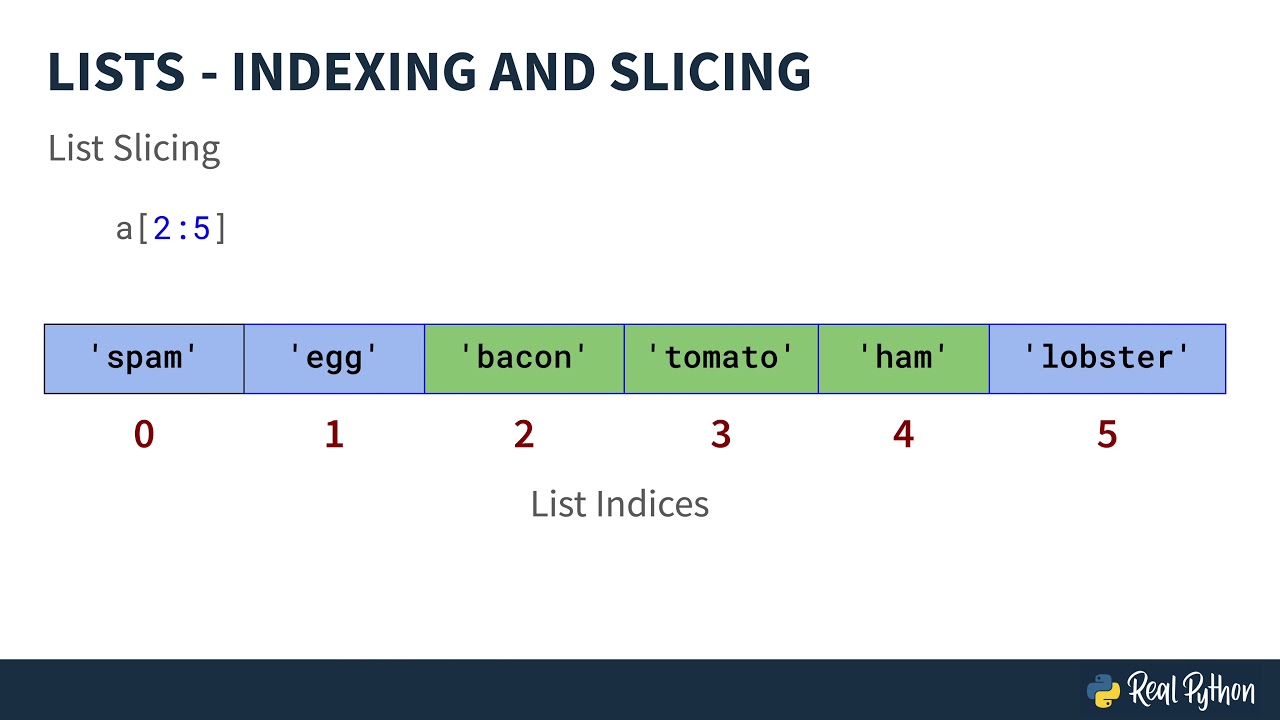
What if you want a part of the list, not just one item? You can do this with slicing. The syntax is my_list[start:end].
start: The index of the first element you want to include.end: The index of the first element you do not want to include. The slice goes up to but not including this index.
This video from John Watson Rooney quickly demonstrates both indexing and slicing.
Indexing and Slicing Python Lists for Beginners
This video, "Indexing and Slicing Python Lists for Beginners", provides a clear visual demonstration of these concepts. He starts with strings but the principles are identical for lists.
Watch the section on lists from 03:13 to 04:54. Notice how he uses both positive and negative indices to access single items and sub-lists.
Here are some common slicing patterns:
numbers = [0, 1, 2, 3, 4, 5, 6, 7, 8, 9]


# Elements from index 2 up to (but not including) index 5
subset = numbers[2:5]  # Result: [2, 3, 4]
print(f"numbers[2:5] -> {subset}")


# If you omit the start index, it defaults to the beginning (index 0)
first_three = numbers[:3] # Result: [0, 1, 2]
print(f"numbers[:3] -> {first_three}")


# If you omit the end index, it defaults to the end of the list
from_index_5 = numbers[5:] # Result: [5, 6, 7, 8, 9]
print(f"numbers[5:] -> {from_index_5}")


# A copy of the whole list
all_numbers = numbers[:] # Result: [0, 1, 2, 3, 4, 5, 6, 7, 8, 9]
print(f"numbers[:] -> {all_numbers}")
This image provides a great visual summary of how slicing works.
3. Modifying Lists: Mutability in Action
One of the most powerful features of lists is that they are mutable, meaning you can change them after they are created.
Changing an Element
You can change an element at a specific index using an assignment statement.
colors = ["red", "green", "blue"]
print(f"Original list: {colors}")


# Let's change "green" to "yellow"
colors[1] = "yellow"
print(f"Modified list: {colors}") # Output: ['red', 'yellow', 'blue']
Adding Elements with append()
The append() method adds a new item to the end of the list.
tasks = ["wake up", "make coffee"]
print(f"Morning tasks: {tasks}")


# Add a new task
tasks.append("check email")
print(f"Updated tasks: {tasks}") # Output: ['wake up', 'make coffee', 'check email']
Removing Elements with pop()
The pop() method is used to remove an item from the list.
- If you call
pop()with no index, it removes and returns the last item. - If you provide an index, like
pop(0), it removes and returns the item at that specific index.
stack_of_plates = ["plate1", "plate2", "plate3"]
print(f"Stack: {stack_of_plates}")


# Remove the top plate (the last one in the list)
last_plate = stack_of_plates.pop()

print(f"I took {last_plate}.")          # Output: I took plate3.
print(f"Remaining stack: {stack_of_plates}") # Output: ['plate1', 'plate2']


# Now remove the first plate
first_plate = stack_of_plates.pop(0)

print(f"I took {first_plate}.")         # Output: I took plate1.
print(f"Final stack: {stack_of_plates}")   # Output: ['plate2']
The article below provides detailed explanations of these modification methods.
Lists in Python – A Comprehensive Guide
To understand list modification in more depth, please read the following sections from the freeCodeCamp article.
Read the section titled "Python List Methods". Focus on the subsections "How to add elements to a list in Python" (specifically the append() method) and "How to remove elements from a list in Python" (specifically the pop() and del methods). This will give you a clear idea of how to change a list's contents.
4. Practice Challenge: Your To-Do List
Let's put everything together by building a simple to-do list manager. This will test your ability to create, access, and modify a list. Follow the steps in your own Python file.
Step 1: Create your initial list
Create a list named my_todos containing three string items: "go for a run", "buy groceries", and "finish lesson".
Step 2: Access and print items
- Print the entire list.
- Print only the second item in the list (
"buy groceries"). - Print the last item in the list using negative indexing.
Step 3: Modify the list
- You remember another task! Use
append()to add"call a friend"to the end of your list. - You decide to do laundry instead of going for a run. Change the first item from
"go for a run"to"do laundry". - Print the updated list to see your changes.
Step 4: Complete a task
- You've just finished your lesson. Use
pop()to remove the task"finish lesson". Since it's not the last item anymore, you'll need to find its index first (it's at index 2 in the updated list). Store the result ofpop()in a variable calledcompleted_task. - Print a message confirming what you did, like:
f"Just completed: {completed_task}". - Print your final to-do list.
Click here to see the complete solution
# Step 1: Create the list
my_todos = ["go for a run", "buy groceries", "finish lesson"]


# Step 2: Access and print
print("Initial To-Do List:", my_todos)
print("Second task:", my_todos[1])
print("Last task:", my_todos[-1])
print("---")


# Step 3: Modify the list
my_todos.append("call a friend")
my_todos[0] = "do laundry"
print("Updated To-Do List:", my_todos)
print("---")


# Step 4: Complete a task
# The list is now ["do laundry", "buy groceries", "finish lesson", "call a friend"]
# "finish lesson" is at index 2
completed_task = my_todos.pop(2)
print(f"Just completed: {completed_task}")
print("Final To-Do List:", my_todos)


# Expected Final Output:
# Initial To-Do List: ['go for a run', 'buy groceries', 'finish lesson']
# Second task: buy groceries
# Last task: finish lesson
# ---
# Updated To-Do List: ['do laundry', 'buy groceries', 'finish lesson', 'call a friend']
# ---
# Just completed: finish lesson
# Final To-Do List: ['do laundry', 'buy groceries', 'call a friend']
Conclusion
Excellent work! You've just learned the fundamentals of Python's most common data structure. This is a huge step forward.
Key Takeaways:
- Lists are created with square brackets
[]and are ordered, mutable collections of items. - Indexing (
my_list[i]) allows you to access a single element by its position. - Slicing (
my_list[start:end]) allows you to create a new list containing a subset of elements. - Mutability means you can change a list in place.
- The
.append(item)method adds an item to the end of a list. - The
.pop(index)method removes an item from a specific index (or the end, if no index is given) and returns it.
Now that you know how to create and manage individual items in a list, the next logical step is to learn how to perform an action on every item in the list. In our next lesson, we will cover how to iterate over sequences like lists, strings, and tuples using for loops. This will unlock the ability to process collections of data, a core skill in programming and algorithm design.