Introduction
Hello! Welcome back to our module on Binary Search Trees.
In our last lesson, we defined the core properties of a Binary Search Tree (BST). You learned that for any given node, all values in its left subtree are smaller, and all values in its right subtree are larger. This simple, recursive rule is what makes the BST such a powerful data structure.
Today, we'll put that rule into practice. Our goal is to implement a search operation in a BST. You will learn how the BST property allows us to write an elegant and efficient algorithm to find a value within the tree. This is a fundamental operation and a classic topic in technical interviews, making it a crucial step in your learning journey.
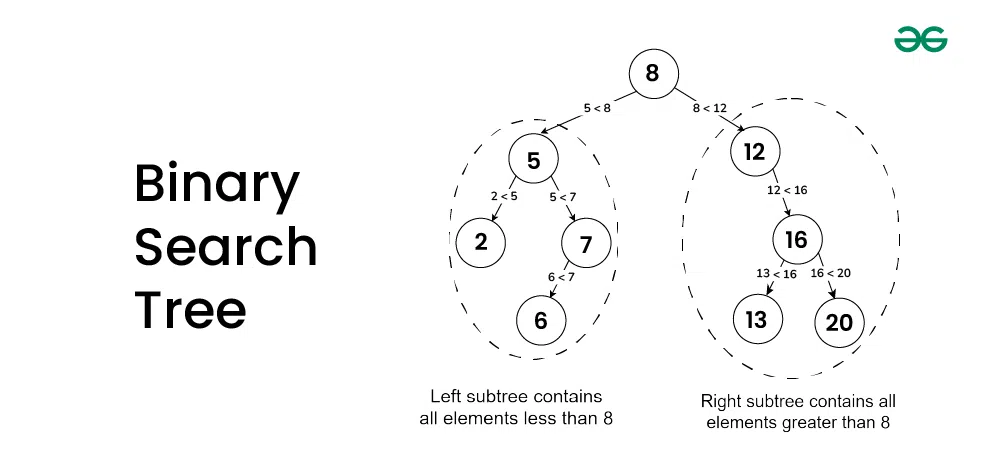
Let's begin by recalling the structure we're working with.
The Search Algorithm
How can we leverage this structure to find a number, say 6, in the tree above?
The logic is remarkably similar to the binary search algorithm you learned for sorted lists. We can eliminate a large portion of the data at every step. The algorithm is as follows:
- Start at the root node.
- Compare the value you're looking for (the target) with the current node's value.
- If the values are equal, you've found the node. The search is successful!
- If the target is less than the current node's value, you know it can only be in the left subtree. You can completely ignore the right subtree.
- If the target is greater than the current node's value, you know it can only be in the right subtree. You can ignore the left subtree.
- Repeat this process, moving down the tree to the left or right, until you either find the value or you try to move to a child that doesn't exist (i.e., you reach a
NoneorNULLreference). If you reachNone, it means the value is not in the tree.
This process is naturally recursive. Searching in a subtree is the same problem as searching in the whole tree, just with a different starting node.
A Step-by-Step Walkthrough
Let's watch a video that breaks down the logic for this search algorithm and presents it as pseudocode. This will help solidify the conditions before we translate them into Python.
Binary Search Tree - Search Pseudo Code
This video from Lalitha Natraj provides a clear, step-by-step explanation of the BST search algorithm, including the logic for handling cases where a value is found and where it is not.
Watch the entire video (it's about 8 minutes). Pay close attention to the three main comparisons and the recursive calls. The video covers: The core idea of comparing the target value to the current node. The base case: what to do if the tree (or subtree) is empty. The three-way decision: go left, go right, or declare a match. An example of finding a value that exists. An example of searching for a value that does not exist.
The video effectively breaks the search process into a set of if-else conditions, which we can summarize:
- Base Case (Not Found): If the current node is
null(orNonein Python), the value isn't here. Stop and report not found. - Base Case (Found): If the target value equals the current node's data, you've found it. Stop and report success.
- Recursive Step (Go Left): If the target value is less than the current node's data, recursively call the search function on the left child.
- Recursive Step (Go Right): If the target value is greater than the current node's data, recursively call the search function on the right child.
Here is a static image showing the path taken to find the value 3.

From Logic to Python Code
Now, let's translate this logic into a Python function. In our previous module on Object-Oriented Programming, you learned about classes. We'll use a Node class to represent each node in our tree.
class Node:
  def __init__(self, key):
    self.key = key
    self.left = None
    self.right = None
Each Node object holds a key (its value) and has two pointers, left and right, which will point to other Node objects or be None.
The following reading provides a concise, recursive Python implementation of the search algorithm.
Search for a Value in a BST - W3Schools
This page from W3Schools presents a clean, focused Python implementation of the search function for a BST. It directly mirrors the logic we just discussed.
Read the section 'Search for a Value in a BST', focusing on the Python code example. Compare each line of the search function to the pseudocode logic from the video.
Let's break down the function from the resource:
# The function takes the current node and the target value as input
def search(node, target):


    # Base Case 1: The node is None, so the value isn't in this branch.
    if node is None:
        return None  # Or False, to indicate not found


    # Base Case 2: We found the value!
    elif node.key == target:
        return node  # Or True, to indicate found


    # Recursive Step 1: Target is smaller, so go left.
    elif target < node.key:
        return search(node.left, target)


    # Recursive Step 2: Target is larger, so go right.
    else:
        return search(node.right, target)
This Python code is a direct translation of the algorithm. The return search(...) lines are the recursive calls that navigate down the tree until one of the base cases (node is None or node.key == target) is met.
Hands-On Practice
The best way to understand an algorithm is to run it. Here is a complete script you can run on your own machine. It includes the Node class, a helper insert function (which we'll study in the next lesson), and our search function.
Copy and paste the following code into a file named bst_search.py and run it from your command line.
# bst_search.py

class Node:
    """A node in a Binary Search Tree."""
    def __init__(self, key):
        self.key = key
        self.left = None
        self.right = None

def insert(node, key):
    """A recursive function to insert a new key in a BST."""


    # If the tree is empty, return a new node
    if node is None:
        return Node(key)


    # Otherwise, recur down the tree
    if key < node.key:
        node.left = insert(node.left, key)
    else:


        # We assume no duplicate keys are inserted
        if key > node.key:
            node.right = insert(node.right, key)

    return node

def search(node, target):
    """A recursive function to search for a target key in a BST."""


    # Base Cases: root is null or target is present at root
    if node is None or node.key == target:
        return node


    # Target is greater than root's key, so search in right subtree
    if target > node.key:
        return search(node.right, target)


    # Target is smaller than root's key, so search in left subtree
    return search(node.left, target)


# --- Main part of the script ---


# Create the root of the tree
root = None
keys_to_insert = [8, 3, 10, 1, 6, 14, 4, 7, 13]


# Build the tree by inserting each key
for key in keys_to_insert:
    root = insert(root, key)


# --- Perform searches ---


# 1. Search for a value that exists
target1 = 6
print(f"Searching for {target1}...")
result1 = search(root, target1)

if result1:
    print(f"Found node with key: {result1.key}\n")
else:
    print(f"Value {target1} not found.\n")


# 2. Search for a value that does NOT exist
target2 = 9
print(f"Searching for {target2}...")
result2 = search(root, target2)

if result2:
    print(f"Found node with key: {result2.key}\n")
else:
    print(f"Value {target2} not found.\n")
Self-Check Exercise:
Before you run the code, try to trace the path the search function will take for target1 = 6 and target2 = 9. Write down the sequence of nodes it will visit. Then, run the script to confirm your answer.
Conclusion
In this lesson, you've successfully translated the theoretical properties of a BST into a practical, working search algorithm. This is a significant step, moving from understanding a concept to implementing it.
Key Takeaways:
- The BST search algorithm leverages the tree's ordered structure to eliminate half of the remaining data at each step.
- The logic follows a simple three-way decision at each node: is the target smaller, larger, or equal to the current node's key?
- This logic translates naturally into a recursive function with two base cases (value found, or end of branch reached) and two recursive steps (go left or go right).
- In a reasonably balanced tree, this algorithm is very efficient, with a time complexity of .
Preview of the Next Lesson:
Now that you can find a value (or a "not found" spot), what's next? In our next lesson, we will implement an insertion operation in a BST. You'll discover that the logic for finding the correct place to insert a new node is almost identical to the search algorithm you just wrote.