Introduction
Welcome to the first lesson of our module on Trees and Binary Search Trees! In previous modules, we've explored linear data structures like lists, where elements are arranged sequentially, and unordered structures like dictionaries and sets, which use hash tables for fast lookups. Now, we're moving into a new category: hierarchical data structures.
The most fundamental hierarchical structure is the tree. Trees are incredibly common in computer science, used for everything from file systems and databases to website rendering and AI decision-making.
Before we can analyze algorithms or write code for trees, we need to build a solid vocabulary. This lesson is all about learning the language of trees. Our goal is to define key tree terminology: root, parent, child, leaf, height, and depth. Mastering these terms is the essential first step to understanding how trees work.
What is a Tree?
At its core, a tree is a data structure that organizes information in a hierarchy, much like a family tree or a company's organizational chart. Unlike a list, it doesn't have a simple start-to-end flow; instead, it has a single starting point at the top and branches out from there.
Let's begin by getting a high-level overview of this concept.
Everything you need to know about tree data structures
The following article from freeCodeCamp provides an excellent introduction to trees by using intuitive, real-world examples before diving into the technical definitions.
Please read the first few sections of the article, starting from the beginning down to and including 'A technical definition'. Focus on how the examples (family tree, company structure, HTML DOM) illustrate the idea of a hierarchy.
As the article explains, a tree consists of nodes (which hold the data) connected by edges (which represent the relationships). This node-and-edge model is the foundation for all the terminology we will cover.
A Quick Tour of Tree Terminology
Now that you have a conceptual understanding, let's take a quick visual tour of the most common terms you'll encounter when working with trees.
Tree data structures in 2 minutes 🌳
This short video from Bro Code provides a fast-paced but clear overview of all the key terms we'll be discussing in this lesson. Don't worry about memorizing everything instantly; we will break it all down in more detail afterward.
Watch the video from the beginning until 02:35. Pay attention to how the narrator uses a sample tree to point out the root, parents, children, siblings, leaves, depth, and height.
Core Tree Relationships
The relationships between nodes in a tree are often described using family-based metaphors. Let's examine these terms using a clear diagram.

Using the diagram above as our reference, let's formally define these terms:
- Root: The single, topmost node in a tree. It is the only node that has no parent. In the diagram, node A is the root.
- Parent: A node that has one or more nodes connected below it. These connected nodes are its children. For example, node B is the parent of nodes D and E.
- Child: A node that is connected to a node above it (its parent). For example, nodes H and I are the children of node D.
- Leaf (or External Node): A node that has no children. These are the nodes at the very bottom of the tree. In the diagram, nodes K, L, M, N, O, and P are all leaf nodes.
- Siblings: A group of nodes that share the same parent. For example, nodes H and I are siblings because they both have node D as their parent.
- Internal Node: Any node that has at least one child. In other words, any node that is not a leaf node. Nodes A, B, C, D, E, F, G, H, I, and J are all internal nodes.
Measuring Position: Height and Depth
Besides relationships, we also need ways to describe a node's position and the tree's overall structure. The two most important measures for this are height and depth. These concepts are related but distinct, and it's crucial to understand the difference.
- Depth of a Node: The number of edges on the path from the root to that node. The depth of the root node is always 0.
- Height of a Node: The number of edges on the longest path from that node down to a leaf. The height of any leaf node is always 0.
A simple way to remember the difference:
- Depth looks "up" toward the root (how far am I from the start?).
- Height looks "down" toward the leaves (what's the longest path from here to the end?).
The Height of the Tree itself is defined as the height of the root node. It tells you the length of the longest path from the top to the bottom of the entire tree.
This next image provides an excellent visualization of height and depth calculated for every node in a tree.
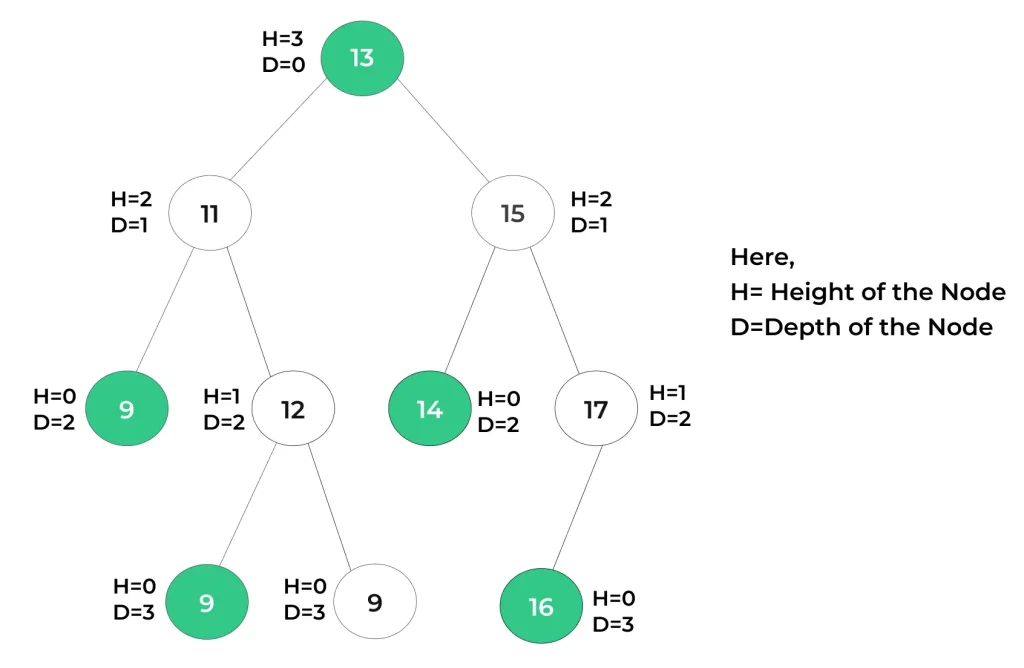
Notice in the image how:
- Depth increases by 1 at each level as you move down from the root (D=0).
- Height is 0 for all the leaves and increases as you move up toward the root.
To solidify these definitions, you can review them in a more structured, textual format.
Introduction to Tree Data Structure - GeeksforGeeks
This article from GeeksforGeeks provides concise, technical definitions for all the terms we've just covered. It's a great reference to bookmark for future review.
Read the sections 'Basic Terminologies In Tree Data Structure' and 'Properties of Tree Data Structure'. This will reinforce your understanding of parent, child, root, leaf, depth, and height.
Self-Check
Let's test your understanding. Using the first diagram we looked at ("Tree Terminology Diagram"), answer the following questions.
- What is the root node of the tree?
- List the children of node C.
- Who is the parent of node J?
- List all the sibling nodes of node E.
- What is the depth of node G?
- What is the height of node B?
- What is the height of the entire tree?
Click here to see the answers
- The root node is A.
- The children of node C are F and G.
- The parent of node J is G.
- The only sibling of node E is D (they share parent B).
- The depth of G is 2. The path from the root is A -> C -> G, which has 2 edges.
- The height of B is 3. The longest path from B to a leaf is B -> D -> I -> M (or N), which has 3 edges.
- The height of the tree is 4. This is the height of the root node A. The longest path in the tree is A -> C -> G -> J -> P, which consists of 4 edges.
Conclusion
In this lesson, we established the fundamental vocabulary for discussing tree data structures. You learned that trees are hierarchical structures made of nodes and edges, and you can now confidently define and identify the key components and measurements.
Key Takeaways:
- A tree is a non-linear data structure that represents data hierarchically.
- The core relationships are root (the top), parent, child, and sibling.
- Leaf nodes are the endpoints of a tree and have no children.
- Depth measures the distance from the root down to a node (starts at 0 at the root).
- Height measures the longest distance from a node down to a leaf (starts at 0 at the leaves).
- The height of the tree is the height of its root node.
Preview of the Next Lesson:
Now that we share a common language, we can start exploring specific types of trees. In the next lesson, we will focus on one of the most important variants in computer science: the Binary Search Tree (BST). You will learn the specific properties that define a BST and make it so efficient for searching and sorting data.