Hello! Welcome to your next lesson in the Active Trade and Risk Management module.
In our last session, we established the most important rule of trading: your primary goal is to preserve your capital. We discussed why managing risk is more critical than any entry strategy and introduced the concepts of the 1% rule and the risk/reward ratio. This was the "why."
Today, we get practical and learn the "how." You'll learn how to implement the most fundamental risk management tool on Binance: the stop-loss order. By the end of this lesson, you will be able to set an order that automatically sells a cryptocurrency if its price drops to a certain level, protecting you from significant losses. This is the mechanism that turns the theory of risk management into a concrete action.
What is a Stop-Loss Order?
A stop-loss order is an instruction you give the exchange to automatically sell your asset if its price falls to a specific, predetermined level. Think of it as an insurance policy for your trade. It takes the emotion out of the decision to sell at a loss and enforces the discipline we talked about in the last lesson.
To get a clear definition and a simple example, let's start with a short reading.
Take Profit & Stop Loss in Crypto: In-Depth Explanation
The article 'Take Profit & Stop Loss in Crypto: In-Depth Explanation' from BitDegree provides a concise definition of what a stop-loss order is and its purpose.
Please read the section titled 'Take Profit (TP) and Stop Loss (SL) Explained: A Quick Crash Course' and the FAQ entry 'How does a Stop Loss order work?'. Focus on understanding that a stop-loss is designed to prevent larger losses by automatically selling at a price you decide in advance.
The key idea is that you decide your maximum acceptable loss before the trade goes against you. When you are calm and rational, you can set a logical exit point. If the price drops to that point, the order executes automatically, preventing you from holding on and hoping, which often leads to much bigger losses.
Understanding Binance's "Stop-Limit" Order
On the Binance spot market, the primary tool for setting a stop-loss is the Stop-Limit order. This order type can be confusing for beginners because it involves setting two different prices: a Stop Price and a Limit Price.
- Stop Price: This is the "trigger." When the market price of the cryptocurrency falls to your Stop Price, Binance activates your sell order. The order is now live, but it hasn't been filled yet.
- Limit Price: This is the specific price (or better) at which you are willing to sell. Once the Stop Price is triggered, a standard limit order to sell is placed on the order book at this Limit Price.
Let's watch a video that does an excellent job of explaining why these two prices are necessary and how they work together.
Binance: How to set Stop Limit order (Stop Loss)
The video 'Binance: How to set Stop Limit order' by eMediaCoach clearly explains the confusion around the two price boxes in a stop-limit order.
Watch from the beginning to 03:23. Pay close attention to the distinction between a regular limit order and a stop-limit order, and the explanation of the 'stop' price as a trigger for creating the 'limit' order.
To summarize the video's key point: You can't just place a regular limit order to sell at a price below the current market price, because the system would see a better price available (the current one) and sell your crypto immediately. The Stop Price acts as a condition: "Only create my sell order if the price drops to this level."
Practical Walkthrough: Setting a Stop-Loss on Binance
Now let's walk through the exact steps on the Binance platform. We'll use a clear, concise video tutorial that shows the process from start to finish.
BINANCE - STOP LOSS - TUTORIAL - (SPOT MARKET)
This tutorial by Kiel Wilson is a step-by-step guide on how to set up a stop-loss using a stop-limit order on the Binance spot exchange. It uses a real chart example to make the process clear.
Watch the entire video (around 4 minutes). Follow along as the presenter: Navigates to the 'Stop-limit' order panel. Chooses a 'Stop price' based on a support level on the chart. Sets a 'Limit price' slightly below the stop price. Confirms the order and shows where to find it in 'Open Orders'.
Let's review the steps and add some important details.
-
Select the "Stop-limit" order type under the sell section of the trading interface.
-
Set the Stop Price: This is your trigger. It should be based on your analysis. For example, you might place it just below a recent support level, as shown in the video. If this level breaks, it's a sign the price may continue to fall, and you want to get out.
-
Set the Limit Price: This is the price your sell order will be placed at. You should set this at or slightly below your Stop Price.
- Why slightly below? In a fast-moving market, the price might drop so quickly that it "slips" right past your stop price and your limit price before your order can be filled. By setting the limit price a little lower (e.g., Stop at $29,500, Limit at $29,450), you create a small price range for your order to execute in, increasing the chance it gets filled. However, don't set it too low, or you risk selling for much less than intended.
-
Enter the Amount of crypto you want to sell and click "Sell".
Here is a static image of what the filled-out panel looks like. This gives you a clear reference.
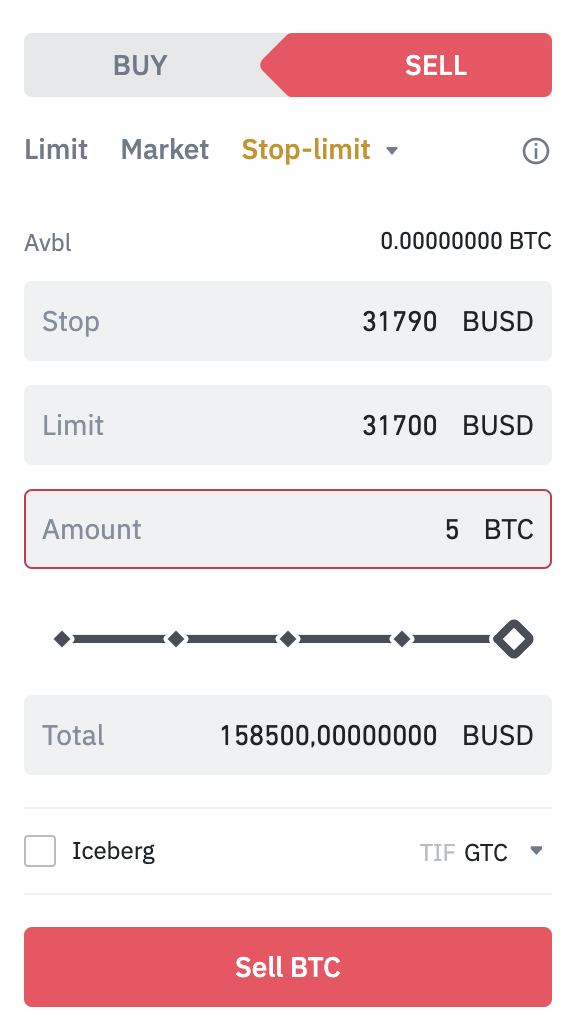
After you confirm, your stop-limit order will appear in your Open Orders tab until it is either triggered by the price or you manually cancel it.
For an additional step-by-step guide with screenshots that you can refer to, the Binance.US Help Center has an excellent article.
How to use the Stop-Limit function
This guide from the Binance.US Help Center provides detailed, step-by-step instructions for both the mobile app and web browser.
Feel free to review the section 'How to use the Stop-Limit function via web browser'. It's a great text-based companion to the video you just watched.
Conclusion
You have just learned one of the most powerful skills for long-term survival in trading. By setting a stop-loss, you define your risk upfront and protect yourself from emotional decisions and catastrophic losses. It is the practical application of the capital preservation mindset we discussed.
Key Takeaways:
- A stop-loss is an automated order to sell an asset and limit your losses.
- On the Binance spot market, you use a Stop-Limit order to set a stop-loss.
- The Stop Price is the market price that triggers the creation of your sell order.
- The Limit Price is the lowest price at which you agree to sell. It should generally be set slightly below the stop price to increase the chance of execution.
- A stop-loss order is your safety net. Use it on every trade to enforce discipline.
What's Next?
Protecting your downside is only half of trade management. What about locking in your profits when a trade goes your way? In the next lesson, we will cover the other side of the equation: setting a take-profit order to automatically secure your gains at a target price. We'll also see how you can combine both a stop-loss and a take-profit into a single, powerful order.