Hello! In our last lesson, we learned how to make our programs make decisions using if, elif, and else statements. This gave your code the ability to follow different paths based on conditions, which is a core part of creating any interactive experience.
Today, we'll add another fundamental tool to your programming arsenal: loops. Loops allow you to repeat a block of code multiple times without having to write it out over and over. Your goal for this lesson is to learn how to create and use for and while loops to repeat code execution.
In game development, loops are everywhere:
- Making a character walk by cycling through animation frames.
- Checking every enemy on screen to see if they've been hit.
- Drawing every tile of your game world onto the screen, 60 times per second.
- Allowing a player to try guessing a password until they get it right.
By the end of this lesson, you'll be able to write code that repeats tasks, which, when combined with the decision-making skills you've already learned, unlocks a huge range of possibilities.
The while Loop: Repeating Until a Condition is Met
Imagine you're designing a lockpicking minigame. The player should be able to keep trying until they either succeed or run out of lockpicks. You don't know ahead of time how many tries it will take. This is the perfect scenario for a while loop.
A while loop repeatedly executes a block of code as long as a certain condition remains True. It's great for what we call indefinite iteration, where the number of repetitions isn't known beforehand.
The basic syntax is:
while condition:
    # Code to repeat
    # This block keeps running as long as 'condition' is True.
    # Something inside this block must eventually make the condition False!
A critical point here is that if the condition never becomes false, you'll create an infinite loop, and your program will get stuck.
Let's see how this works by building a classic number guessing game. The following article will guide you through creating a complete, small game using a while loop.
Build A Game In Python — For Beginners
This article, 'Build A Game In Python — For Beginners', will walk you through creating a number guessing game. It's a fantastic, practical example of a while loop in action.
Read from the beginning down to the end of the if/elif/else block. Focus on how the while rand_int != guess: line works. Notice that the loop continues as long as the player's guess is not equal to the random number. The loop only stops when they guess correctly.
As you saw in the article, the program sets up a condition (guess not matching the random number) and then enters a loop. Inside the loop, it takes the player's input and uses if statements (just like last lesson!) to give hints. The loop naturally ends only when the player's guess makes the while condition False.
The for Loop: Repeating for Each Item in a Sequence
Now, what if you know exactly what you want to iterate over? For example, going through every item in a player's inventory to see if they have a "Key to the City". For this, we use a for loop.
A for loop is used for definite iteration—when you have a collection of items (like a list) and you want to do something for each item.

The syntax looks like this:
player_inventory = ["Sword", "Shield", "Health Potion"]

for item in player_inventory:
    print("You have a " + item)
This would print:
You have a Sword
You have a Shield
You have a Health Potion
The for loop automatically goes through the player_inventory list, assigning each element to the item variable one by one.
Looping a Specific Number of Times with range()
A very common need is to repeat an action a set number of times. For this, for loops are often paired with the range() function. For instance, range(5) generates a sequence of numbers from 0 to 4.
# In an RPG, maybe you cast a spell that hits 3 times.
for i in range(3):
    print("Magic missile strikes the enemy!")
This is much cleaner than writing the print statement three times.
The following video provides a great overview of both while and for loops, including how to use range().
Python While Loops & For Loops | Python tutorial for Beginners
This video from Dave Gray gives a clear explanation of both while and for loops, building on the concepts we've just discussed.
Please watch these three segments: while loop syntax (00:50 - 02:32): This reinforces the basic structure of a while loop. for loop basics (05:37 - 07:26): This shows how to iterate over lists and strings. Using range() (08:49 - 11:30): This explains how to use range() to loop a specific number of times, and how to control the start, stop, and step values.
When to Use for vs. while?
This is a common question for new programmers. A great way to decide is to ask yourself: "Do I know how many times I need to loop before I start?"
Choosing between `for` and `while`
This brief reading clarifies the difference between definite and indefinite iteration, helping you decide which loop to use.
Read the section 'Choosing between for and while'. It provides a simple rule of thumb: use for if you know the bounds of the iteration, and while if you don't.
- Use a
forloop when you are iterating over a known sequence (like a list of inventory items, or arangeof numbers). - Use a
whileloop when you are waiting for a condition to change (like a player guessing a number, or waiting for user input to quit the game).
Finer Control: break and continue
Sometimes you need to change a loop's behavior mid-execution.
break: Immediately exits the entire loop.continue: Skips the rest of the current iteration and jumps to the beginning of the next one.
Imagine searching for a specific key in a list of rooms.
rooms_to_search = ["Kitchen", "Library", "Dungeon", "Observatory"]
for room in rooms_to_search:
    print("Searching the " + room + "...")
    if room == "Dungeon":
        print("Found the key! No need to search further.")
        break  # Exit the loop
    if room == "Kitchen":
        print("This room is empty. Let's move to the next one.")
        continue # Skip to the next room

    # This code only runs for rooms that are not the Kitchen or Dungeon
    print("No key here, but found some gold.")
The video you watched earlier also covers these keywords. Feel free to re-watch the relevant sections if you need a refresher (break is at 02:18 and continue is at 03:01).
Test your understanding!
You are programming the loot dropped by a monster. The loot is represented by a list of strings.
Write a Python program that does the following:
- Create a list variable named
monster_lootcontaining these items:["Slimy Goop", "Rusty Dagger", "Slimy Goop", "Legendary Sword", "Gold Coin"]. - Use a
forloop to iterate through themonster_lootlist. - Inside the loop, use an
ifstatement to check for a specific item.- If the item is
"Slimy Goop", usecontinueto immediately skip to the next item without printing anything. - If the item is
"Legendary Sword", print"!!! You found the Legendary Sword! !!!"and then usebreakto stop searching. - For any other item, print
"You picked up a [item name].", replacing[item name]with the actual item.
- If the item is
Show answer
Here is one possible solution:
monster_loot = ["Slimy Goop", "Rusty Dagger", "Slimy Goop", "Legendary Sword", "Gold Coin"]

for item in monster_loot:
    if item == "Slimy Goop":
        continue  # Skip this item and go to the next

    if item == "Legendary Sword":
        print("!!! You found the Legendary Sword! !!!")
        break  # Stop the loop entirely

    # This line will only be reached for items that are not "Slimy Goop"
    # and come before the "Legendary Sword".
    print("You picked up a " + item + ".")

# Expected output:
# You picked up a Rusty Dagger.
# !!! You found the Legendary Sword! !!!
Notice that "Gold Coin" is never printed because the loop stops when the sword is found.
Nested Loops
Finally, you can put loops inside other loops. This is called a nested loop. This is extremely useful for working with 2D structures, which are at the heart of the RPGs you want to build. For example, to draw a game map, you might have an outer loop for the rows and an inner loop for the columns.
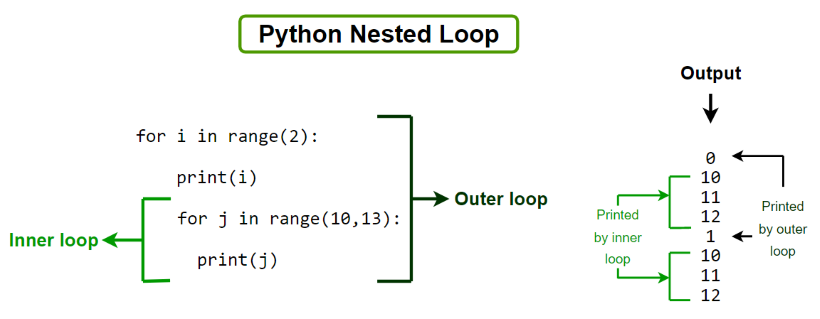
The concept is simple: for every one time the outer loop runs, the inner loop runs completely.
Python While Loops & For Loops | Python tutorial for Beginners
Let's return to the Dave Gray video to see a clear example of nested loops. This will show you how the outer and inner loops interact.
Watch the segment on nested loops from 12:04 to 15:08. Pay close attention to how changing the order of the loops changes the output. This is a key insight into how they work.
Conclusion
Excellent job! You've now mastered the two main types of loops in Python. Repetition is a computer's greatest strength, and you now know how to harness it. By combining loops with the conditional logic from our last lesson, you can create complex and dynamic behaviors for your games.
Here are the key takeaways:
whileloops are for indefinite iteration: they run as long as a condition is true. Perfect for when you don't know how many repetitions are needed.forloops are for definite iteration: they run for each item in a sequence (like a list) or arange.- Remember to avoid infinite loops by ensuring your
whileloop's condition can eventually become false. breakandcontinuegive you fine-grained control to exit a loop or skip an iteration.- Nested loops are powerful for working with grid-like data, such as a game map.
In our next lesson, we will look at functions. As our programs get more complex, like the number guessing game, we need a way to organize our code into reusable, named blocks. Functions are the answer, and they are the next major step toward building a structured and manageable game project.