Hello and welcome to your first lesson on creating games! Your journey to building your own 2D RPG starts right here. Before we can build sprawling worlds and epic combat systems, we need to master the fundamental building blocks of programming. This first module is all about learning Python, the language we'll use to bring your game to life.
In this lesson, you'll learn how to write your first Python programs. Specifically, we'll focus on three core concepts:
- Variables: How to store information like a character's health or name.
- Data Types: The different kinds of information we can store (e.g., text, whole numbers, decimals).
- Basic Operators: How to perform calculations, like updating a score or calculating damage.
Think of these as the absolute essentials—the equivalent of learning notes and scales before composing a symphony. By the end of this lesson, you'll be able to write simple, interactive programs that form the foundation for the game mechanics we'll build later.
What are Variables and Data Types?
In any game, we need to keep track of a lot of information: the player's health, their name, the amount of gold they have, whether a key has been found, and so on. In programming, we store this information in variables. You can think of a variable as a labeled container or an inventory slot where you keep a specific piece of data.
This data comes in different forms, or data types. Let's look at the most common ones we'll use.
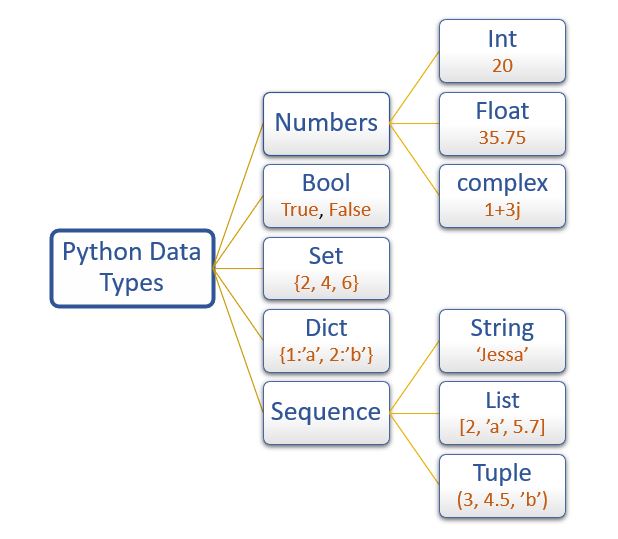
- String (
str): Used for text. A character's name, a line of dialogue, or an item's description are all strings. We write strings inside quotes (e.g.,"Arin"or'Dragon'). - Integer (
int): Used for whole numbers. A character's level, current HP, or gold pieces are integers (e.g.,150,10,999). - Float (
float): Used for numbers with a decimal point. These are useful for things that require more precision, like a 1.5x damage multiplier or the exact time elapsed (e.g.,1.5,32.7). - Boolean (
bool): Can only be one of two values:TrueorFalse. Booleans are perfect for tracking states, likehas_key = Trueoris_enemy_defeated = False.
To get a clear introduction to how we create and use variables in Python, please watch the following segment from a video by Programming with Mosh.
Python for Beginners - Learn Coding with Python in 1 Hour
This video provides a great hands-on introduction to Python. Watch this first section to see how to create variables to store different types of data.
Watch from the timestamp 05:22 to 08:51. Pay attention to how variables are named (using underscores, a style called 'snake_case') and the examples of different data types being assigned to them.
Making Our First Interactive Program
A game isn't very fun if the player can't interact with it. The simplest way to get input from the player is by using the input() function. We can also display information back to them using the print() function.
Let's see how to combine these to create a simple program that greets the player.
Python for Beginners - Learn Coding with Python in 1 Hour
This next clip from the same video demonstrates how to use the input() function to get information from the user and the print() function to display a message.
Watch from 08:59 to 10:52. Notice how the + symbol is used here to combine two strings. This is called concatenation.
The Importance of Type Conversion
As you just saw, the input() function is great for getting data from the user. However, it has one crucial characteristic: it always gives us back a string.
This can be a problem. What if we ask the player for their age and then want to calculate how old they'll be next year? We can't do math with text! Trying to calculate "25" + 1 would cause an error in Python.
To solve this, we must convert the string into a numerical type first. This is called type conversion (or type casting).
int(): Converts a value to an integer.float(): Converts a value to a float.str(): Converts a value back to a string.
This next video segment explains this concept and shows how to solve the exact problem described above.
Python for Beginners - Learn Coding with Python in 1 Hour
Watch this section to understand why type conversion is necessary and how to use functions like int() to turn user input into numbers we can use in calculations.
Watch from 10:52 to 14:48. The example of calculating a person's age is a perfect demonstration of why we need to convert strings to integers before doing math.
Test your understanding!
Let's imagine you're starting to build your RPG. You want to ask the player to choose a starting level for their character, and then tell them how many experience points (XP) they need to reach the next level. Let's say it takes (current_level * 100) XP to level up.
Write a short Python script that:
- Asks the user for their desired starting level.
- Calculates the XP needed to reach the next level.
- Prints a message like: "To reach level [next level], you will need [XP needed] XP."
For example, if the user enters 5, the program should print: "To reach level 6, you will need 500 XP."
Show answer
Here's one way to solve it:
# 1. Ask the user for their starting level
start_level_str = input("Choose your starting level: ")

# Convert the input string to an integer
start_level_int = int(start_level_str)

# 2. Calculate the required values
xp_needed = start_level_int * 100
next_level = start_level_int + 1

# 3. Print the message
# We use str() to convert numbers back to strings for concatenation
print("To reach level " + str(next_level) + ", you will need " + str(xp_needed) + " XP.")

# An alternative, cleaner way to print is by passing multiple items to print(),
# which automatically adds spaces:
# print("To reach level", next_level, ", you will need", xp_needed, "XP.")
Basic Operators: The Tools for Calculation
Now that we know how to handle variables and their types, let's look at the tools we use to manipulate them: operators. We've already seen the assignment operator (=) and the addition operator (+).
Python includes a full suite of arithmetic operators for performing calculations. These will be essential for everything from damage calculation to managing inventory counts.
| Operator | Name | Example | Result | Game Example |
|---|---|---|---|---|
+ |
Addition | 10 + 5 |
15 |
new_health = old_health + health_potion |
- |
Subtraction | 10 - 5 |
5 |
health = health - enemy_damage |
* |
Multiplication | 10 * 5 |
50 |
total_damage = base_damage * 1.5 |
/ |
Division | 10 / 4 |
2.5 |
Returns a float. |
// |
Floor Division | 10 // 4 |
2 |
Returns an integer (discards the remainder). |
% |
Modulo (Remainder) | 10 % 4 |
2 |
is_even = (number % 2 == 0) |
** |
Exponent | 10 ** 2 |
100 |
damage_increase = base_damage ** level |
The following video sections give a practical overview of these operators and two other important concepts: augmented assignment operators (like +=) and operator precedence.
Python for Beginners - Learn Coding with Python in 1 Hour
These final clips explain the different arithmetic operators and the rules Python follows when evaluating complex expressions.
First, watch from 23:29 to 25:54 to learn about the arithmetic operators and the convenient 'augmented assignment' shorthand (e.g., x += 3). Then, watch from 25:54 to 27:19 to understand operator precedence, which is just like the order of operations you learned in math class.
Operator precedence is crucial. In a game, an expression like total_damage = base_damage + 5 * level will calculate 5 * level first, before adding base_damage. Using parentheses () allows you to control this order, ensuring your game's math works exactly as you intend.

For Deeper Reading
Video tutorials are great for seeing things in action, but sometimes a written explanation can help solidify your understanding. The following resource provides a text-based guide to the concepts we've covered today. You don't have to read it all, but it's an excellent reference if you want to review.
Welcome to Game Development with Python!
This resource from 'Game Development with Python!' by Kent D. Lee covers the same topics we've discussed: variables, types, input/output, type conversion, and arithmetic.
Feel free to read through the sections 'Introduction to Types and Calling Functions', 'Converting Between Types', and 'Arithmetic Operations'. This provides a great textual summary of what we've learned.
Conclusion
Excellent work! You've just taken your first and most important step into programming for game development.
Here are the key takeaways from this lesson:
- Variables are named containers for storing data (e.g.,
player_health = 100). - Data has different types, like strings (
"text"), integers (100), floats (1.5), and booleans (True/False). - The
input()function gets information from the player but always returns it as a string. - We must convert strings to numbers using
int()orfloat()before we can perform mathematical calculations. - Arithmetic operators (
+,-,*,/, etc.) are the tools we use to perform those calculations.
You now have the basic tools to handle data in Python. In the next lesson, we'll make our programs much smarter. We'll learn how to use if-else statements and comparison operators, which will allow our code to make decisions and react differently based on the situation—like checking if a player has enough gold to buy an item or if their health has dropped to zero.