Hello! Welcome back to your course on Linux system administration for web developers.
In our last lesson, you successfully configured your Django application to communicate with your PostgreSQL database. This connection worked because of PostgreSQL's default authentication settings. Today, we'll move from relying on defaults to taking explicit control. This is a crucial step in hardening your database server.
Our learning outcome for this lesson is to secure PostgreSQL by configuring pg_hba.conf authentication rules. You'll learn what this file is, how it works, and how to write rules that enforce the principle of least privilege for your Django application.
1. Multi-Layered Security and Authentication
Before we edit any files, it's important to understand where this task fits into the broader picture of database security. A secure system is like a bank vault; it has multiple layers of defense. If one layer fails, another is there to stop an intruder. pg_hba.conf is one of the most important outer layers.
This file's job is to handle Authentication—the process of verifying that a client (like your Django app) is who it claims to be before it's even allowed to try logging in.
To get a solid grasp of these core security concepts, let's watch a segment from a presentation by PostgreSQL experts.
Best Practices in Security with PostgreSQL
This clip from EDB's "Best Practices in Security with PostgreSQL" explains the professional 'AAA' security model (Authentication, Authorization, Auditing) and details how pg_hba.conf is used for the crucial first step: Authentication.
Please watch from 18:12 to 25:35. As you watch, focus on: The difference between Authentication (who you are) and Authorization (what you can do). The role of pg_hba.conf in the authentication process. The fact that the file is read sequentially from top to bottom—the first matching rule wins. The different authentication methods discussed, especially md5 and the more modern scram.
As the video explained, pg_hba.conf is your primary tool for managing connection attempts. Now, let's get hands-on and see what this file looks like and how to modify it.
2. The Structure of pg_hba.conf
First, you need to know where to find this file. Its location can vary, but you can always ask PostgreSQL directly. Open your terminal and run:
sudo -u postgres psql -c "SHOW hba_file;"
On a standard Fedora installation, this will likely point to /var/lib/pgsql/data/pg_hba.conf.
A fresh pg_hba.conf file contains helpful comments and some default rules.
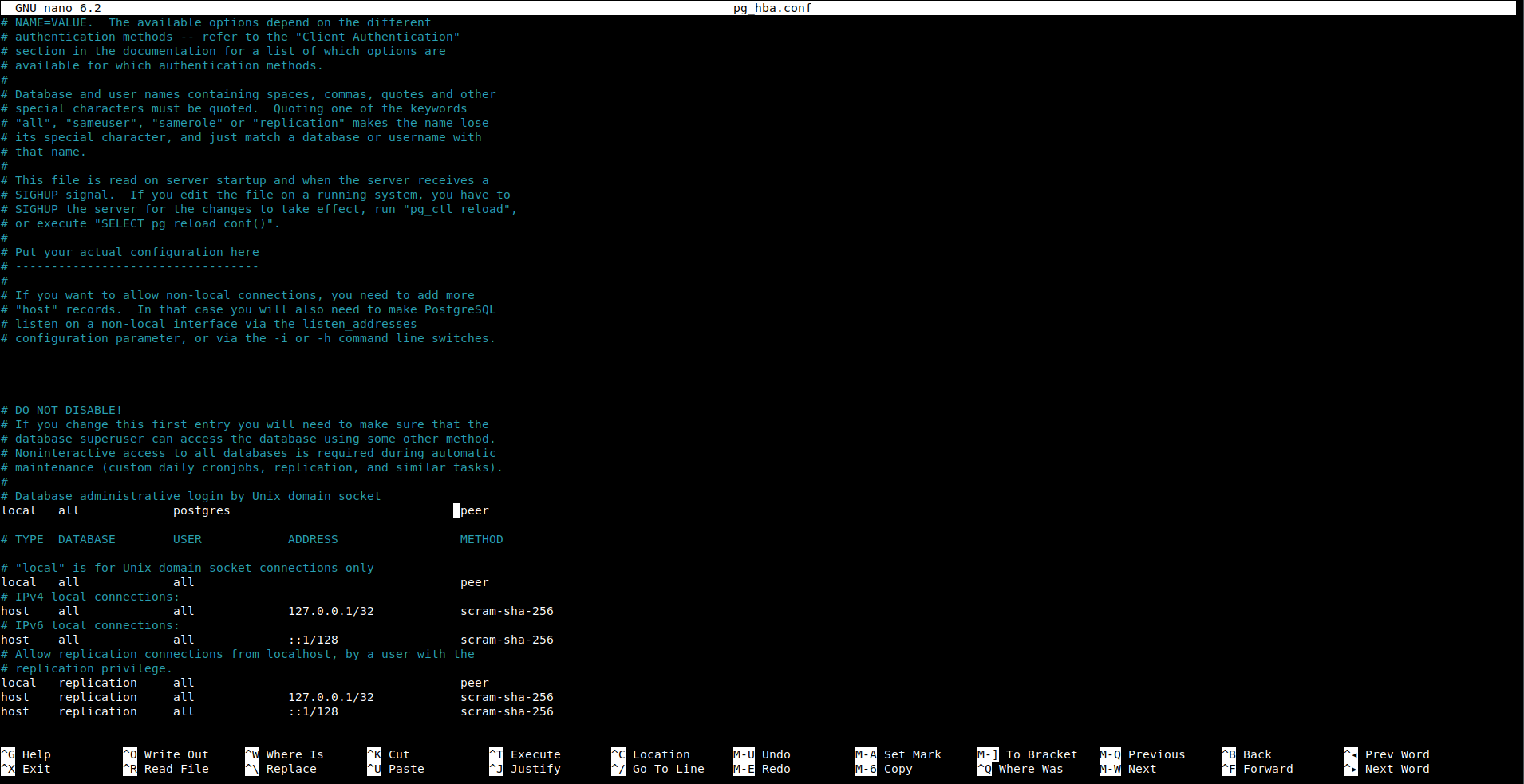
To understand how to write your own rules, you need to know the file's format. The following resource is an excellent reference that breaks down the structure of each line.
How to Configure PostgreSQL Authentication (pg_hba.conf)
This article, "How to Configure PostgreSQL Authentication (pg_hba.conf)", provides a clear and concise breakdown of the file's structure, connection types, and authentication methods. It will serve as a valuable reference.
Please read the sections titled 'File Location', 'Configuration Format', 'Connection Types', and 'Authentication Methods'. Don't worry about memorizing everything; focus on understanding the components of a rule.
Key Takeaways from the Reading:
Each non-commented line in pg_hba.conf is a rule with the following format:
TYPE DATABASE USER ADDRESS METHOD
TYPE: Specifies the connection type. The most common arelocal(for Unix socket connections) andhost(for TCP/IP network connections, even on the same machine vialocalhost).DATABASE: The database the rule applies to. You can useallto match any database.USER: The PostgreSQL user (role) the rule applies to.ADDRESS: The client's IP address range (forhosttype connections). For example,127.0.0.1/32specifically means the localhost IPv4 address.METHOD: How the user must authenticate. Key methods include:peer: Forlocalconnections. Succeeds if the client's operating system username matches the requested database username. This is a common and secure default for local administrative tasks.scram-sha-256: Secure password authentication. This is the recommended method for application connections.md5: An older, less secure password method. You should preferscram-sha-256.trust: Never use in production. Allows connection without any password or identity check.
Most importantly, PostgreSQL reads this file from top to bottom and uses the first rule that matches the connection type, database, user, and source address.
3. Your Turn: Creating a Specific Rule for Django
In the previous lesson, your Django app connected successfully. This is because psycopg2 connects via TCP/IP to localhost, which matched a default host rule in your pg_hba.conf that likely required scram-sha-256.
Now, you will add a specific, explicit rule for your application. This is a best practice that follows the principle of least privilege: only grant the exact access needed, nothing more.
Your Task:
-
Open
pg_hba.conffor editing. Usesudoand your preferred text editor (likenanoorvim).# Replace with the path you found earlier sudo nano /var/lib/pgsql/data/pg_hba.conf -
Add a new rule. The order is critical. Add your specific rule for the Django app before the more general default rules for
host. A good place is right below the line# "local" is for Unix domain socket connections only.Add the following line. This rule states that the user
myproject_useris allowed to connect to the databasemyproject_dbfromlocalhost(127.0.0.1/32) if they provide a valid password using thescram-sha-256method.# TYPE DATABASE USER ADDRESS METHOD # Allow the Django application to connect via TCP/IP from localhost host myproject_db myproject_user 127.0.0.1/32 scram-sha-256 -
Save and close the file. (In
nano, pressCtrl+X, thenY, thenEnter). -
Reload the PostgreSQL configuration. You do not need to restart the entire database service. Reloading is faster and causes no downtime.
sudo systemctl reload postgresqlAlternatively, you can use
sudo -u postgres psql -c "SELECT pg_reload_conf();". -
Verify the new rule. The best way to test is to use the application that depends on it.
- Navigate to your Django project directory.
- Make sure your Python virtual environment is activated.
- Run the
migratecommand again:python manage.py migrate
The command should report "No migrations to apply" but will still attempt to connect to the database. If it completes without a "FATAL: password authentication failed" or "no pg_hba.conf entry" error, your new rule is working correctly!
The Fedora Developer Portal article below provides a similar command-line example and reinforces the critical point about rule order.
PostgreSQL - Fedora Developer Portal
For a supplemental, Fedora-specific example, review this brief section from the Fedora Developer Portal. It highlights the common mistake of appending new rules to the end of the file.
Briefly review the code block under the heading "Controlling access to PG cluster (pg_hba.conf, users, passwords)". Note the comment: # add ... line **before** 'local all all peer' line.
Conclusion
Excellent work! You have now graduated from using default database access rules to defining explicit, secure authentication policies. This is a fundamental skill for any developer who manages their own deployment environment.
Key Takeaways:
pg_hba.confis PostgreSQL's host-based authentication file, acting as a gatekeeper for all incoming connections.- Rules are processed from top to bottom; the first match is used. Therefore, specific rules must always come before general ones.
- The
scram-sha-256method is the modern standard for secure password authentication over a network. - The principle of least privilege should guide your configuration: create specific rules for specific applications, users, and databases.
- Always use
sudo systemctl reload postgresqlto apply configuration changes without interrupting service.
Preview of the Next Lesson:
You've successfully secured the network entryway to PostgreSQL. However, on Fedora, there's another powerful security mechanism running: SELinux. It enforces its own set of rules on how processes can interact with files and the network. In our next lesson, we will learn how to troubleshoot and apply necessary SELinux contexts or booleans for PostgreSQL operation, ensuring both security layers work in harmony.