Welcome to the next lesson in our C# series. Last time, we explored C# properties, seeing how they offer a more elegant and powerful way to manage class data compared to the traditional getter and setter methods you're used to from Java. We covered full properties, auto-properties, and the convenient object initializer syntax.
Today, we'll address one of the most common sources of bugs in programming: the null value. Your experience with Java has undoubtedly introduced you to the dreaded NullPointerException. C# has its own version, the NullReferenceException, but more importantly, it provides a modern and powerful set of tools to handle null values safely and concisely.
In this lesson, you will learn how to apply nullable value types to represent the absence of a value, and how to use the null-conditional and null-coalescing operators to write cleaner, more robust code. These features are a significant quality-of-life improvement that you will come to appreciate.
The Problem of null and the C# Solution
In both Java and C#, reference types (like instances of a class) can be null, meaning they don't refer to any object in memory. Attempting to access a member of a null reference results in an exception.
A key difference, however, lies with value types (int, double, bool, struct). In C#, these types cannot be null by default. An int always has a value, even if it's just 0. This is generally a good thing for safety, but what if you need to represent a "missing" or "not applicable" value? For example, a database table might have a numeric column that allows NULL values. How do you represent that in your C# code?
C# provides a clean solution: nullable value types. Furthermore, it offers specialized operators to streamline the process of checking for and handling null values, for both reference and nullable value types. The flowchart below shows how C#'s null-handling features have evolved over time. Today, we'll focus on the core features introduced before C# 8.0, which form the bedrock of modern null handling.

1. Nullable Value Types: Allowing for "Nothing"
To make a value type nullable, you simply add a question mark (?) after the type name. This allows you to assign null to it, in addition to its normal range of values.
int?can be any integer, ornull.double?can be any double-precision floating-point number, ornull.bool?can betrue,false, ornull.
This is conceptually similar to using wrapper types like Integer or Double in Java, but the syntax in C# is much more integrated and lightweight.
The following video provides an excellent explanation of why nullable types are necessary and how to use them.
C# Nullables - How to CREATE and when to USE them
This video from tutorialsEU - C# explains the motivation behind nullable types and how to declare and use them.
Watch the video from the beginning, focusing on these key segments: The problem: Understand why a database value might need to be null instead of 0. The solution: See how the Nullable<T> structure solves this. The shorthand: Learn the ? syntax, which is what you'll use most of the time. The bool? example: This section highlights how a nullable boolean can represent three states (true, false, or not set), which is a very useful pattern.
Under the hood, int? is just syntactic sugar for a generic structure called System.Nullable<int>. This structure has two important read-only properties:
HasValue: Aboolthat istrueif the variable contains a value, andfalseif it isnull.Value: Retrieves the underlying value. Accessing this property whenHasValueisfalsewill throw an exception, so you should always checkHasValuefirst.
Here is a code snippet demonstrating their use, much like the example in the image below.
double? price = null;
double defaultPrice = 10.00;
double finalPrice;

if (price.HasValue)
{
    finalPrice = price.Value;
}
else
{
    finalPrice = defaultPrice;
}

Console.WriteLine(finalPrice); // Output: 10
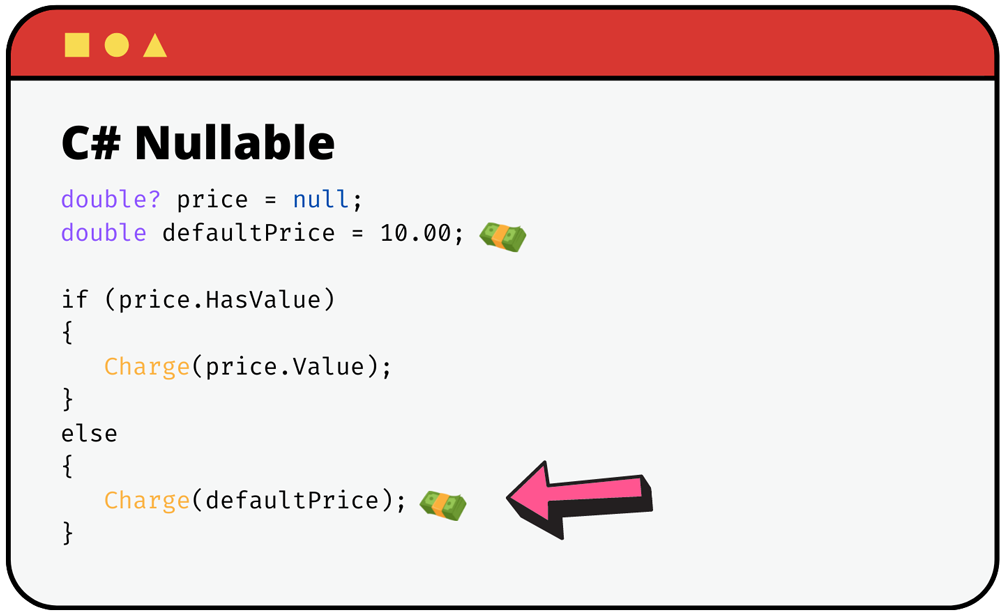
While using HasValue and Value is explicit and clear, C# provides even more concise operators to achieve the same result, which we will explore next. For more details on the fundamentals of nullable types, the Microsoft documentation is an excellent resource.
Understanding values and references | Microsoft Press Store
This article from the Microsoft Press Store provides a thorough explanation of nullable value types.
Please read the sections titled Using nullable types and Understanding the properties of nullable types. These sections formally define the ? syntax and the purpose of the HasValue and Value properties.
2. The Null-Conditional and Null-Coalescing Operators
Now that we can have nullable value types and already know reference types can be null, we need an efficient way to work with them. Chaining if (x != null) checks can make code verbose and hard to read, a pattern you've likely encountered in Java.
C# offers two elegant operators to simplify this:
- The null-conditional operator (
?.) for safely accessing members. - The null-coalescing operators (
??and??=) for providing default values.
The following article gives a fantastic, concise overview of these operators.
C# Null-Conditional (?.) & Null-Coalescing (??) Operators Explained
This blog post by Ivan Kahl clearly explains the purpose and syntax of the null-conditional and null-coalescing operators with practical examples.
Please read the sections What is the Null-Conditional Operator? and What is the Null-Coalescing Operator?. Pay close attention to how they reduce boilerplate code and prevent NullReferenceException.
Let's break down these concepts.
The Null-Conditional Operator (?.)
This operator allows you to access members or call methods on an object only if that object is not null. If the object is null, the expression "short-circuits" and returns null immediately, instead of throwing a NullReferenceException.
Consider this class structure:
public class User
{
    public string Name { get; set; }
    public Address? UserAddress { get; set; }
}

public class Address
{
    public string Street { get; set; }
}
Without the null-conditional operator, getting the street name would look like this:
// The "old" way, common in Java
string street = "Not available";
if (user != null)
{
    if (user.UserAddress != null)
    {
        street = user.UserAddress.Street;
    }
}
With the ?. operator, this becomes a single, readable line:
// The modern C# way
string? street = user?.UserAddress?.Street;
If user is null, or if user.UserAddress is null, the expression stops and street becomes null.
The Null-Coalescing Operator (??)
The ?? operator provides a default value in case an expression evaluates to null. It returns the left-hand operand if it's not null; otherwise, it returns the right-hand operand.
We can combine this with our previous example to provide a default value instead of null:
// Combining ?. and ??
string street = user?.UserAddress?.Street ?? "Not available";
This single line reads: "Get the street from the user's address. If at any point the user or their address is null, or if the street itself is null, use the string 'Not available' instead."
The Null-Coalescing Assignment Operator (??=)
This operator, ??=, assigns the right-hand value to the left-hand variable only if the left-hand variable is null. It's particularly useful for lazy initialization, where you only want to create an object or compute a value the first time it's needed.
private List<string> _tags;

public void AddTag(string tag)
{
    // If _tags is null, create a new list before adding.
    // Otherwise, do nothing.
    _tags ??= new List<string>();

    _tags.Add(tag);
}
To see these operators in action, the following video provides a great live-coding demonstration that complements the article you just read.
No more null exceptions in C# with null-coalescing, ?? and ??= operators
In this video, James Montemagno demonstrates how to use the null-conditional and null-coalescing operators to prevent exceptions and write cleaner code.
Focus on these key demonstrations: Null-Conditional ?.: Watch how the ?. operator is used to safely access properties in a chain, preventing a crash. Null-Coalescing ??: See how ?? provides a default value when a chain of ?. calls results in null. Null-Coalescing Assignment ??=: Pay close attention to this example of lazy initialization, where an object is created only if it's currently null.
Conclusion
In this lesson, we've tackled the pervasive problem of null by exploring C#'s powerful and concise language features for null handling. This is a significant step up from the manual, often verbose null checks required in other languages.
Here are the key takeaways:
- Nullable Value Types (
T?) allow value types likeintorboolto hold anullvalue, which is essential when interfacing with databases or representing optional data. - The Null-Conditional Operator (
?.) provides a safe way to navigate object hierarchies, short-circuiting tonullif any part of the chain isnull, thus preventingNullReferenceException. - The Null-Coalescing Operator (
??) offers a clean syntax to provide a default value when an expression results innull. - The Null-Coalescing Assignment Operator (
??=) is perfect for lazy initialization, assigning a value to a variable only if it is currentlynull.
Mastering these tools will make your C# code significantly safer, more readable, and more robust.
In our next lesson, we will continue exploring C#'s convenient syntax by diving into string manipulation, covering features like string interpolation and verbatim strings that make working with text a breeze.