Hello! Welcome to the sixth lesson in your "AI Automation" course.
In our last lesson, you learned how to store collections of data using lists and dictionaries. This was a big step, allowing you to manage groups of related information. But storing data is only half the story. The real power comes from being able to act on that data automatically.
Today, we'll learn how to do just that using loops. Loops are a fundamental concept in programming that allow you to repeat a block of code multiple times. This is the core of automation—performing repetitive tasks without you having to do them manually, one by one. We will cover two types of loops in Python: while loops and for loops.
Given your experience with C, you'll find the concepts familiar, but you'll notice some important differences in how Python implements them, which we'll highlight along the way.
1. The while Loop: Repeating Code While a Condition is True
A while loop executes a block of code as long as a specified condition is true. Think of it like a security check: "while the door is locked, keep checking". The loop stops only when the condition becomes false.
Here is a flowchart that shows this logic visually:
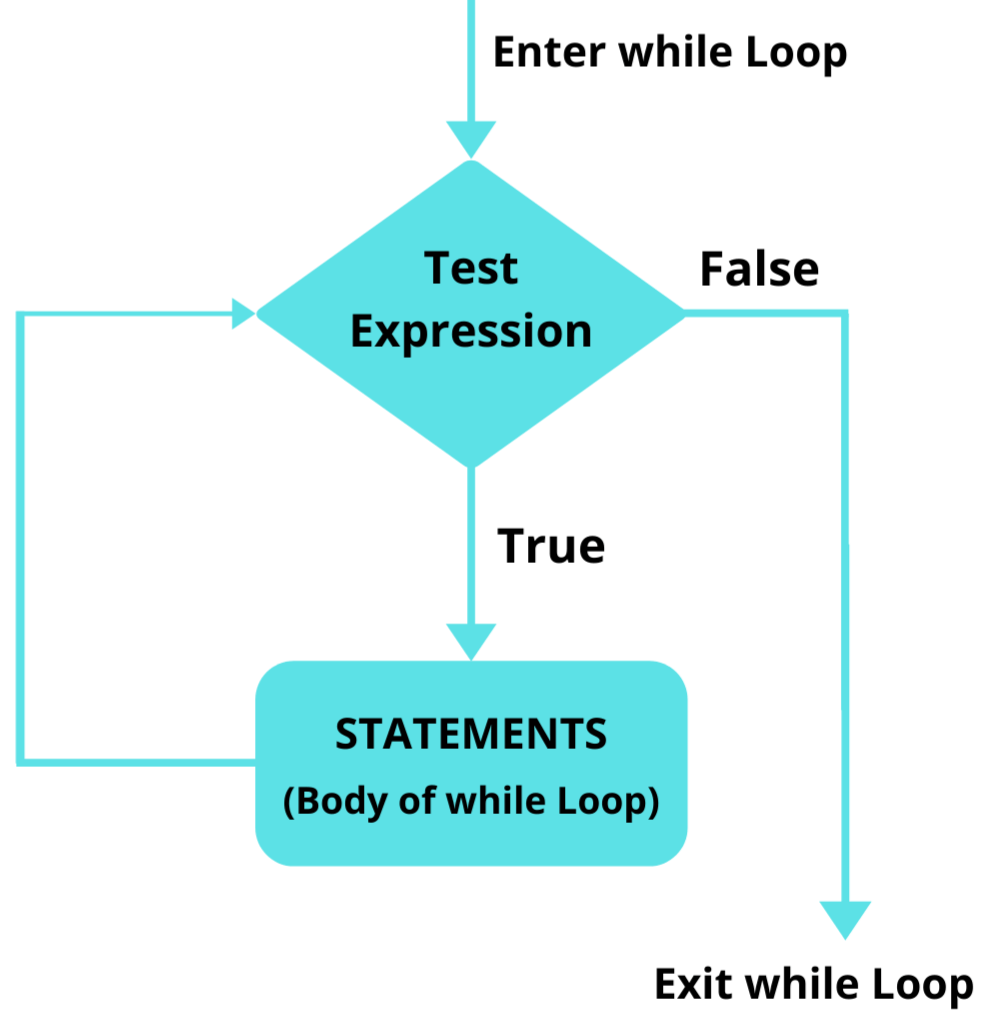
In C, you use curly braces {} to define the loop's body. As we've seen before, Python uses colons : and indentation.
[PDF] Python for C programmers
This short document, 'Python for C programmers', directly compares Python and C. It will help you quickly understand the syntax differences for control statements like loops.
Read the sections 'Control statements' and 'While Loops'. Notice how Python uses colons and indentation instead of curly braces, and see how the while loop structure is otherwise very similar to what you know from C.
Now, let's see a while loop in action. This first video will walk you through the basic syntax and the importance of having a condition that eventually becomes false to avoid an infinite loop.
Python While Loops & For Loops | Python tutorial for Beginners
In this video, Dave Gray provides a clear, step-by-step introduction to while loops.
Watch from 00:50 to 02:18. Pay close attention to the three key parts of the loop: Setting an initial value (e.g., value = 1). The while condition (e.g., while value < 10:). Incrementing the value inside the loop to ensure it eventually ends (e.g., value += 1).
Controlling Loop Flow: break and continue
Sometimes you need to exit a loop early or skip the current iteration. Just like in C, Python uses the break and continue statements for this.
break: Immediately stops and exits the loop.continue: Stops the current iteration and jumps to the beginning of the next one.
This next part of the video demonstrates how to use break to stop a loop when a certain condition is met and continue to skip an iteration.
Python While Loops & For Loops | Python tutorial for Beginners
Let's continue with the same video to see how break and continue work inside a while loop.
Watch from 02:18 to 04:32. Notice how break stops the loop entirely, while continue just skips to the next check of the while condition.
Test your understanding!
Write a script that simulates a simple countdown for a rocket launch.
- Create a variable
timerand set it to10. - Use a
whileloop that continues as long astimeris greater than0. - Inside the loop, print the value of
timer. - After printing, decrease
timerby 1. - Once the loop finishes, print "Blast off!".
Show answer
timer = 10

while timer > 0:
    print(timer)
    timer -= 1  # This is the same as timer = timer - 1

print("Blast off!")

# Expected output:
# 10
# 9
# 8
# 7
# 6
# 5
# 4
# 3
# 2
# 1
# Blast off!
2. The for Loop: Iterating Over a Sequence
While while loops are great for repeating an action an unknown number of times, for loops are designed to iterate over every item in a sequence, like a list or a dictionary. This is where Python's for loop differs significantly from the classic C for loop.
In C, a for loop is typically a counter: for (int i = 0; i < 10; i++). In Python, it works more like a "for each" loop. You provide it a collection, and it gives you each item in that collection, one by one.
[PDF] Python for C programmers
Let's go back to the 'Python for C programmers' PDF to see this key difference explained.
Read the section 'For Loops'. The text explicitly states that Python's for loops are not like C's and are used to iterate over collections.
Let's say you have a list of products from your storekeeper job. With a for loop, you can easily process each one.
# A list of products to check in inventory
products = ["Milk", "Bread", "Butter", "Apples"]

# Iterate over each product in the list
for product in products:
    print(f"Checking stock for: {product}")

# Output:
# Checking stock for: Milk
# Checking stock for: Bread
# Checking stock for: Butter
# Checking stock for: Apples
This is extremely powerful for automation. You can use it to process a list of files, a list of emails, or rows in a spreadsheet.
This video will give you a solid overview of how for loops work with lists, strings, and the range() function.
Python While Loops & For Loops | Python tutorial for Beginners
Dave Gray will now explain for loops, which are one of the most common and useful tools in Python.
Watch from 05:37 to 08:49. This segment covers: Iterating over a list of names. Iterating over the characters in a string. Using break and continue within a for loop.
Recreating a C-style Loop with range()
What if you do want to loop a specific number of times, like in C? You can use Python's built-in range() function. range(5) generates a sequence of numbers from 0 to 4.
Python While Loops & For Loops | Python tutorial for Beginners
The range() function is your tool for creating number-based loops. This next segment shows you how to use it.
Watch from 08:49 to 11:30. Pay attention to how range() can be used in three ways: range(stop): e.g., range(4) gives 0, 1, 2, 3. range(start, stop): e.g., range(2, 5) gives 2, 3, 4. range(start, stop, step): e.g., range(0, 10, 2) gives 0, 2, 4, 6, 8.
Getting the Index and Value with enumerate()
Sometimes, when you're iterating over a list, you need both the item and its index. A common way to do this in C would be to use the loop counter i. In Python, there's a more elegant way: the enumerate() function. It gives you back both the index and the item in each iteration.
This is very useful for tasks like creating numbered lists.
How to Loop over Lists in Python
This short video from Programming with Mosh is excellent. It focuses specifically on the enumerate() function and a clean programming pattern called 'unpacking'.
Watch the entire video (it's short!). You will learn: How enumerate() returns a special object. How to 'unpack' the index and the value into separate variables, which makes your code very readable (e.g., for index, letter in enumerate(letters):).
Test your understanding!
You have a list of tasks for your automation script. You need to print them as a numbered list.
- Create a list called
taskscontaining:"Check for new emails","Download attachments","Process downloaded files". - Use a
forloop withenumerate()to iterate over thetaskslist. - Inside the loop, print each task in the format:
Task 1: Check for new emails. Remember thatenumerate()starts counting from 0, so you might need to add 1 to the index.
Show answer
tasks = ["Check for new emails", "Download attachments", "Process downloaded files"]

for index, task in enumerate(tasks):
    # We add 1 to the index because we want the list to start from 1, not 0
    task_number = index + 1
    print(f"Task {task_number}: {task}")

# Expected output:
# Task 1: Check for new emails
# Task 2: Download attachments
# Task 3: Process downloaded files
3. Nested Loops and A Practical Example
You can place a loop inside another loop. This is called a nested loop. It's useful for working with grid-like data or for combining items from two different lists. The inner loop will run to completion for each iteration of the outer loop.
Python While Loops & For Loops | Python tutorial for Beginners
Nested loops can seem confusing at first, but this video explains the concept very clearly by combining a list of names with a list of actions.
Watch from 11:53 to 15:08. Try to predict the output before he runs the code, both when names is the outer loop and when actions is the outer loop. This will help solidify your understanding.
Real-World Application: Inventory Management
Let's tie this all together with an example that relates to your experience as a storekeeper. Imagine you have an inventory saved in a text file, and you need to write a script to search for an item. This task requires opening a file and looping through its contents.
Inventory Management with File handling in Python
This GeeksforGeeks article shows Python code for a simple inventory management system. We will focus on the functions that use loops to read and modify data.
Look at the code inside the search_inventory() and remove_inventory() functions. You don't need to understand the tkinter (GUI) parts. Just focus on the for loops: In search_inventory(), notice the loop for line in file:. This is a powerful technique to read a file line by line. In remove_inventory(), see the loop for line in inventory_data:. Here, the script is looping over a list of lines that were read from the file earlier.
These examples show how for loops are the workhorse for file processing and data manipulation tasks—two of the most common activities in automation.
Conclusion
Excellent work today! You've learned how to make your programs perform repetitive actions, which is the key to automating almost any task.
Key Takeaways:
whileloops are for repeating a block of code as long as a condition is true. They are ideal when you don't know in advance how many times you need to loop.forloops are for iterating over every item in a sequence (like a list, dictionary, or string). They are perfect for processing collections of data.- The
range()function allows you to createforloops that run a specific number of times, similar to C'sforloop. - The
enumerate()function provides a clean, "Pythonic" way to get both the index and the value when looping over a sequence. - Loops are essential for tasks like processing files, working with lists of data, and building interactive programs.
Next Lesson:
You now know how to write scripts that use variables, conditional logic, and loops. As your scripts get more complex, you'll want a way to organize them. In our next lesson, we will learn how to define and call functions. This will allow you to group related code into reusable blocks, making your automation scripts much cleaner, more powerful, and easier to maintain.