Welcome to the next lesson in our journey through Java's core principles. In our last session, we saw how a subclass can redefine a method inherited from its parent using method overriding. This powerful feature allows for specialized behavior in a class hierarchy. Today, we'll explore a related but distinct concept: method overloading.
This lesson will teach you how to create multiple methods with the same name within a single class, as long as they have different input parameters. This is a fundamental technique for creating clean, intuitive, and flexible APIs. This concept is a form of polymorphism known as compile-time polymorphism, because the Java compiler decides which method to call before the program is even run.
By the end of this lesson, you will be able to implement method overloading and understand its role in writing more readable and maintainable Java code.
Polymorphism: One Name, Many Forms
In Object-Oriented Programming, polymorphism (from Greek, meaning "many forms") is the ability of an object to take on many forms. In Java, this principle is manifested in two primary ways, as illustrated in the diagram below.
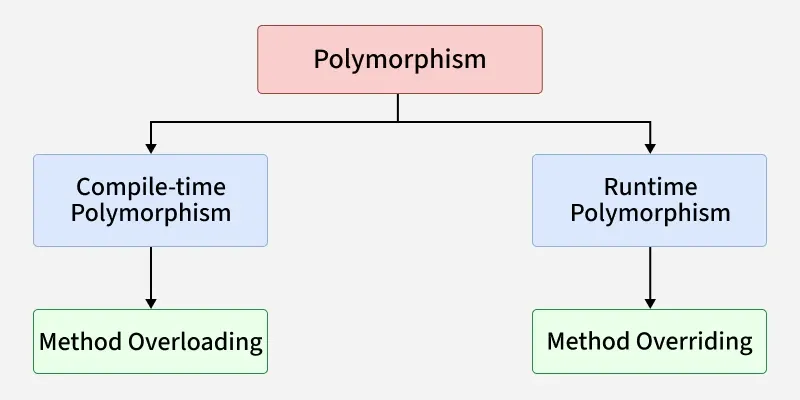
The previous lesson focused on method overriding, where the specific method to be executed is determined at runtime based on the actual object type. Today, we turn our attention to method overloading, where the method to be executed is determined at compile-time based on the arguments you provide in your code.
The Essence of Method Overloading
At its core, method overloading allows a class to have multiple methods that share the same name, provided their parameter lists are different. This isn't just a technical trick; it's a feature designed to improve code clarity. Think about the System.out.println() method. You can pass it an int, a String, a double, or an Object. You don't have to remember different method names like printlnInt(), printlnString(), etc. You just call println(), and Java figures out the rest. That's method overloading in action.
To understand how this works, we need to define a method signature.
Master Java Method Overloading: A Deep Dive with ...
This article from DEV Community gives an excellent introduction to the concept, starting with a clear definition and the crucial idea of a method signature.
Please read the first part of the article, from the definition down to the end of the section on method signatures. This will establish the foundational rule that allows overloading to work.
The key takeaway is that the method signature—the combination of the method's name and its parameter list (the number, type, and order of parameters)—must be unique within a class. The return type is not part of the signature.
The following video provides great intuition by posing a common problem: what if you need to add two numbers sometimes, and three numbers at other times? It shows how overloading provides an elegant solution.
#25 Method Overloading in Java
This video from Telusko builds a strong case for why method overloading is useful.
Watch the following segments to see the problem-solving process: The problem: The presenter shows how a single add method is inflexible if you need to add a varying number of values. A clumsy solution: He then creates methods with different names (addOne, add), highlighting why this is not ideal. The elegant solution: Finally, he introduces method overloading, showing how multiple add methods with different parameters can coexist.
How to Implement Method Overloading
You can overload a method by changing its signature in one of three ways. The GeeksforGeeks article, "Method Overloading in Java," provides clear, concise examples for each.
1. By changing the number of parameters
This is the most straightforward way to overload a method. You can have one method that takes two arguments and another with the same name that takes three. The Java compiler will look at the number of arguments in your method call to decide which one to execute.

For a code-based explanation, review the first example in the GeeksforGeeks article.
This article provides structured examples of each way to overload a method.
Read the section "Changing the Number of Parameters". The Product class example reinforces what's shown in the image above.
2. By changing the data type of parameters
You can also overload methods that have the same number of parameters, as long as the data types differ. For instance, you could have add(int a, int b) and add(double a, double b). When you call add(5, 10), the compiler chooses the first method. When you call add(5.5, 10.2), it chooses the second.
Continue with the same GeeksforGeeks article to see this in practice.
This section demonstrates overloading by parameter type.
Read the section "Changing Data Types of Parameters". Note how the compiler matches the int and double arguments to the correct prod method.
3. By changing the order of parameters
Finally, if the data types are different, you can overload a method by changing the order of its parameters. For example, process(String name, int id) and process(int id, String name) are valid overloads because their signatures are distinct.
This section shows the final way to overload a method.
Read the section "Changing the Order of Parameters". The studentId example clearly shows how parameter order creates a unique signature.
How the Compiler Decides: A Quick Look at Type Promotion
What happens if you call a method with an argument that doesn't perfectly match any of the overloaded versions? For instance, you have show(int x) and show(String s), but you call obj.show('A'). In this case, Java won't immediately fail. It will try to promote the type to the next closest, wider type. Since a char can be safely promoted to an int, the compiler will choose the show(int x) method. This automatic type promotion makes overloading even more flexible.
This section explains a more subtle aspect of how the compiler resolves overloaded calls.
Quickly review the section "What if the Exact Prototype Does Not Match?" and its code example. Notice how the call with a char resolves to the int method.
Your Turn: Building a Practical Logger Utility
Let's apply these concepts to a scenario relevant to backend development. A common requirement in any application is logging. We'll create a simple Logger class that uses method overloading to provide a flexible logging API.
Your task is to create a Logger.java class with three overloaded log methods:
-
public void log(String message)- This is the simplest version. It should print the message to the console with an
[INFO]prefix. - Example output:
[INFO] User logged in successfully.
- This is the simplest version. It should print the message to the console with an
-
public void log(String level, String message)- This version allows specifying a custom log level (e.g., "WARN", "DEBUG"). It should print the level (in uppercase) and the message.
- Example output:
[WARN] Database connection is slow.
-
public void log(String message, Exception e)- This is for logging errors. It should print an
[ERROR]prefix, the message, and then print the stack trace of the exception object. - Hint: You can call the
printStackTrace()method on the exception object (e.printStackTrace();). This will print to the standard error stream (System.err), which is appropriate for errors.
- This is for logging errors. It should print an
Finally, create a Main.java class to test your Logger. Instantiate the Logger and call each of the three log methods to verify they work as expected.
// Main.java example
public class Main {
    public static void main(String[] args) {
        Logger logger = new Logger();

        // Test case 1
        logger.log("Application has started.");

        // Test case 2
        logger.log("debug", "Fetching user data from API.");

        // Test case 3
        try {
            int result = 10 / 0;
        } catch (ArithmeticException e) {
            logger.log("An arithmetic error occurred", e);
        }
    }
}
You can find a similar Logger class example in the DEV Community article if you need a reference.
Master Java Method Overloading: A Deep Dive with ...
This section of the article contains a practical Logger class example that you can use as inspiration for the exercise.
Review this example. It demonstrates a similar structure to the one you are asked to build.
Another extremely common use of overloading is with constructors. This allows you to create objects with different sets of initial information, which is highly practical for creating flexible and easy-to-use classes. The User class example in the same article is a perfect illustration of this.
Summary and What's Next
In this lesson, we've focused on method overloading, a key feature for writing clean and intuitive Java code.
Key Takeaways:
- Method Overloading allows multiple methods in the same class to share a name, as long as their method signatures (name + parameter list) are different.
- You can overload a method by changing the number, type, or order of its parameters.
- The return type is not part of the method signature and cannot be used to overload a method.
- Method overloading is resolved at compile time, which is why it's called compile-time or static polymorphism.
You've now seen the two faces of polymorphism in Java: method overriding (runtime) and method overloading (compile-time). In our next lesson, we will directly compare and contrast these two powerful concepts to solidify your understanding of when and why to use each one. This is a very common interview topic and crucial for a deep understanding of OOP.