Welcome to your first lesson in our Java Mastery course! We're starting at the very foundation of Java and Object-Oriented Programming (OOP): the class. Your goal in this session is to learn how to define your own custom Java classes, complete with the data they hold (fields), the logic for their creation (constructors), and the actions they can perform (methods).
Although you've encountered the concepts of classes and objects in your computer science studies and perhaps through JavaScript's prototype-based model, this lesson will ground you in Java's specific, statically-typed approach. Mastering this is the first essential step toward building the robust backend applications you're aiming for.
The Anatomy of a Class: The Blueprint
In Java, everything exists within a class. Think of a class as a blueprint for creating objects. For instance, a Car class could be a blueprint that defines what every car object will have (like a color and a model) and what it can do (like start its engine or accelerate).
A Java class has three primary components:
- Instance Variables (Fields): These variables store the unique data for each object created from the class. For a
Carobject, this might beString colorandString model. Each car can have a different color and model. - Constructors: This is a special method that is called when you create a new object from the class. Its main job is to initialize the instance variables.
- Methods: These define the object's behaviors. For our
Carobject, we might have methods likestartEngine()ordrive().
This diagram of a Person class clearly illustrates these three parts.
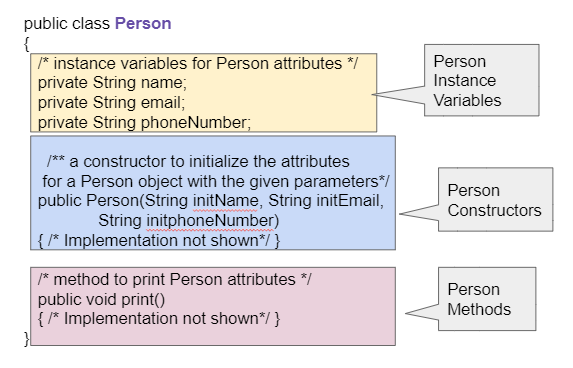
To get a formal introduction to these concepts, please read the following sections from the "CSAwesome" online textbook.
5.1. Anatomy of a Java Class — CSAwesome v1
This reading will walk you through the fundamental structure of a Java class. It uses a Person class as a running example.
Please read the following parts: Start at the beginning and read through the subsection Creating a Class. This provides a high-level overview. Continue to Designing a Class to understand the thought process behind what goes into a class. Read the section on Instance Variables. Pay close attention to the concept of data encapsulation and the use of the private keyword. Finally, read the section on Methods, which explains how we define an object's behavior.
The key takeaway from the reading is the principle of encapsulation: bundling data (private instance variables) and the methods that operate on that data (public methods) together. By making fields private, we prevent direct, uncontrolled access from outside the class, which is a cornerstone of building reliable and maintainable software.
A Practical Pattern: The POJO
In enterprise and backend development, you will constantly encounter a specific style of class known as a POJO, which stands for "Plain Old Java Object." A POJO is a simple class used to represent a data entity. For example, in a user management system, you'd likely have a User POJO with fields for username, email, and password.
POJOs are the backbone of data handling in frameworks like Spring. They are used as Data Transfer Objects (DTOs) to pass data between application layers, and as Entities to map to database tables.
A typical POJO has:
- Private instance variables.
- A public constructor to initialize these variables.
- Public getters and setters—methods dedicated to reading (
get) and updating (set) the private fields. For a field namedemail, you would havegetEmail()andsetEmail(String newEmail).
The following resource provides a great overview of POJOs and their structure.
POJO Class in Java: A Comprehensive Tutorial
This article from upGrad introduces the POJO and explains its importance in Java development.
Read from the beginning down to the section "What is a POJO Class?". Focus on these key points: The initial definition. The table outlining key characteristics, especially "Private Variables, Public Methods". The more detailed explanation under the heading What is a POJO Class?.
Initializing Objects with Constructors
As we've discussed, the constructor is responsible for setting up an object's initial state. You can have multiple constructors in a single class, a concept we'll explore later called "overloading." For now, let's focus on the most common type: the parameterized constructor. This constructor accepts arguments that are used to initialize the object's fields.
When the names of your constructor parameters are the same as your instance variables (a very common practice), you need a way to tell Java which is which. This is where the this keyword comes in. Inside a constructor or method, this refers to the current object being created or worked on. So, this.name always refers to the instance variable name, while name by itself would refer to the parameter passed to the constructor.
The following video provides a clear, practical demonstration of building a class with a constructor and using the this keyword.
Learn CONSTRUCTORS in 10 minutes! 🔨
This "Bro Code" video is a concise and energetic tutorial on creating constructors.
Please watch these segments: The introduction, where a Student class is set up with its fields. Defining the constructor. This part clearly explains how to create a constructor that accepts parameters and uses the this keyword to assign them to the class fields. Creating objects with the constructor, showing how to pass initial values when creating new Student objects.
The image below illustrates different types of constructors within a Bike class. It shows a parameterized constructor, which you just learned about, and also a "copy constructor," which creates a new object from an existing one. Notice how the parameterized constructor takes a String to initialize the object.

Your Turn: Create a Riddle Class
Now it's time to apply what you've learned. The best way to solidify these concepts is to write a class yourself.
Following the structure of the Person and Student classes you've seen, try creating a Riddle class in your own Java development environment (like IntelliJ or VS Code).
Your Riddle class should have:
- Two private instance variables: a
Stringfor the riddle's question and anotherStringfor its answer. - A public constructor: It should accept two
Stringarguments (one for the question, one for the answer) and use them to initialize the instance variables. Remember to use thethiskeyword. - Two public methods:
printQuestion(): This method should print the riddle's question to the console. It takes no arguments and returns nothing (void).printAnswer(): This method should print the riddle's answer to the console. It also takes no arguments and returnsvoid.
This exercise is adapted from the "Programming Challenge" in the CSAwesome resource you read earlier. Don't worry about creating a main method to test it just yet; we'll cover that in the next lesson. Focus only on correctly defining the Riddle class itself.
Key Takeaways
In this lesson, you took the first step in object-oriented programming with Java. You learned that:
- A class is a blueprint for objects, consisting of fields (data), constructors (initialization logic), and methods (behaviors).
- Encapsulation is a core OOP principle where you hide data by making fields
privateand provide access throughpublicmethods (like getters and setters). - A constructor is a special method that shares the same name as the class and is used to create and set the initial state of an object.
- The
thiskeyword is used within a class to refer to the current object, resolving ambiguity between instance variables and parameters. - A POJO is a common design pattern for creating simple data-holding classes, which will be essential in our journey toward backend development.
What's Next?
You now know how to design the blueprint. In the next lesson, we will focus on bringing that blueprint to life. You'll learn how to instantiate objects from your classes using the new keyword and how to call their methods using dot notation to make your programs actually do things.