In our previous lesson, we examined the trade-offs between ArrayList and LinkedList, discovering how their internal data structures dictate their performance for different tasks. Today, we continue our exploration of the Java Collections Framework by shifting our focus from Lists, which handle ordered sequences, to Sets, which are designed to store collections of unique elements.
Your goal for this lesson is to learn how to use HashSet and TreeSet, the two most common Set implementations. We will dissect their core differences, particularly concerning how they order elements and their performance characteristics. Understanding this will empower you to choose the most efficient data structure when you need to guarantee that a collection contains no duplicates—a frequent requirement in backend development.
1. The Set Interface: A Collection of Unique Items
At its heart, a Set is a collection that cannot contain duplicate elements. This contract is the fundamental difference between a Set and a List. If you attempt to add an element to a Set that already contains an equivalent element, the add operation is simply ignored.
Both HashSet and TreeSet implement the Set interface, but they belong to different branches of the collection hierarchy, which hints at their distinct capabilities.
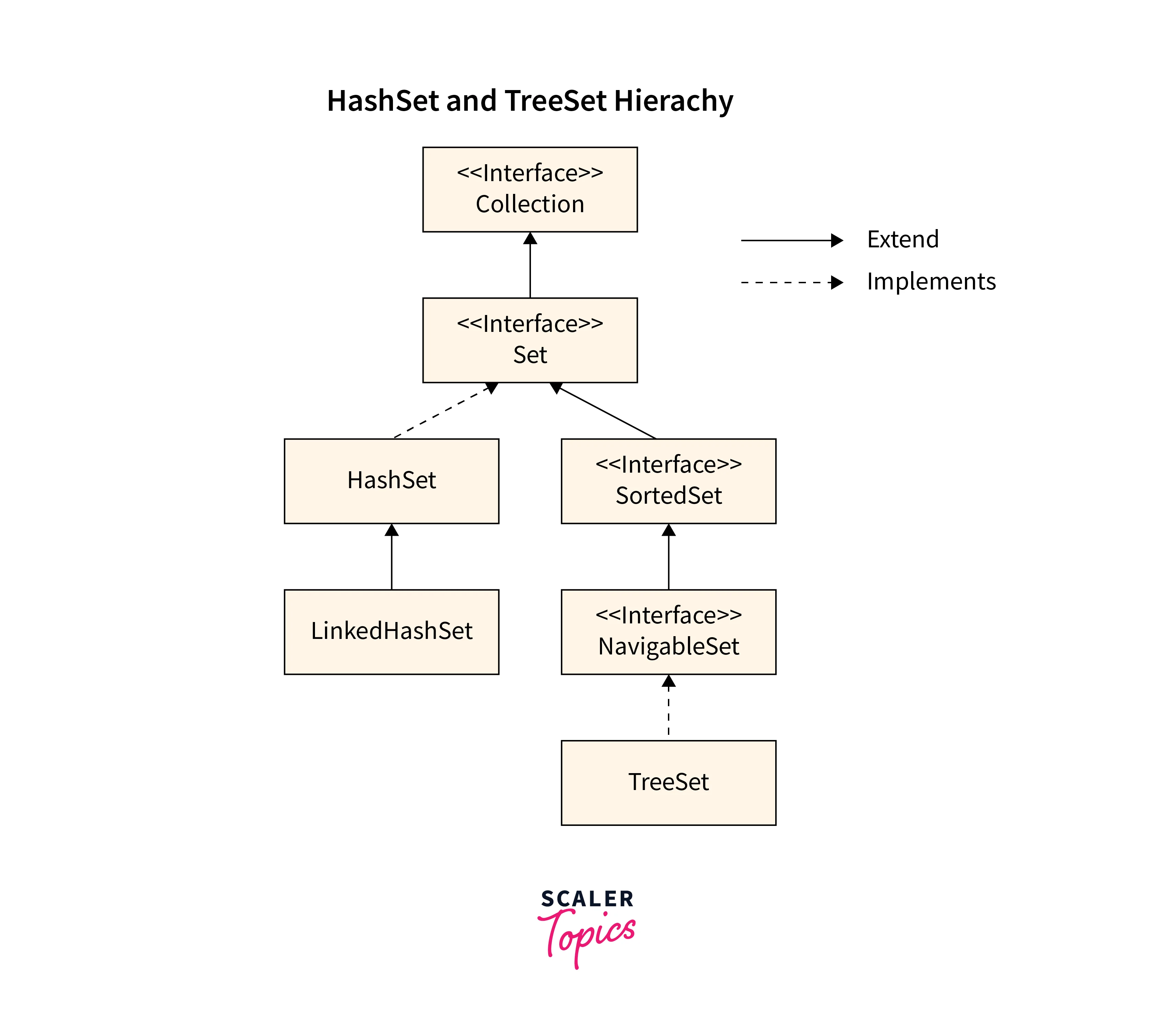
The best way to grasp the core behavior of a Set is to see it in action. The video below provides an excellent introduction to the Set interface and its most common implementation, HashSet.
Set and HashSet in Java - Full Tutorial
This tutorial by Coding with John introduces the concept of a Set and demonstrates its two primary characteristics: it enforces uniqueness and does not maintain a predictable order.
Watch the segment from the introduction to Sets. As you watch, pay close attention to two key points: You cannot directly instantiate a Set (new Set()) because it's an interface; you must use a concrete class like HashSet. Observe what happens when a duplicate element ("Walter") is added to the HashSet, and note the unpredictable order of elements when the set is printed.
As the video demonstrated, HashSet provides a straightforward way to store unique items, but it makes no promises about the order in which you'll get them back. Let's look at why that is.
2. HashSet: Unordered and Fast
The "Hash" in HashSet is the key to its performance. Internally, a HashSet is backed by a HashMap. When you add an object to a HashSet, the object is stored as a key in the underlying HashMap. The value associated with that key is a constant dummy object, as the HashSet only cares about the keys (the elements) themselves.
This reliance on a hash-based data structure means that operations like adding, removing, and checking for the existence of an element (add(), remove(), contains()) are exceptionally fast, taking, on average, constant time—O(1). This speed comes from its ability to use an element's hashCode() to directly calculate where it should be located in memory, avoiding the need to search through the entire collection.
The following diagram visualizes this internal mechanism.
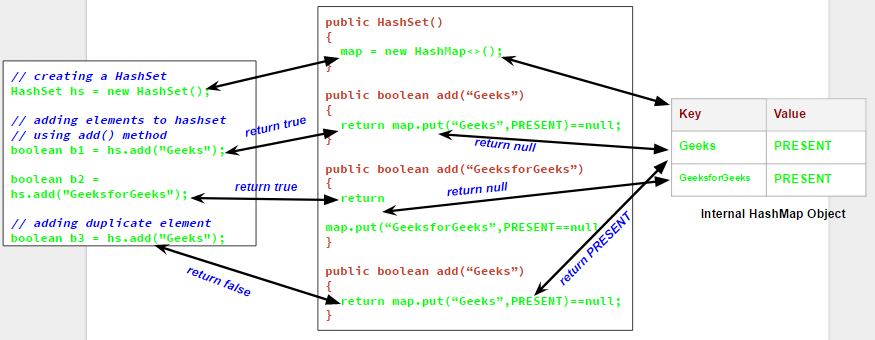
Your prior work with data structures will remind you that the efficiency of a hash table depends on a good hash function (hashCode()) and a consistent definition of equality (equals()). HashSet relies on these two methods to quickly identify and reject duplicates.
3. TreeSet: Ordered and Methodical
Now, what if you need a collection of unique elements that are also kept in a sorted order? This is precisely the problem that TreeSet solves.
A TreeSet is backed by a TreeMap, which is a type of self-balancing binary search tree (specifically, a Red-Black Tree in Java's implementation). Instead of using hash codes, it uses the elements' "natural order" (or a custom Comparator that you provide) to position them within the tree. This structure ensures that the elements are always sorted.
This ordered nature comes at a performance cost. Operations like add(), remove(), and contains() require traversing parts of the tree, resulting in a time complexity of O(log n). While slower than HashSet's O(1), it's still highly efficient and scales well as the collection grows.
Let's return to the "Coding with John" video, which provides a concise comparison.
Set and HashSet in Java - Full Tutorial
This segment compares HashSet with TreeSet, highlighting the trade-off between speed and ordering.
Watch the part of the video from where TreeSet is discussed. Notice how switching the implementation from HashSet to TreeSet automatically arranges the string elements in alphabetical order. The explanation for why HashSet is generally preferred (performance) is a key takeaway.
Another crucial difference stemming from its sorting mechanism is that TreeSet does not allow null elements. It throws a NullPointerException if you try to add one, because null cannot be compared to other objects to determine its position in the sorted order. HashSet, by contrast, allows one null element.
HashSet and TreeSet Comparison
The Baeldung article provides clear code examples demonstrating the difference in handling null objects.
In section 2.2, "Null Objects", review the two test cases. One shows HashSet accepting a null value, while the other shows TreeSet throwing a NullPointerException.
4. Head-to-Head Comparison
We've covered the key distinctions related to ordering, performance, and internal implementation. The following table from the Scaler Topics article provides a perfect summary for a side-by-side comparison.
HashSet vs TreeSet in Java - Scaler Topics
This table concisely summarizes the differences between HashSet and TreeSet across several important features.
In the article, locate and study the table under the heading "Difference between HashSet and TreeSet in Java". Focus on the rows for Ordering, Performance (Average Case), Null Values, and Implementation.
With this comparison in mind, when should you choose one over the other? The decision comes down to your specific requirements.
Use HashSet when:
- You need to store unique elements.
- The speed of insertion, deletion, and look-up is your top priority.
- The order of elements does not matter.
- This is the default and most common choice for a
Set.
Use TreeSet when:
- You need to store unique elements.
- You require the collection to be always sorted.
- You need to perform operations related to ordering, such as finding the first/last element or finding elements within a certain range.
- You can accept the slightly lower performance of O(log n) compared to
HashSet.
Let's see this in code.
import java.util.HashSet;
import java.util.Set;
import java.util.TreeSet;

public class SetDemo {
    public static void main(String[] args) {
        // 1. HashSet Demonstration (Unordered)
        Set<String> hashSet = new HashSet<>();
        hashSet.add("Charlie");
        hashSet.add("Alice");
        hashSet.add("Echo");
        hashSet.add("Bob");
        hashSet.add("Alice"); // Duplicate, will be ignored

        System.out.println("HashSet (unordered): " + hashSet);
        // Possible output: [Alice, Bob, Charlie, Echo] - but order is not guaranteed!

        // 2. TreeSet Demonstration (Sorted)
        Set<String> treeSet = new TreeSet<>();
        treeSet.add("Charlie");
        treeSet.add("Alice");
        treeSet.add("Echo");
        treeSet.add("Bob");
        treeSet.add("Alice"); // Duplicate, will be ignored

        System.out.println("TreeSet (sorted): " + treeSet);
        // Guaranteed output: [Alice, Bob, Charlie, Echo]

        // 3. Null handling
        hashSet.add(null);
        System.out.println("HashSet with null: " + hashSet);

        try {
            treeSet.add(null);
        } catch (NullPointerException e) {
            System.out.println("TreeSet threw NullPointerException when adding null.");
        }
    }
}
Running this code will concretely demonstrate the differences we've discussed: HashSet's unpredictable order, TreeSet's natural alphabetical sorting, and their different behaviors when handling null.
Conclusion
In this lesson, you have learned to distinguish between Java's two primary Set implementations. Just as with ArrayList and LinkedList, the choice between HashSet and TreeSet is a practical engineering decision based on a trade-off between performance and features.
Key Takeaways:
- A
Setis a collection that stores only unique elements. HashSetis the go-to implementation for general-purpose use. It is backed by a hash table, offering very fast O(1) performance for most operations but no guarantee on element order.TreeSetis used when a sorted collection of unique elements is required. It is backed by a balanced tree, offering O(log n) performance and keeping elements in their natural sorted order.HashSetallows onenullelement, whileTreeSetdoes not.
In our next lesson, we will dive into HashMap and TreeMap. You've already had a preview of their importance, as they are the underlying data structures for HashSet and TreeSet. Understanding them directly will unlock one of the most powerful and versatile tools in the Java Collections Framework: key-value mapping.