Hello! Welcome to the first lesson in our new module on Incremental Data Ingestion.
In the previous modules, we focused on transforming data that was already loaded into DataFrames. You've become proficient in using both the PySpark DataFrame API and Spark SQL to clean, reshape, and analyze data. Now, we're going to take a step back and tackle a fundamental question: how does the data get into our tables in the first place, especially in a world where new data files arrive continuously?
This lesson introduces a powerful tool designed for this exact challenge. Your learning outcome is to describe the purpose of Auto Loader for incrementally ingesting files from cloud storage. We will explore the problems with traditional ingestion methods and understand why Auto Loader is the modern, scalable solution on Databricks.
1. The Challenge of Ingesting Files at Scale
Imagine you're building a pipeline to process log files from a popular application. Every minute, hundreds of new JSON files are written to a directory in cloud storage (like Amazon S3 or Azure Data Lake Storage). How would you ingest them?
A naive approach might be to periodically run a job that lists all files in the directory and reads them. This works for a small number of files, but it quickly becomes inefficient and expensive. This is a classic scalability problem in data engineering.
To understand these challenges in detail, let's watch a short segment from a Databricks video. It clearly illustrates the two main problems with traditional file streaming sources.
How Databricks Leverages Auto Loader to Ingest Millions of Files an Hour
This video from Databricks sets the stage by explaining the inherent difficulties of large-scale file ingestion, focusing on scalability and schema management.
Please watch the clip from the beginning up to the 05:37 mark. As you watch, focus on understanding the answers to these two questions: Why is repeatedly listing a directory with millions of files a problem for performance and cost? What happens when a new file arrives with a different structure or new columns (schema evolution) using traditional methods?
As the video explained, the two core challenges are:
- Scalability: Listing a directory containing millions or billions of files just to find a few new ones is computationally wasteful.
- Schema Management: Manually defining a schema is brittle. If the source data structure changes (e.g., a new column is added), the pipeline can fail or, worse, silently lose data.
To build robust, production-grade pipelines, we need a better way.
2. Auto Loader: The Purpose-Built Solution
This is precisely where Databricks Auto Loader comes in.
In simple terms, Auto Loader is a specialized Databricks framework that incrementally and efficiently processes new data files as they arrive in cloud storage. It's built on top of Spark Structured Streaming but is highly optimized for file-based sources.
The official Databricks documentation provides a concise definition of Auto Loader and its function. This short reading will solidify your high-level understanding.
Please read the sections "What is Auto Loader?", "How does Auto Loader work?", and the lists under "Supported Auto Loader sources". These sections are at the very top of the page. Pay attention to the cloudFiles source name and the variety of file formats it supports.
The following image provides a powerful visual summary of Auto Loader's value. It contrasts the complex, multi-part architecture required for traditional ingestion with the streamlined process that Auto Loader enables.
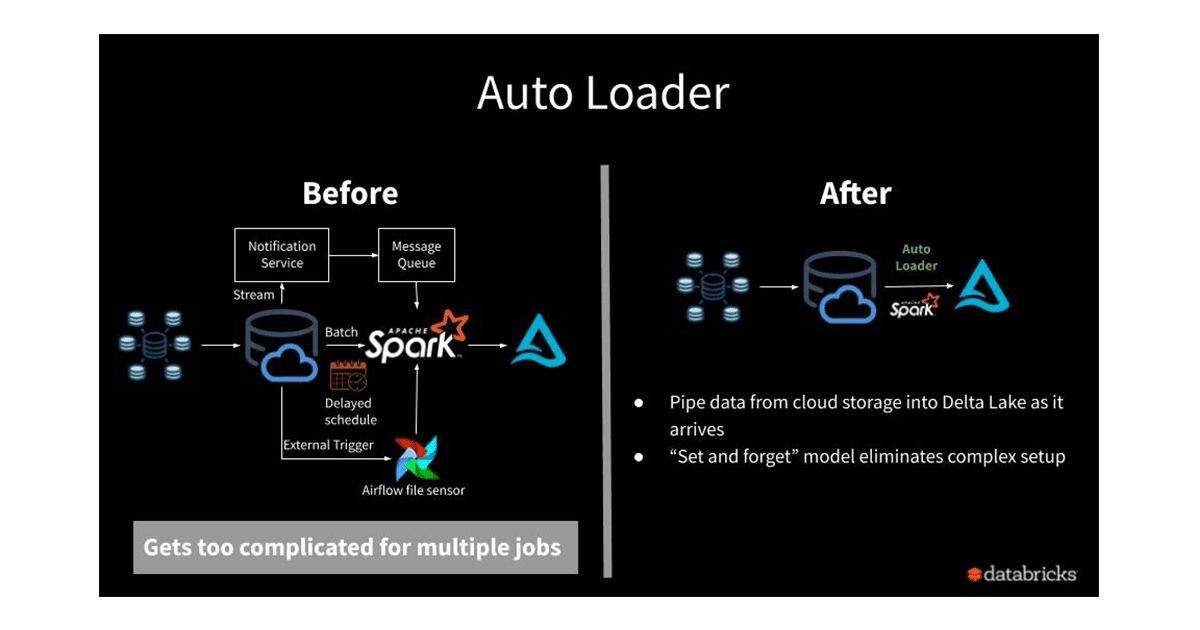
3. How Auto Loader Solves the Ingestion Problem
So, how does Auto Loader avoid the pitfalls of traditional methods? It employs two clever mechanisms.
Solving Scalability with File Notifications
Instead of repeatedly listing a massive directory, Auto Loader can use a more intelligent approach called file notification mode.
How Databricks Leverages Auto Loader to Ingest Millions of Files an Hour
Let's return to the Databricks video, which now explains the solution. This segment details how Auto Loader uses cloud services to discover new files efficiently.
Watch the segment from 05:37 to 08:34. This part explains the core of Auto Loader's scalable design. Focus on the concepts of: File Notifications: Events generated by the cloud provider when a new file is created. Cloud Queues: A service that stores these notifications. The Process: How Auto Loader consumes messages from the queue to know exactly which new files to process, completely avoiding the need for directory listing.
By subscribing to file arrival events, Auto Loader doesn't waste resources checking for files that haven't changed. It processes data as it arrives, leading to lower latency and lower costs.
Solving State Management for Reliability
The second problem was tracking which files have been processed to avoid duplicates and ensure no data is missed, even if the pipeline fails and restarts.
Auto Loader handles this automatically. As described in the Databricks documentation you read, it maintains state in a checkpoint location. It uses a scalable key-value store (RocksDB) to record information about discovered files. This ensures exactly-once processing guarantees—a critical feature for reliable data pipelines. You don't need to build or manage this complex state-tracking logic yourself.
4. When Should You Use Auto Loader?
Auto Loader is a powerful tool, but it's important to know when it's the right choice. It excels in scenarios where data arrives incrementally and continuously.
This article provides a very clear breakdown of when to use Auto Loader versus simpler manual reads.
What Is Databricks Auto Loader and Why It Is so Cool
The article "What Is Databricks Auto Loader and Why It Is so Cool" contains an excellent comparison table. This will help you decide when Auto Loader is the appropriate tool for an ingestion task.
Please read the section titled "When to Use Auto Loader vs. Manual File Reads". Focus on the table comparing the two approaches across different aspects like data arrival patterns, file volume, and schema evolution.
In summary, Auto Loader is the ideal choice when:
- Files arrive continuously or in frequent, unpredictable batches.
- You expect a large and growing number of source files.
- You need to process data with low latency after it arrives.
- The schema of your source data might change over time.
- You want a scalable, "set and forget" solution without building custom tracking logic.
The diagram below places Auto Loader within the medallion architecture, contrasting it with another ingestion tool, COPY INTO. It positions Auto Loader as the tool for streaming and incremental loads into the Bronze layer.

We will cover COPY INTO in a later lesson, but for now, understand that Auto Loader is the primary tool for building automated, continuous ingestion pipelines.
Conclusion
In this lesson, we've explored the fundamental purpose of Databricks Auto Loader. You've learned that it's not just another way to read files; it's an intelligent and scalable framework designed to solve the difficult challenges of continuous data ingestion.
Key Takeaways
- Traditional file ingestion methods struggle with scalability (due to expensive directory listings) and reliability (due to complex state management and schema changes).
- Auto Loader's purpose is to provide an efficient, incremental, and automated way to ingest new data files from cloud storage into Delta Lake.
- It achieves scalability by using file notification mode, which leverages cloud event messaging services to discover new files without listing directories.
- It ensures reliability and exactly-once processing by automatically managing state in a checkpoint location.
- Auto Loader is the recommended tool for building robust pipelines that handle high volumes of continuously arriving data.
Next Steps
Now that you understand what Auto Loader is and why it's so important, our next lesson will move into the practical "how." You will learn to configure Auto Loader using the cloudFiles format to read new files from a directory, taking your first hands-on step toward building a modern data ingestion pipeline.