Hello! Welcome to your next lesson in the "Incremental Data Ingestion" module.
In our last session, we explored how to manage schema evolution using different modes like addNewColumns, rescue, none, and failOnNewColumns. You saw that the rescue mode prevents stream failures by capturing unexpected new columns in a special _rescued_data column.
Today, we'll dive much deeper into this feature. The _rescued_data column is more than just a place for new columns; it's a robust mechanism for handling data quality issues. Our learning goal is to handle corrupt or malformed records using Auto Loader's rescued data column. You will learn how Auto Loader uses this column to quarantine data that doesn't conform to your expected schema, ensuring your data pipelines are fault-tolerant while preserving every piece of information.
1. What Exactly is the Rescued Data Column?
When data quality is less than perfect—which is almost always the case—you need a way to handle records that don't fit the expected structure without stopping your entire ingestion process. This is the primary job of the _rescued_data column.
Let's start with the official definition from the Databricks documentation.
Configure schema inference and evolution in Auto Loader
This documentation page precisely defines the rescued data column, explaining what it contains and the specific reasons why data might be 'rescued'.
Please read the section titled "What is the rescued data column?". Pay close attention to the bulleted list explaining why data isn't parsed.
As you just read, Auto Loader automatically creates and uses the _rescued_data column to ensure no data is lost when records don't align with the schema. The key reasons a record's fields might be rescued are:
- The column is missing from the schema: This is the schema evolution case we saw in the previous lesson.
- Type mismatches: For example, receiving a string like
"N/A"in a column that is defined as an integer. - Case mismatches: If your stream expects a column named
productIDbut receivesproductId(and case sensitivity is not configured to be ignored).
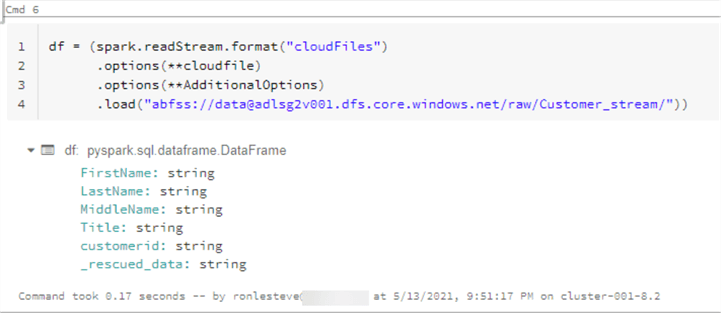
The column itself contains a JSON string with two important pieces of information: the data from the problematic fields and the source file path, which is invaluable for debugging.
2. Seeing Data Rescue in Action
Theory is great, but seeing this process happen is the best way to understand it. Let's watch a demonstration of Auto Loader encountering a data type mismatch.
The following video from Databricks shows an ingestion pipeline where the timestamp column is expected to be a long. The presenter then intentionally ingests a file where the timestamp is malformed, and we can see how Auto Loader handles it.
How Databricks Leverages Auto Loader to Ingest Millions of Files an Hour
This video from Databricks demonstrates several Auto Loader features. We will focus on the part where it handles data with an incorrect data type.
Please watch from 12:18 to 14:18 to understand the concept of 'rescue data' mode. Then, continue watching the demo from 14:18 to 20:30. In the demo, notice how schemaHints are used to enforce a long type on the timestamp column. Pay close attention to what happens around the 19:30 mark when a file with a 'weird timestamp' is added and how it appears in the _rescued_data column.
This demo perfectly illustrates the power of the rescued data feature. The pipeline didn't fail. The valid data was processed correctly, and the problematic timestamp was safely quarantined in the _rescued_data column for later analysis, without data loss.
3. A Key Distinction: Rescued vs. Corrupt Records
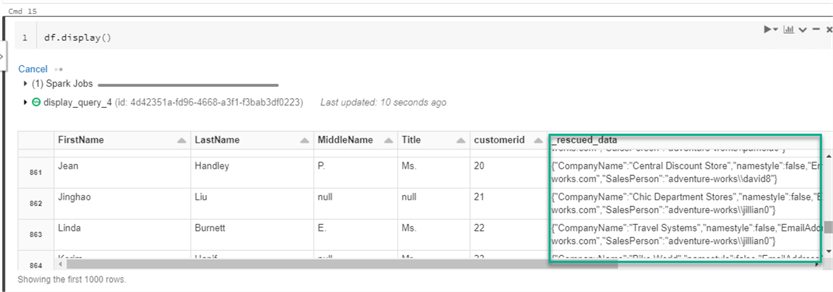
Auto Loader makes an important distinction between data that is non-conforming and data that is unparseable. This distinction determines whether data ends up in the _rescued_data column or a different column called _corrupt_record.
- Non-conforming data (
_rescued_data): The record itself is well-structured (e.g., a valid JSON object or CSV row), but one or more of its fields don't match the target schema (e.g., wrong data type, extra column). - Unparseable data (
_corrupt_record): The entire record is malformed and cannot be parsed at all. For example, a JSON file with missing brackets or a CSV row with a broken delimiter.
The following article provides excellent, practical examples of this difference.
Auto Loader: Data Ingestion with built-in Data Audit & Validation
This Databricks Community blog post gives a practical guide to data validation with Auto Loader. We'll focus on its clear explanation of _rescued_data versus _corrupt_record and a hands-on example.
First, read the section "Understanding the Two Key Options" to solidify the difference between the rescuedData column and the _corrupt_record column. Then, carefully review "Scenario 1: Rescue Mode with Known Schema - Targeted Detection". Analyze the setup code, where a dataType_mismatch file is created, and see how the Auto Loader configuration with schemaEvolutionMode: "rescue" correctly identifies and isolates this issue.
Let's quickly summarize the key implementation differences from the article:
| Feature | _rescued_data Column |
_corrupt_record Column |
|---|---|---|
| Purpose | Captures fields that don't conform to the schema (type/case mismatches, new columns). | Captures entire records that are structurally malformed and cannot be parsed. |
| How to Enable | Set .option("cloudFiles.schemaEvolutionMode", "rescue"). The column is added automatically. |
Must be explicitly added to the schema, often via .option("cloudFiles.schemaHints", "_corrupt_record STRING"). |
| Typical Use Case | Handling common data quality issues and schema drift without interrupting the pipeline. | Debugging severe data corruption issues originating from an upstream source. |
By understanding this distinction, you can build a comprehensive data quality strategy, using rescue mode for expected variations and _corrupt_record for critical parsing failures.
4. Check Your Understanding
You are ingesting CSV files where each row represents a sale and should contain product_id,quantity,price. Your Auto Loader stream is configured with the correct schema (int, int, double) and cloudFiles.schemaEvolutionMode: "rescue".
You receive a new file containing the following two records:
101,10,29.99
102,5,"out of stock"
What will be the state of your target Delta table after processing this file?
Solution
-
Record 1 (
101,10,29.99): This record is perfectly valid and conforms to the schema. It will be inserted into the target table with all columns (product_id,quantity,price) populated correctly. The_rescued_datacolumn for this row will benull. -
Record 2 (
102,5,"out of stock"): This record is non-conforming. Thepricefield contains a string ("out of stock") where adoubleis expected.- A new row will be inserted into the target table.
- The
product_idandquantitycolumns will be populated with102and5. - The
pricecolumn will benullbecause the source value could not be cast to a double. - The
_rescued_datacolumn will contain a JSON string similar to:{"price": "out of stock", "_file_path": "path/to/your/file.csv"}.
The stream will complete successfully without any errors.
Conclusion
You have now mastered a critical component of building robust data ingestion pipelines. By leveraging Auto Loader's rescued data column, you can ensure that data quality issues and schema changes don't bring your systems to a halt. This fault-tolerant approach is essential for production data engineering.
Key Takeaways
- The
_rescued_datacolumn is Auto Loader's mechanism for handling records that are non-conforming but still parsable. - It is enabled by setting
cloudFiles.schemaEvolutionModetorescue. - It captures data from fields with type mismatches, case mismatches, or columns not present in the schema.
- The column stores a JSON object containing the problematic data and the source file path, which is critical for auditing and debugging.
- This is distinct from the
_corrupt_recordcolumn, which is used to capture entire records that are structurally unparseable.
Next Steps
We have now thoroughly covered how to use Auto Loader for incremental ingestion of files from cloud storage. In the next lesson, we will introduce another important tool for file ingestion: the COPY INTO command. You will learn how it provides an idempotent way to load data and, crucially, select the appropriate tool (Auto Loader vs. COPY INTO) for a given file ingestion scenario.